Skip navigation

The BBC did a pretty good job [live tracking the Scotland secession vote](http://www.bbc.com/news/events/scotland-decides/results), but I really didn’t like the color scheme they chose and decided to use the final tally site as the basis for another tutorial using the tools from the Hadleyverse and taking advantage of the fact that newer `gdal` libraries can read in [TopoJSON](https://github.com/mbostock/topojson)/GeoJSON files, meaning we can use _most_ of the maps the D3-ers create/use right in R.

We’ll need a few R packages to help us get, clean, format and chart the data:

library(rvest)
library(dplyr)
library(httr) # >0.5
library(tidyr)
library(gpclib)
library(rgeos)
library(sp)
library(maptools)
library(rgdal) # needs gdal > 1.11.0
library(ggplot2)
library(reshape2)
library(gridExtra)

The new `rvest` package makes it super-fun (and easy) to get data out of web pages (as I’ve [mentioned on the sister blog](http://datadrivensecurity.info/blog/posts/2014/Sep/migrating-to-rvest/)), but said data is still web page data, usually geared towards making things render well in a browser, and we end up having to clean up the extracted fields to get useful data. Since we usually want a data frame from the extraction, an `rvest` idiom I’ve been playing with involves bundling the element extraction & cleanup code into one function and then using that to build the columns:

# extract data from rvest-ed <div>'s and clean it up a bit
# pass in the rvested HTML object and the CSS selector to extract, also 
# indicating whether we want a number or character vector returned
 
extractAndCleanup <- function(data, selector, make_numeric=FALSE) {
  x <- data %>% html_nodes(selector) %>% html_text()
  x <- gsub("^[[:punct:][:space:]]*|[[:punct:][:space:]]*$", "", x)
  if (make_numeric) x <- as.numeric(gsub("[,[:space:]]*", "", x))
  x
}
 
bbc_vote <- html("http://www.bbc.com/news/events/scotland-decides/results")
 
secede <- data.frame(
  council=bbc_vote %>% extractAndCleanup(".body-row__cell--council"),
  electorate=bbc_vote %>% extractAndCleanup(".body-row__cell--electorate", TRUE),
  yes=bbc_vote %>% extractAndCleanup(".body-row__cell--yes", TRUE),
  no=bbc_vote %>% extractAndCleanup(".body-row__cell--no", TRUE),
  stringsAsFactors=FALSE)

We can then compute whether the vote tally was to secede or not and assign a color in the event we choose to use base graphics for plotting (we won’t for this tutorial). I chose a muted version of the Union Jack red and the official Scottish blue for this exercise.

secede <- secede %>% mutate(gone=yes>no,
                            color=ifelse(gone, "#0065BD", "#CF142B77"))

Getting the map from the BBC site is just as simple. An inspection of the site in any decent browser with a “Developer” mode lets us see the elements being downloaded. For the BBC map, it reads the data from: `http://static.bbci.co.uk/news/1.49.0-1192/js/data/maps/l/scotland-elections.js` which is a TopoJSON object wrapped in two lines of extra javascript code. We’ll grab that file, clean it up and read the map into R using `httr`’s new-ish ability to save to a data file:

GET("http://static.bbci.co.uk/news/1.49.0-1192/js/data/maps/l/scotland-elections.js",
    write_disk("data/scotland.json"), progress())
tmp <- readLines("data/scotland.json")
dir.create("data")
writeLines(tmp[2], "data/scotland.json")
 
map <- readOGR("data/scotland.json", "scotland-elections")

We’ll want to work with the map using Council names, so we need to ensure the names from the extracted `div` elements match what’s in the TopoJSON file:

secede$council %in% map@data$name
 
##  [1]  TRUE  TRUE  TRUE FALSE  TRUE FALSE FALSE  TRUE  TRUE  TRUE  TRUE  TRUE
## [13] FALSE  TRUE  TRUE FALSE  TRUE  TRUE  TRUE  TRUE  TRUE  TRUE  TRUE FALSE
## [25]  TRUE  TRUE  TRUE  TRUE  TRUE  TRUE  TRUE  TRUE

It looks like we’ll need to clean the names up a bit, but thankfully the names aren’t too far off:

secede$council <- gsub("&", "and", secede$council)
secede[secede$council=="Edinburgh",]$council = "City of Edinburgh"
secede[secede$council=="Glasgow",]$council = "Glasgow City"
secede[secede$council=="Comhairle nan Eilean Siar",]$council = "Na h-Eileanan an Iar"

If we were using base graphics for plotting, we’d also have to ensure the data was in the right order:

secede$council <- factor(secede$council, map@data$name, ordered=TRUE)
secede <- secede %>% arrange(council)

We’re going to use `ggplot` for the mapping portion, but the normal `fortify` process didn’t work on this TopoJSON file (some polygon errors emerged), so we’ll take another route and do the data Council name↔id mapping after the `fortify` call and merge the rest of our data into the map data frame:

map_df <- fortify(map)
 
# manually associate the map id's with the Council names and vote data
councils <- data.frame(id=0:(length(map@data$name)-1),
                       council=as.character(map@data$name))
map_df <- merge(map_df, councils, by="id")
map_df <- merge(map_df, secede, by="council")

Now we can generate the choropleth:

gg <- ggplot()
gg <- gg + geom_map(data=map_df, map=map_df,
                    aes(map_id=id, x=long, y=lat, group=group, fill=color),
                    color="white", size=0.25)
gg <- gg + scale_fill_manual(values=rev(unique(secede$color)),
                             labels=c("Yes", "No"), name="Secede?")
gg <- gg + xlim(extendrange(r=range(coordinates(map)[,1]), f=0.15))
gg <- gg + ylim(extendrange(r=range(coordinates(map)[,2]), f=0.07))
gg <- gg + coord_map()
gg <- gg + labs(x="", y="")
gg <- gg + theme_bw()
gg <- gg + theme(panel.grid=element_blank())
gg <- gg + theme(legend.position="none")
gg <- gg + theme(panel.border=element_blank())
gg <- gg + theme(axis.ticks=element_blank())
gg <- gg + theme(axis.text=element_blank())
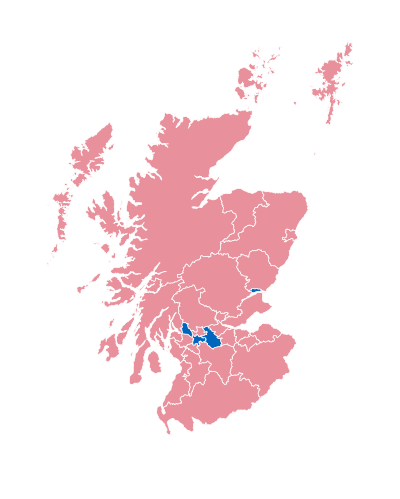
A choropleth is all well-and-good, but—since we have the data–let’s add the bar chart to complete the presentation. We’ll combine some `dplyr` and `tidyr` calls to melt and subset our data frame:

secede_m <- secede %>%
  gather(variable, value, -council) %>%
  filter(variable %in% c("yes", "no")) %>%
  mutate(value=as.numeric(value))

For this exercise, we’ll plot the 100% stacked bars in order of the “No” votes, and we’ll pre-process this ordering to make the `ggplot` code easier on the eyes. We start by merging some data back into our melted data frame so we can build the sorted factor by the “No” value column and then make sure the Councils will be in that order:

secede_m <- merge(secede_m, secede, by="council")
secede_m$variable <- factor(secede_m$variable,
                            levels=c("yes", "no"), ordered=TRUE)
secede_m <- secede_m %>% arrange(no, variable)
secede_m$council <- factor(secede_m$council,
                           unique(secede_m$council), ordered=TRUE)

Finally, we can create the 100% stacked bar plot and combine it with the choropleth to build the final product:

gg1 <- ggplot(secede_m, aes(x=council, y=value, fill=factor(variable)))
gg1 <- gg1 + geom_bar(stat="identity", position="fill")
gg1 <- gg1 + scale_fill_manual(values=rev(unique(secede$color)),
                             labels=c("Yes", "No"), name="Secede?")
gg1 <- gg1 + geom_hline(yintercept=0.50, color="gray80")
gg1 <- gg1 + geom_text(aes(label=percent(yes/100)), y=0.08, color="white", size=3)
gg1 <- gg1 + geom_text(aes(label=percent(no/100)), y=0.92, color="white", size=3)
gg1 <- gg1 + coord_flip()
gg1 <- gg1 + labs(x="", y="")
gg1 <- gg1 + theme_bw()
gg1 <- gg1 + theme(panel.grid=element_blank())
gg1 <- gg1 + theme(legend.position="top")
gg1 <- gg1 + theme(panel.border=element_blank())
gg1 <- gg1 + theme(axis.ticks=element_blank())
gg1 <- gg1 + theme(axis.text.x=element_blank())
 
vote <- arrangeGrob(gg1, gg, ncol=2,
                     main=textGrob("Scotland Votes", gp=gpar(fontsize=20)))
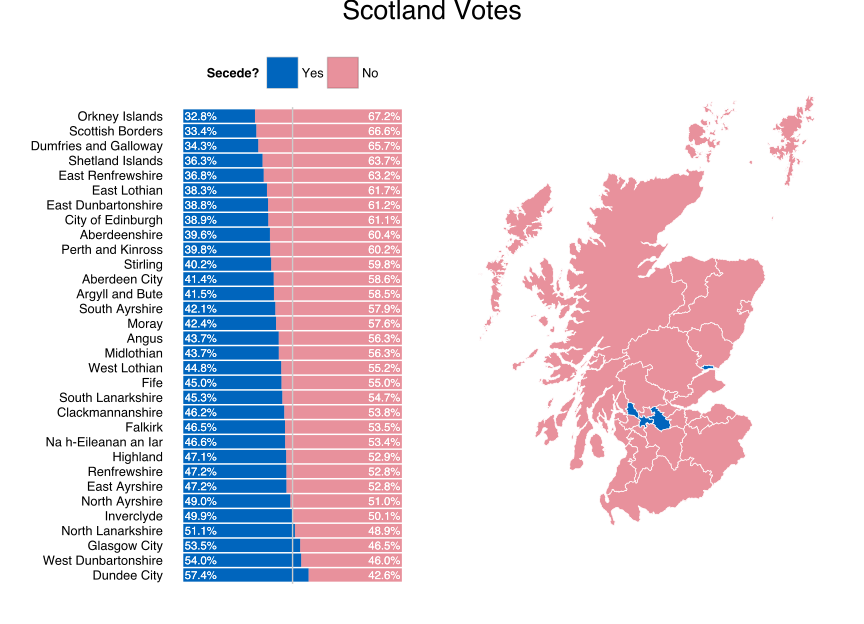

(Click for larger version)

I’ve bundled this code up into it’s own [github repo](https://github.com/hrbrmstr/secede-2014). The full project example has a few extra features as

– it shows how to save the resultant data frame to an R data file (in case the BBC nukes the site)
– also saves the cleaned-up JSON (getting minimal Scotland shapefiles is tricky so this one’s a keeper even with the polygon errors)
– wraps all that in `if` statements so future analysis/vis can work with or without the live data being available.

Hadley really has to stop making R so fun to work with :-)

UPDATE

Based on a comment by Paul Drake suggesting that the BBC choropleth (and, hence, my direct clone of it) could be made more informative by showing the vote difference. Since it’s just changing two lines of code, here it is in-situ vs creating a new post.

gg <- gg + geom_map(data=map_df, map=map_df,
                    aes(map_id=id, x=long, y=lat, group=group, fill=yes-no),
                    color="white", size=0.25)
gg <- gg + scale_fill_gradient(low="#CF142B", high="#0065BD", 
                               name="Secede?\n(vote margin)", guide="legend")

I’ve operated a [Weather Underground](http://www.wunderground.com/) [Personal Weather Station](http://www.wunderground.com/weatherstation/about.asp) (PWS) [[KMEBERWI7](http://www.wunderground.com/personal-weather-station/dashboard?ID=KMEBERWI7#history)] off-and-on (hardware issues notwithstanding) for as long as I can remember, and I thought it was about time to finally do an Alfred↔PWS mashup. My personal requirements were quite modest:

– 5 reading history (including most current)
– Ability to copy all the current day’s readings as CSV
– Quickly get to my PWS data w/o a bookmark

[Alfred](http://www.alfredapp.com/) makes all this possible via customized workflows that support many scripting environments, including Python. Here’s a quick preview before going into the details:

pws-alfred-results

It’s a fairly simple workflow:

– Grab today’s “raw” data (and clean it up)
– Select the last 5 entries
– Connect a URL action and use the full CSV as clipboard contents for any copy action

The full Python code is below and [on github](https://github.com/hrbrmstr/alfred-pws), and you can hit that github link or [Packal](http://www.packal.org/workflow/pws-history) for the compiled workflow. It’s been tested on Mavericks, but more eyes are always welcome.

Customizing the workflow for your own/favorite PWS is as simple as changing the `station` variable.

There’s plenty of room for improvement, including

– performing a background download of the PWS data
– using a sparkline graph as the icon
– customizing which data fields are returned
– providing commands to get/set your/favorite PWS
– providing options for the “copy” return type (currently CSV, but potentially XML or JSON)

Don’t hesitate to post issues or pull requests and check back for updates (as I’m sure some of those improvements will be making their way into the workflow).

import re
import csv
import sys
import datetime
from lib import requests
from workflow import Workflow, web
from StringIO import StringIO
 
# retrieve today's history for station "X"
 
def get_wx_data(station):
 
  tdy = datetime.datetime.today()
 
  # construct the URL for "today"
  url = 'http://www.wunderground.com/weatherstation/WXDailyHistory.asp?ID=%s&day=%d&month=%d&year=%d&graphspan=day&format=1' % (station, tdy.day, tdy.month, tdy.year)
 
  r = web.get(url) # get the data
 
  r.raise_for_status() # report any errors
 
  return(re.sub("\n\n", "\n", re.sub("^\n|<br>", "", r.text))) # clean up the output & pass it back to main control
 
 
# main workflow control
 
def main(wf):
 
  station = "KMEBERWI7" # change to use your own/favorite station
 
  resp = get_wx_data(station)
 
  # only want last 5 readings, change this to whatever you want
  max = 5
 
  i=0
  for row in reversed(list(csv.reader(StringIO(resp)))):
    wf.add_item(title=row[0] + " | " + row[1] + "F | " + row[3] + "in | " + row[8] + "%", 
                subtitle=station, # so you know where you're getting data from
                arg=station, # passed as query to URL action - http://www.wunderground.com/personal-weather-station/dashboard?ID={query}#history
                valid=True, # it can be opened in the browser
                icon="/System/Library/CoreServices/CoreTypes.bundle/Contents/Resources/ToolbarInfo.icns", # info icon
                copytext=resp) # get the whole CSV file in a copy
    if (i==max): break
    i += 1
 
  # output to alfred
 
  wf.send_feedback()
 
if __name__ == u"__main__":
  wf = Workflow()
  sys.exit(wf.run(main))

Rick Wicklin (@[RickWicklin](https://twitter.com/RickWicklin)) made a
recent post to the SAS blog on
[An exploratory technique for visualizing the distributions of 100
variables](http://blogs.sas.com/content/iml/). It’s a very succinct tutorial on both the power of
boxplots and how to make them in SAS (of course). I’m not one to let R
be “out-boxed”, so I threw together a quick re-creation of his example,
mostly as tutorial for any nascent R folks that come across it. (As an
aside, I catch Rick’s and other cool, non-R stuff via the [Stats
Blogs](http://www.statsblogs.com/) blog aggregator.)

The R implementation (syntax notwithstanding) is extremely similar.
First, we’ll need some packages to assist with data reshaping and pretty
plotting:

library(reshape2)
library(ggplot2)

Then, we setup a list so we can pick from the same four distributions
and set the random seed to make this example reproducible:

dists <- c(rnorm, rexp, rlnorm, runif)
 
set.seed(1492)

Now, we generate a data frame of the `100` variables with `1,000`
observations, normalized from `0`-`1`:

many_vars <- data.frame(sapply(1:100, function(x) {
 
  # generate 1,000 random samples
  tmp <- sample(dists, 1)[[1]](1000)
 
  # normalize them to be between 0 & 1
  (tmp - min(tmp)) / (max(tmp) - min(tmp))
 
}))

The `sapply` iterates over the numbers `1` through `100`, passing each
number into a function. Each iteration samples an object from the
`dists` list (which are actual R functions) and then calls the function,
telling it to generate `1,000` samples and normalize the result to be
values between `0` & `1`. By default, R will generate column names that
begin with `X`:

str(many_vars[1:5]) # show the structure of the first 5 cols
 
## 'data.frame':    1000 obs. of  5 variables:
##  $ X1: num  0.1768 0.4173 0.5111 0.0319 0.0644 ...
##  $ X2: num  0.217 0.275 0.596 0.785 0.825 ...
##  $ X3: num  0.458 0.637 0.115 0.468 0.469 ...
##  $ X4: num  0.5186 0.0358 0.5927 0.1138 0.1514 ...
##  $ X5: num  0.2855 0.0786 0.2193 0.433 0.9634 ...

We’re going to plot the boxplots, sorted by the third quantile (just
like in Rick’s example), so we’ll calculate their rank and then use
those ranks (shortly) to order a factor varible:

ranks <- names(sort(rank(sapply(colnames(many_vars), function(x) {
  as.numeric(quantile(many_vars[,x], 0.75))
}))))

There’s alot going on in there. We pass the column names from the
`many_vars` data frame to a function that will return the quantile we
want. Since `sapply` preserves the names we passed in as well as the
values, we extract them (via `names`) after we rank and sort the named
vector, giving us a character vector in the order we’ll need:

str(ranks)
 
##  chr [1:100] "X29" "X8" "X92" "X43" "X11" "X52" "X34" ...

Just like in the SAS post, we’ll need to reshape the data into [long
format from wide
format](http://www.cookbook-r.com/Manipulating_data/Converting_data_between_wide_and_long_format/),
which we can do with `melt`:

many_vars_m <- melt(as.matrix(many_vars))
 
str(many_vars_m)
 
## 'data.frame':    100000 obs. of  3 variables:
##  $ Var1 : int  1 2 3 4 5 6 7 8 9 10 ...
##  $ Var2 : Factor w/ 100 levels "X1","X2","X3",..: 1 1 1 1 1 1 1 1 1 1 ...
##  $ value: num  0.1768 0.4173 0.5111 0.0319 0.0644 ...

And, now we’ll use our ordered column names to ensure that our boxplots
will be presented in the right order (it would be in alpha order if
not). Factor variables in R are space-efficient and allow for handy
manipulations like this (amongst other things). By default,
`many_vars_m$Var2` was in alpha order and this call just re-orders that
factor.

many_vars_m$Var2 <- factor(many_vars_m$Var2, ranks)
 
str(many_vars_m)
 
## 'data.frame':    100000 obs. of  3 variables:
##  $ Var1 : int  1 2 3 4 5 6 7 8 9 10 ...
##  $ Var2 : Factor w/ 100 levels "X29","X8","X92",..: 24 24 24 24 24 24 24 24 24 24 ...
##  $ value: num  0.1768 0.4173 0.5111 0.0319 0.0644 ...

Lastly, we plot all our hard work (click/touch for larger version):

gg <- ggplot(many_vars_m, aes(x=Var2, y=value))
gg <- gg + geom_boxplot(fill="#BDD7E7", notch=TRUE, outlier.size=1)
gg <- gg + labs(x="")
gg <- gg + theme_bw()
gg <- gg + theme(panel.grid=element_blank())
gg <- gg + theme(axis.text.x=element_text(angle=-45, hjust=0.001, size=5))
gg

unnamed-chunk-9

Here’s the program in it’s entirety:

library(reshape2)
library(ggplot2)
 
dists <- c(rnorm, rexp, rlnorm, runif)
 
set.seed(1)
many_vars <- data.frame(sapply(1:100, function(x) {
  tmp <- sample(dists, 1)[[1]](1000)
  (tmp - min(tmp)) / (max(tmp) - min(tmp))
}))
 
ranks <- names(sort(rank(sapply(colnames(many_vars), function(x) {
  as.numeric(quantile(many_vars[,x], 0.75))
}))))
 
many_vars_m <- melt(as.matrix(many_vars))
 
many_vars_m$Var2 <- factor(many_vars_m$Var2, ranks)
 
gg <- ggplot(many_vars_m, aes(x=Var2, y=value))
gg <- gg + geom_boxplot(fill="steelblue", notch=TRUE, outlier.size=1)
gg <- gg + labs(x="")
gg <- gg + theme_bw()
gg <- gg + theme(panel.grid=element_blank())
gg <- gg + theme(axis.text.x=element_text(angle=-45, hjust=0.001))
gg

I tweaked the boxplot, using a
[notch](https://sites.google.com/site/davidsstatistics/home/notched-box-plots)
and making the outliers take up a fewer pixels.

I’m definitely in agreement with Rick that this is an excellent way to
compare many distributions.

Bonus points for the commenter who shows code to color the bars by which distribution generated them!

04konggojira5

Like GODZILLA rising to save Japan, GRANITESEC rises from dormancy (caused mostly by that sod @hrbrmstr) to fill your summer with food, fun & some other audience appropriate word that begins with an “F” to complete the alliteration trifecta.

Hit the Eventbrite link on the right to register and join in the festivities!

Well, the proverbial cat is definitely out of the bag now. I’m moving on from the current gig to take a security data scientist position at Verizon Enterprise. The esteemed Wade Baker will be my new benevolent overlord and it probably isn’t a shocker that I went to the place my [co-author](http://dds.ec/amzn) works.

Wade’s got an awesome team and I’m excited to start contributing. I’ll definitely miss my evil (and, not-so-evil) minions from the current-but-soon-to-be-former gig, but they’ll continue doing EPIC risk work and security analytics in my absence.

Also, I’m staying put in Maine (apart from what I suspect will be a boatload of travel), so fret not Seacoasters, many a night at 7th Settlement will continue to be had!

Thanks to a comment suggestion, the Rforecastio package is now up to version 1.3.0 and has a new parameter which lets you specify which time conversion function you want to use. Details are up on [github](https://github.com/hrbrmstr/Rforecastio).

Not even going to put an `R` category on this since I don’t want to pollute R-bloggers with this tiny post, but I had to provide the option to let folks specify `ssl.verifypeer=FALSE` (so I made it a generic option to pass in any CURL parameters) and I had a couple gaping bugs that I missed due to not clearing out my environment before building & testing.

I’ve bumped up the version number of `Rforecastio` ([github](https://github.com/hrbrmstr/Rforecastio)) to `1.1.0`. The new
features are:

– removing the SSL certificate bypass check (it doesn’t need it
anymore)
– using `plyr` for easier conversion of JSON-\>data frame
– adding in a new `daily` forecast data frame
– roxygen2 inline documentation

library(Rforecastio)
library(ggplot2)
library(plyr)
 
# NEVER put API keys in revision control systems or source code!
fio.api.key= readLines("~/.forecast.io")
 
my.latitude = "43.2673"
my.longitude = "-70.8618"
 
fio.list <- fio.forecast(fio.api.key, my.latitude, my.longitude)
 
fio.gg <- ggplot(data=fio.list$hourly.df, aes(x=time, y=temperature))
fio.gg <- fio.gg + labs(y="Readings", x="Time", title="Houry Readings")
fio.gg <- fio.gg + geom_line(aes(y=humidity*100), color="green")
fio.gg <- fio.gg + geom_line(aes(y=temperature), color="red")
fio.gg <- fio.gg + geom_line(aes(y=dewPoint), color="blue")
fio.gg <- fio.gg + theme_bw()
fio.gg

daily

fio.gg <- ggplot(data=fio.list$daily.df, aes(x=time, y=temperature))
fio.gg <- fio.gg + labs(y="Readings", x="Time", title="Daily Readings")
fio.gg <- fio.gg + geom_line(aes(y=humidity*100), color="green")
fio.gg <- fio.gg + geom_line(aes(y=temperatureMax), color="red")
fio.gg <- fio.gg + geom_line(aes(y=temperatureMin), color="red", linetype=2)
fio.gg <- fio.gg + geom_line(aes(y=dewPoint), color="blue")
fio.gg <- fio.gg + theme_bw()
fio.gg

hourly