Skip navigation

Category Archives: DataViz

UPDATE: The dev version of ggalt has a new geom_stateface() which encapsulates the tedious bits and also included the TTF font.

I’m a huge fan of ProPublica. They have a super-savvy tech team, great reporters, awesome graphics folks and excel at data-driven journalism. Plus, they give away virtually everything, including data, text, graphics & tools.

I was reading @USATODAY’s piece on lead levels in drinking water across America and saw they had a mini-interactive piece included with their findings. A quick view in Developer Tools revealed the JSON and an equally quick use of curlconverter had the data behind the interactive loaded into R in seconds (though it turns out just the straight URL to the JSON file works without the extra cURL parameters).

I wanted to grab the data since, while I feel bad about Texas having 183 testing exceedances, I wanted to see if there’s a worse story if you normalize by population. I performed such a normalization by state (normalizing to per-100k population), but the data includes county information so a logical & necessary next step is to do that calculation as well (which a task left for another day since I think it’ll require some more munging as they used county names vs FIPS codes in the JSON and I suspect the names aren’t prefect). If any reader jumps in to do the county analysis before I do, drop a note here and I’ll update the post with a link to it. Here’s the outcome (top 10 worst states, normalized by population):

Plot_Zoom

Even at the county-level, the normalization isn’t perfect since these are testing levels at specific locations per water provider in a county. But, I made an assumption (it may be wrong, I don’t do macro-level water quality analysis for a living) that 94 exceedances in a small (both in size & population) state like mine (Maine) is probably worse than 183 exceedances across a population the size of Texas. I think I’d need to take population density per county area into account to fully address this, but this is a first stab at the data and this post was written to talk about how to use ProPublica’s stateface font in R vs do investigative data journalism :-)

What’s a ‘stateface’?

The fine folks at ProPublica took the Natural Earth shapefiles and made an icon font out of them. They have full code (with some super spiffy, clean, readable C code you can reuse) in their github repo, but they also provide just the font. However, it’s in OTF format and R kinda needs it in TTF format for widest graphics device support, so I converted it for you (& don’t get me started about fonts in R). You’ll need that font loaded to run the example. Note that ProPublica is still the license owner of that converted font (both the OTF & TTF are free to use, but give credit where it’s due…they did all the hard work). Aannnd it looks like they already had it created (I had only looked at the zip file).

ProPublica provides many support files to use these on the web, since that’s their target environment. They do provide key mappings for the font, which makes it usable in virtually any context fonts are supported. We’ll take advantage of those mappings in a bit, but you should check out their link above, they have some neat examples using these shapes as “sparkmaps” (i.e. inline in a sentence).

Using ‘stateface’ in R

After loading the font into your system, it’s super-easy to use it in R. The font family name is “StateFace-Regular” and this is the translation table from 2-digit state abbreviation to glyph character:

state_trans <- c(AL='B', AK='A', AZ='D', AR='C', CA='E', CO='F', CT='G', 
                 DE='H', DC='y', FL='I', GA='J', HI='K', ID='M', IL='N', 
                 IN='O', IA='L', KS='P', KY='Q', LA='R', ME='U', MD='T',
                 MA='S', MI='V', MN='W', MS='Y', MO='X', MT='Z', NE='c',
                 NV='g', NH='d', NJ='e', NM='f', NY='h', NC='a', ND='b', 
                 OH='i', OK='j', OR='k', PA='l', RI='m', SC='n', SD='o',
                 TN='p', TX='q', UT='r', VT='t', VA='s', WA='u', WV='w', 
                 WI='v', WY='x', US='z')

You now only need to do:

state_trans["ME"]
##  ME 
## "U"

to get the mappings.

This is the (annotated) code to generate the bar chart above:

library(dplyr)    # munging
library(ggplot2)  # plotting, req: devtools::intstall_github("hadley/ggplot2")
library(scales)   # plotting helpers
library(hrbrmisc) # my themes

# read in exceedance state/county data
dat <- read.csv("http://rud.is/dl/h2olead.csv", stringsAsFactors=FALSE)

# this is how USA TODAY's computation works, I'm just following it
xcd <- count(distinct(dat, state, county, name), state, wt=exceedances)

# get U.S. state population estimates for 2015
us_pop <- setNames(read.csv("http://www.census.gov/popest/data/state/totals/2015/tables/NST-EST2015-01.csv",
                            skip=9, nrows=51, stringsAsFactors=FALSE, header=FALSE)[,c(1,9)],
                   c("state_name", "pop"))
us_pop$state_name <- sub("^\\.", "", us_pop$state_name)
us_pop$pop <- as.numeric(gsub(",", "", us_pop$pop))

# join them to the exceedance data
state_tbl <- data_frame(state_name=state.name, state=tolower(state.abb))
us_pop <- left_join(us_pop, state_tbl)
xcd <- left_join(xcd, us_pop)

# compute the exceedance by 100k population & order the
# states by that so we get the right bar order in ggplot
xcd$per100k <- (xcd$n / xcd$pop) * 100000
xcd$state_name <- factor(xcd$state_name,
                         levels=arrange(xcd, per100k)$state_name)
xcd <- arrange(xcd, desc(state_name))

# get the top 10 worse exceedances
top_10 <- head(xcd, 10)

# map (heh) the stateface font glpyh character to the state 2-letter code
top_10$st <- state_trans[toupper(top_10$state)]

gg <- ggplot(top_10, aes(x=state_name, y=per100k))
gg <- gg + geom_bar(stat="identity", width=0.75)

# here's what you need to do to place the stateface glyphs
gg <- gg + geom_text(aes(x=state_name, y=0.25, label=st),
                     family="StateFace-Regular", color="white",
                     size=5, hjust=0)

gg <- gg + geom_text(aes(x=state_name, y=per100k,
                         label=sprintf("%s total  ", comma(n))),
                     hjust=1, color="white", family="KerkisSans", size=3.5)
gg <- gg + scale_x_discrete(expand=c(0,0))
gg <- gg + scale_y_continuous(expand=c(0,0))
gg <- gg + coord_flip()
gg <- gg + labs(x=NULL, y=NULL,
                title="Lead in the water: A nationwide look; Top 10 impacted states",
                subtitle="Exceedance count adjusted per 100K population; total exceedance displayed",
                caption="Data from USA TODAY's compliation of EPA’s Safe Drinking Water Information System (SDWIS) database.")

# you'll need the Kerkis font loaded to use this theme
# http://myria.math.aegean.gr/kerkis/
gg <- gg + theme_hrbrmstr_kerkis(grid=FALSE)

# I neee to fiddle with the theme settings so these line height tweaks
# aren't necessary in the future
gg <- gg + theme(plot.caption=element_text(lineheight=0.7))
gg <- gg + theme(plot.title=element_text(lineheight=0.7))

gg <- gg + theme(axis.text.x=element_blank())
gg <- gg + theme(panel.margin=margin(t=5, b=5, l=20, r=20, "pt"))
gg

Why 'stateface'?

People love maps and the bars seemed, well, lonely :-) Seriously, though, this (IMO) provides a nice trade off between full-on choropleths (which are usually not warranted) and bland, basic bars. The adornments here may help readers engage with the chart a bit more then they otherwise would.

Fin

As I stated, this analysis probably needs to be at the county population level to have the most efficacy, and you'd need to come up with a weighted roll-up mechanism to rank the states properly. I still think this naive normalization is better than using the raw exceednace counts, but I'd love to have comments from folks who do this macro water testing analysis for a living!

Full code is in this gist.

And, woo hoo!, Maine is #1 in blueberries, lobsters & insane governors and #3 in dangerous lead levels in public water systems.

So, I (unapologetically) did this to @Highcharts last week:

They did an awesome makeover (it’s interactive if you follow the link):

chart

And, I’m not kidding, it’s actually a really good treemap. Not too many hierarchies or discrete categories. But, it’s still hard for humans to compare things without the aid of the interaction (which is totally fair, the Highcharts folks do interaction well). I always try to find an alternative to treemaps, usually through trying to figure out the story to tell. I think there’s at least one story in the Highcharts data that we can uncover with a different visualization. Ironically, the visualization I’ve chosen is a stacked bar chart (I don’t generally like them, either). I’ll frame the story and then dissect the code.

RStudioScreenSnapz021

We looked at the number of frameworks being used with Highcharts across web-oriented programming languages. Surprisingly, four of the six top languages—Java, PHP, Python & dotNet—show Highcharts being used without an associated framework, which highlights the flexible nature of Highcharts. There seems to be—unsurprisingly—only one player in town when it comes to Ruby: Ruby on Rails, and the high prevalence of AngularJS tracks with Angular’s apparent dominance in javascript land. INSERT_MARKETING_LANGAUGE_HERE

In real life, I’d add a DataTables interactive table with this to let folks explore a bit more.

Making this in R & ggplot2

Highcharts used a Google Sheet to hold the data for their treemap makeover. That means we can have some fun with it in R. So, the two main story points are:

  1. show how the languages, and in-language frameworks rank against each other
  2. show the dominant framework in each language

As demonstrated, I’ve chosen to use stacked bar charts since there only six languages and it turns out there is a dominant category for each.

A design criteria I made was to use the main or alternate color for each language and use a gradient to segment each in-language framework. I chose the yellow alternate color for Python since it’s such cowardly language there was enough blue in the chart already. Java & Ruby are separated enough that their slightly different reds aren’t too bad/confusing (and neither language left me with much of an alternative). I picked a green from the Mozilla palette for JavaScript since they seem to dominate any Google search for JavaScript info.

Let’s get libraries out of the way. I’m using my personal theme since I really don’t feel like typing everything out. If you need me to, drop a note and I’ll see what I can do.

library(googlesheets) # get the data
library(dplyr)        # reshape the data
library(ggplot2)      # plot
library(hrbrmisc)     # theme
library(scales)       # plot helpers

First, we need the data, and that’s where @jennybryan’s excellent googlesheets package comes into play:

sheet <- gs_key("1wYm5waQmiYKGhtdofvXDS8SHdh72Mwcnygvf3bvFfoU")

langs <- gs_read(sheet)
langs <- langs[-(1:6), 2:4]

We need to be able to order the programming languages by # of frameworks and we need the colors defined:

tops <- count(langs, parent, wt=value)

parent_cols <- c(Java="#960000", PHP="#8892bf", Python="#ffdc51", 
                 JavaScript="#70ab2d", dotNet="#68217a", Ruby="#af1401")

To get bars and stacked segments sorted the right way, we need to add a helper column and arrange the overall data frame:


langs <- arrange(ungroup(mutate(group_by(langs, parent), rank=rank(value))), -rank)

Next, we need to assign colors per language and in-language framework, I do this by computing an ordered alpha value for each framework dependent on the number of frameworks in the language:

langs <- mutate(group_by(langs, parent), 
                color=alpha(parent_cols[parent[1]], seq(1, 0.3, length.out=n())))>

Finally we need the actual languages in factor order for ggplot:


langs$parent <- factor(langs$parent, levels=arrange(tops, n)$parent)

We also need the dominant frameworks separated out so we can annotate them. Extra marks for ensuring they're readable (black vs white depending on the base color):

top_f <- slice(group_by(langs, parent), 1)
top_f$color <- c("white", "white", "#2b2b2b", "#2b2b2b", "white", "white")

With the data in the right format, the actual ggplot code isn't too cumbersome:

gg <- ggplot()

# stack the bars. the bars themselvs will be ordered by the language factor and our
# computed rank will stack them in the right order. we'll use an identify fill for
# the mapped fill aesthetic

gg <- gg + geom_bar(data=langs, stat="identity", 
                    aes(x=parent, y=value, fill=color, order=rank),
                    color="white", size=0.15, width=0.65)

# text labels at the end of the bar means no need for any extra chart junk

gg <- gg + geom_text(data=tops, family="NoyhSlim-Medium",
                     aes(x=parent, y=n, label=n), 
                     hjust=-0.2, size=3)

# here's how we label the dominant framework

gg <- gg + geom_text(data=top_f, family="NoyhSlim-Medium",
                     aes(x=parent, y=value/2, label=id, color=color), 
                     hjust=0.5, size=3)

# we'll control our own panel breathing room, thanks anyway, ggplot2

gg <- gg + scale_x_discrete(expand=c(0,0))
gg <- gg + scale_y_continuous(expand=c(0,0), limits=c(0, 900))

# these tell ggplot to use the color we've specified vs map it to a scale

gg <- gg + scale_color_identity()
gg <- gg + scale_fill_identity()

# the rest doesn't need 'splainin

gg <- gg + coord_flip()
gg <- gg + labs(x=NULL, y=NULL,
                title="Popular web frameworks using Highcharts",
                subtitle="Total usage by language, including the most popular framework in-language",
                caption="Data graciously provided by Highcharts - http://jsfiddle.net/vidarbrekke/n6pd4jfo/")
gg <- gg + theme_hrbrmstr(grid=FALSE, axis="y")
gg <- gg + theme(legend.position="none")
gg <- gg + theme(axis.text.x=element_blank())
gg

If I wanted to kill more time, I'd've used the language logo vs the name in the axis.

Fin

What story/stories can you glean from the data and how would you tell them? Drop a note in the comments with your creation(s)!

Complete, contiguous code is in this gist.

Note that stacked bars aren't always a replacement for treemaps and that treemaps do have valid uses. The important part is to choose the visualization that best supports the story you want to tell.

This is a follow up to a twitter-gist post & to the annotation party we’re having this week

I had not intended this to be “Annotation Week” but there was a large, positive response to my annotation “hack” post. This reaction surprised me, then someone pointed me to this link and also noted that if having to do subtitles via hacks or Illustrator annoyed me, imagine the reaction to people who actually do real work. That led me to pull up my ggplot2 fork (what, you don’t keep a fork of ggplot2 handy, too?) and work out how to augment ggplot2-proper with the functionality. It’s yet-another nod to Hadley as he designed the package so well that slipping in annotations to the label, theme & plot-building code was an actual magical experience. As I was doing this, @janschulz jumped in to add below-plot annotations to ggplot2 (which we’re calling the caption label thanks to a suggestion by @arnicas).

What’s Changed?

There are two new plot label components. The first is for subtitles that appear below the plot title. You can either do:


ggtitle("The Main Title", subtitle="A well-crafted subtitle")

or


labs(title="The Main Title", subtitle="A well-crafted subtitle")

The second is for below-plot annotations (captions), which are added via:


labs(title="Main Title", caption="Where this crazy thing game from")

These are styled via two new theme elements (both adjusted with element_text()):

  • plot.subtitle
  • plot.caption

A “casualty” of these changes is that the main plot.title is now left-justified by default (as is plot.subtitle). plot.caption is right-justified by default.

Yet-another ggplot2 Example

I have thoughts on plot typography which I’ll save for another post, but I wanted to show how to use these new components. You’ll need to devtools::install_github("hadley/ggplot2") to use them until the changes get into CRAN.

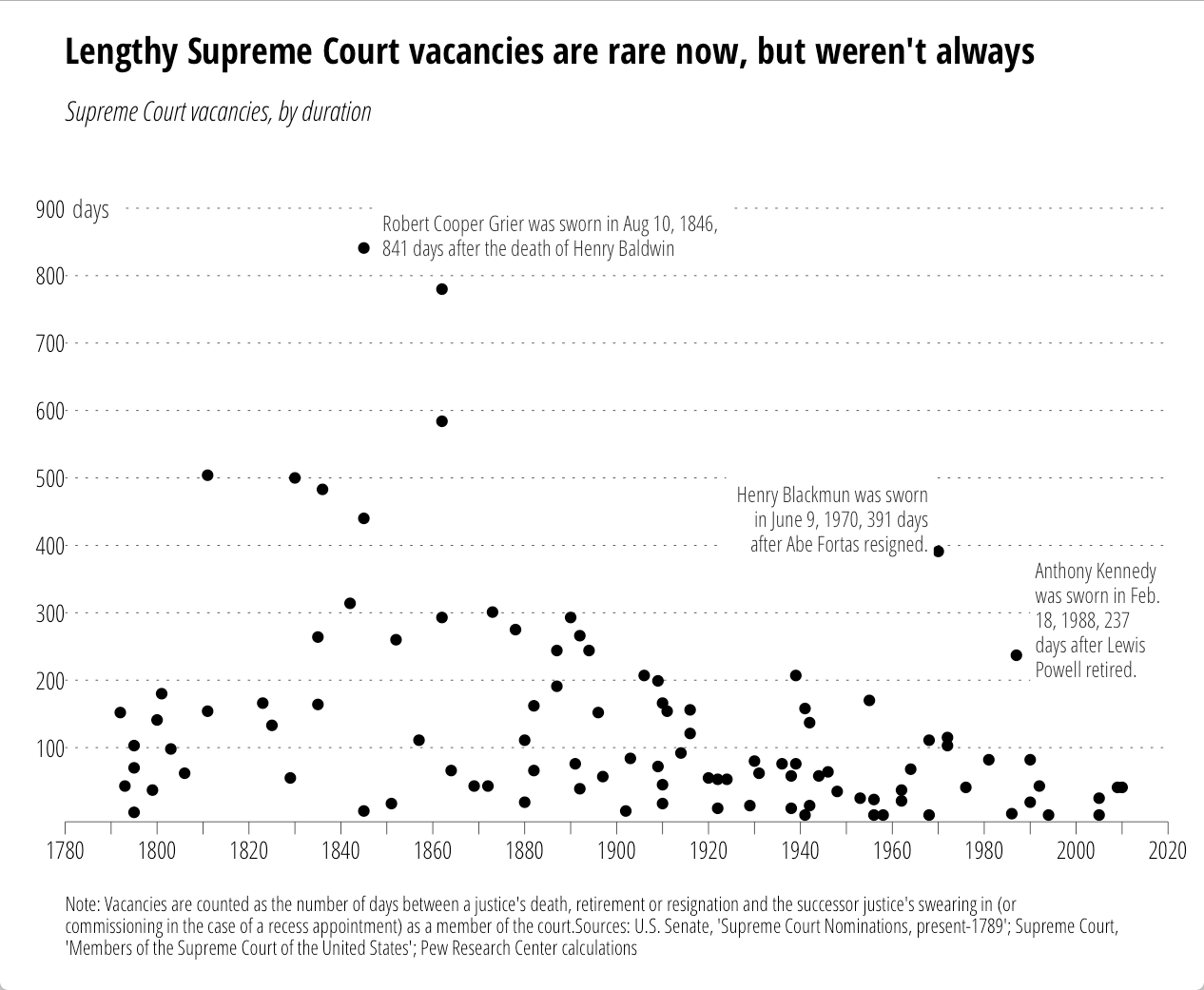
I came across this chart from the Pew Research Center on U.S. Supreme Court “wait times” this week:

supremes-pew

It seemed like a good candidate to test out the new ggplot2 additions. However, while Pew provided the chart, they did not provide data behind it. So, just for you, I used WebPlotDigitizer to encode the points (making good use of a commuter train home). Some points are (no doubt) off by one or two, but precision was not necessary for this riff. The data (and code) are in this gist. First the data.


library(ggplot2)

dat <- read.csv("supreme_court_vacancies.csv", col.names=c("year", "wait"))

Now, we want to reproduce the original chart "theme" pretty closely, so I've done quite a bit of styling outside of the subtitle/caption. One thing we can take care of right away is how to only label every other tick:

xlabs <- seq(1780, 2020, by=10)
xlabs[seq(2, 24, by=2)]  <-  " "

Now we setup the caption. It's long, so we need to wrap it (you need to play with the number of characters value to suit your needs). There's a Shiny Gadget (which is moving to the ggThemeAssist package) to help with this.


caption <- "Note: Vacancies are counted as the number of days between a justice's death, retirement or resignation and the successor justice's swearing in (or commissioning in the case of a recess appointment) as a member of the court.Sources: U.S. Senate, 'Supreme Court Nominations, present-1789'; Supreme Court, 'Members of the Supreme Court of the United States'; Pew Research Center calculations"
caption <- paste0(strwrap(caption, 160), sep="", collapse="\n")
# NOTE: you could probably just use caption <- label_wrap_gen(160)(caption) instead

We're going to try to fully reproduce all the annotations, so here are the in-plot point labels. (Adding the lines is an exercise left to the reader.)


annot <- read.table(text=
"year|wait|just|text
1848|860|0|Robert Cooper Grier was sworn in Aug 10, 1846,
841 days after the death of Henry Baldwin 1969|440|1|Henry Blackmun was sworn
in June 9, 1970, 391 days
after Abe Fortas resigned. 1990|290|0|Anthony Kennedy
was sworn in Feb.
18, 1988, 237
days after Lewis
Powell retired.", sep="|", header=TRUE, stringsAsFactors=FALSE) annot$text <- gsub("
", "\n", annot$text)

Now the fun begins.


gg <- ggplot()
gg <- gg + geom_point(data=dat, aes(x=year, y=wait))

We'll add the y-axis "title" to the inside of the plot:


gg <- gg + geom_label(aes(x=1780, y=900, label="days"),
                      family="OpenSans-CondensedLight",
                      size=3.5, hjust=0, label.size=0, color="#2b2b2b")

Now, we add our lovingly hand-crafted in-plot annotations:


gg <- gg + geom_label(data=annot, aes(x=year, y=wait, label=text, hjust=just),
                      family="OpenSans-CondensedLight", lineheight=0.95,
                      size=3, label.size=0, color="#2b2b2b")

Then, tweak the axes:


gg <- gg + scale_x_continuous(expand=c(0,0),
                              breaks=seq(1780, 2020, by=10),
                              labels=xlabs, limits=c(1780,2020))
gg <- gg + scale_y_continuous(expand=c(0,10),
                              breaks=seq(100, 900, by=100),
                              limits=c(0, 1000))

Thanks to Hadley's package design & Jan's & my additions, this is all you need to do to add the subtitle & caption:


gg <- gg + labs(x=NULL, y=NULL,
                title="Lengthy Supreme Court vacancies are rare now, but weren't always",
                subtitle="Supreme Court vacancies, by duration",
                caption=caption)

Well, perhaps not all since we need to style this puppy. You'll either need to install the font from Google Fonts or sub out the fonts for something you have.


gg <- gg + theme_minimal(base_family="OpenSans-CondensedLight")
# light, dotted major y-grid lines only
gg <- gg + theme(panel.grid=element_line())
gg <- gg + theme(panel.grid.major.y=element_line(color="#2b2b2b", linetype="dotted", size=0.15))
gg <- gg + theme(panel.grid.major.x=element_blank())
gg <- gg + theme(panel.grid.minor.x=element_blank())
gg <- gg + theme(panel.grid.minor.y=element_blank())
# light x-axis line only
gg <- gg + theme(axis.line=element_line())
gg <- gg + theme(axis.line.x=element_line(color="#2b2b2b", size=0.15))
# tick styling
gg <- gg + theme(axis.ticks=element_line())
gg <- gg + theme(axis.ticks.x=element_line(color="#2b2b2b", size=0.15))
gg <- gg + theme(axis.ticks.y=element_blank())
gg <- gg + theme(axis.ticks.length=unit(5, "pt"))
# breathing room for the plot
gg <- gg + theme(plot.margin=unit(rep(0.5, 4), "cm"))
# move the y-axis tick labels over a bit
gg <- gg + theme(axis.text.y=element_text(margin=margin(r=-5)))
# make the plot title bold and modify the bottom margin a bit
gg <- gg + theme(plot.title=element_text(family="OpenSans-CondensedBold", margin=margin(b=15)))
# make the subtitle italic 
gg <- gg + theme(plot.subtitle=element_text(family="OpenSans-CondensedLightItalic"))
# make the caption smaller, left-justified and give it some room from the main part of the panel
gg <- gg + theme(plot.caption=element_text(size=8, hjust=0, margin=margin(t=15)))
gg

That generates:

All the annotations go with the code. No more tricks, hacks or desperate calls for help on StackOverflow!

Now, this does add two new elements to the underlying gtable that gets built, so some other StackOverflow (et al) hacks may break if they don't use names (these elements are named in the gtable just like their ggplot2 names). We didn't muck with the widths/columns at all, so all those hacks (mostly for multi-plot alignment) should still work.

All the code/data is (again) in this gist.

>UPDATE: time spent per task factor order was wrong before. now fixed.

I caught this tweet today:

The WSJ folks usually do a great job, but this was either rushed or not completely thought through. There’s no way you’re going to be able to do any real comparisons between the segments across pies and direct pie % labels kinda mean they should have just made a table if they were going to phone it in.

Despite the fact that today is Pi[e] Day, these pies need to go.

If the intent was to primarily allow comparison of hours in-task, leaving some ability to compare the same time category across tasks, then bars are probably the way to go (you could do a parallel coordinates plot, but those looks like tangled guitar strings to me, so I’ll stick with bars). Here’s one possible alternative using R & ggplot2. Since I provide the data, please link to your own creations as I’d love to see how others would represent the data.

NOTE: I left direct bar labels off deliberately. My view is that (a) this is designed to be a relative comparison vs precise comparison & (b) it’s survey data and if we’re going to add #’s I’d feel compelled to communicate margin of error, etc. I don’t think that’s necessary.

library(ggplot2)
library(grid)
library(scales)
library(hrbrmisc) # devtools::install_github("hrbrmstr/hrbrmisc")
library(tidyr)
 
dat <- read.table(text=
"Task|less_than_one_hour_per_week|one_to_four_hours_per_week|one_to_three_hours_a_day|four_or_more_hours_a_day
Basic exploratory data analysis|11|32|46|12
Data cleaning|19|42|31|7
Machine learning, statistics|34|29|27|10
Creating visualizations|23|41|29|7
Presenting analysis|27|47|20|6
Extract, transform, load|43|32|20|5", sep="|", header=TRUE, stringsAsFactors=FALSE)
 
amount_trans <- c("less_than_one_hour_per_week"="<1 hr/\nwk", 
                  "one_to_four_hours_per_week"="1-4 hrs/\nwk", 
                  "one_to_three_hours_a_day"="1-3 hrs/\nday", 
                  "four_or_more_hours_a_day"="4+ hrs/\nday")
 
dat <- gather(dat, amount, value, -Task)
dat$value <- dat$value / 100
dat$amount <- factor(amount_trans[dat$amount], levels=amount_trans)
 
title_trans <- c("Basic exploratory data analysis"="Basic exploratory\ndata analysis", 
                 "Data cleaning"="Data\ncleaning", 
                 "Machine learning, statistics"="Machine learning,\nstatistics", 
                 "Creating visualizations"="Creating\nvisualizations", 
                 "Presenting analysis"="Presenting\nanalysis", 
                 "Extract, transform, load"="Extract,\ntransform, load")
 
dat$Task <-factor(title_trans[dat$Task], levels=title_trans)
 
gg <- ggplot(dat, aes(x=amount, y=value, fill=amount))
gg <- gg + geom_bar(stat="identity", width=0.75, color="#2b2b2b", size=0.05)
gg <- gg + scale_y_continuous(expand=c(0,0), labels=percent, limits=c(0, 0.5))
gg <- gg + scale_x_discrete(expand=c(0,1))
gg <- gg + scale_fill_manual(name="", values=c("#a6cdd9", "#d2e4ee", "#b7b079", "#efc750"))
gg <- gg + facet_wrap(~Task, scales="free")
gg <- gg + labs(x=NULL, y=NULL, title="Where Does the Time Go?")
gg <- gg + theme_hrbrmstr(grid="Y", axis="x", plot_title_margin=9)
gg <- gg + theme(panel.background=element_rect(fill="#efefef", color=NA))
gg <- gg + theme(strip.background=element_rect(fill="#858585", color=NA))
gg <- gg + theme(strip.text=element_text(family="OpenSans-CondensedBold", size=12, color="white", hjust=0.5))
gg <- gg + theme(panel.margin.x=unit(1, "cm"))
gg <- gg + theme(panel.margin.y=unit(0.5, "cm"))
gg <- gg + theme(legend.position="none")
gg <- gg + theme(panel.grid.major.y=element_line(color="#b2b2b2"))
gg <- gg + theme(axis.text.x=element_text(margin=margin(t=-10)))
gg <- gg + theme(axis.text.y=element_text(margin=margin(r=-10)))
 
ggplot_with_subtitle(gg, 
                     "The amount of time spent on various tasks by surveyed non-managers in data-science positions.",
                     fontfamily="OpenSans-CondensedLight", fontsize=12, bottom_margin=16)

RStudioScreenSnapz018

UPDATE: A newer blog post explaining the new ggplot2 additions: http://rud.is/b/2016/03/16/supreme-annotations/

UPDATE: this capability (+ more) are being rolled into ggplot2-proper. PR will be absorbed into ggplot2 main branch soon. exciting, annotated times ahead!

UPDATE: fontsize issue has been fixed & there’s a Shiny gadget available for interactively making subtitles. More info at the end of the post.

Subtitles aren’t always necessary for plots, but I began to use them enough that I whipped up a function for ggplot2 that does a decent job adding a subtitle to a finished plot object. More than a few folks have tried their hand at this in the past and this is just my incremental contribution until there’s proper support in ggplot2 (someone’s bound to add it via PR at some point).

We’ll nigh fully recreate the following plot from this WaPo article:

2300lawyers0116-2

Here’s a stab at that w/o the subtitle:

library(ggplot2)
library(scales)
 
data.frame(
  yrs=c("1789-90", "1849-50", "1909-10", "1965-66", "2016-16"),
  pct=c(0.526, 0.795, 0.713, 0.575, 0.365),
  xtralabs=c("", "Highest:\n", "", "", "Lowest:\n")
) -> hill_lawyers
 
gg <- ggplot(hill_lawyers, aes(yrs, pct))
gg <- gg + geom_bar(stat="identity", width=0.65)
gg <- gg + geom_label(aes(label=sprintf("%s%s", xtralabs, percent(pct))),
                      vjust=-0.4, family=c(rep("FranklinGothic-Book", 4),"FranklinGothic-Heavy"), 
                      lineheight=0.9, size=4, label.size=0)
gg <- gg + scale_x_discrete()
gg <- gg + scale_y_continuous(expand=c(0,0), limits=c(0.0, 1.0), labels=percent)
gg <- gg + labs(x=NULL, y=NULL, title="Fewer and fewer lawyers on the Hill")
gg <- gg + theme_minimal(base_family="FranklinGothic-Book")
gg <- gg + theme(axis.line=element_line(color="#2b2b2b", size=0.5))
gg <- gg + theme(axis.line.y=element_blank())
gg <- gg + theme(axis.text.x=element_text(family=c(rep("FranklinGothic-Book", 4),
                                                   "FranklinGothic-Heavy")))
gg <- gg + theme(panel.grid.major.x=element_blank())
gg <- gg + theme(panel.grid.major.y=element_line(color="#b2b2b2", size=0.1))
gg <- gg + theme(panel.grid.minor.y=element_blank())
gg <- gg + theme(plot.title=element_text(hjust=0, 
                                         family="FranklinGothic-Heavy", 
                                         margin=margin(b=10)))
gg

RStudio

(There are some “tricks” in that plotting code that may be worth spending an extra minute or two to mull over if you didn’t realize some of the function parameters were vectorized, or that you could get a white background with no border for text labels so grid lines don’t get in the way.)

Ideally, a subtitle would be part of the gtable that gets made underneath the covers so it will “travel well” with the plot object itself. The function below makes a textGrob from whatever text we pass into it and does just that; it inserts the new grob into a new table row.

#' Add a subtitle to a ggplot object and draw plot on current graphics device.
#' 
#' @param gg ggplot2 object
#' @param label subtitle label
#' @param fontfamily font family to use. The function doesn't pull any font 
#'        information from \code{gg} so you should consider specifying fonts
#'        for the plot itself and here. Or send me code to make this smarter :-)
#' @param fontsize font size
#' @param hjust,vjust horizontal/vertical justification 
#' @param bottom_margin space between bottom of subtitle and plot (code{pts})
#' @param newpage draw new (empty) page first?
#' @param vp viewport to draw plot in
#' @param ... parameters passed to \code{gpar} in call to \code{textGrob}
#' @return Invisibly returns the result of \code{\link{ggplot_build}}, which
#'   is a list with components that contain the plot itself, the data,
#'   information about the scales, panels etc.
ggplot_with_subtitle <- function(gg, 
                                 label="", 
                                 fontfamily=NULL,
                                 fontsize=10,
                                 hjust=0, vjust=0, 
                                 bottom_margin=5.5,
                                 newpage=is.null(vp),
                                 vp=NULL,
                                 ...) {
 
  if (is.null(fontfamily)) {
    gpr <- gpar(fontsize=fontsize, ...)
  } else {
    gpr <- gpar(fontfamily=fontfamily, fontsize=fontsize, ...)
  }
 
  subtitle <- textGrob(label, x=unit(hjust, "npc"), y=unit(hjust, "npc"), 
                       hjust=hjust, vjust=vjust,
                       gp=gpr)
 
  data <- ggplot_build(gg)
 
  gt <- ggplot_gtable(data)
  gt <- gtable_add_rows(gt, grobHeight(subtitle), 2)
  gt <- gtable_add_grob(gt, subtitle, 3, 4, 3, 4, 8, "off", "subtitle")
  gt <- gtable_add_rows(gt, grid::unit(bottom_margin, "pt"), 3)
 
  if (newpage) grid.newpage()
 
  if (is.null(vp)) {
    grid.draw(gt)
  } else {
    if (is.character(vp)) seekViewport(vp) else pushViewport(vp)
    grid.draw(gt)
    upViewport()
  }
 
  invisible(data)
 
}

The roxygen comments should give you an idea of how to work with it, and here it is in action:

subtitle <- "The percentage of Congressional members that are laywers has been\ncontinuously dropping since the 1960s"
 
ggplot_with_subtitle(gg, subtitle,
                     fontfamily="FranklinGothic-Book",
                     bottom_margin=20, lineheight=0.9)

Fullscreen_3_12_16__3_39_PM

It deals with long annotations pretty well, too (I strwrapped the source text for the below at 100 characters). The text is senseless here, but it’s just for show (I had it handy…don’t judge…you’re getting free code :-):

Fullscreen_3_12_16__7_44_PM

I think this beats manually re-creating the wheel, even if you only infrequently use subtitles. It definitely beats hand-editing plots and is a bit more elegant and functional than using grid.arrange (et al) to mimic the functionality. It also beats futzing with panel margins and clipping to shoehorn a frankenmashup mess of geom_text or annotation_custom calls.

Kick the tyres, tell me where it breaks and if I can cover enough edge cases (or make it smarter) I’ll add it to my ggalt package.

Shiny Subtitle Gadget

Thanks to:

you can now play with an experimental Shiny gadget which you can load by devtools::install_github("hrbrmstr/hrbrmisc") (that’s a temporary home for it, I use this pkg for testing/playing). Just select a ggplot2 object variable name in RStudio and then select “Add subtitle” from the Addins menu and give it a whirl. It looks like this:

__Development_hrbrmisc_-_master_-_RStudio

>UPDATE: I rejiggered the function to actually now, y’know, do what it says it should do :-)

A friend, we’ll call him _Alen_ put a call out for some function that could take an image and produce a per-row “histogram” along the edge for the number of filled-in points. That requirement eventually scope-creeped to wanting “histograms” on both the edge and bottom. In, essence there was a desire to be able to compare the number of pixels in each row/line to each other.

Now, you’re all like _”Well, you used ggplot to make the image so…”_ Yeah, not so much. They had done some basic charting in D3. And, it turns out, that it would be handy to compare the data between different images since they had different sets of data they were charting in the same place.

I can’t show you their images as they are part of super seekrit research which will eventually solve world hunger and land a family on Mars. But, I _can_ do a minor re-creation. I made a really simple D3 page that draws random lines in a specified color. Like this:


You can view the source of to see the dead-simple D3 that generates that. You’ll see something different in that image every time since it’s javascript and js has no decent built-in random routines (well it does _now_ but the engine functionality in browsers hasn’t caught up yet). So, you won’t be able to 100% replicate the results below but it will work.

First, we need to be able to get the image from the `div` into a bitmap so we can do some pixel counting. We’ll use the new `webshot` package for that.

library(webshot)
 
tmppng1 <- tempfile(fileext=".png")
webshot("http://rud.is/projects/randomlines.html?linecol=f6743d", 
        file=tmppng1,
        selector="#vis")

The image that produced looks like this:

img1

To make the “histograms” on the right and bottom, we’ll use the `raster` capabilities in R to let us treat the data like a matrix so we can easily add columns and rows. I made a function (below) that takes in a `png` file and either a list of colors to look for or a list of colors to exclude and the color you want the “histograms” to be drawn in. This way you can just exclude the background and annotation colors or count specific sets of colors. The counting is fueled by `fastmatch` which makes for super-fast comparisons.

#' Make a "row color density" histogram for an image file
#' 
#' Takes a file path to a png and returns displays it with a histogram of 
#' pixel density
#' 
#' @param img_file path to png file
#' @param target_colors,ignore_colors colors to count or ignore. Either one should be 
#'        \code{NULL} or \code{ignore_colors} should be \code{NULL}. Whichever is
#'        not \code{NULL} should be a vector of hex strings (can be huge vector of 
#'        hex strings as it uses \code{fastmatch}). The alpha channel is thrown away 
#'        if any, so you only need to specify \code{#rrggbb} hex strings
#' @param color to use for the density histogram line
selective_image_color_histogram <- function(img_file, 
                                            target_colors=NULL,
                                            ignore_colors=c("#ffffff", "#000000"),
                                            hist_col="steelblue",
                                            plot=TRUE) {
 
  require(png)
  require(grid)
  require(raster)
  require(fastmatch)
  require(gridExtra)
 
  "%fmin%" <- function(x, table) { fmatch(x, table, nomatch = 0) > 0 }
  "%!fmin%" <- function(x, table) { !fmatch(x, table, nomatch = 0) > 0 }
 
  if (is.null(target_colors) & is.null(ignore_colors)) {
    stop("Only one of 'target_colors' or 'ignore_colors' can be 'NULL'", call.=FALSE)
  }
 
  # clean up params
  target_colors <- tolower(target_colors)  
  ignore_colors <- tolower(ignore_colors)  
 
  # read in file and convert to usable data structure  
  png_file <- readPNG(img_file)
  img <- substr(tolower(as.matrix(as.raster(png_file))), 1, 7)
 
  if (length(target_colors)==0) {
    tf_img <- matrix(img %!fmin% ignore_colors, nrow=nrow(img), ncol=ncol(img))
  } else {
    tf_img <- matrix(img %fmin% target_colors, nrow=nrow(img), ncol=ncol(img))
  }  
 
  # count the pixels
  wvals <- rowSums(tf_img)
  hvals <- colSums(tf_img)
 
  # add a slight right & bottom margin
  wdth <- max(wvals) + round(0.1*max(wvals))
  hght <- max(hvals) + round(0.1*max(hvals))
 
  # create the "histogram" 
  col_mat <- matrix(rep("#ffffff", wdth*nrow(img)), nrow=nrow(img), ncol=wdth)
  for (row in 1:nrow(img)) { 
    col_mat[row, 1:wvals[row]] <- hist_col
  }
 
  # make bigger image
  new_img <- cbind(img, col_mat)
 
  # create the "histogram"
  row_mat <- matrix(rep("#ffffff", hght*ncol(new_img)), ncol=ncol(new_img), nrow=hght)
  for (col in 1:ncol(img)) { 
    row_mat[1:hvals[col], col] <- hist_col
  }
 
  # make a new bigger image and turn it into something we can use with 
  # grid since we can also use it with ggplot this way if we really wanted to
  # and friends don't let friends use base graphics
  rg1 <- rasterGrob(rbind(new_img, row_mat))
 
  # if we want to plot it, now is the time
  if (plot) grid.arrange(rg1)
 
  # return a list with each "histogram"
  return(list(row_hist=wvals, col_hist=hvals))
 
}

After reading in the `png` as a raster, the function counts up all the specified pixels by row and extends the matrix width-wise. Then it does the same by column and extends the matrix height-wise. Finally, it makes a `rasterGrob` (b/c friends don’t let friends use base graphics) and optionally plots the output. It also returns the counts by row and by column. That will let us compare between images.

Now we can do:

a <- selective_image_color_histogram(tmppng, hist_col="#f6743d", plot=TRUE)

hist1

And, make a counterpart image for it:

tmppng2 <- tempfile(fileext=".png")
webshot("http://rud.is/projects/randomlines.html?linecol=80b1d4", 
        file=tmppng2,
        selector="#vis")
 
b <- selective_image_color_histogram(tmppng2, hist_col="#80b1d4", plot=TRUE)

hist2

You can definitely visually compare to see which ones had more “activity” in which row(s) (or column(s)) but why not let R do that for you (you’ll probably need to change the font to something boring like `”Helvetica”`)?

library(ggplot2)
library(dplyr)
 
gg <- ggplot(data_frame(x=1:length(a$row_hist),
                        diff=a$row_hist - b$row_hist,
                        `A vs B`=factor(sign(diff), levels=c(-1, 0, 1), 
                                        labels=c("A", "Neutral", "B"))))
gg <- gg + geom_segment(aes(x=x, xend=x, y=0, yend=diff, color=`A vs B`))
gg <- gg + scale_x_continuous(expand=c(0,0))
gg <- gg + scale_y_continuous(expand=c(0,0))
gg <- gg + scale_color_manual(values=c("#f6743d", "#2b2b2b", "#80b1d4"))
gg <- gg + labs(x="Row", y="Difference")
gg <- gg + coord_flip()
gg <- gg + ggthemes::theme_tufte(base_family="URW Geometric Semi Bold")
gg <- gg + theme(panel.grid=element_line(color="#2b2b2b", size=0.15))
gg <- gg + theme(panel.grid.major.y=element_blank())
gg <- gg + theme(panel.grid.minor=element_blank())
gg <- gg + theme(axis.ticks=element_blank())
gg <- gg + theme(axis.text.y=element_blank())
gg <- gg + theme(axis.title.x=element_text(hjust=0))
gg <- gg + theme(axis.title.y=element_text(hjust=0))
gg

vertdif

This way, you let the _power of data science_ show you the answer. (The column processing chart is an exercise left to the reader).

The code may only be useful to _Alen_, but it was a fun and quick enough exercise that I thought it might be useful to the broader community.

Poke holes or improve upon it at will and tell me how horrible my code is in the comments (I have not looked to see if I subtracted in the right direction as I’m on solo dad duty for a cpl days and #4 is hungry).

My wife tricked me into a partial-weekend project to try to get all the primary/caucus results to-date on a map (the whole us). This is challenging since not all states use counties as boundaries for aggregate results. I’m still piecing together some shapefiles for the primary/caucus summation boundaries for a couple remaining states but I didn’t want to let the data source for the election results go without a mention.

The bestest part of the `iframe` below (which can be busted with [this link](/projects/primaryplotting.html)) is the CNN JSON link. You can discover those with Developer Tools on any modern browser. Here’s [the rest](https://gist.github.com/hrbrmstr/25a53e2fcaee2aafa908) of those links (using a gist to add enough layers of redirection to hopefully keep this data free/available).

It’s really well-formatted JSON. As of this post, not all those links completely work (the Maine & PR results weren’t certified yet). Please credit the hard-working folks at CNN whenever/wherever you use this data (if you use it at all). Making a resource like this available is a great service (even if it wasn’t 100% intentional).

The rest of the post shows how to display the voting % per top-candidate in each Texas county. Because Texas uses counties for roll-up aggregation, we can also use `tigris` to get great maps.


This post comes hot off the heels of the [nigh-feature-complete release of `vegalite`](http://rud.is/b/2016/02/27/create-vega-lite-specs-widgets-with-the-vegalite-package/) (virtually all the components of Vega-Lite are now implemented and just need real-world user testing). I’ve had a few and seen a few questions about “why Vega-Lite”? I _think_ my previous post gave some good answers to “why”. However, Vega-Lite and Vega provide different ways to think about composing statistical graphs than folks seem to be used to (which is part of the “why?”).

Vega-Lite attempts to simplify the way charts are specified (i.e. the way you create a “spec”) in Vega. Vega-proper is rich and complex. You interleave data, operations on data, chart aesthetics and chart element interactions all in one giant JSON file. Vega-Lite 1.0 is definitely more limited than Vega-proper and even when it does add more interactivity (like “brushing”) it will _still_ be more limited, _on purpose_. The reduction in complexity makes it more accessible to both humans and apps, especially apps that don’t grok the Grammar of Graphics (GoG) well.

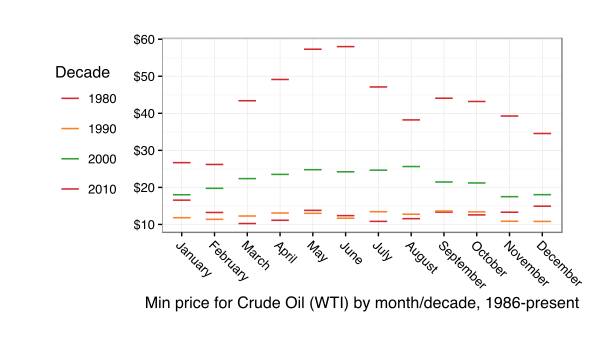
Even though `ggplot2` lets you mix and match statistical operations on data, I’m going to demonstrate the difference in paradigms/idioms through a single chart. I grabbed the [FRED data on historical WTI crude oil prices](https://research.stlouisfed.org/fred2/series/DCOILWTICO) and will show a chart that displays the minimum monthly price per-decade for a barrel of this cancerous, greed-inducing, global-conflict-generating, atmosphere-destroying black gold.

The data consists of records of daily prices (USD) for this commodity. That means we have to:

1. compute the decade
2. compute the month
3. determine the minimum price by month and decade
4. plot the values

The goal of each idiom is to provide a way to reproduce and communicate the “research”.

Here’s the idiomatic way of doing this with Vega-Lite:

library(vegalite)
library(quantmod)
library(dplyr)
 
getSymbols("DCOILWTICO", src="FRED")
 
data_frame(date=index(DCOILWTICO),
           value=coredata(DCOILWTICO)[,1]) %>%
  mutate(decade=sprintf("%s0", substring(date, 1, 3))) -> oil
 
# i created a CSV and moved the file to my server for easier embedding but
# could just have easily embedded the data in the spec.
# remember, you can pipe a vegalite object to embed_spec() to
# get javascript embed code.
 
vegalite() %>%
  add_data("http://rud.is/dl/crude.csv") %>%
  encode_x("date", "temporal") %>%
  encode_y("value", "quantitative", aggregate="min") %>%
  encode_color("decade", "nominal") %>%
  timeunit_x("month") %>%
  axis_y(title="", format="$3d") %>%
  axis_x(labelAngle=45, labelAlign="left", 
         title="Min price for Crude Oil (WTI) by month/decade, 1986-present") %>%
  mark_tick(thickness=3) %>%
  legend_color(title="Decade", orient="left")

Here’s the “spec” that creates (wordpress was having issues with it, hence the gist embed):

And, here’s the resulting visualization:

The grouping and aggregation operations operate in-chart-craft-situ. You have to carefully, visually parse either the spec or the R code that creates the spec to really grasp what’s going on. A different way of looking at this is that you embed everything you need to reproduce the transformations and visual encodings in a single, simple JSON file.

Here’s what I believe to be the modern, idiomatic way to do this in R + `ggplot2`:

library(ggplot2)
library(quantmod)
library(dplyr)
 
getSymbols("DCOILWTICO", src="FRED")
 
data_frame(date=index(DCOILWTICO),
           value=coredata(DCOILWTICO)[,1]) %>%
  mutate(decade=sprintf("%s0", substring(date, 1, 3)),
         month=factor(format(as.Date(date), "%B"),
                      levels=month.name)) -> oil
 
filter(oil, !is.na(value)) %>%
  group_by(decade, month) %>%
  summarise(value=min(value)) %>%
  ungroup() -> oil_summary
 
ggplot(oil_summary, aes(x=month, y=value, group=decade)) +
  geom_point(aes(color=decade), shape=95, size=8) +
  scale_y_continuous(labels=scales::dollar) +
  scale_color_manual(name="Decade", 
                     values=c("#d42a2f", "#fd7f28", "#339f34", "#d42a2f")) +
  labs(x="Min price for Crude Oil (WTI) by month/decade, 1986-present", y=NULL) +
  theme_bw() +
  theme(axis.text.x=element_text(angle=-45, hjust=0)) +
  theme(legend.position="left") +
  theme(legend.key=element_blank()) +
  theme(plot.margin=grid::unit(rep(1, 4), "cm"))

(To stave off some comments, yes I do know you can be Vega-like and compute with arbitrary functions within ggplot2. This was meant to show what I’ve seen to be the modern, recommended idiom.)

You really don’t even need to know R (for the most part) to grok what’s going on. Data is acquired and transformed and we map that into the plot. Yes, you can do the same thing with Vega[-Lite] (i.e. munge the data ahead of time and just churn out marks) but _you’re not encouraged to_. The power of the Vega paradigm is that you _do blend data and operations together_ and they _stay together_.

To make the R+ggplot2 code reproducible the entirety of the script has to be shipped. It’s really the same as shipping the Vega[-Lite] spec, though since you need to reproduce either the JSON or the R code in environments that support the code (R just happens to support both ggplot2 & Vega-Lite now :-).

I like the latter approach but can appreciate both (otherwise I wouldn’t have written the `vegalite` package). I also think Vega-Lite will catch on more than Vega-proper did (though Vega itself is in use and you use under the covers whenever you use `ggvis`). If Vega-Lite does nothing more than improve visualization literacy—you _must_ understand core vis terms to use it—and foster the notion for the need for serialization, reproduction and sharing of basic statistical charts, it will have been an amazing success in my book.