Skip navigation

Category Archives: data wrangling

By now, word of the forcible deplanement of a medical professional by United has reached even the remotest of outposts in the universe. Since the news brought this practice to global attention, I found some aggregate U.S. Gov data made a quick, annual, aggregate look at this soon after the incident:

While informative, that visualization left me wanting for more granular data. Alas, a super-quick search turned up empty.

However, within 24 hours I had a quick glance at a tweet (a link to it in the comments wld be ++gd if anyone fav’d it) that had a screen capture from a PDF from the U.S. DoT Air Travel Consumer Reports site.

There are individual pages for each monthly report which can be derived from the annual index pages. I crafted the URL scraping code below before inspecting an individual PDF. It turns out grabbing all the PDFs was not necessary since they don’t provide monthly figures for the involuntary disembarking. But, I wrote the code and it’ll likely be useful to someone out there so here it is:

library(rvest)
library(stringi)
library(pdftools)
library(hrbrthemes)
library(tidyverse)

# some URLs generate infinite redirection loops so be safe out there
safe_read_html <- safely(read_html)

# grab the individual page URLs for each month available in each year
c("https://www.transportation.gov/airconsumer/air-travel-consumer-reports-2017",
  "https://www.transportation.gov/airconsumer/air-travel-consumer-reports-2016",
  "https://www.transportation.gov/airconsumer/air-travel-consumer-reports-2015") %>%
  map(function(x) {
    read_html(x) %>%
      html_nodes("a[href*='air-travel-consumer-report']") %>%
      html_attr('href')
  }) %>%
  flatten_chr() %>%
  discard(stri_detect_regex, "feedback|/air-travel-consumer-reports") %>% # filter out URLs we don't need
  sprintf("https://www.transportation.gov%s", .) -> main_urls # make them useful

# now, read in all the individual pages. 
# do this separate from URL grabbing above and the PDF URL extraction
# below just to be even safer. 
map(main_urls, safe_read_html) -> pages

# URLs that generate said redirection loops will not have a valid
# result so ignor ethem and find the URLs for the monthly reports
discard(pages, ~is.null(.$result)) %>%
  map("result") %>%
  map(~html_nodes(., "a[href*='pdf']") %>%
        html_attr('href') %>%
        keep(stri_detect_fixed, "ATCR")) %>%
  flatten_chr() -> pdf_urls

# download them, being kind to the DoT server and not re-downloading
# anything we've successfully downloaded already. I really wish this
# was built-in functionality to download.file()
dir.create("atcr_pdfs")
walk(pdf_urls, ~if (!file.exists(file.path("atcr_pdfs", basename(.))))
  download.file(., file.path("atcr_pdfs", basename(.))))

It also wasn’t a complete waste for me since the PDF reports have monthly data in other categories and it did provide me with 3 years of data to compare visually.

The table with annual data looks like this in the PDF:

and, that page looks like this after it gets processed by pdftools::pdf_text():

The format is mostly consistent across the three files, but there are enough differences to require edge-case handling. Still, it’s not too much code to get three, separate tables:

# read in each PDF; find the pages with the tables we need to scrape;
# enable the text table to be read with read.table() and save the
# results
c("2017MarchATCR.pdf", "2016MarchATCR_2.pdf", "2015MarchATCR_1.pdf") %>%
  file.path("atcr_pdfs", .) %>%
  map(pdf_text) %>%
  map(~keep(.x, stri_detect_fixed, "PASSENGERS DENIED BOARDING")[[2]]) %>%
  map(stri_split_lines) %>%
  map(flatten_chr) %>%
  map(function(x) {
    y <- which(stri_detect_regex(x, "Rank|RANK|TOTAL"))
    grep("^\ +[[:digit:]]", x[y[1]:y[2]], value=TRUE) %>%
      stri_trim() %>%
      stri_replace_all_regex("([[:alpha:]])\\*+", "$1") %>%
      stri_replace_all_regex(" ([[:alpha:]])", "_$1") %>%
      paste0(collapse="\n") %>%
      read.table(text=., header=FALSE, stringsAsFactors=FALSE)
  }) -> denied

denied

## [[1]]
##    V1                   V2      V3     V4          V5   V6      V7     V8          V9  V10
## 1   1   _HAWAIIAN_AIRLINES     326     49  10,824,495 0.05     358     29  10,462,344 0.03
## 2   2     _DELTA_AIR_LINES 129,825  1,238 129,281,098 0.10 145,406  1,938 125,044,855 0.15
## 3   3      _VIRGIN_AMERICA   2,375     94   7,945,329 0.12   1,722     80   6,928,805 0.12
## 4   4     _ALASKA_AIRLINES   6,806    931  23,390,900 0.40   5,412    740  22,095,126 0.33
## 5   5     _UNITED_AIRLINES  62,895  3,765  86,836,527 0.43  81,390  6,317  82,081,914 0.77
## 6   6     _SPIRIT_AIRLINES  10,444  1,117  19,418,650 0.58   6,589    496  16,010,164 0.31
## 7   7   _FRONTIER_AIRLINES   2,096    851  14,666,332 0.58   2,744  1,232  12,343,540 1.00
## 8   8   _AMERICAN_AIRLINES  54,259  8,312 130,894,653 0.64  50,317  7,504  97,091,951 0.77
## 9   9     _JETBLUE_AIRWAYS   1,705  3,176  34,710,003 0.92   1,841     73  31,949,251 0.02
## 10 10    _SKYWEST_AIRLINES  41,476  2,935  29,986,918 0.98  51,829  5,079  28,562,760 1.78
## 11 11  _SOUTHWEST_AIRLINES  88,628 14,979 150,655,354 0.99  96,513 15,608 143,932,752 1.08
## 12 12 _EXPRESSJET_AIRLINES  33,590  3,182  21,139,038 1.51  42,933  4,608  24,736,601 1.86
##
## [[2]]
##    V1                   V2      V3     V4          V5   V6      V7     V8          V9  V10
## 1   1     _JETBLUE_AIRWAYS   1,841     73  31,949,251 0.02   2,006    650  29,264,332 0.22
## 2   2   _HAWAIIAN_AIRLINES     358     29  10,462,344 0.03     366    116  10,084,811 0.12
## 3   3      _VIRGIN_AMERICA   1,722     80   6,928,805 0.12     910     57   6,438,023 0.09
## 4   4     _DELTA_AIR_LINES 145,406  1,938 125,044,855 0.16 107,706  4,052 115,737,180 0.35
## 5   5     _SPIRIT_AIRLINES   6,589    496  16,010,164 0.31    ****   ****        **** ****
## 6   6     _ALASKA_AIRLINES   5,412    740  22,095,126 0.33   4,176    864  19,838,878 0.44
## 7   7     _UNITED_AIRLINES  81,390  6,317  82,081,914 0.77  64,968  9,078  77,317,281 1.17
## 8   8   _AMERICAN_AIRLINES  50,317  7,504  97,091,951 0.77  35,152  3,188  77,065,600 0.41
## 9   9   _FRONTIER_AIRLINES   2,744  1,232  12,343,540 1.00   3,864  1,616  11,787,602 1.37
## 10 10  _SOUTHWEST_AIRLINES  96,513 15,608 143,932,752 1.08  82,039 12,041 116,809,601 1.03
## 11 11    _SKYWEST_AIRLINES  51,829  5,079  28,562,760 1.78  42,446  7,170  26,420,593 2.71
## 12 12 _EXPRESSJET_AIRLINES  42,933  4,608  24,736,601 1.86  55,525  7,961  29,344,974 2.71
## 13 13           _ENVOY_AIR  18,125  2,792  11,901,028 2.35  18,615  2,501  15,441,723 1.62
##
## [[3]]
##    V1                   V2      V3     V4          V5   V6     V7    V8          V9  V10
## 1   1      _VIRGIN_AMERICA     910     57   6,438,023 0.09    351    26   6,244,574 0.04
## 2   2   _HAWAIIAN_AIRLINES     366    116  10,084,811 0.12  1,147   172   9,928,830 0.17
## 3   3     _JETBLUE_AIRWAYS   2,006    650  29,264,332 0.22    502    19  28,166,771 0.01
## 4   4     _DELTA_AIR_LINES 107,706  4,052 115,737,180 0.35 81,025 6,070 106,783,155 0.57
## 5   5   _AMERICAN_AIRLINES  60,924  7,471 135,748,581 0.55     **    **          **   **
## 6   6     _ALASKA_AIRLINES   4,176    864  19,838,878 0.44  3,834   714  18,517,953 0.39
## 7   7  _SOUTHWEST_AIRLINES  88,921 13,899 125,381,374 1.11    ***   ***         ***  ***
## 8   8     _UNITED_AIRLINES  64,968  9,078  77,317,281 1.17 57,716 9,015  77,212,471 1.17
## 9   9   _FRONTIER_AIRLINES   3,864  1,616  11,787,602 1.37  3,493 1,272  10,361,896 1.23
## 10 10           _ENVOY_AIR  18,615  2,501  15,441,723 1.62 19,659 1,923  16,939,092 1.14
## 11 11 _EXPRESSJET_AIRLINES  55,525  7,961  29,344,974 2.71 47,844 6,422  31,356,714 2.05
## 12 12    _SKYWEST_AIRLINES  42,446  7,170  26,420,593 2.71 35,942 6,768  26,518,312 2.55

And, it’s not too much more work to get that into a usable, single data frame:

map2_df(2016:2014, denied, ~{
  .y$year <- .x
  set_names(.y[,c(1:6,11)],
            c("rank", "airline", "voluntary_denied", "involuntary_denied",
              "enplaned_ct", "involuntary_db_per_10k", "year")) %>%
    mutate(airline = stri_trans_totitle(stri_trim(stri_replace_all_fixed(airline, "_", " ")))) %>%
    readr::type_convert() %>%
    tbl_df()
}) %>%
  select(-rank) -> denied

glimpse(denied)

## Observations: 37
## Variables: 6
## $ airline                <chr> "Hawaiian Airlines", "Delta Air Lines", "Virgin Americ...
## $ voluntary_denied       <dbl> 326, 129825, 2375, 6806, 62895, 10444, 2096, 54259, 17...
## $ involuntary_denied     <dbl> 49, 1238, 94, 931, 3765, 1117, 851, 8312, 3176, 2935, ...
## $ enplaned_ct            <dbl> 10824495, 129281098, 7945329, 23390900, 86836527, 1941...
## $ involuntary_db_per_10k <dbl> 0.05, 0.10, 0.12, 0.40, 0.43, 0.58, 0.58, 0.64, 0.92, ...
## $ year                   <int> 2016, 2016, 2016, 2016, 2016, 2016, 2016, 2016, 2016, ...

denied

## # A tibble: 37 × 6
##              airline voluntary_denied involuntary_denied enplaned_ct
##                <chr>            <dbl>              <dbl>       <dbl>
## 1  Hawaiian Airlines              326                 49    10824495
## 2    Delta Air Lines           129825               1238   129281098
## 3     Virgin America             2375                 94     7945329
## 4    Alaska Airlines             6806                931    23390900
## 5    United Airlines            62895               3765    86836527
## 6    Spirit Airlines            10444               1117    19418650
## 7  Frontier Airlines             2096                851    14666332
## 8  American Airlines            54259               8312   130894653
## 9    Jetblue Airways             1705               3176    34710003
## 10  Skywest Airlines            41476               2935    29986918
## # ... with 27 more rows, and 2 more variables: involuntary_db_per_10k <dbl>, year <int>

Airlines merge and the PDF does account for that (to some degree) but I’m not writing a news story and only care about the airlines with three years of data since I — for the most part — have only ever flown on ones in that list, so the last step is to filter the list to those with three years of data and make a multi-column slopegraph/bumps chart based on the involuntary disembarking rate by 10k passengers (normalized rates FTW!):

select(denied, airline, year, involuntary_db_per_10k) %>%
  group_by(airline) %>%
  mutate(yr_ct = n()) %>%
  ungroup() %>%
  filter(yr_ct == 3) %>%
  select(-yr_ct) %>%
  mutate(year = factor(year, rev(c(max(year)+1, unique(year))))) -> plot_df

update_geom_font_defaults(font_rc, size = 3)

ggplot() +
  geom_line(data = plot_df, aes(year, involuntary_db_per_10k, group=airline, colour=airline)) +
  geom_text(data = filter(plot_df, year=='2016') %>% mutate(lbl = sprintf("%s (%s)", airline, involuntary_db_per_10k)),
            aes(x=year, y=involuntary_db_per_10k, label=lbl, colour=airline), hjust=0,
            nudge_y=c(0,0,0,0,0,0,0,0,-0.0005,0.03,0), nudge_x=0.015) +
  scale_x_discrete(expand=c(0,0), labels=c(2014:2016, ""), drop=FALSE) +
  scale_y_continuous(trans="log1p") +
  ggthemes::scale_color_tableau() +
  labs(x=NULL, y=NULL,
       title="Involuntary Disembark Rate Per 10K Passengers",
       subtitle="Y-axis log scale; Only included airlines with 3-year span data",
       caption="Source: U.S. DoT Air Travel Consumer Reports <https://www.transportation.gov/airconsumer/air-travel-consumer-reports>") +
  theme_ipsum_rc(grid="X") +
  theme(plot.caption=element_text(hjust=0)) +
  theme(legend.position="none")

I’m really glad I don’t fly on JetBlue much anymore.

FIN

The code and a CSV of the cleaned data is in this gist and the code is also in this RPub.

I’m also glad to now know about a previously hidden, helpful resource for consumers who have to fly on U.S. carriers.

Despite being in cybersecurity nigh forever (a career that quickly turns one into a determined skeptic if you’re doing your job correctly) I have often trusted various (not to be named) news sources, reports and data sources to provide honest and as-unbiased-as-possible information. The debacle in the U.S. in late 2016 has proven (to me) that we’re all on our own when it comes to validating posited truth/fact. I’m teaching two data science college courses this Spring and one motivation for teaching is helping others on the path to data literacy so they don’t have to just believe what’s tossed at them.

It’s also one of the reasons I write R packages and blog/speak (when I can).

Today, I saw a chart in a WSJ article on the impending minimum wage changes (paywalled, so do the Google hack to read it) set to take effect in 19 states.

It’s a great chart and they cite the data source as coming from the Economic Policy Institute. I found some minimum wage data there and manually went through a bit of it to get enough of a feel that the WSJ wasn’t “mis-truthing” or truth-spinning. (As an aside, the minimum wage should definitely be higher, indexed and adjusted for inflation, but that’s a discussion for another time.)

While on EPI’s site, I did notice they had a “State of Working America Data Library” @ http://www.epi.org/data/. The data there is based on U.S. government published data and I validated that EPI isn’t fabricating anything (but you should not just take my word for it and do your own math from U.S. gov sources). I also noticed that the filtering interactions were delayed a bit and posited said condition was due to the site making AJAX/XHR calls to retrieve data. So, I peeked under the covers and discovered a robust, consistent, hidden API that is now wrapped in an R package dubbed epidata.

You can get the details of what’s available via the EPI site or through package docs.

What can you do with this data?

They seem to update the data (pretty much) monthly and it’s based on U.S. gov publications, so you can very easily validate “news” reports, potentially even easier than via packages that wrap the Bureau of Labor Statistics (BLS) API. On a lark, I wanted to compare the unemployment rate vs median wage over time (mostly to test the API and make a connected scatterplot). If you didn’t add the level of detail to the aesthetics I did, the following code is pretty small to do just that:

library(tidyverse)
library(epidata)
library(ggrepel)

unemployment <- get_unemployment()
wages <- get_median_and_mean_wages()

glimpse(wages)
## Observations: 43
## Variables: 3
## $ date    <int> 1973, 1974, 1975, 1976, 1977, 1978, 1979, 1980, 1981, ...
## $ median  <dbl> 16.53, 16.17, 16.05, 16.15, 16.07, 16.36, 16.15, 16.07...
## $ average <dbl> 19.05, 18.67, 18.64, 18.87, 18.77, 18.83, 19.06, 18.66...

glimpse(unemployment)
## Observations: 456
## Variables: 2
## $ date <date> 1978-12-01, 1979-01-01, 1979-02-01, 1979-03-01, 1979-04-...
## $ all  <dbl> 0.061, 0.061, 0.060, 0.060, 0.059, 0.059, 0.059, 0.058, 0...

group_by(unemployment, date=as.integer(lubridate::year(date))) %>%
  summarise(rate=mean(all)) %>%
  left_join(select(wages, date, median), by="date") %>%
  filter(!is.na(median)) %>%
  arrange(date) -> df

cols <- ggthemes::tableau_color_pal()(3)

ggplot(df, aes(rate, median)) +
  geom_path(color=cols[1], arrow=arrow(type="closed", length=unit(10, "points"))) +
  geom_point() +
  geom_label_repel(aes(label=date),
                   alpha=c(1, rep((4/5), (nrow(df)-2)), 1),
                   size=c(5, rep(3, (nrow(df)-2)), 5),
                   color=c(cols[2],
                           rep("#2b2b2b", (nrow(df)-2)),
                           cols[3]),
                   family="Hind Medium") +
  scale_x_continuous(name="Unemployment Rate", expand=c(0,0.001), label=scales::percent) +
  scale_y_continuous(name="Median Wage", expand=c(0,0.25), label=scales::dollar) +
  labs(title="U.S. Unemployment Rate vs Median Wage Since 1978",
       subtitle="Wage data is in 2015 USD",
       caption="Source: EPI analysis of Current Population Survey Outgoing Rotation Group microdata") +
  hrbrmisc::theme_hrbrmstr(grid="XY")

You can build your own “State of Working America Data Library” dashboard with this data (with flexdashboard and/or shiny) and be a bit of a citizen journalist, keeping the actual media in check and staying more informed an engaged.

As usual, drop issues & feature requests in the github repo. If you make some fun things with the data, drop a comment in the blog. Unless something major comes up the package should be on CRAN by the weekend.

The insanely productive elf-lord, @quominus put together a small package ([`triebeard`](https://github.com/ironholds/triebeard)) that exposes an API for [radix/prefix tries](https://en.wikipedia.org/wiki/Trie) at both the R and Rcpp levels. I know he had some personal needs for this and we both kinda need these to augment some functions in our `iptools` package. Despite `triebeard` having both a vignette and function-level examples, I thought it might be good to show a real-world use of the package (at least in the cyber real world): fast determination of which [autonomous system](https://en.wikipedia.org/wiki/Autonomous_system_(Internet)) an IPv4 address is in (if it’s in one at all).

I’m not going to delve to deep into routing (you can find a good primer [here](http://www.kixtart.org/forums/ubbthreads.php?ubb=showflat&Number=81619&site_id=1#import) and one that puts routing in the context of radix tries [here](http://www.juniper.net/documentation/en_US/junos14.1/topics/usage-guidelines/policy-configuring-route-lists-for-use-in-routing-policy-match-conditions.html)) but there exists, essentially, abbreviated tables of which IP addresses belong to a particular network. These tables are in routers on your local networks and across the internet. Groups of these networks (on the internet) are composed into those autonomous systems I mentioned earlier and these tables are used to get the packets that make up the cat videos you watch routed to you as efficiently as possible.

When dealing with cybersecurity data science, it’s often useful to know which autonomous system an IP address belongs in. The world is indeed full of peril and in it there are many dark places. It’s a dangerous business, going out on the internet and we sometimes find it possible to identify unusually malicious autonomous systems by looking up suspicious IP addresses en masse. These mappings look something like this:

CIDR            ASN
1.0.0.0/24      47872
1.0.4.0/24      56203
1.0.5.0/24      56203
1.0.6.0/24      56203
1.0.7.0/24      38803
1.0.48.0/20     49597
1.0.64.0/18     18144

Each CIDR has a start and end IP address which can ultimately be converted to integers. Now, one _could_ just sequentially compare start and end ranges to see which CIDR an IP address belongs in, but there are (as of the day of this post) `647,563` CIDRs to compare against, which—in the worst case—would mean having to traverse through the entire list to find the match (or discover there is no match). There are some trivial ways to slightly optimize this, but the search times could still be fairly long, especially when you’re trying to match a billion IPv4 addresses to ASNs.

By storing the CIDR mask (the number of bits of the leading IP address specified after the `/`) in binary form (strings of 1’s and 0’s) as keys for the trie, we get much faster lookups (only a few comparisons at worst-case vs 647,563).

I made an initial, naïve, mostly straight R, implementation as a precursor to a more low-level implementation in Rcpp in our `iptools` package and to illustrate this use of the `triebeard` package.

One thing we’ll need is a function to convert an IPv4 address (in long integer form) into a binary character string. We _could_ do this with base R, but it’ll be super-slow and it doesn’t take much effort to create it with an Rcpp inline function:

library(Rcpp)
library(inline)

ip_to_binary_string <- rcpp(signature(x="integer"), "
  NumericVector xx(x);

  std::vector<double> X(xx.begin(),xx.end());
  std::vector<std::string> output(X.size());

  for (unsigned int i=0; i<X.size(); i++){

    if ((i % 10000) == 0) Rcpp::checkUserInterrupt();

    output[i] = std::bitset<32>(X[i]).to_string();

  }

  return(Rcpp::wrap(output));
")

ip_to_binary_string(ip_to_numeric("192.168.1.1"))
## [1] "11000000101010000000000100000001"

We take a vector from R and use some C++ standard library functions to convert them to bits. I vectorized this in C++ for speed (which is just a fancy way to say I used a `for` loop). In this case, our short cut will not make for a long delay.

Now, we’ll need a CIDR file. There are [historical ones](http://data.4tu.nl/repository/uuid:d4d23b8e-2077-4592-8b47-cb476ad16e12) avaialble, and I use one that I generated the day of this post (and, referenced in the code block below). You can use [`pyasn`](https://github.com/hadiasghari/pyasn) to make new ones daily (relegating mindless, automated, menial data retrieval tasks to the python goblins, like one should).

library(iptools)
library(stringi)
library(dplyr)
library(purrr)
library(readr)
library(tidyr)

asn_dat_url <- "http://rud.is/dl/asn-20160712.1600.dat.gz"
asn_dat_fil <- basename(asn_dat_url)
if (!file.exists(asn_dat_fil)) download.file(asn_dat_url, asn_dat_fil)

rip <- read_tsv(asn_dat_fil, comment=";", col_names=c("cidr", "asn"))
rip %>%
  separate(cidr, c("ip", "mask"), "/") %>%
  mutate(prefix=stri_sub(ip_to_binary_string(ip_to_numeric(ip)), 1, mask)) -> rip_df

rip_df
## # A tibble: 647,557 x 4
##           ip  mask   asn                   prefix
##        <chr> <chr> <int>                    <chr>
## 1    1.0.0.0    24 47872 000000010000000000000000
## 2    1.0.4.0    24 56203 000000010000000000000100
## 3    1.0.5.0    24 56203 000000010000000000000101
## 4    1.0.6.0    24 56203 000000010000000000000110
## 5    1.0.7.0    24 38803 000000010000000000000111
## 6   1.0.48.0    20 49597     00000001000000000011
## 7   1.0.64.0    18 18144       000000010000000001
## 8  1.0.128.0    17  9737        00000001000000001
## 9  1.0.128.0    18  9737       000000010000000010
## 10 1.0.128.0    19  9737      0000000100000000100
## # ... with 647,547 more rows

You can save off that `data_frame` to an R data file to pull in later (but it’s pretty fast to regenerate).

Now, we create the trie, using the prefix we calculated and a value we’ll piece together for this example:

library(triebeard)

rip_trie <- trie(rip_df$prefix, sprintf("%s/%s|%s", rip_df$ip, rip_df$mask, rip_df$asn))

Yep, that’s it. If you ran this yourself, it should have taken less than 2s on most modern systems to create the nigh 700,000 element trie.

Now, we’ll generate a million random IP addresses and look them up:

set.seed(1492)
data_frame(lkp=ip_random(1000000),
           lkp_bin=ip_to_binary_string(ip_to_numeric(lkp)),
           long=longest_match(rip_trie, lkp_bin)) -> lkp_df

lkp_df
## # A tibble: 1,000,000 x 3
##               lkp                          lkp_bin                long
##             <chr>                            <chr>               <chr>
## 1   35.251.195.57 00100011111110111100001100111001  35.248.0.0/13|4323
## 2     28.57.78.42 00011100001110010100111000101010                <NA>
## 3   24.60.146.202 00011000001111001001001011001010   24.60.0.0/14|7922
## 4    14.236.36.53 00001110111011000010010000110101                <NA>
## 5   7.146.253.182 00000111100100101111110110110110                <NA>
## 6     2.9.228.172 00000010000010011110010010101100     2.9.0.0/16|3215
## 7  108.111.124.79 01101100011011110111110001001111 108.111.0.0/16|3651
## 8    65.78.24.214 01000001010011100001100011010110   65.78.0.0/19|6079
## 9   50.48.151.239 00110010001100001001011111101111   50.48.0.0/13|5650
## 10  97.231.13.131 01100001111001110000110110000011   97.128.0.0/9|6167
## # ... with 999,990 more rows

On most modern systems, that should have taken less than 3s.

The `NA` values are not busted lookups. Many IP networks are assigned but not accessible (see [this](https://en.wikipedia.org/wiki/List_of_assigned_/8_IPv4_address_blocks) for more info). You can validate this with `cymruservices::bulk_origin()` on your own, too).

The trie structure for these CIDRs takes up approximately 9MB of RAM, a small price to pay for speedy lookups (and, memory really is not what the heart desires, anyway). Hopefully the `triebeard` package will help you speed up your own lookups and stay-tuned for a new version of `iptools` with some new and enhanced functions.

The infamous @albertocairo [blogged about](http://www.thefunctionalart.com/2016/06/propublica-visualizes-seasonality-in.html) a [nice interactive piece on German company tax avoidance](https://projects.propublica.org/graphics/dividend) by @ProPublica. Here’s a snapshot of their interactive chart:

![](https://2.bp.blogspot.com/-S-8bu1UdYWM/V1rXibnBxrI/AAAAAAAAGo0/L940SpU3DvUPX90JK82jrKQN6fWMyn2IACLcB/s1600/1prop.png)

Dr. Cairo (his PhD is in the bag as far as I’m concerned :-) posited:

>_Isn’t it weird that the chart doesn’t have a scale on the Y-axis? It’s not the first time I see this, and it makes me feel uneasy._

I jumped over to the interactive piece to see if the authors used interactive tooltips since viewers can get a good idea for the scale limits if they do that and it _kinda sorta_ makes not having Y-axis label mostly OK if they compensate with said interactive notations. The interactive had no tooltips and the Y-axis was completely unlabeled.

Now, they used D3, so there _are_ built-in ways to create and add a Y-axis, so I don’t think this was an “oops…we forgot” moment. The Y values are “Short Interest Quantity” which is the quantity of stock shares that investors have sold short but not yet covered or closed out. It’s definitely a “1%-er” term and the authors already took time to explain some technical financial details and probably would have had to add even more text to explain this term properly (since that short definition is really not enough for most of us 99%-ers). It seems that they felt the the arrowed-annotations on the right hand side of the plot made up for the lack of actual Y-axis detail.

Should we _always_ have labels on a given axis? Would knowing that the Y-axis on this chart went from 0 to 800 million have aided in the decoding or groking the overall message? Here’s another example to help frame that question. This is the seminal `ggplot2::geom_density()` demo chart:

RStudio 2

Given that folks outside the realm of statistics/datasci really don’t grok what that Y-axis is saying, would it be _horribad_ to just leave it with a _”density”_ Y-label (sans unit marks) and then explain it in text (or talk to/around it in text but not go into detail)? Or should we keep the full annotations and spend a precious paragraph of text talking about measuring the area under a curve? (Another argument is to choose the right vis for the right audience but that’s another post entirely).

To further illustrate the posit, I recently made a series of what I call a “rank ordered segment plot” for a [report](https://information.rapid7.com/rs/495-KNT-277/images/rapid7-research-report-national-exposure-index-060716.pdf) that we did at @Rapid7:

ssh_rank_chart-1

There are text annotations for countries at either end of the spectrum on the X-axis but they aren’t individually labeled cuz…ewwww that’d be messy. The interactive version (coming this week over at `community.rapid7.com`) has the full table and light hover popup-annotations. But the point wasn’t to really focus on the countries as it was to depict the sad state of the ratio of unencrypted vs encrypted for a given service type within a country.

So, _should_ the ProPublica authors have tried to be more discrete w/r/t their Y-axis or is it fine the way it is? Does there _always_ need to be discrete axes annotations or is there some wiggle room? Opines are welcome in the comments since I honestly don’t think there is “one answer to rule them all” for this.

And for those that really want to see more discrete info on the ProPublica Y-axis labels, here’s a static, faceted chart (you may need to click/select/tap the chart to make it big enough to view):

Plot_Zoom

### Don’tTry This At Home!

ProPublica made that data available via two CSV files and the crosswalk org translation table via their main D3 javascript file (use Developer Tools “Inspect Element” to see such things). I ended up having to use `Sys.setlocale(‘LC_ALL’,’C’)` and expand the translation table a bit due to some of the mixed encodings in the data sets. Code to make the chart is below.

library(ggplot2)
library(dplyr)
library(stringi)
library(hrbrmisc)
library(scales)
library(ggalt)
library(sitools)

# mixed encodings ftw!
Sys.setlocale('LC_ALL','C') 

# different names in different data sets; sigh
org_crosswalk <- read.table(text='company,trans
"Adidas AG","Adidas AG"
"Allianz SE","Allianz SE"
"BASF SE","BASF SE"
"Bayer AG","Bayer AG"
"Bayerische Motoren Werke AG","BMW AG"
"BMW AG","BMW AG",
"Beiersdorf AG","Beiersdorf AG"
"Commerzbank AG","Commerzbank AG"
"Continental AG","Continental AG"
"Daimler AG","Daimler AG"
"Deutsche Bank AG","Deutsche Bank AG"
"Deutsche Boerse AG","Deutsche Boerse AG"
"Deutsche Lufthansa AG","Deutsche Lufthansa AG"
"Deutsche Post AG","Deutsche Post AG"
"Deutsche Telekom AG","Deutsche Telekom AG"
"E.ON","E.ON"
"Fresenius Medical Care AG & Co. KGaA","Fresenius Medical Care AG"
"Fresenius Medical Care AG","Fresenius Medical Care AG"
"Fresenius SE & Co KGaA","Fresenius SE & Co KGaA"
"HeidelbergCement AG","HeidelbergCement AG"
"Henkel AG & Co. KGaA","Henkel AG & Co. KGaA"
"Infineon Technologies AG","Infineon Technologies AG"
"K+S AG","K+S AG"
"Lanxess AG","Lanxess AG"
"Linde AG","Linde AG"
"Merck KGaA","Merck KGaA"
"MŸnchener RŸckversicherungs-Gesellschaft AG","Munich RE AG"
"M�nchener R�ckversicherungs-Gesellschaft AG","Munich RE AG"
"M\x9fnchener R\x9fckversicherungs-Gesellschaft AG","Munich RE AG"
"M?nchener R?ckversicherungs-Gesellschaft AG","Munich RE AG"
"Munich RE AG","Munich RE AG"
"RWE AG","RWE AG"
"SAP SE","SAP SE"
"Siemens AG","Siemens AG"
"ThyssenKrupp AG","ThyssenKrupp AG"
"Volkswagen AG","Volkswagen AG"', stringsAsFactors=FALSE, sep=",", quote='"', header=TRUE)

# quicker/less verbose than left_join()
org_trans <- setNames(org_crosswalk$trans, org_crosswalk$company)

# get and clean both data sets, being kind to the propublica bandwidth $
rec_url <- "https://projects.propublica.org/graphics/javascripts/dividend/record_dates.csv"
rec_fil <- basename(rec_url)
if (!file.exists(rec_fil)) download.file(rec_url, rec_fil)

records <- read.csv(rec_fil, stringsAsFactors=FALSE)
records %>%
  select(company=1, year=2, record_date=3) %>%
  mutate(record_date=as.Date(stri_replace_all_regex(record_date,
                                                    "([[:digit:]]+)/([[:digit:]]+)+/([[:digit:]]+)$",
                                                    "20$3-$1-$2"))) %>%
  mutate(company=ifelse(grepl("Gesellschaft", company), "Munich RE AG", company)) %>% 
  mutate(company=org_trans[company]) -> records

div_url <- "https://projects.propublica.org/graphics/javascripts/dividend/dividend.csv"
div_fil <- basename(div_url)
if (!file.exists(div_fil)) download.file(div_url, div_fil)

dividends <- read.csv(div_fil, stringsAsFactors=FALSE)

dividends %>%
  select(company=1, pricing_date=2, short_int_qty=3) %>%
  mutate(pricing_date=as.Date(stri_replace_all_regex(pricing_date,
                                                     "([[:digit:]]+)/([[:digit:]]+)+/([[:digit:]]+)$",
                                                     "20$3-$1-$2"))) %>%
  mutate(company=ifelse(grepl("Gesellschaft", company), "Munich RE AG", company)) %>% 
  mutate(company=org_trans[company]) -> dividends

# sitools::f2si() doesn't work so well for this for some reason, so mk a small helper function
m_fmt <- function (x) { sprintf("%d M", as.integer(x/1000000)) }

# gotta wrap'em all
subt <- wrap_format(160)("German companies typically pay shareholders one big dividend a year. With the help of U.S. banks, international investors briefly lend their shares to German funds that don’t have to pay a dividend tax. The avoided tax – usually 15 percent of the dividend – is split by the investors and other participants in the deal. These transactions cost the German treasury about $1 billion a year. [Y-axis == short interest quantity]")

gg <- ggplot()

# draw the markers for the dividends
gg <- gg + geom_vline(data=records,
                      aes(xintercept=as.numeric(record_date)),
                      color="#b2182b", size=0.25, linetype="dotted")

# draw the time series
gg <- gg + geom_line(data=dividends,
                     aes(pricing_date, short_int_qty, group=company),
                     size=0.15)

gg <- gg + scale_x_date(expand=c(0,0))
gg <- gg + scale_y_continuous(expand=c(0,0), labels=m_fmt,
                              limits=c(0,800000000))

gg <- gg + facet_wrap(~company, scales="free_x")

gg <- gg + labs(x="Red, dotted line == Dividend date", y=NULL,
                title="Tax Avoidance Has a Heartbeat",
                subtitle=subt,
                caption="Source: https://projects.propublica.org/graphics/dividend")

# devtools::install_github("hrbrmstr/hrbrmisc") or roll your own
gg <- gg + theme_hrbrmstr_an(grid="XY", axis="", strip_text_size=8.5,
                             subtitle_size=10)
gg <- gg + theme(axis.text=element_text(size=6))
gg <- gg + theme(panel.grid.major=element_line(size=0.05))
gg <- gg + theme(panel.background=element_rect(fill="#e2e2e233",
                                               color="#e2e2e233"))
gg <- gg + theme(panel.margin=margin(10,10,20,10))
gg <- gg + theme(plot.margin=margin(20,20,20,20))
gg <- gg + theme(axis.title.x=element_text(color="#b2182bee", size=9, hjust=1))
gg <- gg + theme(plot.caption=element_text(margin=margin(t=5)))
gg

>UPDATE: Deadline is now 2016-04-05 23:59 EDT; next vis challenge is 2016-04-06!

Per a suggestion, I’m going to try to find a neat data set (prbly one from @jsvine) to feature each week and toss up some sample code (99% of the time prbly in R) and offer up a vis challenge. Just reply in the comments with a link to a gist/repo/rpub/blog/etc (or post directly, though inserting code requires some markup that you can ping me abt) post containing the code & vis with a brief explanation. I’ll gather up everything into a new github organization I made for this context. You can also submit a PR right to [this week’s repo](https://github.com/52vis/2016-13).

Winners get a free digital copy of [Data-Driven Security](http://amzn.to/ddsec), and if you win more than once I’ll come up with other stuff to give away (either an Amazon gift card, a book or something Captain America related).

Submissions should include a story/angle/question you were trying to answer, any notes or “gotchas” that the code/comments doesn’t explain and a [beautiful] vis. You can use whatever language or tool (even Excel or _ugh_ Tableau), but you’ll have to describe what you did step-by-step for the GUI tools or record a video, since the main point about this contest is to help folks learn about asking questions, munging data and making visualizations. Excel & Tableau lock that knowledge in and Tableau even locks that data in.

### Droning on and on

Today’s data source comes from this week’s Data Is Plural newsletter and is all about drones. @jsvine linked to the [main FAA site](http://www.faa.gov/uas/law_enforcement/uas_sighting_reports/) for drone sightings and there’s enough ways to slice the data that it should make for some interesting story angles.

I will remove one of those angles with a simple bar chart of unmanned aircraft (UAS) sightings by week, using an FAA site color for the bars. I wanted to see if there were any overt visual patterns in the time of year or if the registration requirement at the end of 2015 caused any changes (I didn’t crunch the numbers to see if there were any actual patterns that could be found statistically, but that’s something y’all can do). I’m not curious as to what caused the “spike” in August/September 2015 and the report text may have that data.

I’ve put this week’s example code & data into the [52 vis repo](https://github.com/52vis/2016-13) for this week.

library(ggplot2)
library(ggalt)
library(ggthemes)
library(readxl)
library(dplyr)
library(hrbrmisc)
library(grid)
 
# get copies of the data locally
 
URL1 <- "http://www.faa.gov/uas/media/UAS_Sightings_report_21Aug-31Jan.xlsx"
URL2 <- "http://www.faa.gov/uas/media/UASEventsNov2014-Aug2015.xls"
 
fil1 <- basename(URL1)
fil2 <- basename(URL2)
 
if (!file.exists(fil1)) download.file(URL1, fil1)
if (!file.exists(fil2)) download.file(URL2, fil2)
 
# read it in
 
xl1 <- read_excel(fil1)
xl2 <- read_excel(fil2)
 
# munge it a bit so we can play with it by various calendrical options
 
drones <- setNames(bind_rows(xl2[,1:3],
                             xl1[,c(1,3,4)]), 
                   c("ts", "city", "state"))
drones <- mutate(drones, 
                 year=format(ts, "%Y"), 
                 year_mon=format(ts, "%Y%m"), 
                 ymd=as.Date(ts), 
                 yw=format(ts, "%Y%V"))
 
# let's see them by week
by_week <- mutate(count(drones, yw), wk=as.Date(sprintf("%s1", yw), "%Y%U%u")-7)
 
# this looks like bad data but I didn't investigate it too much
by_week <- arrange(filter(by_week, wk>=as.Date("2014-11-10")), wk)
 
# plot
 
gg <- ggplot(by_week, aes(wk, n))
gg <- gg + geom_bar(stat="identity", fill="#937206")
gg <- gg + annotate("text", by_week$wk[1], 49, label="# reports", 
                    hjust=0, vjust=1, family="Cabin-Italic", size=3)
gg <- gg + scale_x_date(expand=c(0,0))
gg <- gg + scale_y_continuous(expand=c(0,0))
gg <- gg + labs(y=NULL,
                title="Weekly U.S. UAS (drone) sightings",
                subtitle="As reported to the Federal Aviation Administration",
                caption="Data from: http://www.faa.gov/uas/law_enforcement/uas_sighting_reports/")
gg <- gg + theme_hrbrmstr(grid="Y", axis="X")
gg <- gg + theme(axis.title.x=element_text(margin=margin(t=-6)))
gg

RStudioScreenSnapz024

### Fin

I’ll still keep up a weekly vis from the Data Is Plural weekly collection even if this whole contest thing doesn’t take root with folks. You can never have too many examples for budding data folks to review.

Folks who’ve been tracking this blog on R-bloggers probably remember [this post](https://rud.is/b/2014/11/16/moving-the-earth-well-alaska-hawaii-with-r/) where I showed how to create a composite U.S. map with an Albers projection (which is commonly referred to as AlbersUSA these days thanks to D3).

I’m not sure why I didn’t think of this earlier, but you don’t _need_ to do those geographical machinations every time you want a prettier & more inclusive map (Alaska & Hawaii have been states for a while, so perhaps we should make more of an effort to include them in both data sets and maps). After doing the map transformations, the composite shape can be saved out to a shapefile, preferably GeoJSON since (a) you can use `geojsonio::geojson_write()` to save it and (b) it’s a single file vs a ZIP/directory.

I did just that and saved both state and country maps out with FIPS codes and other useful data slot bits and created a small data package : [`albersusa`](https://github.com/hrbrmstr/albersusa) : with some helper functions. It’s not in CRAN yet so you need to `devtools::install_github(“hrbrmstr/albersusa”)` to use it. The github repo has some basic examples, heres a slightly more complex one.

### Mapping Obesity

I grabbed an [obesity data set](http://www.cdc.gov/diabetes/data/county.html) from the CDC and put together a compact example for how to make a composite U.S. county choropleth to show obesity rates per county (for 2012, which is the most recent data). I read in the Excel file, pull out the county FIPS code and 2012 obesity rate, then build the choropleth. It’s not a whole lot of code, but that’s one main reason for the package!

library(readxl)
library(rgeos)
library(maptools)
library(ggplot2)   # devtools::install_github("hadley/ggplot2") only if you want subtitles/captions
library(ggalt)
library(ggthemes)
library(albersusa) # devtools::install_github("hrbrmstr/albersusa")
library(viridis)
library(scales)
 
# get the data and be nice to the server and keep a copy of the data for offline use
 
URL <- "http://www.cdc.gov/diabetes/atlas/countydata/OBPREV/OB_PREV_ALL_STATES.xlsx"
fil <- basename(URL)
if (!file.exists(fil)) download.file(URL, fil)
 
# it's not a horrible Excel file, but we do need to hunt for the data
# and clean it up a bit. we just need FIPS & 2012 percent info
 
wrkbk <- read_excel(fil)
obesity_2012 <- setNames(wrkbk[-1, c(2, 61)], c("fips", "pct"))
obesity_2012$pct <- as.numeric(obesity_2012$pct) / 100
 
# I may make a version of this that returns a fortified data.frame but
# for now, we just need to read the built-in saved shapefile and turn it
# into something ggplot2 can handle
 
cmap <- fortify(counties_composite(), region="fips")
 
# and this is all it takes to make the map below
 
gg <- ggplot()
gg <- gg + geom_map(data=cmap, map=cmap,
                    aes(x=long, y=lat, map_id=id),
                    color="#2b2b2b", size=0.05, fill=NA)
gg <- gg + geom_map(data=obesity_2012, map=cmap,
                    aes(fill=pct, map_id=fips),
                    color="#2b2b2b", size=0.05)
gg <- gg + scale_fill_viridis(name="Obesity", labels=percent)
gg <- gg + coord_proj(us_laea_proj)
gg <- gg + labs(title="U.S. Obesity Rate by County (2012)",
                subtitle="Content source: Centers for Disease Control and Prevention",
           caption="Data from http://www.cdc.gov/diabetes/atlas/countydata/County_ListofIndicators.html")
gg <- gg + theme_map(base_family="Arial Narrow")
gg <- gg + theme(legend.position=c(0.8, 0.25))
gg <- gg + theme(plot.title=element_text(face="bold", size=14, margin=margin(b=6)))
gg <- gg + theme(plot.subtitle=element_text(size=10, margin=margin(b=-14)))
gg

Fullscreen_3_29_16__9_06_AM

### Fin

Note that some cartographers think of this particular map view the way I look at a pie chart, but it’s a compact & convenient way to keep the states/counties together and will make it easier to include Alaska & Hawaii in your cartographic visualizations.

The composite GeoJSON files are in:

– `system.file(“extdata/composite_us_states.geojson.gz”, package=”albersusa”)`
– `system.file(“extdata/composite_us_counties.geojson.gz”, package=”albersusa”)`

if you want to use them in another program/context.

Drop an issue [on github](https://github.com/hrbrmstr/albersusa) if you want any more default fields in the data slot and if you “need” territories (I’d rather have a PR for the latter tho :-).

This is a follow up to a twitter-gist post & to the annotation party we’re having this week

I had not intended this to be “Annotation Week” but there was a large, positive response to my annotation “hack” post. This reaction surprised me, then someone pointed me to this link and also noted that if having to do subtitles via hacks or Illustrator annoyed me, imagine the reaction to people who actually do real work. That led me to pull up my ggplot2 fork (what, you don’t keep a fork of ggplot2 handy, too?) and work out how to augment ggplot2-proper with the functionality. It’s yet-another nod to Hadley as he designed the package so well that slipping in annotations to the label, theme & plot-building code was an actual magical experience. As I was doing this, @janschulz jumped in to add below-plot annotations to ggplot2 (which we’re calling the caption label thanks to a suggestion by @arnicas).

What’s Changed?

There are two new plot label components. The first is for subtitles that appear below the plot title. You can either do:


ggtitle("The Main Title", subtitle="A well-crafted subtitle")

or


labs(title="The Main Title", subtitle="A well-crafted subtitle")

The second is for below-plot annotations (captions), which are added via:


labs(title="Main Title", caption="Where this crazy thing game from")

These are styled via two new theme elements (both adjusted with element_text()):

  • plot.subtitle
  • plot.caption

A “casualty” of these changes is that the main plot.title is now left-justified by default (as is plot.subtitle). plot.caption is right-justified by default.

Yet-another ggplot2 Example

I have thoughts on plot typography which I’ll save for another post, but I wanted to show how to use these new components. You’ll need to devtools::install_github("hadley/ggplot2") to use them until the changes get into CRAN.

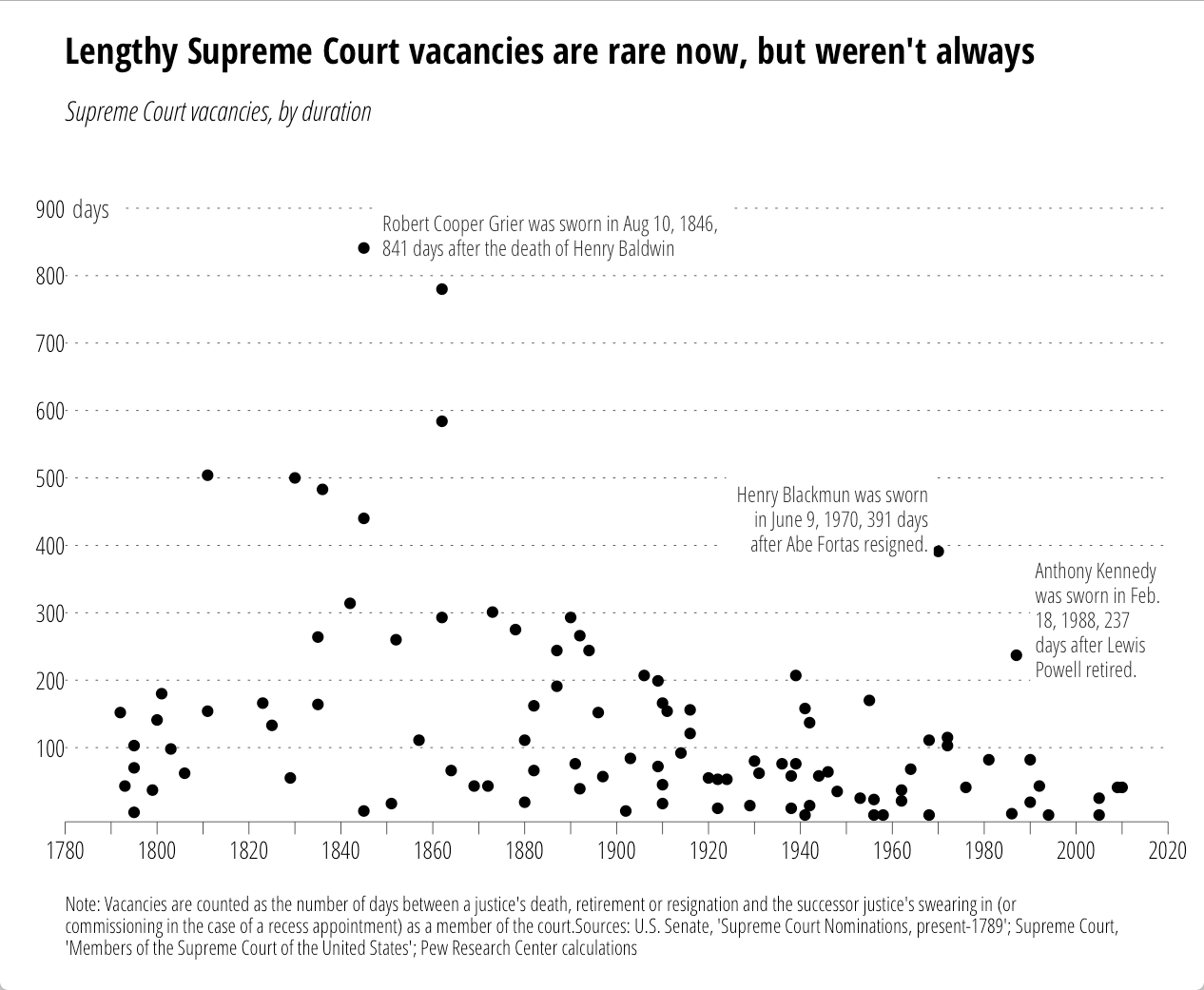
I came across this chart from the Pew Research Center on U.S. Supreme Court “wait times” this week:

supremes-pew

It seemed like a good candidate to test out the new ggplot2 additions. However, while Pew provided the chart, they did not provide data behind it. So, just for you, I used WebPlotDigitizer to encode the points (making good use of a commuter train home). Some points are (no doubt) off by one or two, but precision was not necessary for this riff. The data (and code) are in this gist. First the data.


library(ggplot2)

dat <- read.csv("supreme_court_vacancies.csv", col.names=c("year", "wait"))

Now, we want to reproduce the original chart "theme" pretty closely, so I've done quite a bit of styling outside of the subtitle/caption. One thing we can take care of right away is how to only label every other tick:

xlabs <- seq(1780, 2020, by=10)
xlabs[seq(2, 24, by=2)]  <-  " "

Now we setup the caption. It's long, so we need to wrap it (you need to play with the number of characters value to suit your needs). There's a Shiny Gadget (which is moving to the ggThemeAssist package) to help with this.


caption <- "Note: Vacancies are counted as the number of days between a justice's death, retirement or resignation and the successor justice's swearing in (or commissioning in the case of a recess appointment) as a member of the court.Sources: U.S. Senate, 'Supreme Court Nominations, present-1789'; Supreme Court, 'Members of the Supreme Court of the United States'; Pew Research Center calculations"
caption <- paste0(strwrap(caption, 160), sep="", collapse="\n")
# NOTE: you could probably just use caption <- label_wrap_gen(160)(caption) instead

We're going to try to fully reproduce all the annotations, so here are the in-plot point labels. (Adding the lines is an exercise left to the reader.)


annot <- read.table(text=
"year|wait|just|text
1848|860|0|Robert Cooper Grier was sworn in Aug 10, 1846,
841 days after the death of Henry Baldwin 1969|440|1|Henry Blackmun was sworn
in June 9, 1970, 391 days
after Abe Fortas resigned. 1990|290|0|Anthony Kennedy
was sworn in Feb.
18, 1988, 237
days after Lewis
Powell retired.", sep="|", header=TRUE, stringsAsFactors=FALSE) annot$text <- gsub("
", "\n", annot$text)

Now the fun begins.


gg <- ggplot()
gg <- gg + geom_point(data=dat, aes(x=year, y=wait))

We'll add the y-axis "title" to the inside of the plot:


gg <- gg + geom_label(aes(x=1780, y=900, label="days"),
                      family="OpenSans-CondensedLight",
                      size=3.5, hjust=0, label.size=0, color="#2b2b2b")

Now, we add our lovingly hand-crafted in-plot annotations:


gg <- gg + geom_label(data=annot, aes(x=year, y=wait, label=text, hjust=just),
                      family="OpenSans-CondensedLight", lineheight=0.95,
                      size=3, label.size=0, color="#2b2b2b")

Then, tweak the axes:


gg <- gg + scale_x_continuous(expand=c(0,0),
                              breaks=seq(1780, 2020, by=10),
                              labels=xlabs, limits=c(1780,2020))
gg <- gg + scale_y_continuous(expand=c(0,10),
                              breaks=seq(100, 900, by=100),
                              limits=c(0, 1000))

Thanks to Hadley's package design & Jan's & my additions, this is all you need to do to add the subtitle & caption:


gg <- gg + labs(x=NULL, y=NULL,
                title="Lengthy Supreme Court vacancies are rare now, but weren't always",
                subtitle="Supreme Court vacancies, by duration",
                caption=caption)

Well, perhaps not all since we need to style this puppy. You'll either need to install the font from Google Fonts or sub out the fonts for something you have.


gg <- gg + theme_minimal(base_family="OpenSans-CondensedLight")
# light, dotted major y-grid lines only
gg <- gg + theme(panel.grid=element_line())
gg <- gg + theme(panel.grid.major.y=element_line(color="#2b2b2b", linetype="dotted", size=0.15))
gg <- gg + theme(panel.grid.major.x=element_blank())
gg <- gg + theme(panel.grid.minor.x=element_blank())
gg <- gg + theme(panel.grid.minor.y=element_blank())
# light x-axis line only
gg <- gg + theme(axis.line=element_line())
gg <- gg + theme(axis.line.x=element_line(color="#2b2b2b", size=0.15))
# tick styling
gg <- gg + theme(axis.ticks=element_line())
gg <- gg + theme(axis.ticks.x=element_line(color="#2b2b2b", size=0.15))
gg <- gg + theme(axis.ticks.y=element_blank())
gg <- gg + theme(axis.ticks.length=unit(5, "pt"))
# breathing room for the plot
gg <- gg + theme(plot.margin=unit(rep(0.5, 4), "cm"))
# move the y-axis tick labels over a bit
gg <- gg + theme(axis.text.y=element_text(margin=margin(r=-5)))
# make the plot title bold and modify the bottom margin a bit
gg <- gg + theme(plot.title=element_text(family="OpenSans-CondensedBold", margin=margin(b=15)))
# make the subtitle italic 
gg <- gg + theme(plot.subtitle=element_text(family="OpenSans-CondensedLightItalic"))
# make the caption smaller, left-justified and give it some room from the main part of the panel
gg <- gg + theme(plot.caption=element_text(size=8, hjust=0, margin=margin(t=15)))
gg

That generates:

All the annotations go with the code. No more tricks, hacks or desperate calls for help on StackOverflow!

Now, this does add two new elements to the underlying gtable that gets built, so some other StackOverflow (et al) hacks may break if they don't use names (these elements are named in the gtable just like their ggplot2 names). We didn't muck with the widths/columns at all, so all those hacks (mostly for multi-plot alignment) should still work.

All the code/data is (again) in this gist.

(If you don’t know what XML is, you should probably [read a primer](https://en.wikipedia.org/wiki/XML) before reading this post,)

When working with data, one inevitably comes across things encoded in XML. I’m in the “anti-XML” camp, but deal with my fair share of XML in “cyber” and help out enough people who have to work with XML that I’ve become pretty proficient when slicing & dicing it.

R has two main packages to deal with XML: the original `XML` package and the more lightweight and modern `xml2` package. If you really need all the power of `libxml2` (the C library that powers both packages) or are _creating_ XML from R, then you probably know your way around the `XML` package and are pretty self-sufficient.

Most folks can get by with the `xml2` package if their goal is to work with XML data. By “work with” I mean read in files or data from APIs that come in XML format and have to find nuggets of gold in between all those `<` and `>` tags. To do so requires finding what you need and that means using a query language called `XPath` to pinpoint the node(s) you are after. Working with `XPath` can be pretty daunting for those who went to school to ultimately cure diseases, build high-performing stock portfolios, target advertising to everyone or perform a host of other real work. Becoming an expert in `XPath` was not something on the bucket list but to work with XML you will need to be familiar with it.

The [`xmlview`](https://github.com/hrbrmstr/xmlview) package provides a way to visually inspect XML and interactively test out `XPath` expressions. It’s as simple to use as:

devtools::install_github("ramnathv/htmlwidgets") # we use some bleeding edge features
devtools::install_github("hrbrmstr/xmlview")
library(xml2)
library(xmlview)
 
# plain text XML
xml_view("<note><to>Tove</to><from>Jani</from><heading>Reminder</heading><body>Don't forget me this weekend!</body></note>")
 
# read-in XML document
doc <- read_xml("http://www.npr.org/rss/rss.php?id=1001")
xml_view(doc, add_filter=TRUE)

(There’s also an experimental `xml_tree_view()` in there by @timelyportfolio that we’ll be adding features to at a pretty rapid pace.)

Here’s a screenshot of it in action:

RStudioScreenSnapz003

There are options to change the CSS styling for the formatted code. Yep, it will format and highlight XML for you so it’s easier to work with. There’s an animated gif of a screencast over [on github](https://github.com/hrbrmstr/xmlview) as well.

Once you perfect your `XPath` expression, hit the “R” button and it will generate the code you can copy back into RStudio. It understands namespaces but try not to stuff a huge XML document in there as browsers don’t work well with large data elements (the viewer is an `htmlwidget` and is, hence, browser-based).

It works with plain character XML/HTML, and many `xml2` data types. I have no current plans for `XML` package object support but toss up an issue on github if you really need it (or, better yet, a PR). If there are other desired features (especially from educators), please post a request in github issue as well.

Watch for more features in the coming weeks and a CRAN release once the bleeding edge `htmlwidgets` packages makes it to CRAN.