Skip navigation

Category Archives: Cybersecurity

In the “Changes on CRAN” section of the latest version of the The R Journal (Vol. 10/2, December 2018) had this short blurb entitled “CRAN mirror security”:

Currently, there are 100 official CRAN mirrors, 68 of which provide both secure downloads via ‘https’ and use secure mirroring from the CRAN master (via rsync through ssh tunnels). Since the R 3.4.0 release, chooseCRANmirror() offers these mirrors in preference to the others which are not fully secured (yet).

I would have linked to the R Journal section quoted above but I can’t because I’m blocked from accessing all resources at the IP address serving cran.r-project.org from my business-class internet connection likely due to me having a personal CRAN mirror (that was following the rules, which I also cannot link to since I can’t get to the site).

That word — “security” — is one of the most misunderstood and misused terms in modern times in many contexts. The context for the use here is cybersecurity and since CRAN (and others in the R community) seem to equate transport-layer uber-obfuscation with actual security/safety I thought it would be useful for R users in general to get a more complete picture of these so-called “secure” hosts. I also did this since I had to figure out another way to continue to have a CRAN mirror and needed to validate which nodes both supported + allowed mirroring and were at least somewhat trustworthy.

Unless there is something truly egregious in a given section I’m just going to present data with some commentary (I’m unamused abt being blocked so some commentary has an unusually sharp edge) and refrain from stating “X is 👍|👎” since the goal is really to help you make the best decision of which mirror to use on your own.

The full Rproj supporting the snippets in this post (and including the data gathered by the post) can be found in my new R blog projects.

We’re going to need a few supporting packages so let’s get those out of the way:

library(xml2)
library(httr)
library(curl)
library(stringi)
library(urltools)
library(ipinfo) # install.packages("ipinfo", repos = "https://cinc.rud.is/")
library(openssl)
library(furrr)
library(vershist) # install.packages("vershist", repos = "https://cinc.rud.is/")
library(ggalt)
library(ggbeeswarm)
library(hrbrthemes)
library(tidyverse)

What Is “Secure”?

As noted, CRAN folks seem to think encryption == security since the criteria for making that claim in the R Journal was transport-layer encryption for rsync (via ssh) mirroring from CRAN to a downstream mirror and a downstream mirror providing an https transport for shuffling package binaries and sources from said mirror to your local system(s). I find that equally as adorable as I do the rhetoric from the Let’s Encrypt cabal as this https gets you:

  • in theory protection from person-in-the-middle attacks that could otherwise fiddle with the package bits in transport
  • protection from your organization or ISP knowing what specific package you were grabbing; note that unless you’ve got a setup where your DNS requests are also encrypted the entity that controls your transport layer does indeed know exactly where you’re going.

and…that’s about it.

The soon-to-be-gone-and-formerly-green-in-most-browsers lock icon alone tells you nothing about the configuration of any site you’re connecting to and using rsync over ssh provides no assurance as to what else is on the CRAN mirror server(s), what else is using the mirror server(s), how many admins/users have shell access to those system(s) nor anything else about the cyber hygiene of those systems.

So, we’re going to look at (not necessarily in this order & non-exhaustively since this isn’t a penetration test and only lightweight introspection has been performed):

  • how many servers are involved in a given mirror URL
  • SSL certificate information including issuer, strength, and just how many other domains can use the cert
  • the actual server SSL transport configuration to see just how many CRAN mirrors have HIGH or CRITICAL SSL configuration issues
  • use (or lack thereof) HTTP “security” headers (I mean, the server is supposed to be “secure”, right?)
  • how much other “junk” is running on a given CRAN mirror (the more running services the greater the attack surface)

We’ll use R for most of this, too (I’m likely never going to rewrite longstanding SSL testers in/for R).

Let’s dig in.

Acquiring Most of the Metadata

It can take a little while to run some of the data gathering steps so the project repo includes the already-gathered data. But, we’ll show the work on the first bit of reconnaissance which involves:

  • Slurping the SSL certificate from the first server in each CRAN mirror entry (again, I can’t link to the mirror page because I literally can’t see CRAN or the main R site anymore)
  • Performing an HTTP HEAD request (to minimize server bandwidth & CPU usage) of the full CRAN mirror URL (we have to since load balancers or proxies could re-route us to a completely different server otherwise)
  • Getting an IP address for each CRAN mirror
  • Getting metadata about that IP address

This all done below:

if (!file.exists(here::here("data/mir-dat.rds"))) {
  mdoc <- xml2::read_xml(here::here("data/mirrors.html"), as_html = TRUE)

  xml_find_all(mdoc, ".//td/a[contains(@href, 'https')]") %>%
    xml_attr("href") %>%
    unique() -> ssl_mirrors

  plan(multiprocess)

  # safety first
  dl_cert <- possibly(openssl::download_ssl_cert, NULL)
  HEAD_ <- possibly(httr::HEAD, NULL)
  dig <- possibly(curl::nslookup, NULL)
  query_ip_ <- possibly(ipinfo::query_ip, NULL)

  ssl_mirrors %>%
    future_map(~{
      host <- domain(.x)
      ip <- dig(host, TRUE)
      ip_info <- if (length(ip)) query_ip_(ip) else NULL
      list(
        host = host,
        cert = dl_cert(host),
        head = HEAD_(.x),
        ip = ip,
        ip_info = ip_info
      )
    }) -> mir_dat

  saveRDS(mir_dat, here::here("data/mir-dat.rds"))
} else {
  mir_dat <- readRDS(here::here("data/mir-dat.rds"))
}

# take a look

str(mir_dat[1], 3)
## List of 1
##  $ :List of 5
##   ..$ host   : chr "cloud.r-project.org"
##   ..$ cert   :List of 4
##   .. ..$ :List of 8
##   ..$ head   :List of 10
##   .. ..$ url        : chr "https://cloud.r-project.org/"
##   .. ..$ status_code: int 200
##   .. ..$ headers    :List of 13
##   .. .. ..- attr(*, "class")= chr [1:2] "insensitive" "list"
##   .. ..$ all_headers:List of 1
##   .. ..$ cookies    :'data.frame':   0 obs. of  7 variables:
##   .. ..$ content    : raw(0) 
##   .. ..$ date       : POSIXct[1:1], format: "2018-11-29 09:41:27"
##   .. ..$ times      : Named num [1:6] 0 0.0507 0.0512 0.0666 0.0796 ...
##   .. .. ..- attr(*, "names")= chr [1:6] "redirect" "namelookup" "connect" "pretransfer" ...
##   .. ..$ request    :List of 7
##   .. .. ..- attr(*, "class")= chr "request"
##   .. ..$ handle     :Class 'curl_handle' <externalptr> 
##   .. ..- attr(*, "class")= chr "response"
##   ..$ ip     : chr "52.85.89.62"
##   ..$ ip_info:List of 8
##   .. ..$ ip      : chr "52.85.89.62"
##   .. ..$ hostname: chr "server-52-85-89-62.jfk6.r.cloudfront.net"
##   .. ..$ city    : chr "Seattle"
##   .. ..$ region  : chr "Washington"
##   .. ..$ country : chr "US"
##   .. ..$ loc     : chr "47.6348,-122.3450"
##   .. ..$ postal  : chr "98109"
##   .. ..$ org     : chr "AS16509 Amazon.com, Inc."

Note that two sites failed to respond so they were excluded from all analyses.

A Gratuitous Map of “Secure” CRAN Servers

Since ipinfo.io‘s API returns lat/lng geolocation information why not start with a map (since that’s going to be the kindest section of this post):

maps::map("world", ".", exact = FALSE, plot = FALSE,  fill = TRUE) %>%
  fortify() %>%
  filter(region != "Antarctica") -> world

map_chr(mir_dat, ~.x$ip_info$loc) %>%
  stri_split_fixed(pattern = ",", n = 2, simplify = TRUE) %>%
  as.data.frame(stringsAsFactors = FALSE) %>%
  as_tibble() %>%
  mutate_all(list(as.numeric)) -> wheres_cran

ggplot() +
  ggalt::geom_cartogram(
    data = world, map = world, aes(long, lat, map_id=region),
    color = ft_cols$gray, size = 0.125
  ) +
  geom_point(
    data = wheres_cran, aes(V2, V1), size = 2,
    color = ft_cols$slate, fill = alpha(ft_cols$yellow, 3/4), shape = 21
  ) +
  ggalt::coord_proj("+proj=wintri") +
  labs(
    x = NULL, y = NULL,
    title = "Geolocation of HTTPS-'enabled' CRAN Mirrors"
  ) +
  theme_ft_rc(grid="") +
  theme(axis.text = element_blank())

Shakesperian Security

What’s in a [Subject Alternative] name? That which we call a site secure. By using dozens of other names would smell as not really secure at all? —Hackmeyo & Pwndmeyet (II, ii, 1-2)

The average internet user likely has no idea that one SSL certificate can front a gazillion sites. I’m not just talking a wildcard cert (e.g. using *.rud.is for all rud.is subdomains which I try not to do for many reasons), I’m talking dozens of subject alternative names. Let’s examine some data since an example is better than blathering:

# extract some of the gathered metadata into a data frame
map_df(mir_dat, ~{
  tibble(
    host = .x$host,
    s_issuer = .x$cert[[1]]$issuer %||% NA_character_,
    i_issuer = .x$cert[[2]]$issuer %||% NA_character_,
    algo = .x$cert[[1]]$algorithm %||% NA_character_,
    names = .x$cert[[1]]$alt_names %||% NA_character_,
    nm_ct = length(.x$cert[[1]]$alt_names),
    key_size = .x$cert[[1]]$pubkey$size %||% NA_integer_
  )
}) -> certs

certs <- filter(certs, complete.cases(certs))

count(certs, host, sort=TRUE) %>%
  ggplot() +
  geom_quasirandom(
    aes("", n), size = 2,
    color = ft_cols$slate, fill = alpha(ft_cols$yellow, 3/4), shape = 21
  ) +
  scale_y_comma() +
  labs(
    x = NULL, y = "# Servers",
    title = "Distribution of the number of alt-names in CRAN mirror certificates"
  ) +
  theme_ft_rc(grid="Y")

Most only front a couple but there are some with a crazy amount of domains. We can look at a slice of cran.cnr.berkeley.edu:

filter(certs, host == "cran.cnr.berkeley.edu") %>%
  select(names) %>%
  head(20)
names
nature.berkeley.edu
ag-labor.cnr.berkeley.edu
agro-laboral.cnr.berkeley.edu
agroecology.berkeley.edu
anthoff.erg.berkeley.edu
are-dev.cnr.berkeley.edu
are-prod.cnr.berkeley.edu
are-qa.cnr.berkeley.edu
are.berkeley.edu
arebeta.berkeley.edu
areweb.berkeley.edu
atkins-dev.cnr.berkeley.edu
atkins-prod.cnr.berkeley.edu
atkins-qa.cnr.berkeley.edu
atkins.berkeley.edu
bakerlab-dev.cnr.berkeley.edu
bakerlab-prod.cnr.berkeley.edu
bakerlab-qa.cnr.berkeley.edu
bamg.cnr.berkeley.edu
beahrselp-dev.cnr.berkeley.edu

The project repo has some more examples and you can examine as many as you like.

For some CRAN mirrors the certificate is used all over the place at the hosting organization. That alone isn’t bad, but organizations are generally terrible at protecting the secrets associated with certificate generation (just look at how many Google/Apple app store apps are found monthly to be using absconded-with enterprise certs) and since each server with these uber-certs has copies of public & private bits users had better hope that mal-intentioned ne’er-do-wells do not get copies of them (making it easier to impersonate any one of those, especially if an attacker controls DNS).

This Berkeley uber-cert is also kinda cute since it mixes alt-names for dev, prod & qa systems across may different apps/projects (dev systems are notoriously maintained improperly in virtually every organization).

There are legitimate reasons and circumstances for wildcard certs and taking advantage of SANs. You can examine what other CRAN mirrors do and judge for yourself which ones are Doing It Kinda OK.

Size (and Algorithm) Matters

In some crazy twist of pleasant surprises most of the mirrors seem to do OK when it comes to the algorithm and key size used for the certificate(s):

distinct(certs, host, algo, key_size) %>%
  count(algo, key_size, sort=TRUE)
algo key_size n
sha256WithRSAEncryption 2048 59
sha256WithRSAEncryption 4096 13
ecdsa-with-SHA256 256 2
sha256WithRSAEncryption 256 1
sha256WithRSAEncryption 384 1
sha512WithRSAEncryption 2048 1
sha512WithRSAEncryption 4096 1

You can go to the mirror list and hit up SSL Labs Interactive Server Test (which has links to many ‘splainers) or use the ssllabs🔗 R package to get the grade of each site. I dig into the state of config and transport issues below but will suggest that you stick with sites with ecdsa certs or sha256 and higher numbers if you want a general, quick bit of guidance.

Where Do They Get All These Wonderful Certs?

Certs come from somewhere. You can self-generate play ones, setup your own internal/legit certificate authority and augment trust chains, or go to a bona-fide certificate authority to get a certificate.

Your browsers and operating systems have a built-in set of certificate authorities they trust and you can use ssllabs::get_root_certs()🔗 to see an up-to-date list of ones for Mozilla, Apple, Android, Java & Windows. In the age of Let’s Encrypt, certificates have almost no monetary value and virtually no integrity value so where they come from isn’t as important as it used to be, but it’s kinda fun to poke at it anyway:

distinct(certs, host, i_issuer) %>%
  count(i_issuer, sort = TRUE) %>%
  head(28)
i_issuer n
CN=DST Root CA X3,O=Digital Signature Trust Co. 20
CN=COMODO RSA Certification Authority,O=COMODO CA Limited,L=Salford,ST=Greater Manchester,C=GB 7
CN=DigiCert Assured ID Root CA,OU=www.digicert.com,O=DigiCert Inc,C=US 7
CN=DigiCert Global Root CA,OU=www.digicert.com,O=DigiCert Inc,C=US 6
CN=DigiCert High Assurance EV Root CA,OU=www.digicert.com,O=DigiCert Inc,C=US 6
CN=QuoVadis Root CA 2 G3,O=QuoVadis Limited,C=BM 5
CN=USERTrust RSA Certification Authority,O=The USERTRUST Network,L=Jersey City,ST=New Jersey,C=US 5
CN=GlobalSign Root CA,OU=Root CA,O=GlobalSign nv-sa,C=BE 4
CN=Trusted Root CA SHA256 G2,O=GlobalSign nv-sa,OU=Trusted Root,C=BE 3
CN=COMODO ECC Certification Authority,O=COMODO CA Limited,L=Salford,ST=Greater Manchester,C=GB 2
CN=DFN-Verein PCA Global – G01,OU=DFN-PKI,O=DFN-Verein,C=DE 2
OU=Security Communication RootCA2,O=SECOM Trust Systems CO.\,LTD.,C=JP 2
CN=AddTrust External CA Root,OU=AddTrust External TTP Network,O=AddTrust AB,C=SE 1
CN=Amazon Root CA 1,O=Amazon,C=US 1
CN=Baltimore CyberTrust Root,OU=CyberTrust,O=Baltimore,C=IE 1
CN=Certum Trusted Network CA,OU=Certum Certification Authority,O=Unizeto Technologies S.A.,C=PL 1
CN=DFN-Verein Certification Authority 2,OU=DFN-PKI,O=Verein zur Foerderung eines Deutschen Forschungsnetzes e. V.,C=DE 1
CN=Go Daddy Root Certificate Authority – G2,O=GoDaddy.com\, Inc.,L=Scottsdale,ST=Arizona,C=US 1
CN=InCommon RSA Server CA,OU=InCommon,O=Internet2,L=Ann Arbor,ST=MI,C=US 1
CN=QuoVadis Root CA 2,O=QuoVadis Limited,C=BM 1
CN=QuoVadis Root Certification Authority,OU=Root Certification Authority,O=QuoVadis Limited,C=BM 1

That first one is Let’s Encrypt, which is not unexpected since they’re free and super easy to setup/maintain (especially for phishing campaigns).

A “fun” exercise might be to Google/DDG around for historical compromises tied to these CAs (look in the subject ones too if you’re playing with the data at home) and see what, eh, issues they’ve had.

You might want to keep more of an eye on this whole “boring” CA bit, too, since some trust stores are noodling on the idea of trusting surveillance firms and you never know what Microsoft or Google is going to do to placate authoritarian regimes and allow into their trust stores.

At this point in the exercise you’ve got

  • how many domains a certificate fronts
  • certificate strength
  • certificate birthplace

to use when formulating your own decision on what CRAN mirror to use.

But, as noted, certificate breeding is not enough. Let’s dive into the next areas.

It’s In The Way That You Use It

You can’t just look at a cert to evaluate site security. Sure, you can spend 4 days and use the aforementioned ssllabs package to get the rating for each cert (well, if they’ve been cached then an API call won’t be an assessment so you can prime the cache with 4 other ppl in one day and then everyone else can use the cached values and not burn the rate limit) or go one-by-one in the SSL Labs test site, but we can also use a tool like testssl.sh🔗 to gather technical data via interactive protocol examination.

I’m being a bit harsh in this post, so fair’s fair and here are the plaintext results from my own run of testssl.sh for rud.is along with ones from Qualys:

As you can see in the detail pages, I am having an issue with the provider of my .is domain (severe limitation on DNS record counts and types) so I fail CAA checks because I literally can’t add an entry for it nor can I use a different nameserver. Feel encouraged to pick nits about that tho as that should provide sufficient impetus to take two weeks of IRL time and some USD to actually get it transferred (yay. international. domain. providers.)

The project repo has all the results from a weekend run on the CRAN mirrors. No special options were chosen for the runs.

list.files(here::here("data/ssl"), "json$", full.names = TRUE) %>%
  map_df(jsonlite::fromJSON) %>%
  as_tibble() -> ssl_tests

# filter only fields we want to show and get them in order
sev <- c("OK", "LOW", "MEDIUM", "HIGH", "WARN", "CRITICAL")

group_by(ip) %>%
  count(severity) %>%
  ungroup() %>%
  complete(ip = unique(ip), severity = sev) %>%
  mutate(severity = factor(severity, levels = sev)) %>% # order left->right by severity
  arrange(ip) %>%
  mutate(ip = factor(ip, levels = rev(unique(ip)))) %>% # order alpha by mirror name so it's easier to ref
  ggplot(aes(severity, ip, fill=n)) +
  geom_tile(color = "#b2b2b2", size = 0.125) +
  scale_x_discrete(name = NULL, expand = c(0,0.1), position = "top") +
  scale_y_discrete(name = NULL, expand = c(0,0)) +
  viridis::scale_fill_viridis(
    name = "# Tests", option = "cividis", na.value = ft_cols$gray
  ) +
  labs(
    title = "CRAN Mirror SSL Test Summary Findings by Severity"
  ) +
  theme_ft_rc(grid="") +
  theme(axis.text.y = element_text(size = 8, family = "mono")) -> gg

# We're going to move the title vs have too wide of a plot

gb <- ggplot2::ggplotGrob(gg)
gb$layout$l[gb$layout$name %in% "title"] <- 2

grid::grid.newpage()
grid::grid.draw(gb)

Thankfully most SSL checks come back OK. Unfortunately, many do not:

filter(ssl_tests,severity == "HIGH") %>% 
  count(id, sort = TRUE)
id n
BREACH 42
cipherlist_3DES_IDEA 37
cipher_order 34
RC4 16
cipher_negotiated 10
LOGJAM-common_primes 9
POODLE_SSL 6
SSLv3 6
cert_expiration_status 1
cert_notAfter 1
fallback_SCSV 1
LOGJAM 1
secure_client_renego 1
filter(ssl_tests,severity == "CRITICAL") %>% 
  count(id, sort = TRUE)
id n
cipherlist_LOW 16
TLS1_1 5
CCS 2
cert_chain_of_trust 1
cipherlist_aNULL 1
cipherlist_EXPORT 1
DROWN 1
FREAK 1
ROBOT 1
SSLv2 1

Some CRAN mirror site admins aren’t keeping up with secure SSL configurations. If you’re not familiar with some of the acronyms here are a few (fairly layman-friendly) links:

You’d be hard-pressed to have me say that the presence of these is the end of the world (I mean, you’re trusting random servers to provide packages for you which may run in secure enclaves on production code, so how important can this really be?) but I also wouldn’t attach the word “secure” to any CRAN mirror with HIGH or CRITICAL SSL configuration weaknesses.

Getting Ahead[er] Of Myself

We did the httr::HEAD() request primarily to capture HTTP headers. And, we definitely got some!

map_df(mir_dat, ~{

  if (length(.x$head$headers) == 0) return(NULL)

  host <- .x$host

  flatten_df(.x$head$headers) %>%
    gather(name, value) %>%
    mutate(host = host)

}) -> hdrs

count(hdrs, name, sort=TRUE) %>%
  head(nrow(.))
name n
content-type 79
date 79
server 79
last-modified 72
content-length 67
accept-ranges 65
etag 65
content-encoding 38
connection 28
vary 28
strict-transport-security 13
x-frame-options 8
x-content-type-options 7
cache-control 4
expires 3
x-xss-protection 3
cf-ray 2
expect-ct 2
set-cookie 2
via 2
ms-author-via 1
pragma 1
referrer-policy 1
upgrade 1
x-amz-cf-id 1
x-cache 1
x-permitted-cross-domain 1
x-powered-by 1
x-robots-tag 1
x-tuna-mirror-id 1
x-ua-compatible 1

There are a handful of “security” headers that kinda matter so we’ll see how many “secure” CRAN mirrors use “security” headers:

c(
  "content-security-policy", "x-frame-options", "x-xss-protection",
  "x-content-type-options", "strict-transport-security", "referrer-policy"
) -> secure_headers

count(hdrs, name, sort=TRUE) %>%
  filter(name %in% secure_headers)
name n
strict-transport-security 13
x-frame-options 8
x-content-type-options 7
x-xss-protection 3
referrer-policy 1

I’m honestly shocked any were in use but only a handful or two are using even one “security” header. cran.csiro.au uses all five of the above so good on ya Commonwealth Scientific and Industrial Research Organisation!

I keep putting the word “security” in quotes as R does nothing with these headers when you do an install.packages(). As a whole they’re important but mostly when it comes to your safety when browsing those CRAN mirrors.

I would have liked to have seen at least one with some Content-Security-Policy header, but a girl can at least dream.

Version Aversion

There’s another HTTP response header we can look at, the Server one which is generally there to help attackers figure out whether they should target you further for HTTP server and application attacks. No, I mean it! Back in the day when geeks rules the internets — and it wasn’t just a platform for cat pictures and pwnd IP cameras — things like the Server header were cool because it might help us create server-specific interactions and build cool stuff. Yes, modern day REST APIs are likely better in the long run but the naiveté of the silver age of the internet was definitely something special (and also led to the chaos we have now). But, I digress.

In theory, no HTTP server in it’s rightly configured digital mind would tell you what it’s running down to the version level, but most do. (Again, feel free to pick nits that I let the world know I run nginx…or do I). Assuming the CRAN mirrors haven’t been configured to deceive attackers and report what folks told them to report we can survey what they run behind the browser window:

filter(hdrs, name == "server") %>%
  separate(
    value, c("kind", "version"), sep="/", fill="right", extra="merge"
  ) -> svr

count(svr, kind, sort=TRUE)
kind n
Apache 57
nginx 15
cloudflare 2
CSIRO 1
Hiawatha v10.8.4 1
High Performance 8bit Web Server 1
none 1
openresty 1

I really hope Cloudflare is donating bandwidth vs charging these mirror sites. They’ve likely benefitted greatly from the diverse FOSS projects many of these sites serve. (I hadn’t said anything bad about Cloudflare yet so I had to get one in before the end).

Lots run Apache (makes sense since CRAN-proper does too, not that I can validate that from home since I’m IP blocked…bitter much, hrbrmstr?) Many run nginx. CSIRO likely names their server that on purpose and hasn’t actually written their own web server. Hiawatha is, indeed, a valid web server. While there are also “high performance 8bit web servers” out there I’m willing to bet that’s a joke header value along with “none”. Finally, “openresty” is also a valid web server (it’s nginx++).

We’ll pick on Apache and nginx and see how current patch levels are. Not all return a version number but a good chunk do:

apache_httpd_version_history() %>%
  arrange(rls_date) %>%
  mutate(
    vers = factor(as.character(vers), levels = as.character(vers))
  ) -> apa_all

filter(svr, kind == "Apache") %>%
  filter(!is.na(version)) %>%
  mutate(version = stri_replace_all_regex(version, " .*$", "")) %>%
  count(version) %>%
  separate(version, c("maj", "min", "pat"), sep="\\.", convert = TRUE, fill = "right") %>%
  mutate(pat = ifelse(is.na(pat), 1, pat)) %>%
  mutate(v = sprintf("%s.%s.%s", maj, min, pat)) %>%
  mutate(v = factor(v, levels = apa_all$vers)) %>%
  arrange(v) -> apa_vers

filter(apa_all, vers %in% apa_vers$v) %>%
  arrange(rls_date) %>%
  group_by(rls_year) %>%
  slice(1) %>%
  ungroup() %>%
  arrange(rls_date) -> apa_yrs

ggplot() +
  geom_blank(
    data = apa_vers, aes(v, n)
  ) +
  geom_segment(
    data = apa_yrs, aes(vers, 0, xend=vers, yend=Inf),
    linetype = "dotted", size = 0.25, color = "white"
  ) +
  geom_segment(
    data = apa_vers, aes(v, n, xend=v, yend=0),
    color = ft_cols$gray, size = 8
  ) +
  geom_label(
    data = apa_yrs, aes(vers, Inf, label = rls_year),
    family = font_rc, color = "white", fill = "#262a31", size = 4,
    vjust = 1, hjust = 0, nudge_x = 0.01, label.size = 0
  ) +
  scale_y_comma(limits = c(0, 15)) +
  labs(
    x = "Apache Version #", y = "# Servers",
    title = "CRAN Mirrors Apache Version History"
  ) +
  theme_ft_rc(grid="Y") +
  theme(axis.text.x = element_text(family = "mono", size = 8, color = "white"))

O_O

I’ll let you decide if a six-year-old version of Apache indicates how well a mirror site is run or not. Sure, mitigations could be in place but I see no statement of efficacy on any site so we’ll go with #lazyadmin.

But, it’s gotta be better with nginx, right? It’s all cool & modern!

nginx_version_history() %>%
  arrange(rls_date) %>%
  mutate(
    vers = factor(as.character(vers), levels = as.character(vers))
  ) -> ngx_all

filter(svr, kind == "nginx") %>%
  filter(!is.na(version)) %>%
  mutate(version = stri_replace_all_regex(version, " .*$", "")) %>%
  count(version) %>%
  separate(version, c("maj", "min", "pat"), sep="\\.", convert = TRUE, fill = "right") %>%
  mutate(v = sprintf("%s.%s.%s", maj, min, pat)) %>%
  mutate(v = factor(v, levels = ngx_all$vers)) %>%
  arrange(v) -> ngx_vers

filter(ngx_all, vers %in% ngx_vers$v) %>%
  arrange(rls_date) %>%
  group_by(rls_year) %>%
  slice(1) %>%
  ungroup() %>%
  arrange(rls_date) -> ngx_yrs

ggplot() +
  geom_blank(
    data = ngx_vers, aes(v, n)
  ) +
  geom_segment(
    data = ngx_yrs, aes(vers, 0, xend=vers, yend=Inf),
    linetype = "dotted", size = 0.25, color = "white"
  ) +
  geom_segment(
    data = ngx_vers, aes(v, n, xend=v, yend=0),
    color = ft_cols$gray, size = 8
  ) +
  geom_label(
    data = ngx_yrs, aes(vers, Inf, label = rls_year),
    family = font_rc, color = "white", fill = "#262a31", size = 4,
    vjust = 1, hjust = 0, nudge_x = 0.01, label.size = 0
  ) +
  scale_y_comma(limits = c(0, 15)) +
  labs(
    x = "nginx Version #", y = "# Servers",
    title = "CRAN Mirrors nginx Version History"
  ) +
  theme_ft_rc(grid="Y") +
  theme(axis.text.x = element_text(family = "mono", color = "white"))

🤨

I will at close out this penultimate section with a “thank you!” to the admins at Georg-August-Universität Göttingen and Yamagata University for keeping up with web server patches.

You Made It This Far

If I had known you’d read to the nigh bitter end I would have made cookies. You’ll have to just accept the ones the blog gives your browser (those ones taste taste pretty bland tho).

The last lightweight element we’ll look at is “what else do these ‘secure’ CRAN mirrors run”?

To do this, we’ll turn to Rapid7 OpenData and look at what else is running on the IP addresses used by these CRAN mirrors. We already know some certs are promiscuous, so what about the servers themselves?

cran_mirror_other_things <- readRDS(here::here("data/cran-mirror-other-things.rds"))

# "top" 20
distinct(cran_mirror_other_things, ip, port) %>%
  count(ip, sort = TRUE) %>%
  head(20)
ip n
104.25.94.23 8
143.107.10.17 7
104.27.133.206 5
137.208.57.37 5
192.75.96.254 5
208.81.1.244 5
119.40.117.175 4
130.225.254.116 4
133.24.248.17 4
14.49.99.238 4
148.205.148.16 4
190.64.49.124 4
194.214.26.146 4
200.236.31.1 4
201.159.221.67 4
202.90.159.172 4
217.31.202.63 4
222.66.109.32 4
45.63.11.93 4
62.44.96.11 4

Four isn’t bad since we kinda expect at least 80, 443 and 21 (FTP) to be running. We’ll take those away and look at the distribution:

distinct(cran_mirror_other_things, ip, port) %>%
  filter(!(port %in% c(21, 80, 443))) %>%
  count(ip) %>%
  count(n) %>%
  mutate(n = factor(n)) %>%
  ggplot() +
  geom_segment(
    aes(n, nn, xend = n, yend = 0), size = 10, color = ft_cols$gray
  ) +
  scale_y_comma() +
  labs(
    x = "Total number of running services", y = "# hosts",
    title = "How many other services do CRAN mirrors run?",
    subtitle = "NOTE: Not counting 80/443/21"
  ) +
  theme_ft_rc(grid="Y")

So, what are these other ports?

distinct(cran_mirror_other_things, ip, port) %>%
  count(port, sort=TRUE)
port n
80 75
443 75
21 29
22 18
8080 6
25 5
53 2
2082 2
2086 2
8000 2
8008 2
8443 2
111 1
465 1
587 1
993 1
995 1
2083 1
2087 1

22 is SSH, 53 is DNS, 8000/8008/8080/8553 are web high ports usually associated with admin or API endpoints and generally a bad sign when exposed externally (especially on a “secure” mirror server). 25/465/587/993/995 all deal with mail sending and reading (not exactly a great service to have on a “secure” mirror server). I didn’t poke too hard but 208[2367] tend to be cPanel admin ports and those being internet-accessible is also not great.

Port 111 is sunrpc and is a really bad thing to expose to the internet or to run at all. But, the server is a “secure” CRAN mirror, so perhaps everything is fine.

FIN

While I hope this posts informs, I’ve worked in cybersecurity for ages and — as a result — don’t really expect anything to change. Tomorrow, I’ll still be blocked from the main CRAN & r-project.org site despite having better “security” than the vast majority of these “secure” CRAN mirrors (and was following the rules). Also CRAN mirror settings tend to be fairly invisible since most modern R users use the RStudio default (which is really not a bad choice from any “security” analysis angle), choose the first item in the mirror-chooser (Russian roulette!), or live with the setting in the site-wide Rprofile anyway (org-wide risk acceptance/”blame the admin”).

Since I only stated it way back up top (WordPress says this is ~3,900 words but much of that is [I think] code) you can get the full R project for this and examine the data yourself. There is a bit more data and code in the project since I also looked up the IP addresses in Rapid7’s FDNS OpenData study set to really see how many domains point to a particular CRAN mirror but really didn’t want to drag the post on any further.

Now, where did I put those Python 3 & Julia Jupyter notebooks…

(A reminder to folks expecting “R”/”data science” content: the feed for that is at https://rud.is/b/category/r/feed/ if you don’t want to see the occasional non-R/datasci posts.)


Over at the $WORK blog we posted some research into the fairly horrible Cisco RV320/RV325 router vulnerability. The work blog is the work blog and this blog is my blog (i.e. opinions are my own, yada, yada, yada) and I felt compelled to post a cautionary take to vendors and organizations in general on how security issues can creep into your environment as a result of acquisitions and supply chains.

Looking purely at the evidence gathered from internet scans — which include SSL certificate info — and following the trail in the historical web archive one can make an informed, speculative claim that the weakness described in CVE-2019-1653 existed well before the final company logo ended up on the product.

It appears that NetKlass was at least producing the boards for this class of SMB VPN router and ultimately ended up supplying them to Linksys. A certain giant organization bought that company (and subsequently sold it off again) and it’s very likely this vulnerability ended up in said behemoth’s lap due to both poor supply chain management — in that Linksys seems to have done no security testing on the sourced parts — and, due to the acquisition, which caused those security issues to end up in a major brand’s product inventory.

This can happen to any organization involved in sourcing hardware/software from a third party and/or involved in acquiring another company. Receiving compliance-driven checkbox forms on the efficacy of the target security programs (or sw/hw) is not sufficient but is all too common a practice. Real due diligence involves kinda-trusting then verifying that the claims are accurate.

Rigorous product testing on the part of the original sourcing organization and follow-up assurance testing at the point of acquisition would have very likely caught this issue before it became a responsibly disclosed vulnerability.

Phishing is [still] the primary way attackers either commit a primary criminal act (i.e. phish a target to, say, install ransomware) or is the initial vehicle used to gain a foothold in an organization so they can perform other criminal operations to achieve some goal. As such, security teams, vendors and active members of the cybersecurity community work diligently to neutralize phishing campaigns as quickly as possible.

One popular community tool/resource in this pursuit is PhishTank which is a collaborative clearing house for data and information about phishing on the Internet. Also, PhishTank provides an open API for developers and researchers to integrate anti-phishing data into their applications at no charge.

While the PhishTank API is useful for real-time anti-phishing operations the data is also useful for security researchers as we work to understand the ebb, flow and evolution of these attacks. One avenue of research is to track the various features associated with phishing campaigns which include (amongst many other elements) network (internet) location of the phishing site, industry being targeted, domain names being used, what type of sites are being cloned/copied and a feature we’ll be looking at in this post: what percentage of new phishing sites use SSL encryption and — of these — which type of SSL certificates are “en vogue”.

Phishing sites are increasingly using and relying on SSL certificates because we in the information security industry spent a decade instructing the general internet surfing population to trust sites with the green lock icon near the location bar. Initially, phishers worked to compromise existing, encryption-enabled web properties to install phishing sites/pages since they could leech off of the “trusted” status of the associated SSL certificates. However, the advent of services like Let’s Encrypt have made it possible for attacker to setup their own phishing domains that look legitimate to current-generation internet browsers and prey upon the decade’s old “trust the lock icon” mantra that most internet users still believe. We’ll table that path of discussion (since it’s fraught with peril if you don’t support the internet-do-gooder-consequences-be-darned cabal’s personal agendas) and just focus on how to work with PhishTank data in R and take a look at the most prevalent SSL certs used in the past week (you can extend the provided example to go back as far as you like provided the phishing sites are still online).

Accessing PhishTank From R

You can use the aquarium package [GL|GH] to gain access to the data provided by PhishTank’s API (you need to sign up for access and put you API key into the PHISHTANK_API_KEY environment variable which is best done via your ~/.Renviron file).

Let’s setup all the packages we’ll need and cache a current copy of the PhishTank data. The package forces you to utilize your own caching strategy since it doesn’t make sense for it to decide that for you. I’d suggest either using the time-stamped approach below or using some type of database system (or, say, Apache Drill) to actually manage the data.

Here are the packages we’ll need:

library(psl) # git[la|hu]b/hrbrmstr/psl
library(curlparse) # git[la|hu]b/hrbrmstr/curlparse
library(aquarium) # git[la|hu]b/hrbrmstr/aquarium
library(gt) # github/rstudio/gt
library(furrr)
library(stringi)
library(openssl)
library(tidyverse)

NOTE: The psl and curlparse packages are optional. Windows users will find it difficult to get them working and it may be easier to review the functions provided by the urlparse package and substitute equivalents for the domain() and apex_domain() functions used below. Now, we get a copy of the current PhishTank dataset & cache it:

if (!file.exists("~/Data/2018-12-23-fishtank.rds")) {
  xdf <- pt_read_db()
  saveRDS(xdf, "~/Data/2018-12-23-fishtank.rds")
} else {
  xdf <- readRDS("~/Data/2018-12-23-fishtank.rds")
}

Let’s take a look:

glimpse(xdf)
## Observations: 16,446
## Variables: 9
## $ phish_id          <chr> "5884184", "5884138", "5884136", "5884135", ...
## $ url               <chr> "http://internetbanking-bancointer.com.br/lo...
## $ phish_detail_url  <chr> "http://www.phishtank.com/phish_detail.php?p...
## $ submission_time   <dttm> 2018-12-22 20:45:09, 2018-12-22 18:40:24, 2...
## $ verified          <chr> "yes", "yes", "yes", "yes", "yes", "yes", "y...
## $ verification_time <dttm> 2018-12-22 20:45:52, 2018-12-22 21:26:49, 2...
## $ online            <chr> "yes", "yes", "yes", "yes", "yes", "yes", "y...
## $ details           <list> [<209.132.252.7, 209.132.252.0/24, 7296 468...
## $ target            <chr> "Other", "Other", "Other", "PayPal", "Other"...

The data is really straightforward. We have unique ids for each site/campaign the URL of the site along with a URL to extra descriptive info PhishTank has on the site/campaign. We also know when the site was submitted/discovered and other details, such as the network/internet space the site is in:

glimpse(xdf$details[1])
## List of 1
##  $ :'data.frame':    1 obs. of  6 variables:
##   ..$ ip_address        : chr "209.132.252.7"
##   ..$ cidr_block        : chr "209.132.252.0/24"
##   ..$ announcing_network: chr "7296 468"
##   ..$ rir               : chr "arin"
##   ..$ country           : chr "US"
##   ..$ detail_time       : chr "2018-12-23T01:46:16+00:00"

We’re going to focus on recent phishing sites (in this case, ones that are less than a week old) and those that use SSL certificates:

filter(xdf, verified == "yes") %>%
  filter(online == "yes") %>%
  mutate(diff = as.numeric(difftime(Sys.Date(), verification_time), "days")) %>%
  filter(diff <= 7) %>%
  { all_ct <<- nrow(.) ; . } %>%
  filter(grepl("^https", url)) %>%
  { ssl_ct <<- nrow(.) ; . } %>%
  mutate(
    domain = domain(url),
    apex = apex_domain(domain)
  ) -> recent

Let’s ee how many are using SSL:

(ssl_ct)
## [1] 383

(pct_ssl <- ssl_ct / all_ct)
## [1] 0.2919207

This percentage is lower than a recent “50% of all phishing sites use encryption” statistic going around of late. There are many reasons for the difference:

  • PhishTank doesn’t have all phishing sites in it
  • We just looked at a week of examples
  • Some sites were offline at the time of access attempt
  • Diverse attacker groups with varying degrees of competence engage in phishing attacks

Despite the 20% deviation, 30% is still a decent percentage, and a green, “everything’s ??” icon is a still a valued prize so we shall pursue our investigation.

Now we need to retrieve all those certs. This can be a slow operation that so we’ll grab them in parallel. It’s also quite possible the “online”status above data frame glimpse is inaccurate (sites can go offline quickly) so we’ll catch certificate request failures with safely() and cache the results:

cert_dl <- purrr::safely(openssl::download_ssl_cert)

plan(multiprocess)

if (!file.exists("~/Data/recent.rds")) {

  recent <- mutate(recent, cert = future_map(domain, cert_dl))
  saveRDS(recent, "~/Data/recent.rds")

} else {
  recent <- readRDS("~/Data/recent.rds")
}

Let see how many request failures we had:

(failed <- sum(map_lgl(recent$cert, ~is.null(.x$result))))
## [1] 25

(failed / nrow(recent))
## [1] 0.06527415

As noted in the introduction to the blog, when attackers want to use SSL for the lock icon ruse they can either try to piggyback off of legitimate domains or rely on Let’s Encrypt to help them commit crimes. Let’s see what the top p”apex” domains](https://help.github.com/articles/about-supported-custom-domains/#apex-domains) were in use in the past week:

count(recent, apex, sort = TRUE)
## # A tibble: 255 x 2
##    apex                              n
##    <chr>                         <int>
##  1 000webhostapp.com                42
##  2 google.com                       17
##  3 umbler.net                        8
##  4 sharepoint.com                    6
##  5 com-fl.cz                         5
##  6 lbcpzonasegurabeta-viabcp.com     4
##  7 windows.net                       4
##  8 ashaaudio.net                     3
##  9 brijprints.com                    3
## 10 portaleisp.com                    3
## # ... with 245 more rows

We can see that a large hosting provider (000webhostapp.com) bore a decent number of these sites, but Google Sites (which is what the full domain represented by the google.com apex domain here is usually pointing to) Microsoft SharePoint (sharepoint.com) and Microsoft forums (windows.net) are in active use as well (which is smart give the pervasive trust associated with those properties). There are 241 distinct apex domains in this 1-week set so what is the SSL cert diversity across these pages/campaigns?

We ultimately used openssl::download_ssl_cert to retrieve the SSL certs of each site that was online, so let’s get the issuer and intermediary certs from them and look at the prevalence of each. We’ll extract the fields from the issuer component returned by openssl::download_ssl_cert then just do some basic maths:

filter(recent, map_lgl(cert, ~!is.null(.x$result))) %>%
  mutate(issuers = map(cert, ~map_chr(.x$result, ~.x$issuer))) %>%
  mutate(
    inter = map_chr(issuers, ~.x[1]), # the order is not guaranteed here but the goal of the exercise is
    root = map_chr(issuers, ~.x[2])   # to get you working with the data vs build a 100% complete solution
  ) %>%
  mutate(
    inter = stri_replace_all_regex(inter, ",([[:alpha:]])+=", ";;;$1=") %>%
      stri_split_fixed(";;;") %>% # there are parswers for the cert info fields but this hack is quick and works
      map(stri_split_fixed, "=", 2, simplify = TRUE) %>%
      map(~setNames(as.list(.x[,2]), .x[,1])) %>%
      map(bind_cols),
    root = stri_replace_all_regex(root, ",([[:alpha:]])+=", ";;;$1=") %>%
      stri_split_fixed(";;;") %>%
      map(stri_split_fixed, "=", 2, simplify = TRUE) %>%
      map(~setNames(as.list(.x[,2]), .x[,1])) %>%
      map(bind_cols)
  ) -> recent

Let’s take a look at roots:

unnest(recent, root) %>%
  distinct(phish_id, apex, CN) %>%
  count(CN, sort = TRUE) %>%
  mutate(pct = n/sum(n)) %>%
  gt::gt() %>%
  gt::fmt_number("n", decimals = 0) %>%
  gt::fmt_percent("pct")

CN n pct
DST Root CA X3 96 26.82%
COMODO RSA Certification Authority 93 25.98%
DigiCert Global Root G2 45 12.57%
Baltimore CyberTrust Root 30 8.38%
GlobalSign 27 7.54%
DigiCert Global Root CA 15 4.19%
Go Daddy Root Certificate Authority – G2 14 3.91%
COMODO ECC Certification Authority 11 3.07%
Actalis Authentication Root CA 9 2.51%
GlobalSign Root CA 4 1.12%
Amazon Root CA 1 3 0.84%
Let’s Encrypt Authority X3 3 0.84%
AddTrust External CA Root 2 0.56%
DigiCert High Assurance EV Root CA 2 0.56%
USERTrust RSA Certification Authority 2 0.56%
GeoTrust Global CA 1 0.28%
SecureTrust CA 1 0.28%

DST Root CA X3 is (wait for it) Let’s Encrypt! Now, Comodo is not far behind and indeed surpasses LE if we combine the extra-special “enhanced” versions they provide and it’s important for you to read the comments near the lines of code making assumptions about order of returned issuer information above. Now, let’s take a look at intermediaries:

unnest(recent, inter) %>%
  distinct(phish_id, apex, CN) %>%
  count(CN, sort = TRUE) %>%
  mutate(pct = n/sum(n)) %>%
  gt::gt() %>%
  gt::fmt_number("n", decimals = 0) %>%
  gt::fmt_percent("pct")

CN n pct
Let’s Encrypt Authority X3 99 27.65%
cPanel\, Inc. Certification Authority 75 20.95%
RapidSSL TLS RSA CA G1 45 12.57%
Google Internet Authority G3 24 6.70%
COMODO RSA Domain Validation Secure Server CA 20 5.59%
CloudFlare Inc ECC CA-2 18 5.03%
Go Daddy Secure Certificate Authority – G2 14 3.91%
COMODO ECC Domain Validation Secure Server CA 2 11 3.07%
Actalis Domain Validation Server CA G1 9 2.51%
RapidSSL RSA CA 2018 9 2.51%
Microsoft IT TLS CA 1 6 1.68%
Microsoft IT TLS CA 5 6 1.68%
DigiCert SHA2 Secure Server CA 5 1.40%
Amazon 3 0.84%
GlobalSign CloudSSL CA – SHA256 – G3 2 0.56%
GTS CA 1O1 2 0.56%
AlphaSSL CA – SHA256 – G2 1 0.28%
DigiCert SHA2 Extended Validation Server CA 1 0.28%
DigiCert SHA2 High Assurance Server CA 1 0.28%
Don Dominio / MrDomain RSA DV CA 1 0.28%
GlobalSign Extended Validation CA – SHA256 – G3 1 0.28%
GlobalSign Organization Validation CA – SHA256 – G2 1 0.28%
RapidSSL SHA256 CA 1 0.28%
TrustAsia TLS RSA CA 1 0.28%
USERTrust RSA Domain Validation Secure Server CA 1 0.28%
NA 1 0.28%

LE is number one again! But, it’s important to note that these issuer CommonNames can roll up into a single issuing organization given just how messed up integrity and encryption capability is when it comes to web site certs, so the raw results could do with a bit of post-processing for a more complete picture (an exercise left to intrepid readers).

FIN

There are tons of avenues to explore with this data, so I hope this post whet your collective appetites sufficiently for you to dig into it, especially if you have some dowm-time coming.

Let me also take this opportunity to resissue guidance I and many others have uttered this holiday season: be super careful about what you click on, which sites you even just visit, and just how much you really trust the site, provider and entity behind the form about to enter your personal information and credit card info into.

Despite their now inherent evil status, GitHub has some tools other repository aggregators do not. One such tool is the free vulnerability alert service which will scan repositories for outdated+vulnerable dependencies.

Now, “R” is nowhere near a first-class citizen in the internet writ large, including software development tooling (e.g. the Travis-CI and GitLab continuous integration recipes are community maintained vs a first-class/supported offering). This also means that GitHub’s service will never check for nor alert when a pure R package has security issues, mostly due to the fact that there’s only a teensy few of us who even bother to check packages for issues once in a while and there’s no real way to report said issues into the CVE process easily (though I guess I could given that my $DAYJOB is an official CVE issuer), so the integrity & safety of the R package ecosystem is still in the “trust me, everything’s ?!!” state. Given that, any extra way to keep even some R packages less insecure is great.

So, right now you’re thinking “you click-baited us with a title that your lede just said isn’t possible…WTHeck?!.

It’s true that GitHub does not consider R a first-class citizen, but it does support Java and:

    available.packages() %>% 
      dplyr::as_data_frame() %>% 
      tidyr::separate_rows(Imports, sep=",[[:space:]]*") %>% # we really just
      tidyr::separate_rows(Depends, sep=",[[:space:]]*") %>% # need these two
      tidyr::separate_rows(Suggests, sep=",[[:space:]]*") %>%
      tidyr::separate_rows(Enhances, sep=",[[:space:]]*") %>%
      dplyr::select(Package, Imports, Depends) %>% 
      filter(
        grepl("rJava", Imports) | grepl("rJava", "Depends") | 
          grepl("Suggests", Imports) | grepl("Enhances", "Depends")
      ) %>% 
      dplyr::distinct(Package) %>% 
      dplyr::summarise(total_pkgs_using_rjava = n())
    ## # A tibble: 1 x 1
    ##   total_pkgs_using_rjava
    ##                    <int>
    ## 1                     66

according to ☝ there are 66 CRAN packages that require rJava, seven of which explicitly provide only JARs (a compressed directory tree of supporting Java classes). There are more CRAN-unpublished rJava-based projects on GitLab & GitHub, but it’s likely that public-facing rJava packages that include or depend on public JAR-dependent projects still number less than ~200. Given the now >13K packages in CRAN, this is a tiny subset but with the sorry state of R security, anything is better than nothing.

Having said that, one big reason (IMO) for the lack of Java-wrapped CRAN or “devtools”-only released rJava-dependent packages it that it’s 2018 and you still have better odds of winning a Vegas-jackpot than you do getting rJava to work on your workstation in less than 4 tries and especially after an OS upgrade. That’s sad since there are many wonderful, solid and useful Java libraries that would be super-handy for many workflows yet most of us (I’m including myself) package-writers prefer to spin wheels to get C++ or Rust libraries working with R than try to make it easier for regular R users to tap into that rich Java ecosystem.

But, I digress.

For the handful of us that do write and use rJava-based packages, we can better serve our userbase by deliberately putting those R+Java repos on GitHub. Now, I hear you. They’re evil and by doing this one of the most evil corporations on the planet can make money with your metadata (and, possibly just blatantly steal your code for use in-product without credit) but I’ll give that up on a case-by-case basis to make it easier to keep users safe.

Why will this enhance safety? Go take a look at one of my non-CRAN rJava-backed packages: pdfbox?. It has this awesome “in-your-face” security warning banner:

The vulnerability is CVE-2018-11797 which is baseline computed to be “high severity” with a the following specific weakness: In Apache PDFBox 1.8.0 to 1.8.15 and 2.0.0RC1 to 2.0.11, a carefully crafted PDF file can trigger an extremely long running computation when parsing the page tree.. So, it’s a process denial of service vulnerability. You’ll also note I haven’t updated the JARs yet (mostly since it’s not a code-execution vulnerability).

I knew about this 28 days ago (I’ve been incredibly busy and there’s alot of blather required to talk about it, hence the delay in blogging) thanks to the GitHub service and will resolve it when I get some free time over the Thanksgiving break. I received an alert for this, there are hooks for security alerts (so one can auto-create an issue) and there’s a warning for users and any of them could file an issue to let me know it’s super-important to them that I get it fixed (or they could be super-awesome and file a PR :-).

FIN

The TLDR is (first) a note — to package authors — who use rJava to bite the GitHub bullet and take advantage of this free service; and, (second) — to users — to encourage use of this service by authors of packages you use and to keep a watchful eye out for any security alerts for code you depend on to get things done.

A (perhaps) third and final note is for all of us to be to continually mindful about the safety & integrity of the R package ecosystem and do what we can to keep moving it forward.

I pen this mini-tome on “GDPR Enforcement Day”. The spirit of GDPR is great, but it’s just going to be another Potempkin Village in most organizations much like PCI or SOX. For now, the only thing GDPR has done is made GDPR consulting companies rich, increased the use of javascript on web sites so they can pop-up useless banners we keep telling users not to click on and increase the size of email messages to include mandatory postscripts (that should really be at the beginning of the message, but, hey, faux privacy is faux privacy).

Those are just a few of the “unintended consequences” of GDPR. Just like Let’s Encrypt & “HTTPS Everywhere” turned into “Let’s Enable Criminals and Hurt Real People With Successful Phishing Attacks”, GDPR is going to cause a great deal of downstream issues that either the designers never thought of or decided — in their infinite, superior wisdom — were completely acceptable to make themselves feel better.

Today’s installment of “GDPR Unintended Consequences” is WordPress.

WordPress “powers” a substantial part of the internet. As such, it is a perma-target of attackers.

Since the GDPR Intelligentsia provided a far-too-long lead-time on both the inaugural and mandated enforcement dates for GDPR and also created far more confusion with the regulations than clarity, WordPress owners are flocking to “single button install” solutions to make them magically GDPR compliant (#protip that’s not “a thing”). Here’s a short list of plugins and active installation counts (no links since I’m not going to encourage attack surface expansion):

  • WP GDPR Compliance : 50,000+ active installs
  • GDPR : 10,000+ active installs
  • The GDPR Framework : 6,000+ installs
  • GDPR Cookie Compliance : 10,000+ active installs
  • GDPR Cookie Consent : 200,000+ active installs
  • WP GDPR : 4,000 active installs
  • Cookiebot | GDPR Compliant Cookie Consent and Notice : 10,000+ active installations
  • GDPR Tools : 500+ active installs
  • Surbma — GDPR Proof Cookies : 400+ installs
  • Social Media Share Buttons & Social Sharing Icons (which “enhanced” GDPR compatibility) : 100,000+ active installs
  • iubenda Cookie Solution for GDPR : 10,000+ active installs
  • Cookie Consent : 100,000+ active installs

I’m somewhat confident that a fraction of those publishers follow secure coding guidelines (it may be a small fraction). But, if I was an attacker, I’d be poking pretty hard at a few of those with six-figure installs to see if I could find a usable exploit.

GDPR just gave attackers a huge footprint of homogeneous resources to attempt at-scale exploits. They will very likely succeed (over-and-over-and-over again). This means that GDPR just increased the likelihood of losing your data privacy…the complete opposite of the intent of the regulation.

There are more unintended consequences and I’ll pepper the blog with them as the year and pain progresses.

RIPE 76 is going on this week and — as usual — there are scads of great talks. The selected ones below are just my (slightly) thinner slice at what may have broader appeal outside pure networking circles.

Do not read anything more into the order than the end-number of the “Main URL” since this was auto-generated from a script that processed my Firefox tab URLs.

Artyom Gavrichenkov – Memcache Amplification DDoS: Lessons Learned

Erik Bais – Why Do We Still See Amplification DDOS Traffic

Jordi Palet Martinez – A New Internet Intro to HTTP/2, QUIC, DOH and DNS over QUIC

Sara Dickinson – DNS Privacy BCP

Jordi Palet Martinez – Email Servers on IPv6

Martin Winter – Real-Time BGP Toolkit: A New BGP Monitor Service

Job Snijders – Practical Data Sources For BGP Routing Security

Charles Eckel – Combining Open Source and Open Standards

Kostas Zorbadelos – Towards IPv6 Only: A large scale lw4o6 deployment (rfc7596) for broadband users @AS6799

Louis Poinsignon – Internet Noise (Announcing 1.1.1.0/24)

Filiz Yilmaz – Current Policy Topics – Global Policy Proposals

Geoff Huston – Measuring ATR

Moritz Muller, SIDN – DNSSEC Rollovers

Anand Buddhdev – DNS Status Report

Victoria Risk – A Survey on DNS Privacy

Baptiste Jonglez – High-Performance DNS over TCP

Sara Dickinson – Latest Measurements on DNS Privacy

Willem Toorop – Sunrise DNS-over-TLS! Sunset DNSSEC – Who Needs Reasons, When You’ve Got Heroes

Laurenz Wagner – A Modern Chatbot Approach for Accessing the RIPE Database

I apologize up-front for using bad words in this post.

Said bad words include “Facebook”, “Mark Zuckerberg” and many referrals to entities within the U.S. Government. Given the topic, it cannot be helped.

I’ve also left the R tag on this despite only showing some ggplot2 plots and Markdown tables. See the end of the post for how to get access to the code & data. R was used solely and extensively for the work behind the words.


This week Congress put on a show as they summoned the current Facebook CEO — Mark Zuckerberg — down to Washington, D.C. to demonstrate how little most of them know about how the modern internet and social networks actually work plus chest-thump to prove to their constituents they really and truly care about you.

These Congress-critters offered such proof in the guise of railing against Facebook for how they’ve handled your data. Note that I should really say our data since they do have an extensive profile database on me and most everyone else even if they’re not Facebook platform users (full disclosure: I do not have a Facebook account).

Ostensibly, this data-mishandling impacted your privacy. Most of the committee members wanted any constituent viewers to come away believing they and their fellow Congress-critters truly care about your privacy.

Fortunately, we have a few ways to measure this “caring” and the remainder of this post will explore how much members of the U.S. House and Senate care about your privacy when you visit their official .gov web sites. Future posts may explore campaign web sites and other metrics, but what better place to show they care about you then right there in their digital houses.

Privacy Primer

When you visit a web site with any browser, the main URL pulls in resources to aid in the composition and functionality of the page. These could be:

  • HTML (the main page is very likely HTML unless it’s just a media URL)
  • images (png, jpg, gif, “svg”, etc),
  • fonts
  • CSS (the “style sheet” that tells the browser how to decorate and position elements on the page)
  • binary objects (such as embedded PDF files or “protocol buffer” content)
  • XML or JSON
  • JavaScript

(plus some others)

When you go to, say, www.example.com the site does not have to load all the resources from example.com domains. In fact, it’s rare to find a modern site which does not use resources from one or more third party sites.

When each resource is loaded (generally) some information about you goes along for the ride. At a minimum, the request time and source (your) IP address is exposed and — unless you’re really careful/paranoid — the referring site, browser configuration and even cookies are even available to the third party sites. It does not take many of these data points to (pretty much) uniquely identify you. And, this is just for “benign” content like images. We’ll get to JavaScript in a bit.

As you move along the web, these third-party touch-points add up. To demonstrate this, I did my best to de-privatize my browser and OS configuration and visited 12 web sites while keeping a fresh install of Firefox Lightbeam running. Here’s the result:

Each main circle is a distinct/main site and the triangles are resources the site tried to load. The red triangles indicate a common third-party resource that was loaded by two or more sites. Each of those red triangles knows where you’ve been (again, unless you’ve been very careful/paranoid) and can use that information to enhance their knowledge about you.

It gets a bit worse with JavaScript content since a much stronger fingerprint can be created for you (you can learn more about fingerprints at this spiffy EFF site). Plus, JavaScript code can try to pilfer cookies, “hack” the browser, serve up malicious adverts, measure time-on-site, and even enlist you in a cryptomining army.

There are other issues with trusting loaded browser content, but we’ll cover that a bit further into the investigation.

Measuring “Caring”

The word “privacy” was used over 100 times each day by both Zuckerberg and our Congress-critters. Senators and House members made it pretty clear Facebook should care more about your privacy. Implicit in said posit is that they, themselves, must care about your privacy. I’m sure they’ll be glad to point out all along the midterm campaign trails just how much they’re doing to protect your privacy.

We don’t just have to take their word for it. After berating Facebook’s chief college dropout and chastising the largest social network on the planet we can see just how much of “you” these representatives give to Facebook (and other sites) and also how much they protect you when you decide to pay them[] [] a digital visit.

For this metrics experiment, I built a crawler using R and my splashr? package which, in turn, uses ScrapingHub’s open source Splash. Splash is an automation framework that lets you programmatically visit a site just like a human would with a real browser.

Normally when one scrapes content from the internet they’re just grabbing the plain, single HTML file that is at the target of a URL. Splash lets us behave like a browser and capture all the resources — images, CSS, fonts, JavaScript — the site loads and will also execute any JavaScript, so it will also capture resources each script may itself load.

By capturing the entire browser experience for the main page of each member of Congress we can get a pretty good idea of just how much each one cares about your digital privacy, and just how much they secretly love Facebook.

Let’s take a look, first, at where you go when you digitally visit a Congress-critter.

Network/Hosting/DNS

Each House and Senate member has an official (not campaign) site that is hosted on a .gov domain and served up from a handful of IP addresses across the following (n is the number of Congress-critter web sites):

asn aso n
AS5511 Orange 425
AS7016 Comcast Cable Communications, LLC 95
AS20940 Akamai International B.V. 13
AS1999 U.S. House of Representatives 6
AS7843 Time Warner Cable Internet LLC 1
AS16625 Akamai Technologies, Inc. 1

“Orange” is really Akamai and Akamai is a giant content delivery network which helps web sites efficiently provide content to your browser and can offer Denial of Service (DoS) protection. Most sites are behind Akamai, which means you “touch” Akamai every time you visit the site. They know you were there, but I know a sufficient body of folks who work at Akamai and I’m fairly certain they’re not too evil. Virtually no representative solely uses House/Senate infrastructure, but this is almost a necessity given how easy it is to take down a site with a DoS attack and how polarized politics is in America.

To get to those IP addresses, DNS names like www.king.senate.gov (one of the Senators from my state) needs to be translated to IP addresses. DNS queries are also data gold mines and everyone from your ISP to the DNS server that knows the name-to-IP mapping likely sees your IP address. Here are the DNS servers that serve up the directory lookups for all of the House and Senate domains:

nameserver gov_hosted
e4776.g.akamaiedge.net. FALSE
wc.house.gov.edgekey.net. FALSE
e509.b.akamaiedge.net. FALSE
evsan2.senate.gov.edgekey.net. FALSE
e485.b.akamaiedge.net. FALSE
evsan1.senate.gov.edgekey.net. FALSE
e483.g.akamaiedge.net. FALSE
evsan3.senate.gov.edgekey.net. FALSE
wwwhdv1.house.gov. TRUE
firesideweb02cc.house.gov. TRUE
firesideweb01cc.house.gov. TRUE
firesideweb03cc.house.gov. TRUE
dchouse01cc.house.gov. TRUE
c3pocc.house.gov. TRUE
ceweb.house.gov. TRUE
wwwd2-cdn.house.gov. TRUE
45press.house.gov. TRUE
gopweb1a.house.gov. TRUE
eleven11web.house.gov. TRUE
frontierweb.house.gov. TRUE
primitivesocialweb.house.gov. TRUE

Akamai kinda does need to serve up DNS for the sites they host, so this list also makes sense. But, you’ve now had two touch-points logged and we haven’t even loaded a single web page yet.

Safe? & Secure? Connections

When we finally make a connection to a Congress-critter’s site, it is going to be over SSL/TLS. They all support it (which is ?, but SSL/TLS confidentiality is not as bullet-proof as many “HTTPS Everywhere” proponents would like to con you into believing). However, I took a look at the SSL certificates for House and Senate sites. Here’s a sampling from, again, my state (one House representative):

The *.house.gov “Common Name (CN)” is a wildcard certificate. Many SSL certificates have just one valid CN, but it’s also possible to list alternate, valid “alt” names that can all use the same, single certificate. Wildcard certificates ease the burden of administration but it also means that if, say, I managed to get my hands on the certificate chain and private key file, I could setup vladimirputin.house.gov somewhere and your browser would think it’s A-OK. Granted, there are far more Representatives than there are Senators and their tenure length is pretty erratic these days, so I can sort of forgive them for taking the easy route, but I also in no way, shape or form believe they protect those chains and private keys well.

In contrast, the Senate can and does embed the alt-names:

Are We There Yet?

We’ve got the IP address of the site and established a “secure” connection. Now it’s time to grab the index page and all the rest of the resources that come along for the ride. As noted in the Privacy Primer (above), the loading of third-party resources is problematic from a privacy (and security) perspective. Just how many third party resources do House and Senate member sites rely on?

To figure that out, I tallied up all of the non-.gov resources loaded by each web site and plotted the distribution of House and Senate (separately) in a “beeswarm” plot with a boxplot shadowing underneath so you can make out the pertinent quantiles:

As noted, the median is around 30 for both House and Senate member sites. In other words, they value your browsing privacy so little that most Congress-critters gladly share your browser session with many other sites.

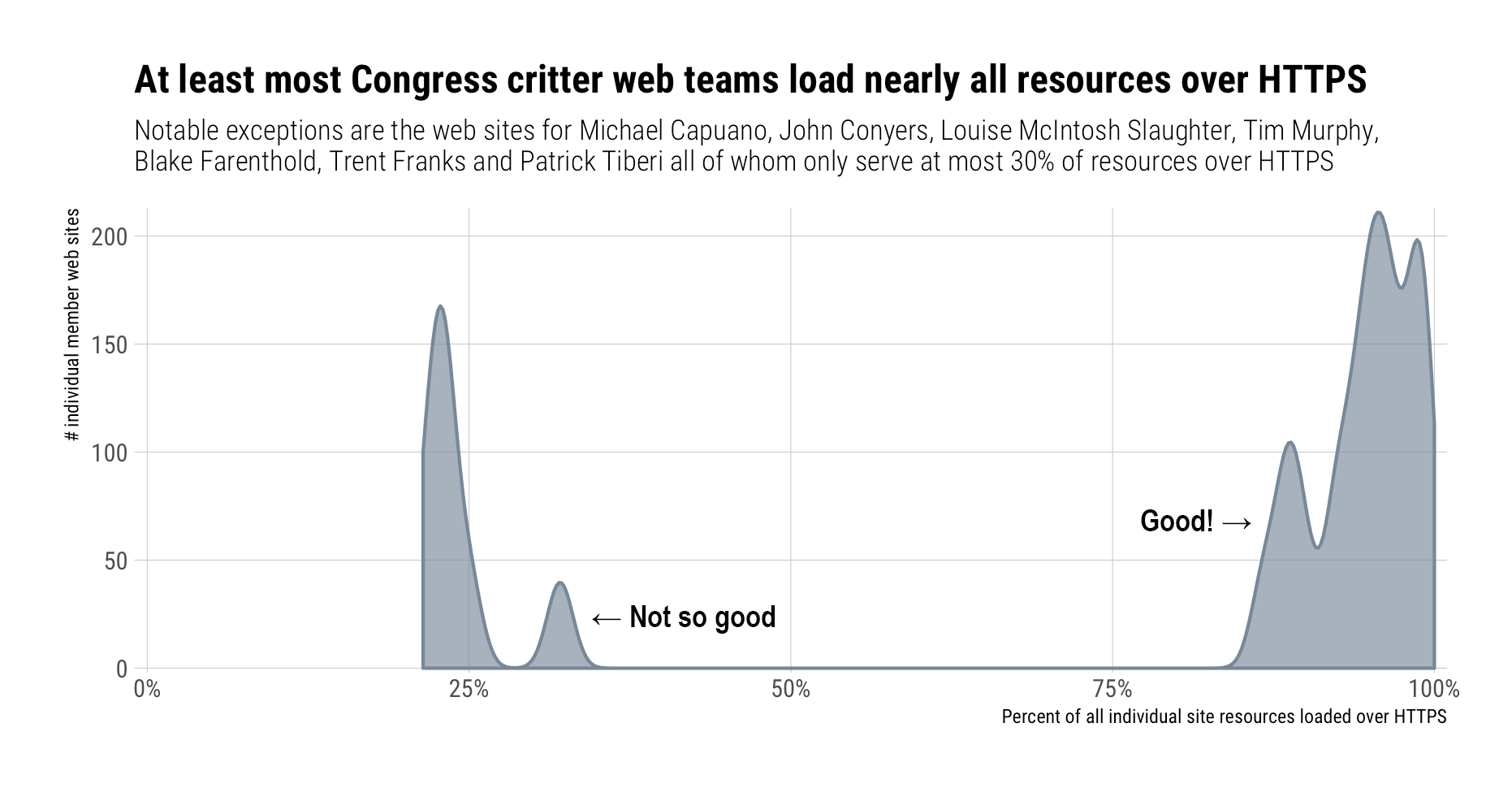
We also talked about confidentiality above. If an https site loads http resources the contents of what you see on the page cannot but guaranteed. So, how responsible are they when it comes to at least ensuring these third-party resources are loaded over https?

You’re mostly covered from a pseudo-confidentiality perspective, but what are they serving up to you? Here’s a summary of the MIME types being delivered to you:

MIME Type Number of Resources Loaded
image/jpeg 6,445
image/png 3,512
text/html 2,850
text/css 1,830
image/gif 1,518
text/javascript 1,512
font/ttf 1,266
video/mp4 974
application/json 673
application/javascript 670
application/x-javascript 353
application/octet-stream 187
application/font-woff2 99
image/bmp 44
image/svg+xml 39
text/plain 33
application/xml 15
image/jpeg, video/mp2t 12
application/x-protobuf 9
binary/octet-stream 5
font/woff 4
image/jpg 4
application/font-woff 2
application/vnd.google.gdata.error+xml 1

We’ll cover some of these in more detail a bit further into the post.

Facebook & “Friends”

Facebook started all this, so just how cozy are these Congress-critters with Facebook?

Turns out that both Senators and House members are very comfortable letting you give Facebook a love-tap when you come visit their sites since over 60% of House and 40% of Senate sites use 2 or more Facebook resources. Not all Facebook resources are created equal[ly evil] and we’ll look at some of the more invasive ones soon.

Facebook is not the only devil out there. I added in the public filter list from Disconnect and the numbers go up from 60% to 70% for the House and from 40% to 60% for the Senate when it comes to a larger corpus of known tracking sites/resources.

Here’s a list of some (first 20) of the top domains (with one of Twitter’s media-serving domains taking the individual top-spot):

Main third-party domain # of ‘pings’ %
twimg.com 764 13.7%
fbcdn.net 655 11.8%
twitter.com 573 10.3%
google-analytics.com 489 8.8%
doubleclick.net 462 8.3%
facebook.com 451 8.1%
gstatic.com 385 6.9%
fonts.googleapis.com 270 4.9%
youtube.com 246 4.4%
google.com 183 3.3%
maps.googleapis.com 144 2.6%
webtrendslive.com 95 1.7%
instagram.com 75 1.3%
bootstrapcdn.com 68 1.2%
cdninstagram.com 63 1.1%
fonts.net 51 0.9%
ajax.googleapis.com 50 0.9%
staticflickr.com 34 0.6%
translate.googleapis.com 34 0.6%
sharethis.com 32 0.6%

So, when you go to check out what your representative is ‘officially’ up to, you’re being served…up on a silver platter to a plethora of sites where you are the product.

It’s starting to look like Congress-folk aren’t as sincere about your privacy as they may have led us all to believe this week.

A [Java]Script for Success[ful Privacy Destruction]

As stated earlier, not all third-party content is created equally malicious. JavaScript resources run code in your browser on your device and while there are limits to what it can do, those limits diminish weekly as crafty coders figure out more ways to use JavaScript to collect information and perform shady or malicious deeds.

So, how many House/Senate sites load one or more third-party JavaScript resources?

Virtually all of them.

To make matters worse, no .gov or third-party resource of any kind was loaded using subresource integrity validation. Subresource integrity validation means that the site owner — at some point — ensured that the resource being loaded was not malicious and then created a fingerprint for it and told your browser what that fingerprint is so it can compare it to what got loaded. If the fingerprints don’t match, the content is not loaded/executed. Using subresource integrity is not trivial since it requires a top-notch content management team and failure to synchronize/checkpoint third-party content fingerprints will result in resources failing to load.

Congress was quick to demand that Facebook implement stronger policies and controls, but they, themselves, cannot be bothered.

Future Work

There are plenty more avenues to explore in this data set (such as “security headers” — they all 100% use strict-transport-security pretty well, but are deeply deficient in others) and more targets for future works, such as the campaign sites of House and Senate members. I may follow up with a look at a specific slice from this data set (the members of the committees who were berating Zuckerberg this week).

The bottom line is that while the beating Facebook took this week was just, those inflicting the pain have a long way to go themselves before they can truly judge what other social media and general internet sites do when it comes to ensuring the safety and privacy of their visitors.

In other words, “Legislator, regulate thyself” before thy regulatists others.

FIN

Apart from some egregiously bad (or benign) examples, I tried not to “name and shame”. I also won’t answer any questions about facets by party since that really doesn’t matter too much as they’re all pretty bad when it comes to understanding and implementing privacy and safey on their sites.

The data set can be found over at Zenodo (alternately, click/tap/select the badge below). I converted the R data frame to ndjson/streaming JSON/jsonlines (however you refer to the format) and tested it out in Apache Drill.

I’ll toss up some R code using data extracts later this week (meaning by April 20th).

DOI

The 2018 IEEE Security & Privacy Conference is in May but they’ve posted their full proceedings and it’s better to grab them early than to wait for it to become part of a paid journal offering.

There are alot of papers. Not all match my interests but (fortunately?) many did and I’ve filtered down a list of the more interesting (to me) ones. It’s encouraging to see academic cybersecurity researchers branching out across a whole host of areas.

I can’t promise a the morning paper-esque daily treatment of these on the blog but I’ll likely exposit a few of them over the coming weeks. I’ve emoji’d a few that stood out. Order is the order I read them in (no other meaning to the order).