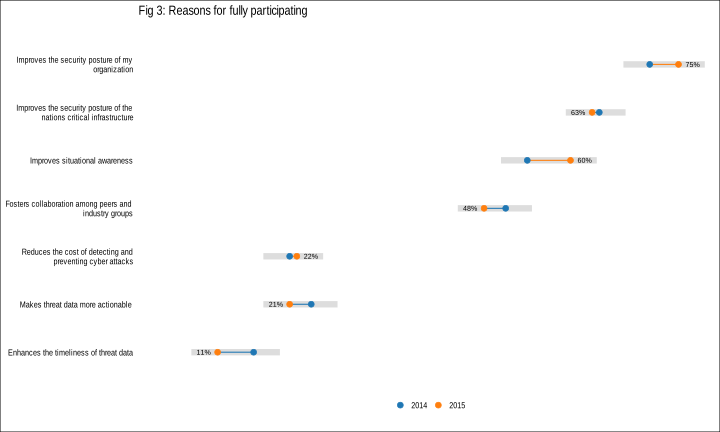
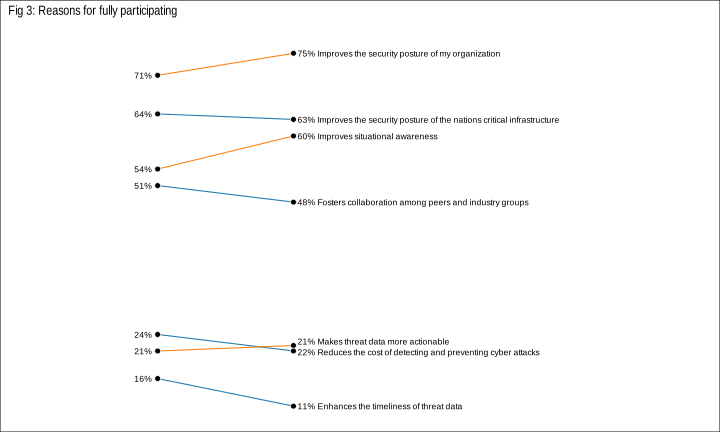
[Vega-Lite](http://vega.github.io/vega-lite/) 1.0 was [released this past week](https://medium.com/@uwdata/introducing-vega-lite-438f9215f09e#.yfkl0tp1c). I had been meaning to play with it for a while but I’ve been burned before by working with unstable APIs and was waiting for this to bake to a stable release. Thankfully, there were no new shows in the Fire TV, Apple TV or Netflix queues, enabling some fast-paced nocturnal coding to make an [R `htmlwidget`s interface](https://github.com/hrbrmstr/vegalite) to the Vega-Lite code before the week was out.
What is “Vega” and why “-Lite”? [Vega](http://vega.github.io/) is _”a full declarative visualization grammar, suitable for expressive custom interactive visualization design and programmatic generation.”_ Vega-Lite _”provides a higher-level grammar for visual analysis, comparable to ggplot or Tableau, that generates complete Vega specifications.”_ Vega-Lite compiles to Vega and is more compact and accessible than Vega (IMO). Both are just JSON data files with a particular schema that let you encode the data, encodings and aesthetics for statistical charts.
Even I don’t like to write JSON by hand and I can’t imagine anyone really wanting to do that. I see Vega and Vega-Lite as amazing ways to serialize statistical charts from ggplot2 or even Tableau (or any Grammar of Graphics-friendly creation tool) and to pass around for use in other programs—like [Voyager](http://vega.github.io/voyager/) or [Pole★](http://vega.github.io/polestar/)—or directly on the web. It is “glued” to D3 (given the way data transformations are encoded and colors are specified) but it’s a pretty weak glue and one could make a Vega or Vega-Lite spec render to anything given some elbow grease.
But, enough words! Here’s how to make a simple Vega-Lite bar chart using `vegalite`:
# devtools::install_github("hrbrmstr/vegalite")
library(vegalite)

dat <- jsonlite::fromJSON('[
    {"a": "A","b": 28}, {"a": "B","b": 55}, {"a": "C","b": 43},
    {"a": "D","b": 91}, {"a": "E","b": 81}, {"a": "F","b": 53},
    {"a": "G","b": 19}, {"a": "H","b": 87}, {"a": "I","b": 52}
  ]')

vegalite() %>%
  add_data(dat) %>%
  encode_x("a", "ordinal") %>%
  encode_y("b", "quantitative") %>%
  mark_bar()
Note that bar graph you see above is _not_ a PNG file or `iframe`d widget. If you `view-source:` you’ll see that I was able to take the Vega-Lite generated spec for that widget code (done by piping the widget to `to_spec()`) and just insert it into this post via:
<style media="screen">.wpvegadiv { display:inline-block; margin:auto }</style>

<center><div id="vlvis1" class="wpvegadiv"></div></center>

<script>
var spec1 = JSON.parse('{"description":"","data":{"values":[{"a":"A","b":28},{"a":"B","b":55},{"a":"C","b":43},{"a":"D","b":91},{"a":"E","b":81},{"a":"F","b":53},{"a":"G","b":19},{"a":"H","b":87},{"a":"I","b":52}]},"mark":"bar","encoding":{"x":{"field":"a","type":"ordinal"},"y":{"field":"b","type":"quantitative"}},"config":[],"embed":{"renderer":"svg","actions":{"export":false,"source":false,"editor":false}}} ');

var embedSpec = { "mode": "vega-lite", "spec": spec1, "renderer": spec1.embed.renderer, "actions": spec1.embed.actions };

vg.embed("#vlvis1", embedSpec, function(error, result) {});
</script>
I did have have all the necessary js libs pre-loaded like you see [in this example](http://vega.github.io/vega-lite/tutorials/getting_started.html#embed). You can use the `embed_spec()` function to generate most of that for you, too.
This means you can use R to gather, clean, tidy and analyze data. Then, generate a visualization based on that data with `vegalite`. _Then_ generate a lightweight JSON spec from it and easily embed it anywhere without having to rig up a way to get a widget working or ship giant R markdown created files (like [this one](http://rud.is/projects/vegalite01.html) which has many full `vegalite` widgets on it).
One powerful feature of Vega/Vega-Lite is that the data does not have to be embedded in the spec.
Take this streamgraph visualization about unemployment levels across various industries over time:
vegalite() %>%
  cell_size(500, 300) %>%
  add_data("https://vega.github.io/vega-editor/app/data/unemployment-across-industries.json") %>%
  encode_x("date", "temporal") %>%
  encode_y("count", "quantitative", aggregate="sum") %>%
  encode_color("series", "nominal") %>%
  scale_color_nominal(range="category20b") %>%
  timeunit_x("yearmonth") %>%
  scale_x_time(nice="month") %>%
  axis_x(axisWidth=0, format="%Y", labelAngle=0) %>%
  mark_area(interpolate="basis", stack="center")
The URL you see in the R code is placed into the JSON spec. That means whenever that data changes and the visualization is refreshed, you see updated content without going back to R (or js code).
Now, dynamically-created visualizations are great, but what if you want to actually let your viewers have a copy of it? With Vega/Vega-Lite, you don’t need to resort to hackish bookmarklets, just change a configuration option to enable an export link:
vegalite(export=TRUE) %>%
  add_data("https://vega.github.io/vega-editor/app/data/seattle-weather.csv") %>%
  encode_x("date", "temporal") %>%
  encode_y("*", "quantitative", aggregate="count") %>%
  encode_color("weather", "nominal") %>%
  scale_color_nominal(domain=c("sun","fog","drizzle","rain","snow"),
                      range=c("#e7ba52","#c7c7c7","#aec7e8","#1f77b4","#9467bd")) %>%
  timeunit_x("month") %>%
  axis_x(title="Month") %>%
  mark_bar()
(You can style/place that link however/wherever you want. It’s a simple classed `
If you choose a `canvas` renderer, the “export” option will be PNG vs SVG.
The package is nearly (~98%) feature complete to the 1.0 Vega-Lite standard. There are some tedious bits from the Vega-Lite spec remaining to be encoded. I’ve transcribed much of the Vega-Lite documentation to R function & package documentation with links back to the Vega-Lite sources if you need more detail.
I’m hoping to be able to code up an “`as_spec()`” function to enable quick conversion of ggplot2-created graphics to Vega-Lite (and support converting a ggplot2 object to a Vega-Lite spec in `to_spec()`) but that won’t be for a while unless someone wants to jump on board and implement an Vega expression creator/parser in R for me :-)
You can work with the current code [on github](https://github.com/hrbrmstr/vegalite) and/or jump on board to help with package development or file an issue with an idea or a bug. Please note that this package is under _heavy development_ and the function interface is very likely to change as I and others work with it and develop more streamlined ways to handle the encodings. Check back to the github repo often to find out what’s different (there will be a `NEWS` file posted soon and maintained as well).
 By using an R package as the framework for the visualization, it’s possible to keep the data with the code and also organize and document the code in a way that makes it easy for folks to use and explore without cutting and pasting (our `source`ing) code. It also makes it possible to list all the dependencies for the project and help ensure they’ll be installed when someone tries to work with it.
  The CSV file of places looks something like this:
 Because the project is in a pacakge, we can run package checks to see if we’re missing anything including other pacakge dependencies, function documentation and other details that the package tools are gleeful to point out. We can also include code to test out our various components to ensure they are behaving as expected (i.e. generating the right data/output).