Skip navigation

Category Archives: Data Visualization

This post comes hot off the heels of the [nigh-feature-complete release of `vegalite`](http://rud.is/b/2016/02/27/create-vega-lite-specs-widgets-with-the-vegalite-package/) (virtually all the components of Vega-Lite are now implemented and just need real-world user testing). I’ve had a few and seen a few questions about “why Vega-Lite”? I _think_ my previous post gave some good answers to “why”. However, Vega-Lite and Vega provide different ways to think about composing statistical graphs than folks seem to be used to (which is part of the “why?”).

Vega-Lite attempts to simplify the way charts are specified (i.e. the way you create a “spec”) in Vega. Vega-proper is rich and complex. You interleave data, operations on data, chart aesthetics and chart element interactions all in one giant JSON file. Vega-Lite 1.0 is definitely more limited than Vega-proper and even when it does add more interactivity (like “brushing”) it will _still_ be more limited, _on purpose_. The reduction in complexity makes it more accessible to both humans and apps, especially apps that don’t grok the Grammar of Graphics (GoG) well.

Even though `ggplot2` lets you mix and match statistical operations on data, I’m going to demonstrate the difference in paradigms/idioms through a single chart. I grabbed the [FRED data on historical WTI crude oil prices](https://research.stlouisfed.org/fred2/series/DCOILWTICO) and will show a chart that displays the minimum monthly price per-decade for a barrel of this cancerous, greed-inducing, global-conflict-generating, atmosphere-destroying black gold.

The data consists of records of daily prices (USD) for this commodity. That means we have to:

1. compute the decade
2. compute the month
3. determine the minimum price by month and decade
4. plot the values

The goal of each idiom is to provide a way to reproduce and communicate the “research”.

Here’s the idiomatic way of doing this with Vega-Lite:

library(vegalite)
library(quantmod)
library(dplyr)
 
getSymbols("DCOILWTICO", src="FRED")
 
data_frame(date=index(DCOILWTICO),
           value=coredata(DCOILWTICO)[,1]) %>%
  mutate(decade=sprintf("%s0", substring(date, 1, 3))) -> oil
 
# i created a CSV and moved the file to my server for easier embedding but
# could just have easily embedded the data in the spec.
# remember, you can pipe a vegalite object to embed_spec() to
# get javascript embed code.
 
vegalite() %>%
  add_data("http://rud.is/dl/crude.csv") %>%
  encode_x("date", "temporal") %>%
  encode_y("value", "quantitative", aggregate="min") %>%
  encode_color("decade", "nominal") %>%
  timeunit_x("month") %>%
  axis_y(title="", format="$3d") %>%
  axis_x(labelAngle=45, labelAlign="left", 
         title="Min price for Crude Oil (WTI) by month/decade, 1986-present") %>%
  mark_tick(thickness=3) %>%
  legend_color(title="Decade", orient="left")

Here’s the “spec” that creates (wordpress was having issues with it, hence the gist embed):

And, here’s the resulting visualization:

The grouping and aggregation operations operate in-chart-craft-situ. You have to carefully, visually parse either the spec or the R code that creates the spec to really grasp what’s going on. A different way of looking at this is that you embed everything you need to reproduce the transformations and visual encodings in a single, simple JSON file.

Here’s what I believe to be the modern, idiomatic way to do this in R + `ggplot2`:

library(ggplot2)
library(quantmod)
library(dplyr)
 
getSymbols("DCOILWTICO", src="FRED")
 
data_frame(date=index(DCOILWTICO),
           value=coredata(DCOILWTICO)[,1]) %>%
  mutate(decade=sprintf("%s0", substring(date, 1, 3)),
         month=factor(format(as.Date(date), "%B"),
                      levels=month.name)) -> oil
 
filter(oil, !is.na(value)) %>%
  group_by(decade, month) %>%
  summarise(value=min(value)) %>%
  ungroup() -> oil_summary
 
ggplot(oil_summary, aes(x=month, y=value, group=decade)) +
  geom_point(aes(color=decade), shape=95, size=8) +
  scale_y_continuous(labels=scales::dollar) +
  scale_color_manual(name="Decade", 
                     values=c("#d42a2f", "#fd7f28", "#339f34", "#d42a2f")) +
  labs(x="Min price for Crude Oil (WTI) by month/decade, 1986-present", y=NULL) +
  theme_bw() +
  theme(axis.text.x=element_text(angle=-45, hjust=0)) +
  theme(legend.position="left") +
  theme(legend.key=element_blank()) +
  theme(plot.margin=grid::unit(rep(1, 4), "cm"))
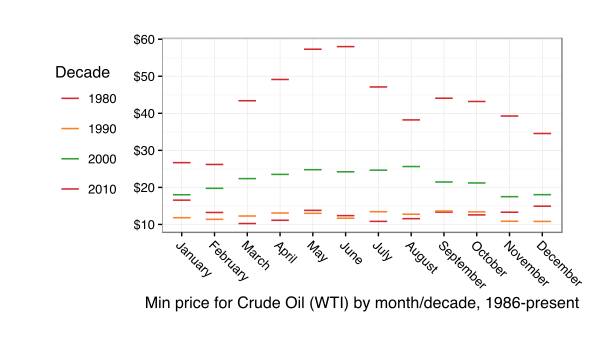
(To stave off some comments, yes I do know you can be Vega-like and compute with arbitrary functions within ggplot2. This was meant to show what I’ve seen to be the modern, recommended idiom.)

You really don’t even need to know R (for the most part) to grok what’s going on. Data is acquired and transformed and we map that into the plot. Yes, you can do the same thing with Vega[-Lite] (i.e. munge the data ahead of time and just churn out marks) but _you’re not encouraged to_. The power of the Vega paradigm is that you _do blend data and operations together_ and they _stay together_.

To make the R+ggplot2 code reproducible the entirety of the script has to be shipped. It’s really the same as shipping the Vega[-Lite] spec, though since you need to reproduce either the JSON or the R code in environments that support the code (R just happens to support both ggplot2 & Vega-Lite now :-).

I like the latter approach but can appreciate both (otherwise I wouldn’t have written the `vegalite` package). I also think Vega-Lite will catch on more than Vega-proper did (though Vega itself is in use and you use under the covers whenever you use `ggvis`). If Vega-Lite does nothing more than improve visualization literacy—you _must_ understand core vis terms to use it—and foster the notion for the need for serialization, reproduction and sharing of basic statistical charts, it will have been an amazing success in my book.

[Vega-Lite](http://vega.github.io/vega-lite/) 1.0 was [released this past week](https://medium.com/@uwdata/introducing-vega-lite-438f9215f09e#.yfkl0tp1c). I had been meaning to play with it for a while but I’ve been burned before by working with unstable APIs and was waiting for this to bake to a stable release. Thankfully, there were no new shows in the Fire TV, Apple TV or Netflix queues, enabling some fast-paced nocturnal coding to make an [R `htmlwidget`s interface](https://github.com/hrbrmstr/vegalite) to the Vega-Lite code before the week was out.

What is “Vega” and why “-Lite”? [Vega](http://vega.github.io/) is _”a full declarative visualization grammar, suitable for expressive custom interactive visualization design and programmatic generation.”_ Vega-Lite _”provides a higher-level grammar for visual analysis, comparable to ggplot or Tableau, that generates complete Vega specifications.”_ Vega-Lite compiles to Vega and is more compact and accessible than Vega (IMO). Both are just JSON data files with a particular schema that let you encode the data, encodings and aesthetics for statistical charts.

Even I don’t like to write JSON by hand and I can’t imagine anyone really wanting to do that. I see Vega and Vega-Lite as amazing ways to serialize statistical charts from ggplot2 or even Tableau (or any Grammar of Graphics-friendly creation tool) and to pass around for use in other programs—like [Voyager](http://vega.github.io/voyager/) or [Pole★](http://vega.github.io/polestar/)—or directly on the web. It is “glued” to D3 (given the way data transformations are encoded and colors are specified) but it’s a pretty weak glue and one could make a Vega or Vega-Lite spec render to anything given some elbow grease.

But, enough words! Here’s how to make a simple Vega-Lite bar chart using `vegalite`:

# devtools::install_github("hrbrmstr/vegalite")
library(vegalite)
 
dat <- jsonlite::fromJSON('[
    {"a": "A","b": 28}, {"a": "B","b": 55}, {"a": "C","b": 43},
    {"a": "D","b": 91}, {"a": "E","b": 81}, {"a": "F","b": 53},
    {"a": "G","b": 19}, {"a": "H","b": 87}, {"a": "I","b": 52}
  ]')
 
vegalite() %>% 
  add_data(dat) %>%
  encode_x("a", "ordinal") %>%
  encode_y("b", "quantitative") %>%
  mark_bar()

Note that bar graph you see above is _not_ a PNG file or `iframe`d widget. If you `view-source:` you’ll see that I was able to take the Vega-Lite generated spec for that widget code (done by piping the widget to `to_spec()`) and just insert it into this post via:

<style media="screen">.wpvegadiv { display:inline-block; margin:auto }</style>
 
<center><div id="vlvis1" class="wpvegadiv"></div></center>
 
<script>
var spec1 = JSON.parse('{"description":"","data":{"values":[{"a":"A","b":28},{"a":"B","b":55},{"a":"C","b":43},{"a":"D","b":91},{"a":"E","b":81},{"a":"F","b":53},{"a":"G","b":19},{"a":"H","b":87},{"a":"I","b":52}]},"mark":"bar","encoding":{"x":{"field":"a","type":"ordinal"},"y":{"field":"b","type":"quantitative"}},"config":[],"embed":{"renderer":"svg","actions":{"export":false,"source":false,"editor":false}}} ');
 
var embedSpec = { "mode": "vega-lite", "spec": spec1, "renderer": spec1.embed.renderer, "actions": spec1.embed.actions };
 
vg.embed("#vlvis1", embedSpec, function(error, result) {});
</script>

I did have have all the necessary js libs pre-loaded like you see [in this example](http://vega.github.io/vega-lite/tutorials/getting_started.html#embed). You can use the `embed_spec()` function to generate most of that for you, too.

This means you can use R to gather, clean, tidy and analyze data. Then, generate a visualization based on that data with `vegalite`. _Then_ generate a lightweight JSON spec from it and easily embed it anywhere without having to rig up a way to get a widget working or ship giant R markdown created files (like [this one](http://rud.is/projects/vegalite01.html) which has many full `vegalite` widgets on it).

One powerful feature of Vega/Vega-Lite is that the data does not have to be embedded in the spec.

Take this streamgraph visualization about unemployment levels across various industries over time:

vegalite() %>%
  cell_size(500, 300) %>%
  add_data("https://vega.github.io/vega-editor/app/data/unemployment-across-industries.json") %>%
  encode_x("date", "temporal") %>%
  encode_y("count", "quantitative", aggregate="sum") %>%
  encode_color("series", "nominal") %>%
  scale_color_nominal(range="category20b") %>%
  timeunit_x("yearmonth") %>%
  scale_x_time(nice="month") %>%
  axis_x(axisWidth=0, format="%Y", labelAngle=0) %>%
  mark_area(interpolate="basis", stack="center")

The URL you see in the R code is placed into the JSON spec. That means whenever that data changes and the visualization is refreshed, you see updated content without going back to R (or js code).

Now, dynamically-created visualizations are great, but what if you want to actually let your viewers have a copy of it? With Vega/Vega-Lite, you don’t need to resort to hackish bookmarklets, just change a configuration option to enable an export link:

vegalite(export=TRUE) %>%
  add_data("https://vega.github.io/vega-editor/app/data/seattle-weather.csv") %>%
  encode_x("date", "temporal") %>%
  encode_y("*", "quantitative", aggregate="count") %>%
  encode_color("weather", "nominal") %>%
  scale_color_nominal(domain=c("sun","fog","drizzle","rain","snow"),
                      range=c("#e7ba52","#c7c7c7","#aec7e8","#1f77b4","#9467bd")) %>%
  timeunit_x("month") %>%
  axis_x(title="Month") %>% 
  mark_bar()

(You can style/place that link however/wherever you want. It’s a simple classed `

`.)

If you choose a `canvas` renderer, the “export” option will be PNG vs SVG.

The package is nearly (~98%) feature complete to the 1.0 Vega-Lite standard. There are some tedious bits from the Vega-Lite spec remaining to be encoded. I’ve transcribed much of the Vega-Lite documentation to R function & package documentation with links back to the Vega-Lite sources if you need more detail.

I’m hoping to be able to code up an “`as_spec()`” function to enable quick conversion of ggplot2-created graphics to Vega-Lite (and support converting a ggplot2 object to a Vega-Lite spec in `to_spec()`) but that won’t be for a while unless someone wants to jump on board and implement an Vega expression creator/parser in R for me :-)

You can work with the current code [on github](https://github.com/hrbrmstr/vegalite) and/or jump on board to help with package development or file an issue with an idea or a bug. Please note that this package is under _heavy development_ and the function interface is very likely to change as I and others work with it and develop more streamlined ways to handle the encodings. Check back to the github repo often to find out what’s different (there will be a `NEWS` file posted soon and maintained as well).

Despite being a cybersecurity professional, it’s pretty easy to social engineer me:

I’ll note that @jayjacobs does it all the time to me.

I took Thorsten’s tweet as a challenge to ggplot2-ize the Bloomberg visualizations as best as possible.

All the code in [on github](https://github.com/hrbrmstr/forceaccounted) and you can see the finished product (knitted from an Rmd file) [on this project page](http://rud.is/projects/force_accounted.html) or mini-scroll below in the `iframe`.

I encourage folks to look at the project (it’s actually a package) source as it has quite a bit of data munging and ggplot2 “tricks” that could be useful in “real” visualizations.

Moritz Stefaner started off 2016 with a [very spiffy post](http://truth-and-beauty.net/experiments/ach-ingen-zell/) on _”a visual exploration of the spatial patterns in the endings of German town and village names”_. Moritz was [exploring some new data processing & visualization tools](https://github.com/moritzstefaner/ach-ingen-zell) for the post, but when I saw what he was doing I wondered how hard it would be to do something similar in R and also used it as an opportunity to start practicing a new habit in 2016: packages vs projects.

To state more precisely the goals for this homage, the plan was to:

– use as close to the same data sets Mortiz has in his github repo, _including_ the ones in pure javascript
– generate an HTML page as output that is as close to the style in Moritz’s visualization
– use R for _everything_ (i.e. no “cheating” by sneaking in some javascript via `htmlwidgets`)
– bundle everything into a package to take advantage of all the good stuff that comes with R package validation

You may want to [take a look at the result](http://rud.is/zellingenach.html) to see if you want to continue reading (I hope you will!).

### The Setup
rud_is_zellingenach_htmlBy using an R package as the framework for the visualization, it’s possible to keep the data with the code and also organize and document the code in a way that makes it easy for folks to use and explore without cutting and pasting (our `source`ing) code. It also makes it possible to list all the dependencies for the project and help ensure they’ll be installed when someone tries to work with it.

While I _could_ have converted Moritz’s processed data into R data files, I left the CSV intact and the javascript file of suffix groupings also intact to show that R is extremely flexible when it comes to data processing (which is a “duh” for most folks by this point but the use of javascript data structures might give some folks ideas as how to reduce data duplication between projects). Both these files get stored in the `inst/alt` folder of the source package. I also end up using some CSS for the final visualization and placed that into a file in the same directory, which makes the code that generates the HTML a bit cleaner.

Because R processes some things automatically (like `.onAttach`) when it interacts with a package one can have it provide helpful instructions (in this case, how to generate the visualization) in similar fashion to the `ggplot2` loading messages.

Similarly, there both the package itself and the package functions have documentation to help folks understand both what the package and each component is doing.

### The Fun Stuff
rud_is_zellingenach_htmlThe CSV file of places looks something like this:

name,latitude,longitude
Nierskanal,49.01,13.23
Zwiefelhof,49.22,11.18
Zwiefaltendorf,48.21,9.51
Zwiefalten,48.23,9.46
Zwiedorf,53.69,13.05
Zwickgabel,48.58,8.31
Zwickau,50.72,12.48
Zwethau,51.58,13.04
Zwesten,51.05,9.17

and, the suffix groupings list looks like this:

const suffixList = [
  ["ach", "a", "aa", "ah"],
  ["ar", "ahr"],
  ["ate", "te", "nit", "net"],
  ["au", "aue", "oog", "ooge", "ohe", "oie"],
  ["bach", "bach", "bek", "beken", "beck", "bke"],
  ["berg", "bergen", "barg", "bargen"],
  ["born", "bronn"],
  ["bruch", "broich", "brook", "brock", "brauk"],
  ["bruck", "brück", "brügge"],
  ...
];

While `read.csv` (no need for `readr` as the file is small) can handle the CSV file, we use the `V8` package to source the javascript and convert it to an R object:

ct <- v8()
ct$source(system.file("alt/suffixlist.js", package="zellingenach"))
ct$get("suffixList")

We actually turn that into a vector of regular expressions (for town name ending checking) and a list of vectors (for the HTML visualization creation). Check out `suffix_regex()` and `suffix_names()` in the source code.

The `read_places()` function builds a `data.frame` of the places combined with the suffix grouping(s) they belong to:

# read in the file
plc <- read.csv(system.file("alt/placenames_de.tsv", package="zellingenach"),
                stringsAsFactors=FALSE)
 
# iterate over each suffix and identify which place names match the grouping
lapply(suf, function(regex) {
  which(stri_detect_regex(plc$name, regex))
}) -> matched_endings
 
plc$found <- ""
 
# add which grouping(s) the place was found to a new column
for(i in 1:length(matched_endings)) {
  where_found <- matched_endings[[i]]
  plc$found[where_found] <-
    paste0(plc$found[where_found], sprintf("%d|", i))
}
 
# some don't match so get rid of them
mutate(filter(plc, found != ""), found=sub("\\|$", "", found))

I do something a bit different than Moritz in that in that I allow towns to be part of multiple suffix groups, since:

– I’m neither a historian nor expert in German town naming conventions, and
– the javascript version and this R version both take a naive approach to suffix mapping.

This means my numbers (for the _”#### places”_ label) will be different for some of my maps.

R has similar shortcut functions (Mortiz uses D3) to make hexgrids out of shapefiles. Here’s the entirety of `create_hexgrid()`:

de_shp <- getData("GADM", country="DEU", level=0, path=tempdir())
 
de_hex_pts <- spsample(de_shp, type="hexagonal", n=10000, cellsize=0.19,
                       offset=c(0.5, 0.5), pretty=TRUE)
 
HexPoints2SpatialPolygons(de_hex_pts)

You can play with `cellsize` to change the number of hexes. I tried to find a good number to get close to the # in Moritz’s maps.

This all gets put together in `make_maps()` where we use `ggplot2` to build 52 gridded heatmaps (one for each suffix grouping). I used a log of the counts to map to a binned viridis color scale, so my colors come out a bit different than Moritz’s but the overall patterns are on par with his.

Finally, `display_maps()` takes the list created by `make_maps()` and builds out an HTML page using the `htmltools` package for the page framework and `svglite::htmlSVG` to make SVGs of the ggplot objects). NOTE that you can use the `output_file` option of `display_maps()` to send the HTML to a file as well as display it in the viewer/browser.

### Fin
rud_is_zellingenach_htmlBecause the project is in a pacakge, we can run package checks to see if we’re missing anything including other pacakge dependencies, function documentation and other details that the package tools are gleeful to point out. We can also include code to test out our various components to ensure they are behaving as expected (i.e. generating the right data/output).

Once nice thing about the output is that it’s “responsive”, which means it handles multiple screen sizes quite well. So, if your screen is huge, you’ll have many map boxes on one line and if it’s small (like the `iframe` below) it will have fewer.

You’ll see that my maps are a bit bigger than Moritz’s. This is due to both the hex grid size and the fact that the SVG output is just slightly larger overall than the ones made by D3. Of note: I noticed some suffix subtitle components wrapped at the “-” so I converted the plain dashes to non-breaking ones `‑`/”‑”.

The one downside to using a package for this is that it’s harder to post complete code into a blog post, but you can [clone the repo](https://github.com/hrbrmstr/zellingenach) to look at the code and skip the dissection and just generate the visualization locally via:

install.packages("ggalt")
# OR: devtools::install_github("hrbrmstr/ggalt") 
devtools::install_github("hrbrmstr/zellingenach")
display_maps()

By targeting SVG & HTML, we can make a cross-platform, crisp and responsive visualization all without leaving RStudio.

If you caught any errors or made something cool with any of the code, please drop an issue on github and a note in the comments (respectively)!

If you prefer a single- `source`-able version, please see [this gist](https://gist.github.com/hrbrmstr/f3d2568ad0f27b2384d3).

Happy New YeaR!

James Austin (@awhstin) made some #spiffy 4-panel maps with base R graphics but also posited he didn’t use ggplot2 because:

ggplot2 and maps currently do not support world maps at this point, which does not give us a great overall view.

That is certainly a box I would not put ggplot2 into, especially with the newly updated R maps (et al) packages, ggplot2 2.0 and my (still in development) ggalt package (though this was all possible before ggplot2 2.0 and ggalt). NOTE: I have no idea why I get so defensive about ggplot2 besides the fact that it’s one the best visualization tools ever created.

Here’s all you need to use the built-in facet options of ggplot2 to make the 4-panel plot (as James points out, you can get the data file from here: CLIWOC15.csv):

library(ggplot2)  # FYI you need v2.0
library(dplyr)    # yes, i could have not done this and just used 'subset' instead of 'filter'
library(ggalt)    # devtools::install_github("hrbrmstr/ggalt")
library(ggthemes) # theme_map and tableau colors
 
world <- map_data("world")
world <- world[world$region != "Antarctica",] # intercourse antarctica
 
dat <- read.csv("CLIWOC15.csv")        # having factors here by default isn't a bad thing
dat <- filter(dat, Nation != "Sweden") # I kinda feel bad for Sweden but 4 panels look better than 5 and it doesn't have much data
 
gg <- ggplot()
gg <- gg + geom_map(data=world, map=world,
                    aes(x=long, y=lat, map_id=region),
                    color="white", fill="#7f7f7f", size=0.05, alpha=1/4)
gg <- gg + geom_point(data=dat, 
                      aes(x=Lon3, y=Lat3, color=Nation), 
                      size=0.15, alpha=1/100)
gg <- gg + scale_color_tableau()
gg <- gg + coord_proj("+proj=wintri")
gg <- gg + facet_wrap(~Nation)
gg <- gg + theme_map()
gg <- gg + theme(strip.background=element_blank())
gg <- gg + theme(legend.position="none")
gg

facetmaps

You can use a separate shapefile if you want, but this is quite minimalist (a feature James suggests is desirable) and emphasizes the routes quite nicely IMO.

It’s been a while since I’ve updated my [metricsgraphics package](https://cran.r-project.org/web/packages/metricsgraphics/index.html). The hit list for changes includes:

– Fixes for the new ggplot2 release (metricsgraphics uses the `movies` data set which is now in ggplot2movies)
– Updated all javascript libraries to the most recent versions
– Borrowed the ability to add CSS rules to a widget from taucharts (`mjs_add_css_rule`)
– Added a metricsgraphics plugin to enable line chart region annotation (`mjs_annotate_region`)
– Enabled explicit coloring line/area charts (it was a new feature in the underlying Metrics-Graphics library)
– You can use bare or quoted names when specifying the x & y accessors and can also use a variable name
– You can now use the metricsgraphics title & description capabilities, but doing so voids any predictable/specified widget height/width and the description functionality is really only suited for bootstrap templates

I think all that can be demonstrated in the following snippet:

library(metricsgraphics)
 
dat <- read.csv("http://real-chart.finance.yahoo.com/table.csv?s=AAPL&a=07&b=9&c=1996&d=11&e=21&f=2015&g=d&ignore=.csv",
                stringsAsFactors=FALSE)
 
DATE <- "Date"
 
dat %>%
  filter(Date>="2008-01-01") %>% 
  mjs_plot(DATE, y="Low", title="AAPL Stock (2008-Present)", width=800, height=500) %>% 
  mjs_line(color="#6a3d9a") %>% 
  mjs_add_line(High, color="#ff7f00") %>% 
  mjs_axis_x(xax_format="date") %>% 
  mjs_add_css_rule("{{ID}} .blk { fill:black }") %>%
  mjs_annotate_region("2013-01-01", "2013-12-31", "Volatility", "blk") %>% 
  mjs_add_marker("2014-06-09", "Split") %>% 
  mjs_add_marker("2012-09-12", "iPhone 5") %>% 
  mjs_add_legend(c("Low", "High"))

NOTE: I’m still trying to figure out why WebKit on Safari renders the em dashes and Chrome does not.

I woke up this morning to a [headline story from the Washington Post](https://www.washingtonpost.com/news/the-fix/wp/2015/12/10/to-many-christian-terrorists-arent-true-christians-but-muslim-terrorists-are-true-muslims/) on _”Americans are twice as willing to distance Christian extremists from their religion as Muslims_”. This post is not about the content of the headline or story. It _is_ about the horrible pie chart WaPo led the article with:

Untitled

This isn’t just a rant of a madman against pie charts. While I _am_ vehemently opposed to them, we did cover them [in our book](https://books.google.com/books?id=7DqwAgAAQBAJ&pg=PA146&lpg=PA146&dq=data-driven+security+pie+chart&source=bl&ots=Cy1iJylsHd&sig=a6Hz1JB-QYLq6H0VZJpPleJgRkQ&hl=en&sa=X&ved=0ahUKEwj79uqt_tjJAhVG0iYKHS0uDn4Q6AEIMzAH#v=onepage&q=data-driven%20security%20pie%20chart&f=false) and my co-author (@jayjacobs) and the incredibly talented @annkemery both agree there are often cases where they are appropriate. Even using their less-sensitive sensibilities, this would not be one of those cases.

So, what—exactly—is the problem? WaPo tried to enable comparison between pies by exploding them and using colors to indicate similar fear levels, mapping shades to entries in the top legend. Your eye has to move around a bit to take everything in and remember the mapping as you focus on each slice (since you will end up doing that given that each category colored differently). Their whole goal was to enable the reader to see the change in sentiment towards terrorism since this time last year.

Hrm. Two dates. Small set of values. Desire to quickly compare change in value/slope. **This sounds like a job for a slopegraph!**

The article and graphic are based on a [survey](http://publicreligion.org/research/2015/12/survey-nearly-half-of-americans-worried-that-they-or-their-family-will-be-a-victim-of-terrorism/). Thankfully the [complete survey data was made available](http://publicreligion.org/site/wp-content/uploads/2015/12/December-2015-PRRI-RNS-Topline1.pdf), which made it easy to do a makeover (in R of course). Here’s the result:

unnamed-chunk-1-1

Each category change is clearly visible, you don’t need to remember color association and you even know the actual values*.

The R code is below and in [this gist](https://gist.github.com/hrbrmstr/9bf4f93dffc1df48fe27). How would you make the WaPo chart better (drop a note in the comments with a link to your own makeover)?

library(tidyr)
library(ggplot2)
library(ggthemes)
library(scales)
library(dplyr)
 
# Easiest way to transcribe the PDF table
# The slope calculation will enable us to color the lines/points based on up/down
dat <- data_frame(`2014-11-01`=c(0.11, 0.22, 0.35, 0.31, 0.01),
                  `2015-12-01`=c(0.17, 0.30, 0.30, 0.23, 0.00),
                  slope=factor(sign(`2014-11-01` - `2015-12-01`)),
                  fear_level=c("Very worried", "Somewhat worried", "Not too worried",
                               "Not at all", "Don't know/refused"))
 
# Transform that into something we can use
dat <- gather(dat, month, value, -fear_level, -slope)
 
# We need real dates for the X-axis manipulation
dat <- mutate(dat, month=as.Date(as.character(month)))
 
# Since 2 categories have the same ending value, we need to
# take care of that (this is one of a few "gotchas" in slopegraph preparation)
end_lab <- dat %>%
  filter(month==as.Date("2015-12-01")) %>%
  group_by(value) %>%
  summarise(lab=sprintf("%s", paste(fear_level, collapse=", ")))
 
gg <- ggplot(dat)
 
# line
gg <- gg + geom_line(aes(x=month, y=value, color=slope, group=fear_level), size=1)
# points
gg <- gg + geom_point(aes(x=month, y=value, fill=slope, group=fear_level),
                      color="white", shape=21, size=2.5)
 
# left labels
gg <- gg + geom_text(data=filter(dat, month==as.Date("2014-11-01")),
                     aes(x=month, y=value, label=sprintf("%s — %s  ", fear_level, percent(value))),
                     hjust=1, size=3)
# right labels
gg <- gg + geom_text(data=end_lab,
                     aes(x=as.Date("2015-12-01"), y=value,
                         label=sprintf("  %s — %s", percent(value), lab)),
                     hjust=0, size=3)
 
# Here we do some slightly tricky x-axis formatting to ensure we have enough
# space for the in-panel labels, only show the months we need and have
# the month labels display properly
gg <- gg + scale_x_date(expand=c(0.125, 0),
                        labels=date_format("%b\n%Y"),
                        breaks=c(as.Date("2014-11-01"), as.Date("2015-12-01")),
                        limits=c(as.Date("2014-02-01"), as.Date("2016-12-01")))
gg <- gg + scale_y_continuous()
 
# I used colors from the article
gg <- gg + scale_color_manual(values=c("#f0b35f", "#177fb9"))
gg <- gg + scale_fill_manual(values=c("#f0b35f", "#177fb9"))
gg <- gg + labs(x=NULL, y=NULL, title="Fear of terror attacks (change since last year)\n")
gg <- gg + theme_tufte(base_family="Helvetica")
gg <- gg + theme(axis.ticks=element_blank())
gg <- gg + theme(axis.text.y=element_blank())
gg <- gg + theme(legend.position="none")
gg <- gg + theme(plot.title=element_text(hjust=0.5))
gg
* Well, it’s survey. To add insult to injury, it’s a sentiment-based survey given right after a likely-to-be-attributed-terrorism attack. Also, there is a margin of error that isn’t communicated in either visualization. So while there is “data”, trust it at your own peril.

Cybersecurity is a domain that really likes surveys, or at the very least it has many folks within it that like to conduct and report on surveys. One recent survey on threat intelligence is in it’s second year, so it sets about comparing answers across years. Rather than go into the many technical/statistical issues with this survey, I’d like to focus on alternate ways to visualize the comparison across years.

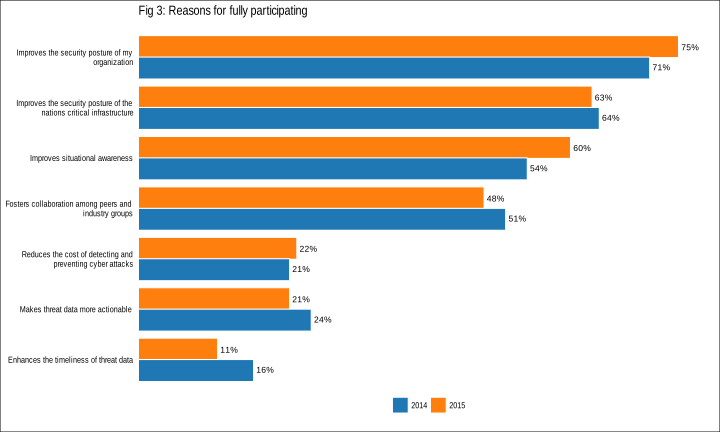
We’ll use the data that makes up this chart (Figure 3 from the report):

surveybars

since it’s pretty representative of the remainder of the figures.

Let’s start by reproducing this figure with ggplot2:

library(dplyr)
library(tidyr)
library(stringr)
library(ggplot2)
library(scales)
library(ggthemes)
library(extrafont)

loadfonts(quiet=TRUE)

read.csv("question.csv", stringsAsFactors=FALSE) %>%
  gather(year, value, -belief) %>%
  mutate(year=factor(sub("y", "", year)),
         belief=str_wrap(belief, 40)) -> question

beliefs <- unique(question$belief)
question$belief <- factor(beliefs, levels=rev(beliefs[c(1,2,4,5,3,7,6)]))

gg <- ggplot(question, aes(belief, value, group=year))
gg <- gg + geom_bar(aes(fill=year), stat="identity", position="dodge",
                    color="white", width=0.85)
gg <- gg + geom_text(aes(label=percent(value)), hjust=-0.15,
                     position=position_dodge(width=0.8), size=3)
gg <- gg + scale_x_discrete(expand=c(0,0))
gg <- gg + scale_y_continuous(expand=c(0,0), label=percent, limits=c(0,0.8))
gg <- gg + scale_fill_tableau(name="")
gg <- gg + coord_flip()
gg <- gg + labs(x=NULL, y=NULL, title="Fig 3: Reasons for fully participating\n")
gg <- gg + theme_tufte(base_family="Arial Narrow")
gg <- gg + theme(axis.ticks.x=element_blank())
gg <- gg + theme(axis.text.x=element_blank())
gg <- gg + theme(axis.ticks.y=element_blank())
gg <- gg + theme(legend.position="bottom")
gg <- gg + theme(plot.title=element_text(hjust=0))
gg

Now, the survey does caveat the findings and talks about non-response bias, sampling-frame bias and self-reporting bias. However, nowhere does it talk about the margin of error or anything relating to uncertainty. Thankfully, both the 2014 and 2015 reports communicate population and sample sizes, so we can figure out the margin of error:

library(samplesize4surveys)

moe_2014 <- e4p(19915, 701, 0.5)
## With the parameters of this function: N = 19915 n =  701 P = 0.5 DEFF =  1 conf = 0.95 . 
## The estimated coefficient of variation is  3.709879 . 
## The margin of error is 3.635614 . 
## 

moe_2015 <- e4p(18705, 692, 0.5)
## With the parameters of this function: N = 18705 n =  692 P = 0.5 DEFF =  1 conf = 0.95 . 
## The estimated coefficient of variation is  3.730449 . 
## The margin of error is 3.655773 .

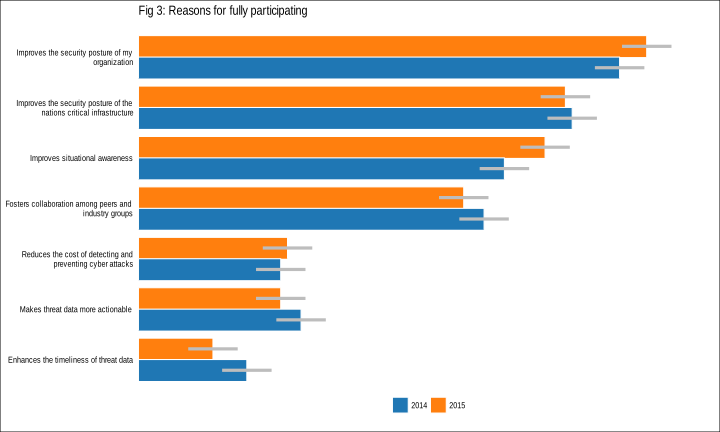
They are both roughly 3.65% so let's take a look at our dodged bar chart again with this new information:

mutate(question, ymin=value-0.0365, ymax=value+0.0365) -> question

gg <- ggplot(question, aes(belief, value, group=year))
gg <- gg + geom_bar(aes(fill=year), stat="identity",
                    position=position_dodge(0.85),
                    color="white", width=0.85)
gg <- gg + geom_linerange(aes(ymin=ymin, ymax=ymax),
                         position=position_dodge(0.85),
                         size=1.5, color="#bdbdbd")
gg <- gg + scale_x_discrete(expand=c(0,0))
gg <- gg + scale_y_continuous(expand=c(0,0), label=percent, limits=c(0,0.85))
gg <- gg + scale_fill_tableau(name="")
gg <- gg + coord_flip()
gg <- gg + labs(x=NULL, y=NULL, title="Fig 3: Reasons for fully participating\n")
gg <- gg + theme_tufte(base_family="Arial Narrow")
gg <- gg + theme(axis.ticks.x=element_blank())
gg <- gg + theme(axis.text.x=element_blank())
gg <- gg + theme(axis.ticks.y=element_blank())
gg <- gg + theme(legend.position="bottom")
gg <- gg + theme(plot.title=element_text(hjust=0))
gg

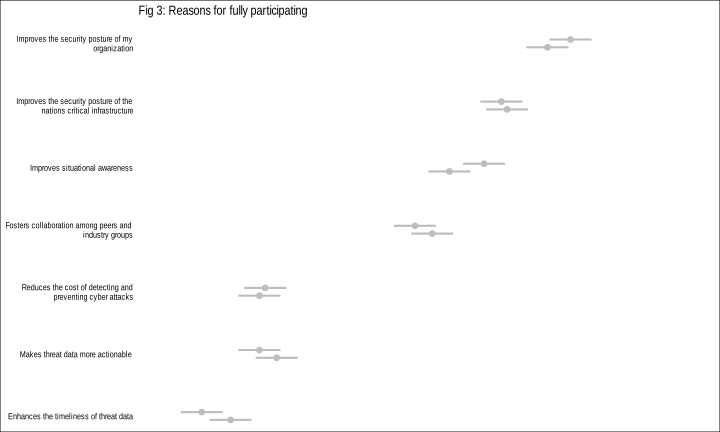
Hrm. There seems to be a bit of overlap. Let's just focus on that:

gg <- ggplot(question, aes(belief, value, group=year))
gg <- gg + geom_pointrange(aes(ymin=ymin, ymax=ymax),
                         position=position_dodge(0.25),
                         size=1, color="#bdbdbd", fatten=1)
gg <- gg + scale_x_discrete(expand=c(0,0))
gg <- gg + scale_y_continuous(expand=c(0,0), label=percent, limits=c(0,1))
gg <- gg + scale_fill_tableau(name="")
gg <- gg + coord_flip()
gg <- gg + labs(x=NULL, y=NULL, title="Fig 3: Reasons for fully participating\n")
gg <- gg + theme_tufte(base_family="Arial Narrow")
gg <- gg + theme(axis.ticks.x=element_blank())
gg <- gg + theme(axis.text.x=element_blank())
gg <- gg + theme(axis.ticks.y=element_blank())
gg <- gg + theme(legend.position="bottom")
gg <- gg + theme(plot.title=element_text(hjust=0))
gg

The report actually makes hard claims based on the year-over-year change in the answers to many of the questions (not just this chart). Most have these overlapping intervals. Now, I understand that when a paying customer says they want a report that they wouldn't really be satisfied with a one-pager saying "See last years's report", but not communicating the uncertainty in these results seems like a significant omission.

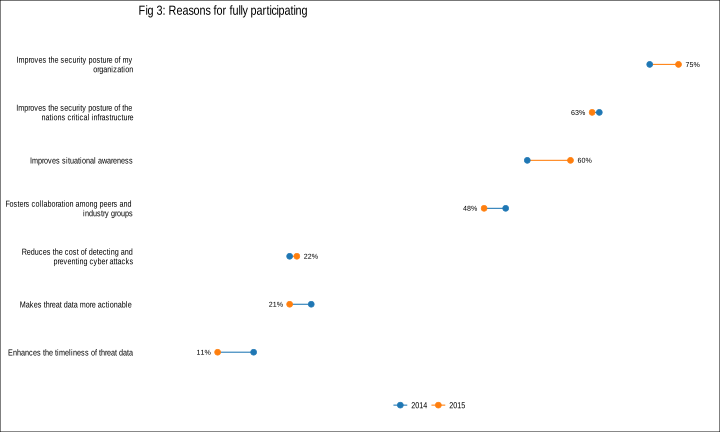
But, I digress. There are better (or at least alternate) ways than bars to show this comparison. One is a "dumbbell chart".

question %>%
  group_by(belief) %>%
  mutate(line_col=ifelse(diff(value)<0, "2015", "2014"),
         hjust=ifelse(diff(value)<0, -0.5, 1.5)) %>%
  ungroup() -> question

gg <- ggplot(question)
gg <- gg + geom_path(aes(x=value, y=belief, group=belief, color=line_col))
gg <- gg + geom_point(aes(x=value, y=belief, color=year))
gg <- gg + geom_text(data=filter(question, year=="2015"),
                     aes(x=value, y=belief, label=percent(value),
                         hjust=hjust), size=2.5)
gg <- gg + scale_x_continuous(expand=c(0,0), limits=c(0,0.8))
gg <- gg + scale_color_tableau(name="")
gg <- gg + labs(x=NULL, y=NULL, title="Fig 3: Reasons for fully participating\n")
gg <- gg + theme_tufte(base_family="Arial Narrow")
gg <- gg + theme(axis.ticks.x=element_blank())
gg <- gg + theme(axis.text.x=element_blank())
gg <- gg + theme(axis.ticks.y=element_blank())
gg <- gg + theme(legend.position="bottom")
gg <- gg + theme(plot.title=element_text(hjust=0))
gg

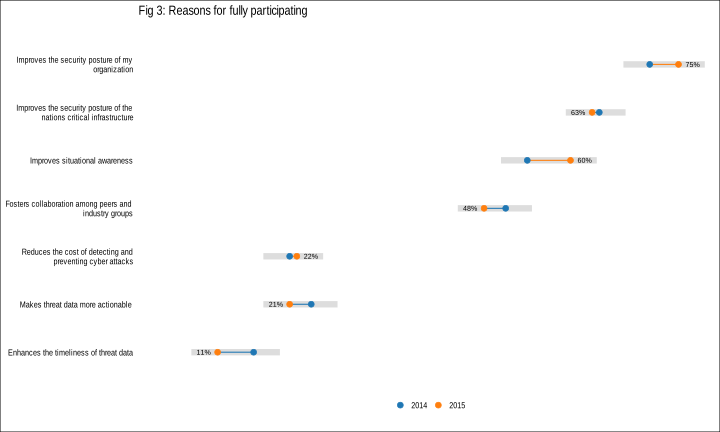
I've used line color to indicate whether the 2015 value increased or decreased from 2014.

But, we still have the issue of communicating the margin of error. One way I came up with (which is not perfect) is to superimpose the dot-plot on top of the entire margin of error interval. While it doesn't show the discrete start/end margin for each year it does help to show that making definitive statements on the value comparisons is not exactly a good idea:

group_by(question, belief) %>%
  summarize(xmin=min(ymin), xmax=max(ymax)) -> band

gg <- ggplot(question)
gg <- gg + geom_segment(data=band,
                        aes(x=xmin, xend=xmax, y=belief, yend=belief),
                        color="#bdbdbd", alpha=0.5, size=3)
gg <- gg + geom_path(aes(x=value, y=belief, group=belief, color=line_col),
                     show.legend=FALSE)
gg <- gg + geom_point(aes(x=value, y=belief, color=year))
gg <- gg + geom_text(data=filter(question, year=="2015"),
                     aes(x=value, y=belief, label=percent(value),
                         hjust=hjust), size=2.5)
gg <- gg + scale_x_continuous(expand=c(0,0), limits=c(0,0.8))
gg <- gg + scale_color_tableau(name="")
gg <- gg + labs(x=NULL, y=NULL, title="Fig 3: Reasons for fully participating\n")
gg <- gg + theme_tufte(base_family="Arial Narrow")
gg <- gg + theme(axis.ticks.x=element_blank())
gg <- gg + theme(axis.text.x=element_blank())
gg <- gg + theme(axis.ticks.y=element_blank())
gg <- gg + theme(legend.position="bottom")
gg <- gg + theme(plot.title=element_text(hjust=0))
gg

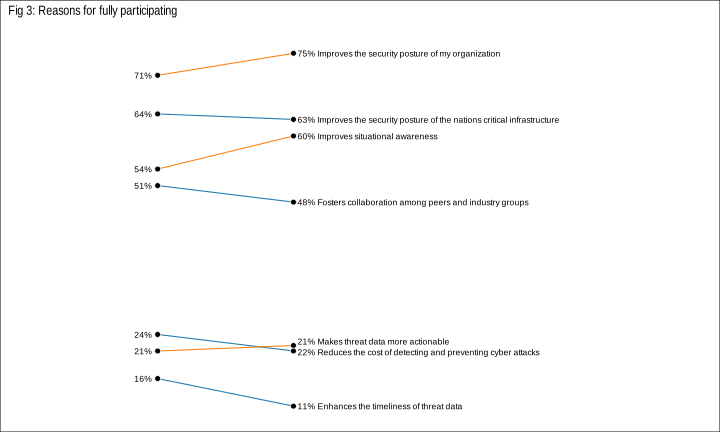
Finally, the year-to-year nature of the data was just begging for a slopegraph:

question %>% mutate(vjust=0.5) -> question
question[(question$belief=="Makes threat data more actionable") &
           (question$year=="2015"),]$vjust <- -1
question[(question$belief=="Reduces the cost of detecting and\npreventing cyber attacks") &
           (question$year=="2015"),]$vjust <- 1.5

question$year <- factor(question$year, levels=c("2013", "2014", "2015", "2016", "2017", "2018"))

gg <- ggplot(question)
gg <- gg + geom_path(aes(x=year, y=value, group=belief, color=line_col))
gg <- gg + geom_point(aes(x=year, y=value), shape=21, fill="black", color="white")
gg <- gg + geom_text(data=filter(question, year=="2015"),
                     aes(x=year, y=value,
                         label=sprintf("\u2000%s %s", percent(value),
                                       gsub("\n", " ", belief)),
                         vjust=vjust), hjust=0, size=3)
gg <- gg + geom_text(data=filter(question, year=="2014"),
                     aes(x=year, y=value, label=percent(value)),
                     hjust=1.3, size=3)
gg <- gg + scale_x_discrete(expand=c(0,0.1), drop=FALSE)
gg <- gg + scale_color_tableau(name="")
gg <- gg + labs(x=NULL, y=NULL, title="Fig 3: Reasons for fully participating\n")
gg <- gg + theme_tufte(base_family="Arial Narrow")
gg <- gg + theme(axis.ticks=element_blank())
gg <- gg + theme(axis.text=element_blank())
gg <- gg + theme(legend.position="none")
gg <- gg + theme(plot.title=element_text(hjust=0.5))
gg <- gg + theme(plot.title=element_text(hjust=0))
gg

It doesn't help communicate uncertainty but it's a nice alternative to bars.

Hopefully this helps provide some alternatives to bars for these types of comparisons and also ways to communicate uncertainty without confusing the reader (communicating uncertainty to a broad audience is hard).

Perhaps those conducting surveys (or data analyses in general) could subscribe to a "data visualizers" paraphrase of a quote from Epidemics, Book I, of the Hippocratic school:

"Practice two things in your dealings with data: either help or do not harm the reader."

The full Rmd and data for this post is in this gist.