Skip navigation

Category Archives: Data Visualization

Matt @stiles is a spiffy data journalist at the @latimes and he posted an interesting chart on U.S. Attorneys General longevity (given that the current US AG is on thin ice):

I thought it would be neat (since Matt did the data scraping part already) to look at AG tenure distribution by party, while also pointing out where Sessions falls.

Now, while Matt did scrape the data, it’s tucked away into a javascript variable in an iframe on the page that contains his vis.

It’s still easier to get it from there vs re-scrape Wikipedia (like Matt did) thanks to the V8 package by @opencpu.

The following code:

  • grabs the vis iframe
  • extracts and evaluates the target javascript to get a nice data frame
  • performs some factor re-coding (for better grouping and to make it easier to identify Sessions)
  • plots the distributions using the beeswarm quasirandom alogrithm
library(V8)
library(rvest)
library(ggbeeswarm)
library(hrbrthemes)
library(tidyverse)

pg <- read_html("http://mattstiles.org/dailygraphics/graphics/attorney-general-tenure-20172517/child.html?initialWidth=840&childId=pym_0&parentTitle=Chart%3A%20If%20Ousted%2C%20Jeff%20Sessions%20Would%20Have%20a%20Historically%20Short%20Tenure%20%7C%20The%20Daily%20Viz&parentUrl=http%3A%2F%2Fthedailyviz.com%2F2017%2F07%2F25%2Fchart-if-ousted-jeff-sessions-would-have-a-historically-short-tenure%2F")

ctx <- v8()
ctx$eval(html_nodes(pg, xpath=".//script[contains(., 'DATA')]") %>% html_text())

ctx$get("DATA") %>% 
  as_tibble() %>% 
  readr::type_convert() %>% 
  mutate(party = ifelse(is.na(party), "Other", party)) %>% 
  mutate(party = fct_lump(party)) %>% 
  mutate(color1 = case_when(
    party == "Democratic" ~ "#313695",
    party == "Republican" ~ "#a50026",
    party == "Other" ~ "#4d4d4d")
  ) %>% 
  mutate(color2 = ifelse(grepl("Sessions", label), "#2b2b2b", "#00000000")) -> ags

ggplot() + 
  geom_quasirandom(data = ags, aes(party, amt, color = color1)) +
  geom_quasirandom(data = ags, aes(party, amt, color = color2), 
                   fill = "#ffffff00", size = 4, stroke = 0.25, shape = 21) +
  geom_text(data = data_frame(), aes(x = "Republican", y = 100, label = "Jeff Sessions"), 
            nudge_x = -0.15, family = font_rc, size = 3, hjust = 1) +
  scale_color_identity() +
  scale_y_comma(limits = c(0, 4200)) +
  labs(x = "Party", y = "Tenure (days)", 
       title = "U.S. Attorneys General",
       subtitle = "Distribution of tenure in office, by days & party: 1789-2017",
       caption = "Source data/idea: Matt Stiles <bit.ly/2vXAHTM>") +
  theme_ipsum_rc(grid = "XY")

I turned the data into a CSV and stuck it in this gist if folks want to play w/o doing the js scraping.

I caught this “gem” in the Wall Street Journal tonight:

It’s pretty hard to compare store-to-store, even though it is fairly clear which ones are going-going-gone. If we want to see the relative percentage of each store closing and also want to see how they stack up against each other, then let’s make a column of 100% bars and label total stores in each:

library(hrbrthemes)
library(tidyverse)

read.table(text='store,closing,total
"Radio Shack",550,1500
"Payless",400,2600
"Rue21",400,1100
"The Limited",250,250
"bebe",180,180
"Wet Seal",170,170
"Crocs",160,560
"JCPenny",138,1000
"American Apparel",110,110
"Kmart",109,735
"hhgregg",88,220
"Sears",41,695', sep=",", header=TRUE, stringsAsFactors=FALSE) %>% 
  as_tibble() %>% 
  mutate(remaining = total - closing,
         gone = round((closing/total) * 100)/100,
         stay = 1-gone,
         rem_lab = ifelse(remaining == 0, "", scales::comma(remaining))) %>% 
  arrange(desc(stay)) %>% 
  mutate(store=factor(store, levels=store)) -> closing_df

update_geom_font_defaults(font_rc)

ggplot(closing_df) +
  geom_segment(aes(0, store, xend=gone, yend=store, color="Closing"), size=8) +
  geom_segment(aes(gone, store, xend=gone+stay, yend=store, color="Remaining"), size=8) +
  geom_text(aes(x=0, y=store, label=closing), color="white", hjust=0, nudge_x=0.01) +
  geom_text(aes(x=1, y=store, label=rem_lab), color="white", hjust=1, nudge_x=-0.01) +
  scale_x_percent() +
  scale_color_ipsum(name=NULL) +
  labs(x=NULL, y=NULL, 
       title="Selected 2017 Store closings (estimated)",
       subtitle="Smaller specialty chains such as Bebe and American Apparel are closing their stores,\nwhile lareger chains such as J.C. Penny and Sears are scaling back their footprint.") +
  theme_ipsum_rc(grid="X") +
  theme(axis.text.x=element_text(hjust=c(0, 0.5, 0.5, 0.5, 1))) +
  theme(legend.position=c(0.875, 1.025)) +
  theme(legend.direction="horizontal")

One might try circle packing or a treemap to show both relative store count and percentage, but I think the bigger story is the percent reduction for each retail chain. It’d be cool to see what others come up with.

Despite being in cybersecurity nigh forever (a career that quickly turns one into a determined skeptic if you’re doing your job correctly) I have often trusted various (not to be named) news sources, reports and data sources to provide honest and as-unbiased-as-possible information. The debacle in the U.S. in late 2016 has proven (to me) that we’re all on our own when it comes to validating posited truth/fact. I’m teaching two data science college courses this Spring and one motivation for teaching is helping others on the path to data literacy so they don’t have to just believe what’s tossed at them.

It’s also one of the reasons I write R packages and blog/speak (when I can).

Today, I saw a chart in a WSJ article on the impending minimum wage changes (paywalled, so do the Google hack to read it) set to take effect in 19 states.

It’s a great chart and they cite the data source as coming from the Economic Policy Institute. I found some minimum wage data there and manually went through a bit of it to get enough of a feel that the WSJ wasn’t “mis-truthing” or truth-spinning. (As an aside, the minimum wage should definitely be higher, indexed and adjusted for inflation, but that’s a discussion for another time.)

While on EPI’s site, I did notice they had a “State of Working America Data Library” @ http://www.epi.org/data/. The data there is based on U.S. government published data and I validated that EPI isn’t fabricating anything (but you should not just take my word for it and do your own math from U.S. gov sources). I also noticed that the filtering interactions were delayed a bit and posited said condition was due to the site making AJAX/XHR calls to retrieve data. So, I peeked under the covers and discovered a robust, consistent, hidden API that is now wrapped in an R package dubbed epidata.

You can get the details of what’s available via the EPI site or through package docs.

What can you do with this data?

They seem to update the data (pretty much) monthly and it’s based on U.S. gov publications, so you can very easily validate “news” reports, potentially even easier than via packages that wrap the Bureau of Labor Statistics (BLS) API. On a lark, I wanted to compare the unemployment rate vs median wage over time (mostly to test the API and make a connected scatterplot). If you didn’t add the level of detail to the aesthetics I did, the following code is pretty small to do just that:

library(tidyverse)
library(epidata)
library(ggrepel)

unemployment <- get_unemployment()
wages <- get_median_and_mean_wages()

glimpse(wages)
## Observations: 43
## Variables: 3
## $ date    <int> 1973, 1974, 1975, 1976, 1977, 1978, 1979, 1980, 1981, ...
## $ median  <dbl> 16.53, 16.17, 16.05, 16.15, 16.07, 16.36, 16.15, 16.07...
## $ average <dbl> 19.05, 18.67, 18.64, 18.87, 18.77, 18.83, 19.06, 18.66...

glimpse(unemployment)
## Observations: 456
## Variables: 2
## $ date <date> 1978-12-01, 1979-01-01, 1979-02-01, 1979-03-01, 1979-04-...
## $ all  <dbl> 0.061, 0.061, 0.060, 0.060, 0.059, 0.059, 0.059, 0.058, 0...

group_by(unemployment, date=as.integer(lubridate::year(date))) %>%
  summarise(rate=mean(all)) %>%
  left_join(select(wages, date, median), by="date") %>%
  filter(!is.na(median)) %>%
  arrange(date) -> df

cols <- ggthemes::tableau_color_pal()(3)

ggplot(df, aes(rate, median)) +
  geom_path(color=cols[1], arrow=arrow(type="closed", length=unit(10, "points"))) +
  geom_point() +
  geom_label_repel(aes(label=date),
                   alpha=c(1, rep((4/5), (nrow(df)-2)), 1),
                   size=c(5, rep(3, (nrow(df)-2)), 5),
                   color=c(cols[2],
                           rep("#2b2b2b", (nrow(df)-2)),
                           cols[3]),
                   family="Hind Medium") +
  scale_x_continuous(name="Unemployment Rate", expand=c(0,0.001), label=scales::percent) +
  scale_y_continuous(name="Median Wage", expand=c(0,0.25), label=scales::dollar) +
  labs(title="U.S. Unemployment Rate vs Median Wage Since 1978",
       subtitle="Wage data is in 2015 USD",
       caption="Source: EPI analysis of Current Population Survey Outgoing Rotation Group microdata") +
  hrbrmisc::theme_hrbrmstr(grid="XY")

You can build your own “State of Working America Data Library” dashboard with this data (with flexdashboard and/or shiny) and be a bit of a citizen journalist, keeping the actual media in check and staying more informed an engaged.

As usual, drop issues & feature requests in the github repo. If you make some fun things with the data, drop a comment in the blog. Unless something major comes up the package should be on CRAN by the weekend.

The @pewresearch folks have been collecting political survey data for quite a while, and I noticed the [visualization below](http://www.people-press.org/2014/06/12/section-1-growing-ideological-consistency/#interactive) referenced in a [Tableau vis contest entry](https://www.interworks.com/blog/rrouse/2016/06/24/politics-viz-contest-plotting-political-polarization):

Cursor_and_Political_Polarization_and_Growing_Ideological_Consistency___Pew_Research_Center

Those are filled [frequency polygons](http://onlinestatbook.com/2/graphing_distributions/freq_poly.html), which are super-easy to replicate in ggplot2, especially since Pew even _kind of_ made the data available via their interactive visualization (it’s available in other Pew resources, just not as compact). So, we can look at all 5 study years for both the general population and politically active respondents with `ggplot2` facets, incorporating the use of `V8`, `dplyr`, `tidyr`, `purrr` and some R spatial functions along the way.

The first code block has the “data”, data transformations and initial plot code. The “data” is really javascript blocks picked up from the `view-source:` of the interactive visualization. We use the `V8` package to get this data then bend it to our will for visuals.

library(V8)
library(dplyr)
library(tidyr)
library(purrr)
library(ggplot2)  # devtools::install_github("hadley/ggplot2)
library(hrbrmisc) # devtools::install_github("hrbrmstr/hrbrmisc)
library(rgeos)
library(sp)

ctx <- v8()
ctx$eval("
	var party_data = [
		[{
			name: 'Dem',
			data: [0.57,1.60,1.89,3.49,3.96,6.56,7.23,8.54,9.10,9.45,9.30,9.15,7.74,6.80,4.66,4.32,2.14,1.95,0.87,0.57,0.12]
		},{
			name: 'REP',
			data: [0.03,0.22,0.28,1.49,1.66,2.77,3.26,4.98,5.36,7.28,7.72,8.16,8.86,8.88,8.64,8.00,6.20,5.80,4.87,4.20,1.34]
		}],
		[{
			name: 'Dem',
			data: [1.22,2.78,3.28,5.12,6.15,7.77,8.24,9.35,9.73,9.19,8.83,8.47,5.98,5.17,3.62,2.87,1.06,0.75,0.20,0.15,0.04]
		}, {
			name: 'REP',
			data: [0.23,0.49,0.65,2.23,2.62,4.06,5.02,7.53,7.70,7.28,7.72,8.15,8.87,8.47,7.08,6.27,4.29,3.99,3.54,2.79,1.03]
		}],
		[{
			name: 'Dem',
			data: [2.07,3.57,4.21,6.74,7.95,8.41,8.58,9.07,8.98,8.46,8.47,8.49,5.39,3.62,2.11,1.98,1.00,0.55,0.17,0.17,0.00]
		}, {
			name: 'REP',
			data: [0.19,0.71,1.04,2.17,2.07,3.65,4.92,7.28,8.26,9.64,9.59,9.55,7.91,7.74,6.84,6.01,4.37,3.46,2.09,1.65,0.86]
		}],
		[{
			name: 'Dem',
			data: [2.97,4.09,4.28,6.65,7.90,8.37,8.16,8.74,8.61,8.15,7.74,7.32,4.88,4.82,2.79,2.07,0.96,0.78,0.41,0.29,0.02]
		}, {
			name: 'REP',
			data: [0.04,0.21,0.28,0.88,1.29,2.64,3.08,4.92,5.84,6.65,6.79,6.92,8.50,8.61,8.05,8.00,7.52,7.51,5.61,4.17,2.50]
		}],
		[{
			name: 'Dem',
			data: [4.81,6.04,6.57,7.67,7.84,8.09,8.24,8.91,8.60,6.92,6.69,6.47,4.22,3.85,1.97,1.69,0.66,0.49,0.14,0.10,0.03]
		}, {
			name: 'REP',
			data: [0.11,0.36,0.49,1.23,1.35,2.35,2.83,4.63,5.09,6.12,6.27,6.41,7.88,8.03,7.58,8.26,8.12,7.29,6.38,5.89,3.34]
		}],
	];

	var party_engaged_data = [
		[{
			name: 'Dem',
			data: [0.88,2.19,2.61,4.00,4.76,6.72,7.71,8.45,8.03,8.79,8.79,8.80,7.23,6.13,4.53,4.31,2.22,2.01,1.05,0.66,0.13]
		}, {
			name: 'REP',
			data: [0.00,0.09,0.09,0.95,1.21,1.67,2.24,3.22,3.70,6.24,6.43,6.62,8.01,8.42,8.97,8.48,7.45,7.68,8.64,7.37,2.53]
		}],
		[{
			name: 'Dem',
			data: [1.61,3.35,4.25,6.75,8.01,8.20,8.23,9.14,8.94,8.68,8.46,8.25,4.62,3.51,2.91,2.63,1.19,0.74,0.24,0.17,0.12]
		},{
			name: 'REP',
			data: [0.21,0.38,0.68,1.62,1.55,2.55,3.99,4.65,4.31,5.78,6.28,6.79,8.47,9.01,8.61,8.34,7.16,6.50,6.10,4.78,2.25]
		}],
		[{
			name: 'Dem',
			data: [3.09,4.89,6.22,9.40,9.65,9.20,8.99,6.48,7.36,7.67,6.95,6.22,4.53,3.79,2.19,2.02,0.74,0.07,0.27,0.27,0.00]
		}, {
			name: 'REP',
			data: [0.29,0.59,0.67,2.11,2.03,2.67,4.12,6.55,6.93,8.42,8.79,9.17,7.33,6.84,7.42,7.25,6.36,5.32,3.35,2.57,1.24]
		}],
		[{
			name: 'Dem',
			data: [6.00,5.24,5.11,7.66,9.25,8.25,8.00,8.09,8.12,7.05,6.59,6.12,4.25,4.07,2.30,1.49,0.98,0.80,0.42,0.16,0.06]
		}, {
			name: 'REP',
			data: [0.00,0.13,0.13,0.48,0.97,2.10,2.73,3.14,3.64,5.04,5.30,5.56,6.87,6.75,8.03,9.33,11.01,10.49,7.61,6.02,4.68]
		}],
		[{
			name: 'Dem',
			data: [9.53,9.68,10.35,9.33,9.34,7.59,6.67,6.41,6.60,5.21,4.84,4.47,2.90,2.61,1.37,1.14,0.73,0.59,0.30,0.28,0.06]
		}, {
			name: 'REP',
			data: [0.15,0.11,0.13,0.46,0.52,1.18,1.45,2.46,2.84,4.15,4.37,4.60,6.36,6.66,7.34,9.09,11.40,10.53,10.58,9.85,5.76]
		}],
	];
")

years <- c(1994, 1999, 2004, 2001, 2014)

# Transform the javascript data -------------------------------------------

party_data <- ctx$get("party_data")
map_df(1:length(party_data), function(i) {
  x <- party_data[[i]]
  names(x$data) <- x$name
  dat <- as.data.frame(x$data)
  bind_cols(dat, data_frame(x=-10:10, year=rep(years[i], nrow(dat))))
}) -> party_data

party_engaged_data <- ctx$get("party_engaged_data")
map_df(1:length(party_engaged_data), function(i) {
  x <- party_engaged_data[[i]]
  names(x$data) <- x$name
  dat <- as.data.frame(x$data)
  bind_cols(dat, data_frame(x=-10:10, year=rep(years[i], nrow(dat))))
}) -> party_engaged_data

# We need it in long form -------------------------------------------------

gather(party_data, party, pct, -x, -year) %>%
  mutate(party=factor(party, levels=c("REP", "Dem"))) -> party_data_long

gather(party_engaged_data, party, pct, -x, -year) %>%
  mutate(party=factor(party, levels=c("REP", "Dem"))) -> party_engaged_data_long

# Traditional frequency polygon plots -------------------------------------

gg <- ggplot()
gg <- gg + geom_ribbon(data=party_data_long,
                       aes(x=x, ymin=0, ymax=pct, fill=party, color=party), alpha=0.5)
gg <- gg + scale_x_continuous(expand=c(0,0), breaks=c(-8, 0, 8),
                              labels=c("Consistently\nliberal", "Mixed", "Consistently\nconservative"))
gg <- gg + scale_y_continuous(expand=c(0,0), limits=c(0, 12))
gg <- gg + scale_color_manual(name=NULL, values=c(Dem="#728ea2", REP="#cf6a5d"),
                              labels=c(Dem="Democrats", REP="Republicans"))
gg <- gg + guides(color="none", fill=guide_legend(override.aes=list(alpha=1)))
gg <- gg + scale_fill_manual(name=NULL, values=c(Dem="#728ea2", REP="#cf6a5d"),
                             labels=c(Dem="Democrats", REP="Republicans"))
gg <- gg + facet_wrap(~year, ncol=2, scales="free_x")
gg <- gg + labs(x=NULL, y=NULL,
                title="Political Polarization, 1994-2014 (General Population)",
                caption="Source: http://www.people-press.org/2014/06/12/section-1-growing-ideological-consistency/iframe/")
gg <- gg + theme_hrbrmstr_an(grid="")
gg <- gg + theme(panel.margin=margin(t=30, b=30, l=30, r=30))
gg <- gg + theme(legend.position=c(0.75, 0.1))
gg <- gg + theme(legend.direction="horizontal")
gg <- gg + theme(axis.text.y=element_blank())
gg

gg <- ggplot()
gg <- gg + geom_ribbon(data=party_engaged_data_long,
                       aes(x=x, ymin=0, ymax=pct, fill=party, color=party), alpha=0.5)
gg <- gg + scale_x_continuous(expand=c(0,0), breaks=c(-8, 0, 8),
                              labels=c("Consistently\nliberal", "Mixed", "Consistently\nconservative"))
gg <- gg + scale_y_continuous(expand=c(0,0), limits=c(0, 12))
gg <- gg + scale_color_manual(name=NULL, values=c(Dem="#728ea2", REP="#cf6a5d"),
                              labels=c(Dem="Democrats", REP="Republicans"))
gg <- gg + guides(color="none", fill=guide_legend(override.aes=list(alpha=1)))
gg <- gg + scale_fill_manual(name=NULL, values=c(Dem="#728ea2", REP="#cf6a5d"),
                             labels=c(Dem="Democrats", REP="Republicans"))
gg <- gg + facet_wrap(~year, ncol=2, scales="free_x")
gg <- gg + labs(x=NULL, y=NULL,
                title="Political Polarization, 1994-2014 (Politically Active)",
                caption="Source: http://www.people-press.org/2014/06/12/section-1-growing-ideological-consistency/iframe/")
gg <- gg + theme_hrbrmstr_an(grid="")
gg <- gg + theme(panel.margin=margin(t=30, b=30, l=30, r=30))
gg <- gg + theme(legend.position=c(0.75, 0.1))
gg <- gg + theme(legend.direction="horizontal")
gg <- gg + theme(axis.text.y=element_blank())
gg

genalpha

engalpha

It provides a similar effect to the Pew & Interworks visuals using alpha transparency to blend the point of polygon intersections. But I _really_ kinda like the way both Pew & Interworks did their visualizations without alpha blending yet still highlighting the intersected areas. We can do that in R as well with a bit more work by:

– grouping each data frame by year
– turning each set of points (Dem & Rep) to R polygons
– computing the intersection of those polygons
– turning that intersection back into a data frame
– adding this new polygon to the plots while also removing the alpha blend

Here’s what that looks like in code:

# Setup a function to do the polygon intersection -------------------------

polysect <- function(df) {

  bind_rows(data_frame(x=-10, pct=0),
            select(filter(df, party=="Dem"), x, pct),
            data_frame(x=10, pct=0)) %>%
    as.matrix() %>%
    Polygon() %>%
    list() %>%
    Polygons(1) %>%
    list() %>%
    SpatialPolygons() -> dem

  bind_rows(data_frame(x=-10, pct=0),
            select(filter(df, party=="REP"), x, pct),
            data_frame(x=10, pct=0)) %>%
    as.matrix() %>%
    Polygon() %>%
    list() %>%
    Polygons(1) %>%
    list() %>%
    SpatialPolygons() -> rep

  inter <- gIntersection(dem, rep)
  inter <- as.data.frame(inter@polygons[[1]]@Polygons[[1]]@coords)[c(-1, -25),]
  inter <- mutate(inter, year=df$year[1])
  inter

}

# Get the intersected area ------------------------------------------------

group_by(party_data_long, year) %>%
  do(polysect(.)) -> general_sect

group_by(party_engaged_data_long, year) %>%
  do(polysect(.)) -> engaged_sect


# Try the plots again -----------------------------------------------------

gg <- ggplot()
gg <- gg + geom_ribbon(data=party_data_long,
                       aes(x=x, ymin=0, ymax=pct, fill=party, color=party))
gg <- gg + geom_ribbon(data=general_sect, aes(x=x, ymin=0, ymax=y), color="#666979", fill="#666979")
gg <- gg + scale_x_continuous(expand=c(0,0), breaks=c(-8, 0, 8),
                              labels=c("Consistently\nliberal", "Mixed", "Consistently\nconservative"))
gg <- gg + scale_y_continuous(expand=c(0,0), limits=c(0, 12))
gg <- gg + scale_color_manual(name=NULL, values=c(Dem="#728ea2", REP="#cf6a5d"),
                              labels=c(Dem="Democrats", REP="Republicans"))
gg <- gg + guides(color="none", fill=guide_legend(override.aes=list(alpha=1)))
gg <- gg + scale_fill_manual(name=NULL, values=c(Dem="#728ea2", REP="#cf6a5d"),
                             labels=c(Dem="Democrats", REP="Republicans"))
gg <- gg + facet_wrap(~year, ncol=2, scales="free_x")
gg <- gg + labs(x=NULL, y=NULL,
                title="Political Polarization, 1994-2014 (General Population)",
                caption="Source: http://www.people-press.org/2014/06/12/section-1-growing-ideological-consistency/iframe/")
gg <- gg + theme_hrbrmstr_an(grid="")
gg <- gg + theme(panel.margin=margin(t=30, b=30, l=30, r=30))
gg <- gg + theme(legend.position=c(0.75, 0.1))
gg <- gg + theme(legend.direction="horizontal")
gg <- gg + theme(axis.text.y=element_blank())
gg

gg <- ggplot()
gg <- gg + geom_ribbon(data=party_engaged_data_long,
                       aes(x=x, ymin=0, ymax=pct, fill=party, color=party))
gg <- gg + geom_ribbon(data=engaged_sect, aes(x=x, ymin=0, ymax=y), color="#666979", fill="#666979")
gg <- gg + scale_x_continuous(expand=c(0,0), breaks=c(-8, 0, 8),
                              labels=c("Consistently\nliberal", "Mixed", "Consistently\nconservative"))
gg <- gg + scale_y_continuous(expand=c(0,0), limits=c(0, 12))
gg <- gg + scale_color_manual(name=NULL, values=c(Dem="#728ea2", REP="#cf6a5d"),
                              labels=c(Dem="Democrats", REP="Republicans"))
gg <- gg + guides(color="none", fill=guide_legend(override.aes=list(alpha=1)))
gg <- gg + scale_fill_manual(name=NULL, values=c(Dem="#728ea2", REP="#cf6a5d"),
                             labels=c(Dem="Democrats", REP="Republicans"))
gg <- gg + facet_wrap(~year, ncol=2, scales="free_x")
gg <- gg + labs(x=NULL, y=NULL,
                title="Political Polarization, 1994-2014 (Politically Active)",
                caption="Source: http://www.people-press.org/2014/06/12/section-1-growing-ideological-consistency/iframe/")
gg <- gg + theme_hrbrmstr_an(grid="")
gg <- gg + theme(panel.margin=margin(t=30, b=30, l=30, r=30))
gg <- gg + theme(legend.position=c(0.75, 0.1))
gg <- gg + theme(legend.direction="horizontal")
gg <- gg + theme(axis.text.y=element_blank())
gg

genfull

engfull

Without much extra effort/work we now have what I believe to be a more striking set of visuals. (And, I should probably makes a `points_to_spatial_polys()` convenience function.)

You’ll find the “overall” group data as well as the party median values in [the Pew HTML source code](view-source:http://www.people-press.org/2014/06/12/section-1-growing-ideological-consistency/iframe/) if you want to try to fully replicate their visualizations.

Once again, @albertocairo notices an interesting chart and spurs pondering in the visualization community with [his post](http://www.thefunctionalart.com/2016/06/defying-conventions-in-visualization.html) covering an unusual “vertical time series” chart produced for the print version of the NYTimes:

IMG_0509-1

I’m actually less concerned about the vertical time series chart component here since I agree with TAVE* Cairo that folks are smart enough to grok it and that it will be a standard convention soon enough given the prevalence of our collective tiny, glowing rectangles. The Times folks plotted Martin-Quinn (M-Q) scores for the U.S. Supreme Court justices which are estimates of how liberal or conservative a justice was in a particular term. Since they are estimates they aren’t exact and while it’s fine to plot the mean value (as suggested by the M-Q folks), if we’re going to accept the intelligence of the reader to figure out the nouveau time series layout, perhaps we can also show them some of the uncertainty behind these estimates.

What I’ve done below is take the data provided by the M-Q folks and make what I’ll call a vertical time series river plot using the mean, median and one standard deviation. This shows the possible range of real values the estimates can take and provides a less-precise but more forthright view of the values (in my opinion). You can see right away that they estimates are not so precise, but there is still an overall trend for the justices to become more liberal in modern times.

Cursor_and_RStudio

The ggplot2 code is a bit intricate, which is one reason I’m posting it. You need to reorient your labeling mind due to the need to use `coord_flip()`. I also added an arrow on the Y-axis to show how time flows. I think the vis community will need to help standardize on some good practices for how to deal with these vertical time series charts to help orient readers more quickly. In a more dynamic visualization, either using something like D3 or even just stop-motion animation, the flow could actually draw in the direction time flows, which would definitely make it easier immediately orient the reader.

However, the main point here is to not be afraid to show uncertainty. In fact, the more we all work at it, the better we’ll all be able to come up with effective ways to show it.

* == “The Awesome Visualization Expert” since he winced at my use of “Dr. Cairo” :-)

library(dplyr)
library(readr)
library(ggplot2)  # devtools::install_github("hadley/ggplot2")
library(hrbrmisc) # devtools::install_github("hrbrmstr/hrbrmisc")
library(grid)
library(scales)

URL <- "http://mqscores.berkeley.edu/media/2014/justices.csv"
fil <- basename(URL)
if (!file.exists(fil)) download.file(URL, fil)

justices <- read_csv(fil)

justices %>%
  filter(term>=1980,
         justiceName %in% c("Thomas", "Scalia", "Alito", "Roberts", "Kennedy",
                            "Breyer", "Kagan", "Ginsburg", "Sotomayor")) %>%
  mutate(col=ifelse(justiceName %in% c("Breyer", "Kagan", "Ginsburg", "Sotomayor"),
                    "Democrat", "Republican")) -> recent

just_labs <- data_frame(
  label=c("Thomas", "Scalia", "Alito", "Roberts", "Kennedy", "Breyer", "Kagan", "Ginsburg", "Sotomayor"),
      x=c(  1990.5,   1985.5,  2004.5,    2004.5,    1986.5,      1994,   2010,     1992.5,      2008.5),
      y=c(     2.9,      1.4,    1.35,       1.7,       1.0,      -0.1,   -0.9,       -0.1,          -2)
)

gg <- ggplot(recent)
gg <- gg + geom_hline(yintercept=0, alpha=0.5)
gg <- gg + geom_label(data=data.frame(x=c(0.1, -0.1),
                                      label=c("More →\nconservative", "← More\nliberal"),
                                      hjust=c(0, 1)), aes(y=x, x=1982, hjust=hjust, label=label),
                      family="Arial Narrow", fontface="bold", size=4, label.size=0, vjust=1)
gg <- gg + geom_ribbon(aes(ymin=post_mn-post_sd, ymax=post_mn+post_sd, x=term,
                             group=justice, fill=col, color=col), size=0.1, alpha=0.3)
gg <- gg + geom_line(aes(x=term, y=post_med, color=col, group=justice), size=0.1)
gg <- gg + geom_text(data=just_labs, aes(x=x, y=y, label=label),
                     family="Arial Narrow", size=2.5)
gg <- gg + scale_x_reverse(expand=c(0,0), limits=c(2014, 1982),
                           breaks=c(2014, seq(2010, 1990, -10), 1985, 1982),
                           labels=c(2014, seq(2010, 1990, -10), "1985\nTERM\n↓", ""))
gg <- gg + scale_y_continuous(expand=c(0,0), labels=c(-2, "0\nM-Q Score", 2, 4))
gg <- gg + scale_color_manual(name=NULL, values=c(Democrat="#2166ac", Republican="#b2182b"), guide=FALSE)
gg <- gg + scale_fill_manual(name="Nominated by a", values=c(Democrat="#2166ac", Republican="#b2182b"))
gg <- gg + coord_flip()
gg <- gg + labs(x=NULL, y=NULL,
                title="Martin-Quinn scores for selected justices, 1985-2014",
                subtitle="Ribbon band derived from mean plus one standard deviation. Inner line is the M-Q median.",
                caption="Data source: http://mqscores.berkeley.edu/measures.php")
gg <- gg + theme_hrbrmstr_an(grid="XY")
gg <- gg + theme(plot.subtitle=element_text(margin=margin(b=15)))
gg <- gg + theme(legend.title=element_text(face="bold"))
gg <- gg + theme(legend.position=c(0.05, 0.6))
gg <- gg + theme(plot.margin=margin(20,20,20,20))
gg

Yes, I manually positioned the names of the justices, hence the weird spacing for those lines. Also, after publishing this post, I tweaked the line-height of the “More Liberal”/”More Conservative” top labels a bit and would definitely suggest doing that to anyone attempting to reproduce this code (the setting I used was `0.9`).

The NPR vis team contributed to a recent [story](http://n.pr/1USSliN) about Armslist, a “craigslist for guns”. Now, I’m neither pro-“gun” or anti-“gun” since this subject, like most heated ones, has more than two sides. What I _am_ is pro-*data*, and the U.S. Congress is so [deep in the pockets of the NRA](http://abcnews.go.com/Health/cdc-launched-comprehensive-gun-study-15-years/story?id=39873289) that there’s no way for there to be any Federally-supported, data-driven research on gun injuries/deaths. Thankfully, California is going to [start funding research](http://www.wired.com/2016/06/congress-refuses-california-funds-gun-violence-research-center/), so we may see some evidence-based papers in the (hopefully) not-too-distant future.

When I read the NPR story I couldn’t believe it was easier to get a gun than it is get [pick your vice or other bit of dangerous contraband]. The team at NPR ended up [scraping the Armslist site](http://blog.apps.npr.org/2016/06/17/scraping-tips.html) and provided a [CSV of the data](http://apps.npr.org/armslist-analysis/armslist-listings-2016-06-16.csv). Their own blog post admirably started off with a “Can you scrape?” section. This is an area I see so many python, R and other folks totally ignore since they seem to feel that just because you _can_ do something also gives you license to do so.

I’m glad the NPR team provided the CSV of their results since I suspect that Armslist will be adding some “no scraping” language to their Terms of Service. Interestingly enough, the Armslist site owners spend a great deal of verbiage across their site indemnifying themselves (that’s how proud of their service they are).

Since they provided the CSV, I poked at it a bit and produced some alternate views of the data. One bit of info I was interested in is how much the ask price was for the firearms. Since this is a craigslist-like site, some of the prices are missing and others are obviously either “filler” like `12345678` or are legitimately large (i.e. the price for a rare antique). Given the huge right-skew, I limited the initial view to “affordable” ones (which I defined as between $0.00 & $2,500 USD and if you look at the data yourself you’ll see why). I then computed the bandwidth for the density estimate and did some other basic maths to see what price range of the offers made up at least 50% of the overall listings. I probably should have excluded the $1 offers but the data is there for you to use to augment anything I’ve done here.

ask-prices-1

Most of these firearms are quite affordable (even if you ignore the $1.00 USD offers).

One other view I wanted to see was that of the listings-per-day.

per-day-1

Info from the NPR vis team suggests this is not a 100% accurate view since the listings “age out” and they did a point-in-time scrape. It would be interesting to start a daily scraper for this site or ask to work with the raw data from the site itself (but it’s unlikely Armslist would have the courage to make said data available to news organizations or researchers). Also, the value for the last segment-bar does not appear to be from a fully day’s scrape. Nothing says ‘Murica like selling guns in a sketchy way for Memorial Day.

Finally, I wanted a different view of the ranked states.

by-state-1

(The `ggplot2` code for this one is kinda interesting for any R folk who are curious). This segment-bar chart is a bit of an eye strain (click on it to make it larger) but the main thing I wanted to see was if Ohio was as gun-nutty for the three less-than-valid (IMO) types of firearms sales (which is a different view than automatic vs semi-automatic). Sure enough, Ohio leads the pack (in other news, the same states are in the top 5 across these three categories).

“Spinnable” R code for these charts is below, so go forth and see if you can tease out any other views from the data. There is a free-text listing description field which may be interesting to mine, and the R code has sorted lists by manufacturer and caliber you can view if you run/spin it. It might be interesting to get data [like this for Ohio](https://en.wikipedia.org/wiki/Gun_laws_in_Ohio) for other states and do some clustering based on the legal categories outlined in the table.

#' ---
#' output:
#'   html_document:
#'     keep_md: true
#' ---

#+ message=FALSE, echo=FALSE, warning=FALSE
library(dplyr)
library(readr)
library(ggalt)
library(hrbrmisc)
library(KernSmooth)
library(scales)
library(stringi)
library(extrafont)
library(DT)

loadfonts()

arms <- read_csv("armslist-listings-2016-06-16.csv")
arms <- mutate(arms,
               price=ifelse(price=="FREE", 0, price),
               price=ifelse(price=="Offer", NA, price),
               price=make_numeric(price))
arms <- mutate(arms,
               listed_date=gsub("^.*y, ", "", listed_date),
               listed_date=as.Date(listed_date, "%B %d, %Y"))

affordable <- filter(arms, price>0 & price<2500)

bw <- dpik(affordable$price, scalest="stdev")

a_dens <- bkde(affordable$price, bandwidth=bw,
               range.x=range(affordable$price),
               truncate=TRUE)

peaks <- data_frame(
  pk=which(diff(sign(diff(c(0, a_dens$y)))) == -2),
  x=a_dens$x[pk],
  y=a_dens$y[pk]
)

ann <- sprintf('%s (%s of all listings) firearms are\noffered between $1 & $600 USD',
               comma(nrow(filter(affordable, between(price, 1, 600)))),
               percent(nrow(filter(affordable, between(price, 1, 600)))/nrow(arms)))

grps <- setNames(1:6, unique(arms$category))

ggplot() +
  geom_segment(data=cbind.data.frame(a_dens), aes(x, xend=x, 0, yend=y),
               color="#2b2b2b", size=0.15) +
  geom_vline(data=peaks[c(1,8),], aes(xintercept=x), size=0.5,
             linetype="dotted", color="#b2182b") +
  geom_label(data=peaks[c(1,8),], label.size=0,
            aes(x, y, label=dollar(floor(x)), hjust=c(0, 0)),
            nudge_x=c(10, 10), vjust=0, size=3,
            family="Arial Narrow") +
  geom_label(data=data.frame(), hjust=0, label.size=0, size=3,
             aes(label=ann, x=800, y=min(a_dens$y) + sum(range(a_dens$y))*0.7),
             family="Arial Narrow") +
  scale_x_continuous(expand=c(0,0), breaks=seq(0, 2500, 500), label=dollar, limits=c(0, 2500)) +
  scale_y_continuous(expand=c(0,0), limits=c(0, max(a_dens$y*1.05))) +
  labs(x=NULL, y="density",
       title="Distribution of firearm ask prices on Armslist",
       subtitle=sprintf("Counts are across all firearm types (%s)",
                        stri_replace_last_regex(paste0(names(grps), collapse=", "), ",", " &")),
       caption="Source: NPR http://n.pr/1USSliN") +
  theme_hrbrmstr_an(grid="X=Y", subtitle_size=10) +
  theme(axis.text.x=element_text(hjust=c(0, rep(0.5, 4), 1))) +
  theme(axis.text.y=element_blank()) +
  theme(plot.margin=margin(10,10,10,10)) -> gg

#+ ask-prices, dev="png", fig.width=8, fig.height=4, fig.retina=2, message=FALSE, echo=FALSE, warning=FALSE
gg

count(arms, state, category) %>%
  group_by(category) %>%
  mutate(f=paste0(paste0(rep(" ", grps[category[1]]), collapse=""), state, collaspe="")) %>%
  ungroup() %>%
  arrange(desc(n)) %>%
  mutate(f=factor(f, levels=rev(f))) %>%
  filter(category %in% c("Handguns", "Rifles", "Shotguns")) %>%
  ggplot(aes(x=n, y=f)) +
  geom_segment(aes(yend=f, xend=0), size=0.5) +
  scale_x_continuous(expand=c(0,0), label=comma) +
  facet_wrap(~category, scales="free") +
  labs(x="Note: free x-axis scale", y=NULL,
       title="Distribution of firearm listing by state",
       subtitle="Listings of Antique Firearms, Muzzle Loaders & NFA Firearms are not included in this view",
       caption="Source: NPR http://n.pr/1USSliN") +
  theme_hrbrmstr_an(grid="X", subtitle_size=10) +
  theme(axis.text.y=element_text(size=6)) -> gg

#+ by-state, dev="png", fig.width=8, fig.height=6, fig.retina=2, message=FALSE, echo=FALSE, warning=FALSE
gg

count(arms, listed_date) %>%
  ggplot(aes(listed_date, n)) +
  geom_segment(aes(xend=listed_date, yend=0)) +
  geom_vline(xintercept=c(as.numeric(c(as.Date("2016-05-26"),
                                       as.Date("2016-05-28"),
                                       as.Date("2016-06-02")))), color="#b2182b", size=0.5, linetype="dotted") +
  geom_label(data=data.frame(), hjust=1, vjust=1, nudge_x=-0.5, label.size=0, size=3,
             aes(x=as.Date("2016-05-26"), y=1800, label="NYT & CNN Gun Editorials"),
             family="Arial Narrow", color="#b2182b") +
  geom_label(data=data.frame(), hjust=1, vjust=1, nudge_x=-0.5, label.size=0, size=3,
             aes(x=as.Date("2016-05-28"), y=8500, label="Memorial Day"),
             family="Arial Narrow", color="#b2182b") +
  geom_label(data=data.frame(), hjust=0, vjust=1, nudge_x=0.5,
             label.size=0, size=3, lineheight=0.9,
             aes(x=as.Date("2016-06-02"), y=7000,
                 label="National Gun\nViolence\nAwareness Day"),
             family="Arial Narrow", color="#b2182b") +
  scale_x_date(expand=c(0,1), label=date_format("%B 2016")) +
  scale_y_continuous(expand=c(0,0), label=comma, limit=c(0, 9000)) +
  labs(x=NULL, y=NULL,
       title="Armslist firearm new listings per day",
       subtitle="Period range: March 16, 2016 to June 16, 2016",
       caption="Source: NPR http://n.pr/1USSliN") +
  theme_hrbrmstr_an(grid="XY") +
  theme(plot.margin=margin(10,10,10,10)) -> gg

#+ per-day, dev="png", fig.width=8, fig.height=5, fig.retina=2, message=FALSE, echo=FALSE, warning=FALSE
gg

count(arms, manufacturer) %>%
  filter(!is.na(manufacturer)) %>%
  arrange(desc(n)) %>%
  select(Manufacturer=manufacturer, Count=n) %>%
  datatable() %>%
  formatCurrency(columns="Count", currency="")

count(arms, caliber) %>%
  filter(!is.na(caliber)) %>%
  arrange(desc(n)) %>%
  select(Caliber=caliber, Count=n) %>%
  datatable() %>%
  formatCurrency(columns="Count", currency="")

@theboysmithy did a [great piece](http://www.ft.com/intl/cms/s/0/6f777c84-322b-11e6-ad39-3fee5ffe5b5b.html) on coming up with an alternate view for a timeline for an FT piece.

Here’s an excerpt (read the whole piece, though, it’s worth it):

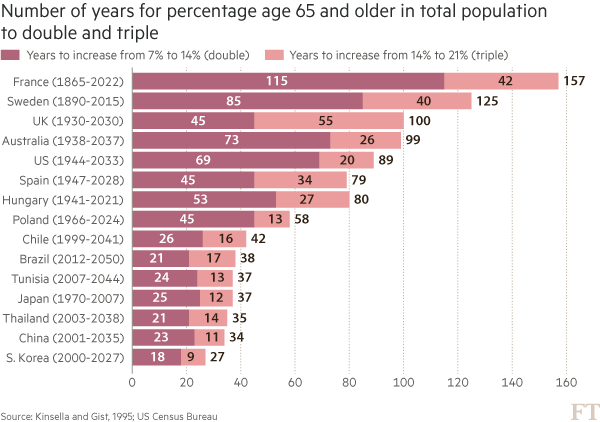
Here is an example from a story recently featured in the FT: emerging- market populations are expected to age more rapidly than those in developed countries. The figures alone are compelling: France is expected to take 157 years (from 1865 to 2022) to triple the proportion of its population aged over 65, from 7 per cent to 21 per cent; for China, the equivalent period is likely to be just 34 years (from 2001 to 2035).

You may think that visualising this story is as simple as creating a bar chart of the durations ordered by length. In fact, we came across just such a chart from a research agency.

But, to me, this approach generates “the feeling” — and further scrutiny reveals specific problems. A reader must work hard to memorise the date information next to the country labels to work out if there is a relationship between the start date and the length of time taken for the population to age. The chart is clearly not ideal, but how do we improve it?

Alan went on to talk about the process of improving the vis, eventually turning to [Joseph Priestly](https://en.wikipedia.org/wiki/Joseph_Priestley) for inspiration. Here’s their makeover:

![](http://im.ft-static.com/content/images/4a75d9ce-3223-11e6-bda0-04585c31b153.img)

Alan used D3 to make this, which had me head scratching for a bit. Bostock is genius & I :heart: D3 immensely, but I never really thought of it as a “canvas” for doing general data visualization creation for something like a print publication (it’s geared towards making incredibly data-rich interactive visualizations). It’s 100% cool to do so, though. It has fine-grained control over every aspect of a visualization and you can easily turn SVGs into PDFs or use them in programs like Illustrator to make the final enhancements. However, D3 is not the only tool that can make a chart like this.

I made the following in R (of course):

RStudio

The annotations in Alan’s image were (99% most likely) made with something like Illustrator. I stopped short of fully reproducing the image (life is super-crazy, still), but could have done so (the entire image is one `ggplot2` object).

This isn’t an “R > D3” post, though, since I use both. It’s about (a) reinforcing Alan’s posits that we should absolutely take inspiration from historical vis pioneers (so read more!) + need a diverse visualization “utility belt” (ref: Batman) to ensure you have the necessary tools to make a given visualization; (b) trusting your “Spidey-sense” when it comes to evaluating your creations/decisions; and, (c) showing that R is a great alternative to D3 for something like this :-)

Spider-man (you expected headier references from a dude with a shield avatar?) has this ability to sense danger right before it happens and if you’re making an effort to develop and share great visualizations, you definitely have this same sense in your DNA (though I would not recommend tossing pie charts at super-villains to stop them). When you’ve made something and it just doesn’t “feel right”, look to other sources of inspiration or reach out to your colleagues or the community for ideas or guidance. You _can_ and _do_ make awesome things, and you _do_ have a “Spidey-sense”. You just need to listen to it more, add depth and breadth to your “utility belt” and keep improving with each creation you release into the wild.

R code for the ggplot vis reproduction is below, and it + the CSV file referenced are in [this gist](https://gist.github.com/hrbrmstr/f12101f8ef1657f9e1457e0dde1602f8).

library(ggplot2)
library(dplyr)

ft <- read.csv("ftpop.csv", stringsAsFactors=FALSE)

arrange(ft, start_year) %>%
  mutate(country=factor(country, levels=c(" ", rev(country), "  "))) -> ft

ft_labs <- data_frame(
  x=c(1900, 1950, 2000, 2050, 1900, 1950, 2000, 2050),
  y=c(rep(" ", 4), rep("  ", 4)),
  hj=c(0.5, 0.5, 0.5, 0.5, 0.5, 0.5, 0.5, 0.5),
  vj=c(1, 1, 1, 1, 0, 0, 0, 0)
)

ft_lines <- data_frame(x=c(1900, 1950, 2000, 2050))

ft_ticks <- data_frame(x=seq(1860, 2050, 10))

gg <- ggplot()

# tick marks & gridlines
gg <- gg + geom_segment(data=ft_lines, aes(x=x, xend=x, y=2, yend=16),
                        linetype="dotted", size=0.15)
gg <- gg + geom_segment(data=ft_ticks, aes(x=x, xend=x, y=16.9, yend=16.6),
                        linetype="dotted", size=0.15)
gg <- gg + geom_segment(data=ft_ticks, aes(x=x, xend=x, y=1.1, yend=1.4),
                        linetype="dotted", size=0.15)

# double & triple bars
gg <- gg + geom_segment(data=ft, size=5, color="#b0657b",
                        aes(x=start_year, xend=start_year+double, y=country, yend=country))
gg <- gg + geom_segment(data=ft, size=5, color="#eb9c9d",
                        aes(x=start_year+double, xend=start_year+double+triple, y=country, yend=country))

# tick labels
gg <- gg + geom_text(data=ft_labs, aes(x, y, label=x, hjust=hj, vjust=vj), size=3)

# annotations
gg <- gg + geom_label(data=data.frame(), hjust=0, label.size=0, size=3,
                      aes(x=1911, y=7.5, label="France is set to take\n157 years to triple the\nproportion ot its\npopulation aged 65+,\nChina only 34 years"))
gg <- gg + geom_curve(data=data.frame(), aes(x=1911, xend=1865, y=9, yend=15.5),
                      curvature=-0.5, arrow=arrow(length=unit(0.03, "npc")))
gg <- gg + geom_curve(data=data.frame(), aes(x=1915, xend=2000, y=5.65, yend=5),
                      curvature=0.25, arrow=arrow(length=unit(0.03, "npc")))

# pretty standard stuff here
gg <- gg + scale_x_continuous(expand=c(0,0), limits=c(1860, 2060))
gg <- gg + scale_y_discrete(drop=FALSE)
gg <- gg + labs(x=NULL, y=NULL, title="Emerging markets are ageing at a rapid rate",
                subtitle="Time taken for population aged 65 and over to double and triple in proportion (from 7% of total population)",
                caption="Source: http://on.ft.com/1Ys1W2H")
gg <- gg + theme_minimal()
gg <- gg + theme(axis.text.x=element_blank())
gg <- gg + theme(panel.grid=element_blank())
gg <- gg + theme(plot.margin=margin(10,10,10,10))
gg <- gg + theme(plot.title=element_text(face="bold"))
gg <- gg + theme(plot.subtitle=element_text(size=9.5, margin=margin(b=10)))
gg <- gg + theme(plot.caption=element_text(size=7, margin=margin(t=-10)))
gg

The infamous @albertocairo [blogged about](http://www.thefunctionalart.com/2016/06/propublica-visualizes-seasonality-in.html) a [nice interactive piece on German company tax avoidance](https://projects.propublica.org/graphics/dividend) by @ProPublica. Here’s a snapshot of their interactive chart:

![](https://2.bp.blogspot.com/-S-8bu1UdYWM/V1rXibnBxrI/AAAAAAAAGo0/L940SpU3DvUPX90JK82jrKQN6fWMyn2IACLcB/s1600/1prop.png)

Dr. Cairo (his PhD is in the bag as far as I’m concerned :-) posited:

>_Isn’t it weird that the chart doesn’t have a scale on the Y-axis? It’s not the first time I see this, and it makes me feel uneasy._

I jumped over to the interactive piece to see if the authors used interactive tooltips since viewers can get a good idea for the scale limits if they do that and it _kinda sorta_ makes not having Y-axis label mostly OK if they compensate with said interactive notations. The interactive had no tooltips and the Y-axis was completely unlabeled.

Now, they used D3, so there _are_ built-in ways to create and add a Y-axis, so I don’t think this was an “oops…we forgot” moment. The Y values are “Short Interest Quantity” which is the quantity of stock shares that investors have sold short but not yet covered or closed out. It’s definitely a “1%-er” term and the authors already took time to explain some technical financial details and probably would have had to add even more text to explain this term properly (since that short definition is really not enough for most of us 99%-ers). It seems that they felt the the arrowed-annotations on the right hand side of the plot made up for the lack of actual Y-axis detail.

Should we _always_ have labels on a given axis? Would knowing that the Y-axis on this chart went from 0 to 800 million have aided in the decoding or groking the overall message? Here’s another example to help frame that question. This is the seminal `ggplot2::geom_density()` demo chart:

RStudio 2

Given that folks outside the realm of statistics/datasci really don’t grok what that Y-axis is saying, would it be _horribad_ to just leave it with a _”density”_ Y-label (sans unit marks) and then explain it in text (or talk to/around it in text but not go into detail)? Or should we keep the full annotations and spend a precious paragraph of text talking about measuring the area under a curve? (Another argument is to choose the right vis for the right audience but that’s another post entirely).

To further illustrate the posit, I recently made a series of what I call a “rank ordered segment plot” for a [report](https://information.rapid7.com/rs/495-KNT-277/images/rapid7-research-report-national-exposure-index-060716.pdf) that we did at @Rapid7:

ssh_rank_chart-1

There are text annotations for countries at either end of the spectrum on the X-axis but they aren’t individually labeled cuz…ewwww that’d be messy. The interactive version (coming this week over at `community.rapid7.com`) has the full table and light hover popup-annotations. But the point wasn’t to really focus on the countries as it was to depict the sad state of the ratio of unencrypted vs encrypted for a given service type within a country.

So, _should_ the ProPublica authors have tried to be more discrete w/r/t their Y-axis or is it fine the way it is? Does there _always_ need to be discrete axes annotations or is there some wiggle room? Opines are welcome in the comments since I honestly don’t think there is “one answer to rule them all” for this.

And for those that really want to see more discrete info on the ProPublica Y-axis labels, here’s a static, faceted chart (you may need to click/select/tap the chart to make it big enough to view):

Plot_Zoom

### Don’tTry This At Home!

ProPublica made that data available via two CSV files and the crosswalk org translation table via their main D3 javascript file (use Developer Tools “Inspect Element” to see such things). I ended up having to use `Sys.setlocale(‘LC_ALL’,’C’)` and expand the translation table a bit due to some of the mixed encodings in the data sets. Code to make the chart is below.

library(ggplot2)
library(dplyr)
library(stringi)
library(hrbrmisc)
library(scales)
library(ggalt)
library(sitools)

# mixed encodings ftw!
Sys.setlocale('LC_ALL','C') 

# different names in different data sets; sigh
org_crosswalk <- read.table(text='company,trans
"Adidas AG","Adidas AG"
"Allianz SE","Allianz SE"
"BASF SE","BASF SE"
"Bayer AG","Bayer AG"
"Bayerische Motoren Werke AG","BMW AG"
"BMW AG","BMW AG",
"Beiersdorf AG","Beiersdorf AG"
"Commerzbank AG","Commerzbank AG"
"Continental AG","Continental AG"
"Daimler AG","Daimler AG"
"Deutsche Bank AG","Deutsche Bank AG"
"Deutsche Boerse AG","Deutsche Boerse AG"
"Deutsche Lufthansa AG","Deutsche Lufthansa AG"
"Deutsche Post AG","Deutsche Post AG"
"Deutsche Telekom AG","Deutsche Telekom AG"
"E.ON","E.ON"
"Fresenius Medical Care AG & Co. KGaA","Fresenius Medical Care AG"
"Fresenius Medical Care AG","Fresenius Medical Care AG"
"Fresenius SE & Co KGaA","Fresenius SE & Co KGaA"
"HeidelbergCement AG","HeidelbergCement AG"
"Henkel AG & Co. KGaA","Henkel AG & Co. KGaA"
"Infineon Technologies AG","Infineon Technologies AG"
"K+S AG","K+S AG"
"Lanxess AG","Lanxess AG"
"Linde AG","Linde AG"
"Merck KGaA","Merck KGaA"
"MŸnchener RŸckversicherungs-Gesellschaft AG","Munich RE AG"
"M�nchener R�ckversicherungs-Gesellschaft AG","Munich RE AG"
"M\x9fnchener R\x9fckversicherungs-Gesellschaft AG","Munich RE AG"
"M?nchener R?ckversicherungs-Gesellschaft AG","Munich RE AG"
"Munich RE AG","Munich RE AG"
"RWE AG","RWE AG"
"SAP SE","SAP SE"
"Siemens AG","Siemens AG"
"ThyssenKrupp AG","ThyssenKrupp AG"
"Volkswagen AG","Volkswagen AG"', stringsAsFactors=FALSE, sep=",", quote='"', header=TRUE)

# quicker/less verbose than left_join()
org_trans <- setNames(org_crosswalk$trans, org_crosswalk$company)

# get and clean both data sets, being kind to the propublica bandwidth $
rec_url <- "https://projects.propublica.org/graphics/javascripts/dividend/record_dates.csv"
rec_fil <- basename(rec_url)
if (!file.exists(rec_fil)) download.file(rec_url, rec_fil)

records <- read.csv(rec_fil, stringsAsFactors=FALSE)
records %>%
  select(company=1, year=2, record_date=3) %>%
  mutate(record_date=as.Date(stri_replace_all_regex(record_date,
                                                    "([[:digit:]]+)/([[:digit:]]+)+/([[:digit:]]+)$",
                                                    "20$3-$1-$2"))) %>%
  mutate(company=ifelse(grepl("Gesellschaft", company), "Munich RE AG", company)) %>% 
  mutate(company=org_trans[company]) -> records

div_url <- "https://projects.propublica.org/graphics/javascripts/dividend/dividend.csv"
div_fil <- basename(div_url)
if (!file.exists(div_fil)) download.file(div_url, div_fil)

dividends <- read.csv(div_fil, stringsAsFactors=FALSE)

dividends %>%
  select(company=1, pricing_date=2, short_int_qty=3) %>%
  mutate(pricing_date=as.Date(stri_replace_all_regex(pricing_date,
                                                     "([[:digit:]]+)/([[:digit:]]+)+/([[:digit:]]+)$",
                                                     "20$3-$1-$2"))) %>%
  mutate(company=ifelse(grepl("Gesellschaft", company), "Munich RE AG", company)) %>% 
  mutate(company=org_trans[company]) -> dividends

# sitools::f2si() doesn't work so well for this for some reason, so mk a small helper function
m_fmt <- function (x) { sprintf("%d M", as.integer(x/1000000)) }

# gotta wrap'em all
subt <- wrap_format(160)("German companies typically pay shareholders one big dividend a year. With the help of U.S. banks, international investors briefly lend their shares to German funds that don’t have to pay a dividend tax. The avoided tax – usually 15 percent of the dividend – is split by the investors and other participants in the deal. These transactions cost the German treasury about $1 billion a year. [Y-axis == short interest quantity]")

gg <- ggplot()

# draw the markers for the dividends
gg <- gg + geom_vline(data=records,
                      aes(xintercept=as.numeric(record_date)),
                      color="#b2182b", size=0.25, linetype="dotted")

# draw the time series
gg <- gg + geom_line(data=dividends,
                     aes(pricing_date, short_int_qty, group=company),
                     size=0.15)

gg <- gg + scale_x_date(expand=c(0,0))
gg <- gg + scale_y_continuous(expand=c(0,0), labels=m_fmt,
                              limits=c(0,800000000))

gg <- gg + facet_wrap(~company, scales="free_x")

gg <- gg + labs(x="Red, dotted line == Dividend date", y=NULL,
                title="Tax Avoidance Has a Heartbeat",
                subtitle=subt,
                caption="Source: https://projects.propublica.org/graphics/dividend")

# devtools::install_github("hrbrmstr/hrbrmisc") or roll your own
gg <- gg + theme_hrbrmstr_an(grid="XY", axis="", strip_text_size=8.5,
                             subtitle_size=10)
gg <- gg + theme(axis.text=element_text(size=6))
gg <- gg + theme(panel.grid.major=element_line(size=0.05))
gg <- gg + theme(panel.background=element_rect(fill="#e2e2e233",
                                               color="#e2e2e233"))
gg <- gg + theme(panel.margin=margin(10,10,20,10))
gg <- gg + theme(plot.margin=margin(20,20,20,20))
gg <- gg + theme(axis.title.x=element_text(color="#b2182bee", size=9, hjust=1))
gg <- gg + theme(plot.caption=element_text(margin=margin(t=5)))
gg