Skip navigation

Category Archives: DataViz

The NPR vis team contributed to a recent [story](http://n.pr/1USSliN) about Armslist, a “craigslist for guns”. Now, I’m neither pro-“gun” or anti-“gun” since this subject, like most heated ones, has more than two sides. What I _am_ is pro-*data*, and the U.S. Congress is so [deep in the pockets of the NRA](http://abcnews.go.com/Health/cdc-launched-comprehensive-gun-study-15-years/story?id=39873289) that there’s no way for there to be any Federally-supported, data-driven research on gun injuries/deaths. Thankfully, California is going to [start funding research](http://www.wired.com/2016/06/congress-refuses-california-funds-gun-violence-research-center/), so we may see some evidence-based papers in the (hopefully) not-too-distant future.

When I read the NPR story I couldn’t believe it was easier to get a gun than it is get [pick your vice or other bit of dangerous contraband]. The team at NPR ended up [scraping the Armslist site](http://blog.apps.npr.org/2016/06/17/scraping-tips.html) and provided a [CSV of the data](http://apps.npr.org/armslist-analysis/armslist-listings-2016-06-16.csv). Their own blog post admirably started off with a “Can you scrape?” section. This is an area I see so many python, R and other folks totally ignore since they seem to feel that just because you _can_ do something also gives you license to do so.

I’m glad the NPR team provided the CSV of their results since I suspect that Armslist will be adding some “no scraping” language to their Terms of Service. Interestingly enough, the Armslist site owners spend a great deal of verbiage across their site indemnifying themselves (that’s how proud of their service they are).

Since they provided the CSV, I poked at it a bit and produced some alternate views of the data. One bit of info I was interested in is how much the ask price was for the firearms. Since this is a craigslist-like site, some of the prices are missing and others are obviously either “filler” like `12345678` or are legitimately large (i.e. the price for a rare antique). Given the huge right-skew, I limited the initial view to “affordable” ones (which I defined as between $0.00 & $2,500 USD and if you look at the data yourself you’ll see why). I then computed the bandwidth for the density estimate and did some other basic maths to see what price range of the offers made up at least 50% of the overall listings. I probably should have excluded the $1 offers but the data is there for you to use to augment anything I’ve done here.

ask-prices-1

Most of these firearms are quite affordable (even if you ignore the $1.00 USD offers).

One other view I wanted to see was that of the listings-per-day.

per-day-1

Info from the NPR vis team suggests this is not a 100% accurate view since the listings “age out” and they did a point-in-time scrape. It would be interesting to start a daily scraper for this site or ask to work with the raw data from the site itself (but it’s unlikely Armslist would have the courage to make said data available to news organizations or researchers). Also, the value for the last segment-bar does not appear to be from a fully day’s scrape. Nothing says ‘Murica like selling guns in a sketchy way for Memorial Day.

Finally, I wanted a different view of the ranked states.

by-state-1

(The `ggplot2` code for this one is kinda interesting for any R folk who are curious). This segment-bar chart is a bit of an eye strain (click on it to make it larger) but the main thing I wanted to see was if Ohio was as gun-nutty for the three less-than-valid (IMO) types of firearms sales (which is a different view than automatic vs semi-automatic). Sure enough, Ohio leads the pack (in other news, the same states are in the top 5 across these three categories).

“Spinnable” R code for these charts is below, so go forth and see if you can tease out any other views from the data. There is a free-text listing description field which may be interesting to mine, and the R code has sorted lists by manufacturer and caliber you can view if you run/spin it. It might be interesting to get data [like this for Ohio](https://en.wikipedia.org/wiki/Gun_laws_in_Ohio) for other states and do some clustering based on the legal categories outlined in the table.

#' ---
#' output:
#'   html_document:
#'     keep_md: true
#' ---

#+ message=FALSE, echo=FALSE, warning=FALSE
library(dplyr)
library(readr)
library(ggalt)
library(hrbrmisc)
library(KernSmooth)
library(scales)
library(stringi)
library(extrafont)
library(DT)

loadfonts()

arms <- read_csv("armslist-listings-2016-06-16.csv")
arms <- mutate(arms,
               price=ifelse(price=="FREE", 0, price),
               price=ifelse(price=="Offer", NA, price),
               price=make_numeric(price))
arms <- mutate(arms,
               listed_date=gsub("^.*y, ", "", listed_date),
               listed_date=as.Date(listed_date, "%B %d, %Y"))

affordable <- filter(arms, price>0 & price<2500)

bw <- dpik(affordable$price, scalest="stdev")

a_dens <- bkde(affordable$price, bandwidth=bw,
               range.x=range(affordable$price),
               truncate=TRUE)

peaks <- data_frame(
  pk=which(diff(sign(diff(c(0, a_dens$y)))) == -2),
  x=a_dens$x[pk],
  y=a_dens$y[pk]
)

ann <- sprintf('%s (%s of all listings) firearms are\noffered between $1 & $600 USD',
               comma(nrow(filter(affordable, between(price, 1, 600)))),
               percent(nrow(filter(affordable, between(price, 1, 600)))/nrow(arms)))

grps <- setNames(1:6, unique(arms$category))

ggplot() +
  geom_segment(data=cbind.data.frame(a_dens), aes(x, xend=x, 0, yend=y),
               color="#2b2b2b", size=0.15) +
  geom_vline(data=peaks[c(1,8),], aes(xintercept=x), size=0.5,
             linetype="dotted", color="#b2182b") +
  geom_label(data=peaks[c(1,8),], label.size=0,
            aes(x, y, label=dollar(floor(x)), hjust=c(0, 0)),
            nudge_x=c(10, 10), vjust=0, size=3,
            family="Arial Narrow") +
  geom_label(data=data.frame(), hjust=0, label.size=0, size=3,
             aes(label=ann, x=800, y=min(a_dens$y) + sum(range(a_dens$y))*0.7),
             family="Arial Narrow") +
  scale_x_continuous(expand=c(0,0), breaks=seq(0, 2500, 500), label=dollar, limits=c(0, 2500)) +
  scale_y_continuous(expand=c(0,0), limits=c(0, max(a_dens$y*1.05))) +
  labs(x=NULL, y="density",
       title="Distribution of firearm ask prices on Armslist",
       subtitle=sprintf("Counts are across all firearm types (%s)",
                        stri_replace_last_regex(paste0(names(grps), collapse=", "), ",", " &")),
       caption="Source: NPR http://n.pr/1USSliN") +
  theme_hrbrmstr_an(grid="X=Y", subtitle_size=10) +
  theme(axis.text.x=element_text(hjust=c(0, rep(0.5, 4), 1))) +
  theme(axis.text.y=element_blank()) +
  theme(plot.margin=margin(10,10,10,10)) -> gg

#+ ask-prices, dev="png", fig.width=8, fig.height=4, fig.retina=2, message=FALSE, echo=FALSE, warning=FALSE
gg

count(arms, state, category) %>%
  group_by(category) %>%
  mutate(f=paste0(paste0(rep(" ", grps[category[1]]), collapse=""), state, collaspe="")) %>%
  ungroup() %>%
  arrange(desc(n)) %>%
  mutate(f=factor(f, levels=rev(f))) %>%
  filter(category %in% c("Handguns", "Rifles", "Shotguns")) %>%
  ggplot(aes(x=n, y=f)) +
  geom_segment(aes(yend=f, xend=0), size=0.5) +
  scale_x_continuous(expand=c(0,0), label=comma) +
  facet_wrap(~category, scales="free") +
  labs(x="Note: free x-axis scale", y=NULL,
       title="Distribution of firearm listing by state",
       subtitle="Listings of Antique Firearms, Muzzle Loaders & NFA Firearms are not included in this view",
       caption="Source: NPR http://n.pr/1USSliN") +
  theme_hrbrmstr_an(grid="X", subtitle_size=10) +
  theme(axis.text.y=element_text(size=6)) -> gg

#+ by-state, dev="png", fig.width=8, fig.height=6, fig.retina=2, message=FALSE, echo=FALSE, warning=FALSE
gg

count(arms, listed_date) %>%
  ggplot(aes(listed_date, n)) +
  geom_segment(aes(xend=listed_date, yend=0)) +
  geom_vline(xintercept=c(as.numeric(c(as.Date("2016-05-26"),
                                       as.Date("2016-05-28"),
                                       as.Date("2016-06-02")))), color="#b2182b", size=0.5, linetype="dotted") +
  geom_label(data=data.frame(), hjust=1, vjust=1, nudge_x=-0.5, label.size=0, size=3,
             aes(x=as.Date("2016-05-26"), y=1800, label="NYT & CNN Gun Editorials"),
             family="Arial Narrow", color="#b2182b") +
  geom_label(data=data.frame(), hjust=1, vjust=1, nudge_x=-0.5, label.size=0, size=3,
             aes(x=as.Date("2016-05-28"), y=8500, label="Memorial Day"),
             family="Arial Narrow", color="#b2182b") +
  geom_label(data=data.frame(), hjust=0, vjust=1, nudge_x=0.5,
             label.size=0, size=3, lineheight=0.9,
             aes(x=as.Date("2016-06-02"), y=7000,
                 label="National Gun\nViolence\nAwareness Day"),
             family="Arial Narrow", color="#b2182b") +
  scale_x_date(expand=c(0,1), label=date_format("%B 2016")) +
  scale_y_continuous(expand=c(0,0), label=comma, limit=c(0, 9000)) +
  labs(x=NULL, y=NULL,
       title="Armslist firearm new listings per day",
       subtitle="Period range: March 16, 2016 to June 16, 2016",
       caption="Source: NPR http://n.pr/1USSliN") +
  theme_hrbrmstr_an(grid="XY") +
  theme(plot.margin=margin(10,10,10,10)) -> gg

#+ per-day, dev="png", fig.width=8, fig.height=5, fig.retina=2, message=FALSE, echo=FALSE, warning=FALSE
gg

count(arms, manufacturer) %>%
  filter(!is.na(manufacturer)) %>%
  arrange(desc(n)) %>%
  select(Manufacturer=manufacturer, Count=n) %>%
  datatable() %>%
  formatCurrency(columns="Count", currency="")

count(arms, caliber) %>%
  filter(!is.na(caliber)) %>%
  arrange(desc(n)) %>%
  select(Caliber=caliber, Count=n) %>%
  datatable() %>%
  formatCurrency(columns="Count", currency="")
@theboysmithy did a [great piece](http://www.ft.com/intl/cms/s/0/6f777c84-322b-11e6-ad39-3fee5ffe5b5b.html) on coming up with an alternate view for a timeline for an FT piece.

Here’s an excerpt (read the whole piece, though, it’s worth it):

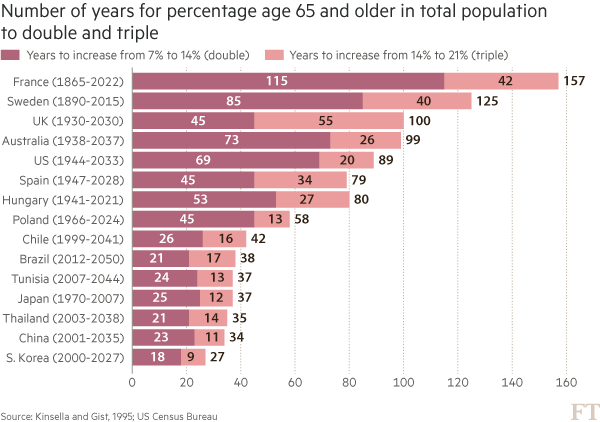
Here is an example from a story recently featured in the FT: emerging- market populations are expected to age more rapidly than those in developed countries. The figures alone are compelling: France is expected to take 157 years (from 1865 to 2022) to triple the proportion of its population aged over 65, from 7 per cent to 21 per cent; for China, the equivalent period is likely to be just 34 years (from 2001 to 2035).

You may think that visualising this story is as simple as creating a bar chart of the durations ordered by length. In fact, we came across just such a chart from a research agency.

But, to me, this approach generates “the feeling” — and further scrutiny reveals specific problems. A reader must work hard to memorise the date information next to the country labels to work out if there is a relationship between the start date and the length of time taken for the population to age. The chart is clearly not ideal, but how do we improve it?

Alan went on to talk about the process of improving the vis, eventually turning to [Joseph Priestly](https://en.wikipedia.org/wiki/Joseph_Priestley) for inspiration. Here’s their makeover:

![](http://im.ft-static.com/content/images/4a75d9ce-3223-11e6-bda0-04585c31b153.img)

Alan used D3 to make this, which had me head scratching for a bit. Bostock is genius & I :heart: D3 immensely, but I never really thought of it as a “canvas” for doing general data visualization creation for something like a print publication (it’s geared towards making incredibly data-rich interactive visualizations). It’s 100% cool to do so, though. It has fine-grained control over every aspect of a visualization and you can easily turn SVGs into PDFs or use them in programs like Illustrator to make the final enhancements. However, D3 is not the only tool that can make a chart like this.

I made the following in R (of course):

RStudio

The annotations in Alan’s image were (99% most likely) made with something like Illustrator. I stopped short of fully reproducing the image (life is super-crazy, still), but could have done so (the entire image is one `ggplot2` object).

This isn’t an “R > D3” post, though, since I use both. It’s about (a) reinforcing Alan’s posits that we should absolutely take inspiration from historical vis pioneers (so read more!) + need a diverse visualization “utility belt” (ref: Batman) to ensure you have the necessary tools to make a given visualization; (b) trusting your “Spidey-sense” when it comes to evaluating your creations/decisions; and, (c) showing that R is a great alternative to D3 for something like this :-)

Spider-man (you expected headier references from a dude with a shield avatar?) has this ability to sense danger right before it happens and if you’re making an effort to develop and share great visualizations, you definitely have this same sense in your DNA (though I would not recommend tossing pie charts at super-villains to stop them). When you’ve made something and it just doesn’t “feel right”, look to other sources of inspiration or reach out to your colleagues or the community for ideas or guidance. You _can_ and _do_ make awesome things, and you _do_ have a “Spidey-sense”. You just need to listen to it more, add depth and breadth to your “utility belt” and keep improving with each creation you release into the wild.

R code for the ggplot vis reproduction is below, and it + the CSV file referenced are in [this gist](https://gist.github.com/hrbrmstr/f12101f8ef1657f9e1457e0dde1602f8).

library(ggplot2)
library(dplyr)

ft <- read.csv("ftpop.csv", stringsAsFactors=FALSE)

arrange(ft, start_year) %>%
  mutate(country=factor(country, levels=c(" ", rev(country), "  "))) -> ft

ft_labs <- data_frame(
  x=c(1900, 1950, 2000, 2050, 1900, 1950, 2000, 2050),
  y=c(rep(" ", 4), rep("  ", 4)),
  hj=c(0.5, 0.5, 0.5, 0.5, 0.5, 0.5, 0.5, 0.5),
  vj=c(1, 1, 1, 1, 0, 0, 0, 0)
)

ft_lines <- data_frame(x=c(1900, 1950, 2000, 2050))

ft_ticks <- data_frame(x=seq(1860, 2050, 10))

gg <- ggplot()

# tick marks & gridlines
gg <- gg + geom_segment(data=ft_lines, aes(x=x, xend=x, y=2, yend=16),
                        linetype="dotted", size=0.15)
gg <- gg + geom_segment(data=ft_ticks, aes(x=x, xend=x, y=16.9, yend=16.6),
                        linetype="dotted", size=0.15)
gg <- gg + geom_segment(data=ft_ticks, aes(x=x, xend=x, y=1.1, yend=1.4),
                        linetype="dotted", size=0.15)

# double & triple bars
gg <- gg + geom_segment(data=ft, size=5, color="#b0657b",
                        aes(x=start_year, xend=start_year+double, y=country, yend=country))
gg <- gg + geom_segment(data=ft, size=5, color="#eb9c9d",
                        aes(x=start_year+double, xend=start_year+double+triple, y=country, yend=country))

# tick labels
gg <- gg + geom_text(data=ft_labs, aes(x, y, label=x, hjust=hj, vjust=vj), size=3)

# annotations
gg <- gg + geom_label(data=data.frame(), hjust=0, label.size=0, size=3,
                      aes(x=1911, y=7.5, label="France is set to take\n157 years to triple the\nproportion ot its\npopulation aged 65+,\nChina only 34 years"))
gg <- gg + geom_curve(data=data.frame(), aes(x=1911, xend=1865, y=9, yend=15.5),
                      curvature=-0.5, arrow=arrow(length=unit(0.03, "npc")))
gg <- gg + geom_curve(data=data.frame(), aes(x=1915, xend=2000, y=5.65, yend=5),
                      curvature=0.25, arrow=arrow(length=unit(0.03, "npc")))

# pretty standard stuff here
gg <- gg + scale_x_continuous(expand=c(0,0), limits=c(1860, 2060))
gg <- gg + scale_y_discrete(drop=FALSE)
gg <- gg + labs(x=NULL, y=NULL, title="Emerging markets are ageing at a rapid rate",
                subtitle="Time taken for population aged 65 and over to double and triple in proportion (from 7% of total population)",
                caption="Source: http://on.ft.com/1Ys1W2H")
gg <- gg + theme_minimal()
gg <- gg + theme(axis.text.x=element_blank())
gg <- gg + theme(panel.grid=element_blank())
gg <- gg + theme(plot.margin=margin(10,10,10,10))
gg <- gg + theme(plot.title=element_text(face="bold"))
gg <- gg + theme(plot.subtitle=element_text(size=9.5, margin=margin(b=10)))
gg <- gg + theme(plot.caption=element_text(size=7, margin=margin(t=-10)))
gg

The infamous @albertocairo [blogged about](http://www.thefunctionalart.com/2016/06/propublica-visualizes-seasonality-in.html) a [nice interactive piece on German company tax avoidance](https://projects.propublica.org/graphics/dividend) by @ProPublica. Here’s a snapshot of their interactive chart:

![](https://2.bp.blogspot.com/-S-8bu1UdYWM/V1rXibnBxrI/AAAAAAAAGo0/L940SpU3DvUPX90JK82jrKQN6fWMyn2IACLcB/s1600/1prop.png)

Dr. Cairo (his PhD is in the bag as far as I’m concerned :-) posited:

>_Isn’t it weird that the chart doesn’t have a scale on the Y-axis? It’s not the first time I see this, and it makes me feel uneasy._

I jumped over to the interactive piece to see if the authors used interactive tooltips since viewers can get a good idea for the scale limits if they do that and it _kinda sorta_ makes not having Y-axis label mostly OK if they compensate with said interactive notations. The interactive had no tooltips and the Y-axis was completely unlabeled.

Now, they used D3, so there _are_ built-in ways to create and add a Y-axis, so I don’t think this was an “oops…we forgot” moment. The Y values are “Short Interest Quantity” which is the quantity of stock shares that investors have sold short but not yet covered or closed out. It’s definitely a “1%-er” term and the authors already took time to explain some technical financial details and probably would have had to add even more text to explain this term properly (since that short definition is really not enough for most of us 99%-ers). It seems that they felt the the arrowed-annotations on the right hand side of the plot made up for the lack of actual Y-axis detail.

Should we _always_ have labels on a given axis? Would knowing that the Y-axis on this chart went from 0 to 800 million have aided in the decoding or groking the overall message? Here’s another example to help frame that question. This is the seminal `ggplot2::geom_density()` demo chart:

RStudio 2

Given that folks outside the realm of statistics/datasci really don’t grok what that Y-axis is saying, would it be _horribad_ to just leave it with a _”density”_ Y-label (sans unit marks) and then explain it in text (or talk to/around it in text but not go into detail)? Or should we keep the full annotations and spend a precious paragraph of text talking about measuring the area under a curve? (Another argument is to choose the right vis for the right audience but that’s another post entirely).

To further illustrate the posit, I recently made a series of what I call a “rank ordered segment plot” for a [report](https://information.rapid7.com/rs/495-KNT-277/images/rapid7-research-report-national-exposure-index-060716.pdf) that we did at @Rapid7:

ssh_rank_chart-1

There are text annotations for countries at either end of the spectrum on the X-axis but they aren’t individually labeled cuz…ewwww that’d be messy. The interactive version (coming this week over at `community.rapid7.com`) has the full table and light hover popup-annotations. But the point wasn’t to really focus on the countries as it was to depict the sad state of the ratio of unencrypted vs encrypted for a given service type within a country.

So, _should_ the ProPublica authors have tried to be more discrete w/r/t their Y-axis or is it fine the way it is? Does there _always_ need to be discrete axes annotations or is there some wiggle room? Opines are welcome in the comments since I honestly don’t think there is “one answer to rule them all” for this.

And for those that really want to see more discrete info on the ProPublica Y-axis labels, here’s a static, faceted chart (you may need to click/select/tap the chart to make it big enough to view):

Plot_Zoom

### Don’tTry This At Home!

ProPublica made that data available via two CSV files and the crosswalk org translation table via their main D3 javascript file (use Developer Tools “Inspect Element” to see such things). I ended up having to use `Sys.setlocale(‘LC_ALL’,’C’)` and expand the translation table a bit due to some of the mixed encodings in the data sets. Code to make the chart is below.

library(ggplot2)
library(dplyr)
library(stringi)
library(hrbrmisc)
library(scales)
library(ggalt)
library(sitools)

# mixed encodings ftw!
Sys.setlocale('LC_ALL','C') 

# different names in different data sets; sigh
org_crosswalk <- read.table(text='company,trans
"Adidas AG","Adidas AG"
"Allianz SE","Allianz SE"
"BASF SE","BASF SE"
"Bayer AG","Bayer AG"
"Bayerische Motoren Werke AG","BMW AG"
"BMW AG","BMW AG",
"Beiersdorf AG","Beiersdorf AG"
"Commerzbank AG","Commerzbank AG"
"Continental AG","Continental AG"
"Daimler AG","Daimler AG"
"Deutsche Bank AG","Deutsche Bank AG"
"Deutsche Boerse AG","Deutsche Boerse AG"
"Deutsche Lufthansa AG","Deutsche Lufthansa AG"
"Deutsche Post AG","Deutsche Post AG"
"Deutsche Telekom AG","Deutsche Telekom AG"
"E.ON","E.ON"
"Fresenius Medical Care AG & Co. KGaA","Fresenius Medical Care AG"
"Fresenius Medical Care AG","Fresenius Medical Care AG"
"Fresenius SE & Co KGaA","Fresenius SE & Co KGaA"
"HeidelbergCement AG","HeidelbergCement AG"
"Henkel AG & Co. KGaA","Henkel AG & Co. KGaA"
"Infineon Technologies AG","Infineon Technologies AG"
"K+S AG","K+S AG"
"Lanxess AG","Lanxess AG"
"Linde AG","Linde AG"
"Merck KGaA","Merck KGaA"
"MŸnchener RŸckversicherungs-Gesellschaft AG","Munich RE AG"
"M�nchener R�ckversicherungs-Gesellschaft AG","Munich RE AG"
"M\x9fnchener R\x9fckversicherungs-Gesellschaft AG","Munich RE AG"
"M?nchener R?ckversicherungs-Gesellschaft AG","Munich RE AG"
"Munich RE AG","Munich RE AG"
"RWE AG","RWE AG"
"SAP SE","SAP SE"
"Siemens AG","Siemens AG"
"ThyssenKrupp AG","ThyssenKrupp AG"
"Volkswagen AG","Volkswagen AG"', stringsAsFactors=FALSE, sep=",", quote='"', header=TRUE)

# quicker/less verbose than left_join()
org_trans <- setNames(org_crosswalk$trans, org_crosswalk$company)

# get and clean both data sets, being kind to the propublica bandwidth $
rec_url <- "https://projects.propublica.org/graphics/javascripts/dividend/record_dates.csv"
rec_fil <- basename(rec_url)
if (!file.exists(rec_fil)) download.file(rec_url, rec_fil)

records <- read.csv(rec_fil, stringsAsFactors=FALSE)
records %>%
  select(company=1, year=2, record_date=3) %>%
  mutate(record_date=as.Date(stri_replace_all_regex(record_date,
                                                    "([[:digit:]]+)/([[:digit:]]+)+/([[:digit:]]+)$",
                                                    "20$3-$1-$2"))) %>%
  mutate(company=ifelse(grepl("Gesellschaft", company), "Munich RE AG", company)) %>% 
  mutate(company=org_trans[company]) -> records

div_url <- "https://projects.propublica.org/graphics/javascripts/dividend/dividend.csv"
div_fil <- basename(div_url)
if (!file.exists(div_fil)) download.file(div_url, div_fil)

dividends <- read.csv(div_fil, stringsAsFactors=FALSE)

dividends %>%
  select(company=1, pricing_date=2, short_int_qty=3) %>%
  mutate(pricing_date=as.Date(stri_replace_all_regex(pricing_date,
                                                     "([[:digit:]]+)/([[:digit:]]+)+/([[:digit:]]+)$",
                                                     "20$3-$1-$2"))) %>%
  mutate(company=ifelse(grepl("Gesellschaft", company), "Munich RE AG", company)) %>% 
  mutate(company=org_trans[company]) -> dividends

# sitools::f2si() doesn't work so well for this for some reason, so mk a small helper function
m_fmt <- function (x) { sprintf("%d M", as.integer(x/1000000)) }

# gotta wrap'em all
subt <- wrap_format(160)("German companies typically pay shareholders one big dividend a year. With the help of U.S. banks, international investors briefly lend their shares to German funds that don’t have to pay a dividend tax. The avoided tax – usually 15 percent of the dividend – is split by the investors and other participants in the deal. These transactions cost the German treasury about $1 billion a year. [Y-axis == short interest quantity]")

gg <- ggplot()

# draw the markers for the dividends
gg <- gg + geom_vline(data=records,
                      aes(xintercept=as.numeric(record_date)),
                      color="#b2182b", size=0.25, linetype="dotted")

# draw the time series
gg <- gg + geom_line(data=dividends,
                     aes(pricing_date, short_int_qty, group=company),
                     size=0.15)

gg <- gg + scale_x_date(expand=c(0,0))
gg <- gg + scale_y_continuous(expand=c(0,0), labels=m_fmt,
                              limits=c(0,800000000))

gg <- gg + facet_wrap(~company, scales="free_x")

gg <- gg + labs(x="Red, dotted line == Dividend date", y=NULL,
                title="Tax Avoidance Has a Heartbeat",
                subtitle=subt,
                caption="Source: https://projects.propublica.org/graphics/dividend")

# devtools::install_github("hrbrmstr/hrbrmisc") or roll your own
gg <- gg + theme_hrbrmstr_an(grid="XY", axis="", strip_text_size=8.5,
                             subtitle_size=10)
gg <- gg + theme(axis.text=element_text(size=6))
gg <- gg + theme(panel.grid.major=element_line(size=0.05))
gg <- gg + theme(panel.background=element_rect(fill="#e2e2e233",
                                               color="#e2e2e233"))
gg <- gg + theme(panel.margin=margin(10,10,20,10))
gg <- gg + theme(plot.margin=margin(20,20,20,20))
gg <- gg + theme(axis.title.x=element_text(color="#b2182bee", size=9, hjust=1))
gg <- gg + theme(plot.caption=element_text(margin=margin(t=5)))
gg

It’s no seekrit that I :heart: Hilbert curve heatmaps of IPv4 space. Real-world IPv4 maps (i.e. the ones that drop dots on the Earth) have little utility, but with Hilbert curves maps of IPv4 space many different topologies can be superimposed (from ASNs to—if need be—geographic locations). Plus, there’s more opportunity to find patterns by keeping CIDRs naturally close to each other.

The Measurement Factory created the [`ipv4-heatmap`](http://maps.measurement-factory.com/) command-line utility back in 2007 and there have been some tweaks and expansions to it by others over time. I wanted to use these IPv4 heatmaps in the [National Exposure](https://community.rapid7.com/community/infosec/blog/2016/06/07/rapid7-releases-new-research) report I worked on with @todb & @jhartftw at @Rapid7 but _cannot stand_ the built-in red-blue color scheme, especially when there’s [viridis](https://cran.r-project.org/web/packages/viridis/vignettes/intro-to-viridis.html) available. So, I [forked the code](https://github.com/hrbrmstr/ipv4-heatmap) and added both viridis and [colorbrewer](colorbrewer2.org) palettes to it as command-line options.

Here are two examples (the results of the National Exposure study), one using viridis and one using the colorbrewer `rdbu` palette:

![](https://www.dropbox.com/s/we5f5u7ejj7cp8l/viridis.png?raw=1)

![](https://www.dropbox.com/s/uznijxxq99qoces/rdbu-inverted.png?raw=1)

You specify the palette with `-P palette` and can invert the order of any palette with `-i` and the chosen palette will also be used in any legend you add the visualization.

Since these 4096×4096 files are a bit big, you can hit up [this dropbox link](https://www.dropbox.com/sh/wqyly8ewxeko5jn/AAC5bHIpQTuxWGBPYzMqceLQa?dl=0) to see a “gallery” of the various forward and reverse palettes.

The palette selection code is a bit brute-force at the moment, mostly due to the fact that I’m planning on a C++ port of the code and eventual inclusion of the Hilbert heatmap functionality in the [`iptools`](http://github.com/hrbrmstr/iptools) package.

This made the rounds on social media last week:

One of the original versions was static and was not nearly as popular, but—as you can see—this one went viral.

Despite the public’s infatuation with circles (I’m lookin’ at you, pie charts), I’m not going to reproduce this polar coordinate visualization in ggplot2. I believe others have already done so (or are doing so) and you can mimic the animation pretty easily with `coord_polar()` and @drob’s enhanced ggplot2 animation tools.

NOTE: If you’re more interested in the stats/science than a spirograph or colorful D3 animation (below), Gavin Simpson (@ucfagls) has an [awesome post](http://www.fromthebottomoftheheap.net/2016/03/25/additive-modeling-global-temperature-series-revisited/) with a detailed view of the HadCRUT data set.

## HadCRUT in R

I noticed that [the original data source](http://www.metoffice.gov.uk/hadobs/hadcrut4/), had 12 fields, two of which (columns 11 & 12) are the lower+upper bounds of the 95% confidence interval of the combined effects of all the uncertainties described in the HadCRUT4 error model (measurement and sampling, bias and coverage uncertainties). The spinning vis of doom may be mesmerizing, but it only shows the median. I thought it might be fun to try to make a good looking visualization using the CI as well (you can pick one of the other pairs to try this at home), both in R and then in D3. I chose D3 for the animated version mostly to play with the new 4.0 main branch, but I think it’s possible to do more with dynamic visualizations in D3 than it is with R (and it doesn’t require stop-motion techniques).

The following code:

– reads in the data set (and saves it locally to be nice to their bandwidth bill)
– does some munging to get fields we need
– saves a version out for use with D3
– uses `geom_segment()` + `geom_point()` to do the heavy lifting
– colors the segments by year using the `viridis` palette (the Plasma version)
– labels the plot by decade using facets and some fun facet margin “tricks” to make it look like the x-axis labels are on top

library(readr)    # read_table() / write_csv()
library(dplyr)
library(zoo)      # as.yearmon()
library(ggplot2)  # devtools::install_github("hadley/ggplot2")
library(hrbrmisc) # devtools::install_github("hrbrmstr/hrbrmisc")
library(viridis)

URL <- "http://www.metoffice.gov.uk/hadobs/hadcrut4/data/current/time_series/HadCRUT.4.4.0.0.monthly_ns_avg.txt"
fil <- sprintf("data/%s", basename(URL))
if (!file.exists(fil)) download.file(URL, fil)

global_temps <- read_table(fil, col_names=FALSE)

global_temps %>%
  select(year_mon=1, median=2, lower=11, upper=12) %>%
  mutate(year_mon=as.Date(as.yearmon(year_mon, format="%Y/%m")),
         year=as.numeric(format(year_mon, "%Y")),
         decade=(year %/% 10) * 10,
         month=format(year_mon, "%b")) %>%
  mutate(month=factor(month, levels=month.abb)) %>%
  filter(year != 2016) -> global_temps

# for D3 vis
write_csv(global_temps, "data/temps.csv")

#+ hadcrut, fig.retina=2, fig.width=12, fig.height=6
gg <- ggplot(global_temps)
gg <- gg + geom_segment(aes(x=year_mon, xend=year_mon, y=lower, yend=upper, color=year), size=0.2)
gg <- gg + geom_point(aes(x=year_mon, y=median), color="white", shape=".", size=0.01)
gg <- gg + scale_x_date(name="Median in white", expand=c(0,0.5))
gg <- gg + scale_y_continuous(name=NULL, breaks=c(0, 1.5, 2),
                              labels=c("0°C", "1.5°C", "2.0°C"), limits=c(-1.6, 2.25))
gg <- gg + scale_color_viridis(option="C")
gg <- gg + facet_wrap(~decade, nrow=1, scales="free_x")
gg <- gg + labs(title="Global Temperature Change (1850-2016)",
                subtitle="Using lower and upper bounds of the 95% confidence interval of the combined effects of all the uncertainties described in the HadCRUT4 error model (measurement and sampling, bias and coverage uncertainties; fields 11 & 12)",
                caption="HadCRUT4 (http://www.metoffice.gov.uk/hadobs/hadcrut4/index.html)")
gg <- gg + theme_hrbrmstr_my(grid="XY")
gg <- gg + theme(panel.background=element_rect(fill="black", color="#2b2b2b", size=0.15))
gg <- gg + theme(panel.margin=margin(0,0,0,0))
gg <- gg + theme(panel.grid.major.y=element_line(color="#b2182b", size=0.25))
gg <- gg + theme(strip.text=element_text(hjust=0.5))
gg <- gg + theme(axis.title.x=element_text(hjust=0, margin=margin(t=-10)))
gg <- gg + theme(axis.text.x=element_blank())
gg <- gg + theme(axis.text.y=element_text(size=12, color="#b2182b"))
gg <- gg + theme(legend.position="none")
gg <- gg + theme(plot.margin=margin(10, 10, 10, 10))
gg <- gg + theme(plot.caption=element_text(margin=margin(t=-6)))
gg

hadcrut

(Click image for larger version)

My `theme_hrbrmstr_my()` required the Myriad Pro font, so you’ll need to use one of the other themes in the `hrbrmisc` package or fill in some `theme()` details on your own.

## HadCRUT in D3

While the static visualization is pretty, we can kick it up a bit with some basic animations. Rather than make a multi-file HTML+js+D3+CSS example, this is all self-contained (apart from the data) in a single `index.html` file (some folks asked for the next D3 example to be self-contained).

Some nice new features of D3 4.0 (that I ended up using here):

– easier to use `scale`s
– less verbose `axis` creation
– `viridis` is now a first-class citizen

Mike Bostock has spent much time refining the API for [D3 4.0](https://github.com/d3/d3) and it shows. I’m definitely looking forward to playing with it over the rest of the year.

The vis is below but you can bust the `iframe` via [https://rud.is/projects/hadcrut4/](https://rud.is/projects/hadcrut4/).

I have it setup as “click to view” out of laziness. It’s not hard to make it trigger on `div` scroll visibility, but this way you also get to repeat the visualization animation without it looping incessantly.

If you end up playing with the D3 code, definitely change the width. I had to make it a bit smaller to fit it into the blog theme.

## Fin

You can find the source for both the R & D3 visualizations [on github](https://github.com/hrbrmstr/hadcrut).

I follow the most excellent Pew Research folks on Twitter to stay in tune with what’s happening (statistically speaking) with the world. Today, they tweeted this excerpt from their 2015 Global Attitudes survey:

I thought it might be helpful to folks if I made a highly aesthetically tuned version of Pew’s chart (though I chose to go a bit more minimal in terms of styling than they did) with the new geom_dumbbell() in the development version of ggalt. The source (below) is annotated, but please drop a note in the comments if any of the code would benefit from more exposition.

I’ve also switched to using the Prism javascript library starting with this post after seeing how well it works in RStudio’s flexdashboard package. If the “light on black” is hard to read or distracting, drop a note here and I’ll switch the theme if enough folks are having issues.

library(ggplot2) # devtools::install_github("hadley/ggplot2")
library(ggalt)   # devtools::install_github("hrbrmstr/ggalt")
library(dplyr)   # for data_frame() & arrange()

# I'm not crazy enough to input all the data; this will have to do for the example
df <- data_frame(country=c("Germany", "France", "Vietnam", "Japan", "Poland", "Lebanon",
                           "Australia", "South\nKorea", "Canada", "Spain", "Italy", "Peru",
                           "U.S.", "UK", "Mexico", "Chile", "China", "India"),
                 ages_35=c(0.39, 0.42, 0.49, 0.43, 0.51, 0.57,
                           0.60, 0.45, 0.65, 0.57, 0.57, 0.65,
                           0.63, 0.59, 0.67, 0.75, 0.52, 0.48),
                 ages_18_to_34=c(0.81, 0.83, 0.86, 0.78, 0.86, 0.90,
                                 0.91, 0.75, 0.93, 0.85, 0.83, 0.91,
                                 0.89, 0.84, 0.90, 0.96, 0.73, 0.69),
                 diff=sprintf("+%d", as.integer((ages_18_to_34-ages_35)*100)))

# we want to keep the order in the plot, so we use a factor for country
df <- arrange(df, desc(diff))
df$country <- factor(df$country, levels=rev(df$country))

# we only want the first line values with "%" symbols (to avoid chart junk)
# quick hack; there is a more efficient way to do this
percent_first <- function(x) {
  x <- sprintf("%d%%", round(x*100))
  x[2:length(x)] <- sub("%$", "", x[2:length(x)])
  x
}

gg <- ggplot()
# doing this vs y axis major grid line
gg <- gg + geom_segment(data=df, aes(y=country, yend=country, x=0, xend=1), color="#b2b2b2", size=0.15)
# dum…dum…dum!bell
gg <- gg + geom_dumbbell(data=df, aes(y=country, x=ages_35, xend=ages_18_to_34),
                         size=1.5, color="#b2b2b2", point.size.l=3, point.size.r=3,
                         point.colour.l="#9fb059", point.colour.r="#edae52")
# text below points
gg <- gg + geom_text(data=filter(df, country=="Germany"),
                     aes(x=ages_35, y=country, label="Ages 35+"),
                     color="#9fb059", size=3, vjust=-2, fontface="bold", family="Calibri")
gg <- gg + geom_text(data=filter(df, country=="Germany"),
                     aes(x=ages_18_to_34, y=country, label="Ages 18-34"),
                     color="#edae52", size=3, vjust=-2, fontface="bold", family="Calibri")
# text above points
gg <- gg + geom_text(data=df, aes(x=ages_35, y=country, label=percent_first(ages_35)),
                     color="#9fb059", size=2.75, vjust=2.5, family="Calibri")
gg <- gg + geom_text(data=df, color="#edae52", size=2.75, vjust=2.5, family="Calibri",
                     aes(x=ages_18_to_34, y=country, label=percent_first(ages_18_to_34)))
# difference column
gg <- gg + geom_rect(data=df, aes(xmin=1.05, xmax=1.175, ymin=-Inf, ymax=Inf), fill="#efefe3")
gg <- gg + geom_text(data=df, aes(label=diff, y=country, x=1.1125), fontface="bold", size=3, family="Calibri")
gg <- gg + geom_text(data=filter(df, country=="Germany"), aes(x=1.1125, y=country, label="DIFF"),
                     color="#7a7d7e", size=3.1, vjust=-2, fontface="bold", family="Calibri")
gg <- gg + scale_x_continuous(expand=c(0,0), limits=c(0, 1.175))
gg <- gg + scale_y_discrete(expand=c(0.075,0))
gg <- gg + labs(x=NULL, y=NULL, title="The social media age gap",
                subtitle="Adult internet users or reported smartphone owners who\nuse social networking sites",
                caption="Source: Pew Research Center, Spring 2015 Global Attitudes Survey. Q74")
gg <- gg + theme_bw(base_family="Calibri")
gg <- gg + theme(panel.grid.major=element_blank())
gg <- gg + theme(panel.grid.minor=element_blank())
gg <- gg + theme(panel.border=element_blank())
gg <- gg + theme(axis.ticks=element_blank())
gg <- gg + theme(axis.text.x=element_blank())
gg <- gg + theme(plot.title=element_text(face="bold"))
gg <- gg + theme(plot.subtitle=element_text(face="italic", size=9, margin=margin(b=12)))
gg <- gg + theme(plot.caption=element_text(size=7, margin=margin(t=12), color="#7a7d7e"))
gg

RStudio

The Wall Street Journal did a project piece [a while back](http://projects.wsj.com/waste-lands/) in the _”Waste Lands: America’s Forgotten Nuclear Legacy”_. They dug through [Department of Energy](http://www.lm.doe.gov/default.aspx?id=2602) and [CDC](http://www.cdc.gov/niosh/ocas/ocasawe.html) data to provide an overview of the lingering residue of this toxic time in America’s past (somehow, I have to believe the fracking phenomena of our modern era will end up doing far more damage in the long run).

Being a somewhat interactive piece, I was able to tease out the data source behind it for this week’s challenge. I’m, once again, removing the obvious vis and re-creating a non-interactive version of the WSJ’s main map view (with some additional details).

There’s definitely a story or two here, but I felt that the overall message fell a bit flat the way the WSJ folks told it. Can you find an angle or question that tells a tale in a more compelling fashion? I added some hints in the code snippet below (and in the repo) as to how you might find additional details for each toxic site (and said details are super-scrape-able with `rvest`). I also noticed some additional external data sets that could be brought in (but I’ll leave that detective work to our contestants).

If you’re up to the task, fork [this week’s repo](https://github.com/52vis/2016-15), create a subdirectory for your submission and shoot a PR my way (notifying folks here in the comments about your submission is also encouraged).

Entries accepted up until 2016-04-20 23:59:59 EDT.

Hadley has volunteered a signed book and I think I’ll take him up on the offer for this week’s prize (unless you really want a copy of Data-Driven Security :-).

One last note: I’ve secured `52vis.com` and will be getting that configured for next week’s contest. It’ll be a nice showcase site for all the submissions.

library(albersusa) # devtools::install_github("hrbrmstr/hrbrmisc")
library(rgeos)
library(maptools)
library(ggplot2)
library(ggalt)
library(ggthemes)
library(jsonlite)
library(tidyr)
library(dplyr)
library(purrr)
 
#' WSJ Waste Lands: http://projects.wsj.com/waste-lands/
#' Data from: http://www.lm.doe.gov/default.aspx?id=2602 &
#'            http://www.cdc.gov/niosh/ocas/ocasawe.html
 
sites <- fromJSON("sites.json", flatten=TRUE)
 
#' need to replace the 0-length data.frames with at least one row of `NA`s
#' so we can safely `unnest()` them later
 
sites$locations <- map(sites$locations, function(x) {
  if (nrow(x) == 0) {
    data_frame(latitude=NA, longitude=NA, postal_code=NA, name=NA, street_address=NA)
  } else {
    x
  }
})
 
#' we'll need this later
 
sites$site.rating <- factor(sites$site.rating,
                           levels=c(3:0),
                           labels=c("Remote or no potential for radioactive contamination, based on criteria at the time of FUSRAP review.",
                                    "Referred to another agency or program, no authority to clean up under FUSRAP, or status unclear.",
                                    "Cleanup declared complete under FUSRAP.",
                                    "Cleanup in progress under the Formerly Utilized Sites Remedial Action Program (FUSRAP)."))
 
#' One teensy discrepancy:
 
nrow(sites)
 
#' ## [1] 517
#'
#' The stacked bars total on the WSJ site is 515.
#' Further complication is that sites$locations is a list column with nested
#' data.frames:
 
sites <- unnest(sites)
 
nrow(sites)
 
#' ## [1] 549
 
sum(complete.cases(sites[,c("longitude", "latitude")]))
 
#' ## [1] 352
#'
#' So, just mapping long/lat is going to miss part of the story. But, I'm just
#' providing a kick-start for folks, so I'll just map long/lat :-)
 
glimpse(sites)
 
#' ## Observations: 549
#' ## Variables: 11
#' ## $ site.city      (chr) "Flint", "Albuquerque", "Buffalo", "Los...
#' ## $ site.name      (chr) "AC Spark Plug, Dort Highway Plant", "A...
#' ## $ site.rating    (fctr) Remote or no potential for radioactive...
#' ## $ site.state     (chr) "MI", "NM", "NY", "NM", "PA", "NY", "OH...
#' ## $ site.state_ap  (chr) "Mich.", "N.M.", "N.Y.", "N.M.", "Pa.",...
#' ## $ site.slug      (chr) "1-ac-spark-plug-dort-highway-plant", "...
#' ## $ latitude       (dbl) 43.02938, NA, NA, 35.88883, 39.95295, 4...
#' ## $ longitude      (dbl) -83.65525, NA, NA, -106.30502, -75.5927...
#' ## $ postal_code    (chr) "48506", NA, NA, "87544", "19382", "100...
#' ## $ name           (chr) "", NA, NA, "", "", "", "Former Buildin...
#' ## $ street_address (chr) "1300 North Dort Highway", NA, NA, "Pue...
 
#' Note that `site.slug` can be used with this URL:
#' `http://projects.wsj.com/waste-lands/site/SITE.SLUG.HERE/` to get to
#' detail pages on the WSJ site.
 
#' I want to use my `albersusa` mutated U.S. shapefile for this (NOTE: I'm moving
#' `albersus` into one of the rOpenSci pacakges soon vs publishing it standalone to CRAN)
#' so I need to mutate the Alaska points (there are no Hawaii points).
#' This step is *not necessary* unless you plan on displaying points on this
#' mutated map. I also realized I need to provide a mutated projection translation
#' function for AK & HI for the mutated Albers mapss.
 
tmp  <- data.frame(dplyr::select(filter(sites, site.state=="AK"), longitude, latitude))
coordinates(tmp) <- ~longitude+latitude
proj4string(tmp) <- CRS(us_longlat_proj)
tmp <- spTransform(tmp, CRS(us_laea_proj))
tmp <- elide(tmp, rotate=-50)
tmp <- elide(tmp, scale=max(apply(bbox(tmp), 1, diff)) / 2.3)
tmp <- elide(tmp, shift=c(-2100000, -2500000))
proj4string(tmp) <- CRS(us_laea_proj)
tmp <- spTransform(tmp, us_longlat_proj)
tmp <- as.data.frame(tmp)
 
sites[sites$site.state=="AK",]$longitude <- tmp$x
sites[sites$site.state=="AK",]$latitude <- tmp$y
 
#' and now we plot the sites
 
us_map <- fortify(usa_composite(), region="name")
 
gg <- ggplot()
gg <- gg + geom_map(data=us_map, map=us_map,
                    aes(x=long, y=lat, map_id=id),
                    color="#2b2b2b", size=0.15, fill="#e5e3df")
gg <- gg + geom_point(dat=sites, aes(x=longitude, y=latitude, fill=site.rating),
                      shape=21, color="white", stroke=1, alpha=1, size=3)
gg <- gg + scale_fill_manual(name="", values=c("#00a0b0", "#edc951", "#6a4a3c", "#eb6841"))
gg <- gg + coord_proj(us_laea_proj)
gg <- gg + guides(fill=guide_legend(override.aes=list(alpha=1, stroke=0.2, color="#2b2b2b", size=4)))
gg <- gg + labs(title="Waste Lands: America's Forgotten Nuclear Legacy",
                 caption="Data from the WSJ")
gg <- gg + theme_map()
gg <- gg + theme(legend.position="bottom")
gg <- gg + theme(legend.direction="vertical")
gg <- gg + theme(legend.key=element_blank())
gg <- gg + theme(plot.title=element_text(size=18, face="bold", hjust=0.5))
gg

waste

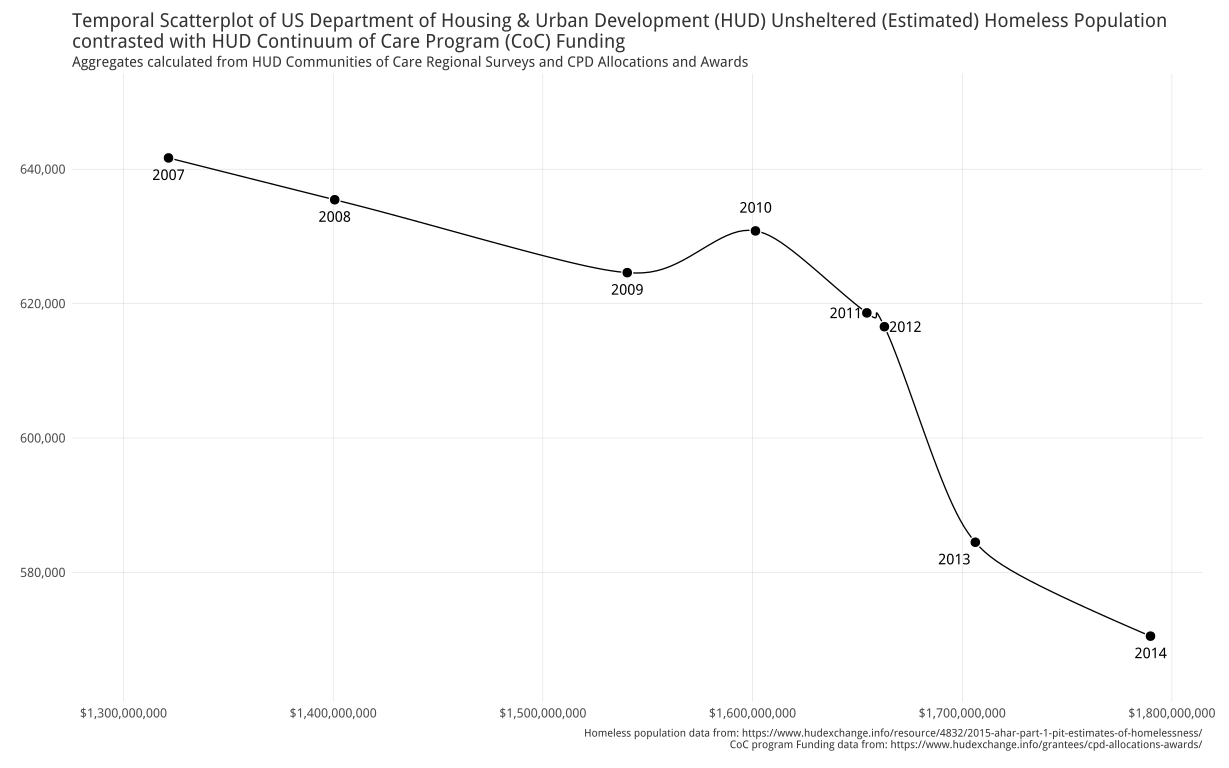
I’ve been staring at this homeless data set for a few weeks now since I’m using it both here and in the data science class I’m teaching. It’s been one of the most mindful data sets I’ve worked with in a while. Even when reduced to pure numbers in named columns, the names really stick with you…_”Unsheltered Homeless People in Families”_…_”Unsheltered Chronically Homeless”_…_”Homeless Veterans”_…_”Unsheltered Homeless Unaccompanied Youth”_. These are real people, really hurting.

That’s one of the _superpowers_ “Data Science” gives you: the ability to shed light on the things that matter and to tell meaningful stories that people _need_ to hear. From my interactions with some of the folks who submitted entries, I know they, too, were impacted by the stories contained in this data set. Let’s see what they uncovered.

(All the code & un-shrunk visualizations are in the [52vis github repo](https://github.com/52vis/2016-14))

Camille compared a point-in-time view of one of the most vulnerable parts of the population—youth (under 25)—with the overall population:

homeless_rates

The youth homelessness situation in Nevada seems especially disconcerting and I wonder how much better/worse it might be if we factored in the 25 & under U.S. census information (I’m really a bit reticent to run those numbers for fear it’ll be even worse).

Craine Munton submitted our first D3 entry! I ended up tweaking some of the JS & CSS `href`s (to fix non-sync’d files) and you can see the full version [here](https://rud.is/52vis/2016-14/cmrunton/). I’m going to try to embed it below as well (I’ll leave it up even if it’s not fully sized well. Just hit the aforementioned URL for the full-browser version).

Craine focused on another vulnerable and sometimes forgotten segment: those that put their lives on the line for our freedom and the safety and security of threatened people groups around the globe.

Joshua Kunst is an incredibly talented individual who has made a number of stunning visualizations in R. He used htmlwidgets to tell [a captivating story](https://rud.is/52vis/2016-14/jbkunst/) that ends in (statistically inferred) _hope_.

Hit the [full page](https://rud.is/52vis/2016-14/jbkunst/) for the frame-busted visualization.

Jake Kaupp took inspiration from Alberto Cairo and created some truly novel visualizations. I’m putting the easiest to embed first:

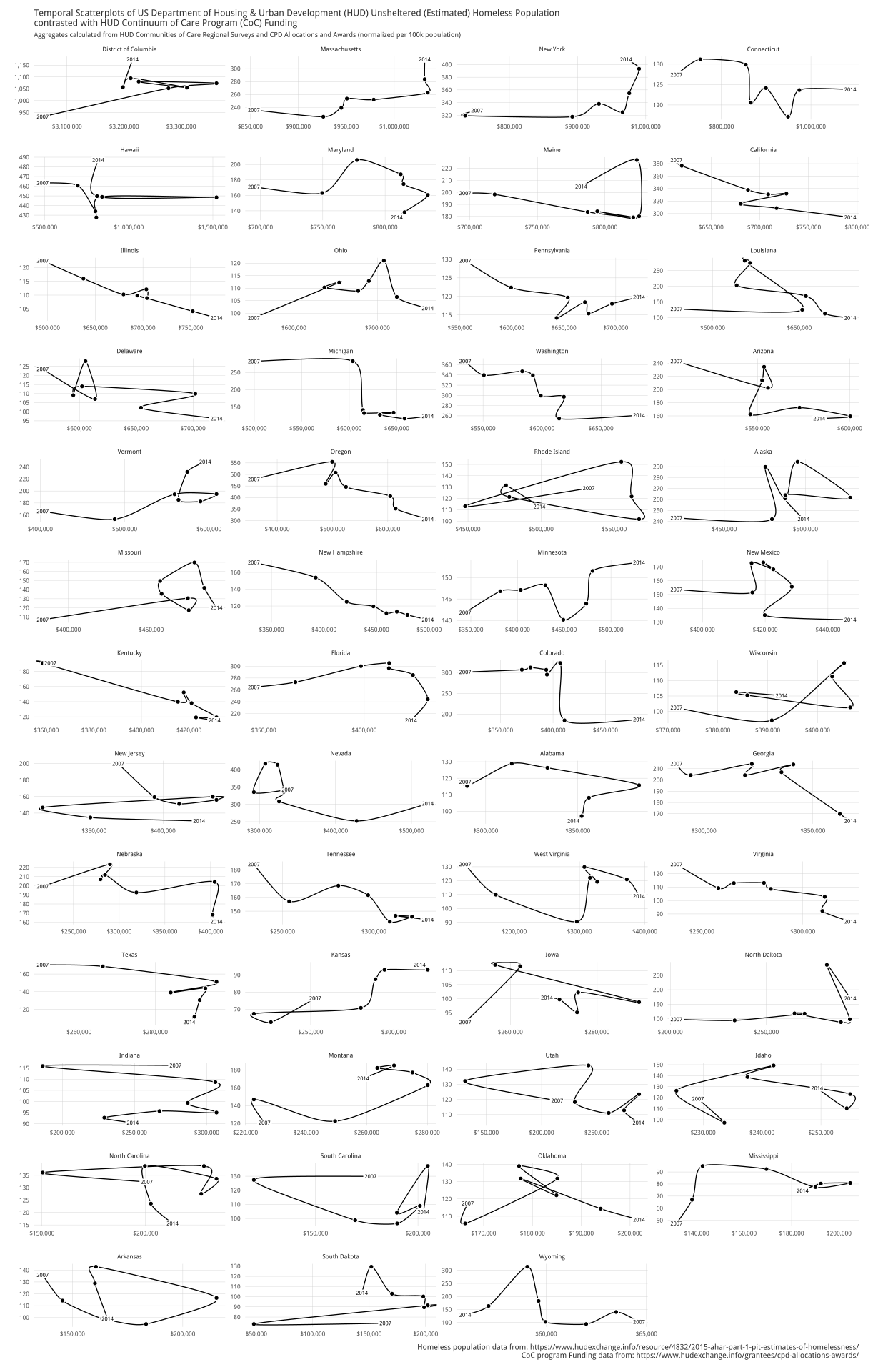
Jake has [written a superb piece](https://jkaupp.github.io/) on his creation, included an [interactive Shiny app](https://jkaupp.shinyapps.io/52vis_Homeless/) and brought in extra data to try to come to grips with this data. Definitely take time to read his post (even if it means you never get back to this post).

His small-multiples view is below but you should click on it to see it in full-browser view.

Jonathan Carroll (another fellow rOpenSci’er) created a companion [blog post](http://jcarroll.com.au/2016/04/10/52vis-week-2-challenge/) for his animated choropleth entry:

HomelessPopulation_optim

I really like how it highlights the differences per year and a number of statistical/computational choices he made.

Julia Silge focused on youth as well asking two compelling questions (you can read her [exposition](http://rpubs.com/juliasilge/170499) as well):

unnamed-chunk-7-1

unnamed-chunk-9-1

(In seeing this second youth-focused vis and also having a clearer picture of the areas of greatest concern, I’m wondering if there’s a climate/weather-oriented reason for certain areas standing out when it comes to homeless youth issues.)

Philipp Ottolinger took a statistical look at youth and veterans:

homeless_plot

Make sure to dedicate some cycles to [check out his approach](https://github.com/ottlngr/2016-14/blob/ottlngr/ottlngr/homeless_ottlngr.Rmd).

@patternproject did not succumb to the temptation to draw a map just because “it’s U.S. State data” and chose, instead, to look across time and geography to tease out patterns using a heatmap.

Rplot01

I _really_ like this novel approach and am now rethinking my approach geo-temporal visualizations.

Xan Gregg looked at sheltered vs unsheltered homeless populations from a few different viewpoints (including animation).

homelesslines

homelessmaps

sheltered-homeless-by-state

(Again, beautiful work in JMP).

### We have a winner

The diversity and craftsmanship of these entries was amazing to see, as was the care and attention each submitter took when dealing with this truly tough subject. I was personally impacted by each one and I hope it raised awareness in the broader data science community.

I couldn’t choose between Joshua Kunst’s & Jake Kaupp’s entries so they’re tied for first place and they’ll both be getting a copy of [Data-Driven Security](http://dds.ec/amzn).

Joshua & Jake: hit up bob at rudis dot net to claim your prize!

A $50.00 donation has also been made to the [National Coalition for the Homeless](http://nationalhomeless.org/) dedicating it by name to each of the contest participants.