Skip navigation

Thanks to a nice call-out post link on Flowing Data in my RSS feeds this morning, I found Naomi Robbins’ Effective Graphs Forbes blog, perused the archives a bit and came across her post on arrow charts.

She presented a nice comparison between (ugh) pie charts, arrow charts and slopegraphs. Sadly, both the NPR slopegraph and Peltier’s slopegraph included in the article committed some of the cardinal sins of slopegraphs I have pointed out previously. Let’s take a look (click on each graphic to make them bigger):


  • Use of binning/rounding without annotation
  • Use of binning/rounding but not to show rate of change
  • Stacking labels (presenting rank where none exists)

More faithful representations would be explicit rounding/binning (to only show rate of change):

or the full scale version (warning: huge slopegraph) to accurately show the value differences and rate of change:

The data set is small, so transcription is not really be an issue, but here is is for you if you want to play with it some more.

This is definitely a case where her arrow charts are a solid alternative to slopegraphs, so definitely check out her post.

You may not be aware of the fact that the #spiffy Verizon Biz folk have some VERIS open source components, one of which is the XML schema for the “Vocabulary for Event Recording and Incident Sharing”.

While most Java-backends will readily slurp up and spit back archaic XML data, the modern web is a JSON world and I wanted to take a stab at encoding the sample incident in JSON format since I’m pretty convinced this type of data is definitely a NoSQL candidate and that JSON is the future.

I didn’t run this past the VZB folk prior to the post, but I think I got it right (well, it validates, at least :-) :

  1. {
  2.   "VERIS_community": {
  3.     "incident": {
  4.       "incident_uid": "String",
  5.       "handler_id": "String",
  6.       "security_compromise": "String",
  7.       "related_incidents": { "related_incident_id": "String" },
  8.       "summary": "String",
  9.       "notes": "String",
  10.       "victim": {
  11.         "victim_id": "String",
  12.         "industry": "000",
  13.         "employee_count": "25,001 to 50,000",
  14.         "location": {
  15.           "country": "String",
  16.           "region": "String"
  17.         },
  18.         "revenue": {
  19.           "amount": "0",
  20.           "iso_currency_code": "USD"
  21.         },
  22.         "security_budget": {
  23.           "amount": "0",
  24.           "iso_currency_code": "USD"
  25.         },
  26.         "notes": "String"
  27.       },
  28.       "agent": [
  29.         {
  30.           "motive": "String",
  31.           "role": "String",
  32.           "notes": "String"
  33.         },
  34.         {
  35.           "type": "External",
  36.           "motive": "String",
  37.           "role": "String",
  38.           "notes": "String",
  39.           "external_variety": "String",
  40.           "origins": {
  41.             "origin": {
  42.               "country": "String",
  43.               "region": "String"
  44.             }
  45.           },
  46.           "ips": { "ip": "String" }
  47.         },
  48.         {
  49.           "type": "Internal",
  50.           "motive": "String",
  51.           "role": "String",
  52.           "notes": "String",
  53.           "internal_variety": "String"
  54.         },
  55.         {
  56.           "type": "Partner",
  57.           "motive": "String",
  58.           "role": "String",
  59.           "notes": "String",
  60.           "industry": "0000",
  61.           "origins": {
  62.             "origin": {
  63.               "country": "String",
  64.               "region": "String"
  65.             }
  66.           }
  67.         }
  68.       ],
  69.       "action": [
  70.         { "notes": "Some notes about a generic action." },
  71.         {
  72.           "type": "Malware",
  73.           "notes": "String",
  74.           "malware_function": "String",
  75.           "malware_vector": "String",
  76.           "cves": { "cve": "String" },
  77.           "names": { "name": "String" },
  78.           "filenames": { "filename": "String" },
  79.           "hash_values": { "hash_value": "String" },
  80.           "outbound_IPs": { "outbound_IP": "String" },
  81.           "outbound_URLs": { "outbound_URL": "String" }
  82.         },
  83.         {
  84.           "type": "Hacking",
  85.           "notes": "String",
  86.           "hacking_method": "String",
  87.           "hacking_vector": "String",
  88.           "cves": { "cve": "String" }
  89.         },
  90.         {
  91.           "type": "Social",
  92.           "notes": "String",
  93.           "social_tactic": "String",
  94.           "social_channel": "String",
  95.           "email": {
  96.             "addresses": { "address": "String" },
  97.             "subject_lines": { "subject_line": "String" },
  98.             "urls": { "url": "String" }
  99.           }
  100.         },
  101.         {
  102.           "type": "Misuse",
  103.           "notes": "Notes for a misuse action.",
  104.           "misuse_variety": "String",
  105.           "misuse_venue": "String"
  106.         },
  107.         {
  108.           "type": "Physical",
  109.           "notes": "Notes for a physical action.",
  110.           "physical_variety": "String",
  111.           "physical_location": "String",
  112.           "physical_access": "String"
  113.         },
  114.         {
  115.           "type": "Error",
  116.           "notes": "Notes for a Error action.",
  117.           "error_variety": "String",
  118.           "error_reason": "String"
  119.         },
  120.         {
  121.           "type": "Environmental",
  122.           "notes": "Notes for a environmental action.",
  123.           "environmental_variety": "String"
  124.         }
  125.       ],
  126.       "assets": {
  127.         "asset_variety": "String",
  128.         "asset_ownership": "String",
  129.         "asset_hosting": "String",
  130.         "asset_management": "String",
  131.         "os": "String",
  132.         "notes": "String"
  133.       },
  134.       "attribute": [
  135.         { "notes": "String" },
  136.         {
  137.           "type": "ConfidentialityPossession",
  138.           "notes": "String",
  139.           "data_disclosure": "String",
  140.           "data": {
  141.             "data_variety": "String",
  142.             "amount": "0"
  143.           },
  144.           "data_state": "String"
  145.         },
  146.         {
  147.           "type": "AvailabilityUtility",
  148.           "notes": "String",
  149.           "availability_utility_variety": "String",
  150.           "availability_utility_duration": "String"
  151.         }
  152.       ],
  153.       "timeline": {
  154.         "timestamp_first_known_action": {
  155.           "year": "2001",
  156.           "month": "--12",
  157.           "day": "---17",
  158.           "time": "14:20:00.0Z"
  159.         },
  160.         "timestamp_data_exfiltration": {
  161.           "year": "2001",
  162.           "month": "--12",
  163.           "day": "---17",
  164.           "time": "14:20:00.0Z"
  165.         },
  166.         "timestamp_incident_discovery": {
  167.           "year": "2001",
  168.           "month": "--12",
  169.           "day": "---17",
  170.           "time": "14:20:00.0Z"
  171.         },
  172.         "timestamp_containment": {
  173.           "year": "2001",
  174.           "month": "--12",
  175.           "day": "---17",
  176.           "time": "14:20:00.0Z"
  177.         },
  178.         "timestamp_initial_compromise": {
  179.           "year": "2001",
  180.           "month": "--12",
  181.           "day": "---17",
  182.           "time": "14:20:00.0Z"
  183.         },
  184.         "timestamp_investigation": {
  185.           "year": "2001",
  186.           "month": "--12",
  187.           "day": "---17",
  188.           "time": "14:20:00.0Z"
  189.         }
  190.       },
  191.       "discovery_method": "String",
  192.       "control_failure": "String",
  193.       "corrective_action": "String",
  194.       "loss": {
  195.         "loss_variety": "String",
  196.         "loss_amount": {
  197.           "amount": "0",
  198.           "iso_currency_code": "USD"
  199.         }
  200.       },
  201.       "impact_rating": "String",
  202.       "impact_estimate": {
  203.         "amount": "0",
  204.         "iso_currency_code": "USD"
  205.       },
  206.       "certainty": "String"
  207.     }
  208.   }
  209. }

I believe I’d advocate for the “timestamps” to be more timestamp-y in the JSON version (the dashes do not make much sense to me even in the XML version) and any fields with min/max range values to be separated to actual min & max fields. I’m going try to find some cycles to mock up a MongoDB / Node.js sample to show how this JSON format would work. At a minimum, even a rough conversion from XML to JSON when requested by a browser would make it easier for client-side data rendering/manipulation.

If you’re not thinking about using VERIS for documenting incidents or hounding your vendors to enable easier support for it, you should be. If you’re skittish about recording incidents anonymously into the VERIS Community, you should get over it (barring capacity constraints).

Benchmarking/profiling is one of the fundamental practices for tech folk and Feng Shen’s recent post to Hacker News continues this fine tradition with a look at startup & run times for “fibonacci(40)” in seven computer languages (two ‘C’ variants, Clojure, go, python, node & Java).

Good, quick project, but I didn’t think the chart he made (check the site) comparing the results did proper justice (though python is the clear loser even with Clojure’s horrid startup time) to each language, so I charted out the startup times separately:

Here’s a Google Drive spreadsheet for the data that also has larger views of the charts.

In @jayjacobs’ latest post on SSH honeypot passsword analysis he shows some spiffy visualizations from crunching the data with Tableau. While I’ve joked with him and called them “robocharts”, the reality is that Tableau does let you work on visualizing the answers to questions quickly without having to go into “code mode” (and that doesn’t make it wrong).

I’ve been using Jay’s honeypot data for both attack analysis as well as an excuse to compare data crunching and visualization tools (so far I’ve poked at it with R and python) in an effort to see what tools are good for exploring various types of questions.

A question that came to mind recently was “Hmmm…I wonder if there is a patten to the timings of probes/attacks?” and I posited that a time-series view across the days would help illustrate that. To that end, I came up with the idea of breaking the attacks into one hour chuncks and build a day-stacked heatmap which could be filtered by country. Something like this:

I’ve been wanting to play with D3 and exploring this concept with it seemed to be a good fit.

Given that working with the real data would entail loading a ~4MB file every time someone viewed this blog post, I put the working example in a separate page where you can do a “view source” to see the code. Without the added complexity of a popup selector and loading spinner, the core code is about 50 lines, much of which could be condensed even further since it’s just chaining calls in javascript. I cheated a bit and used jQuery, too, plus made some of it dependent on WebKit (the legend may look weird in Firefox) due to time constraints.

The library is wicked simple to grok and makes it easy to come up with new ways to look at data (as you can see from the examples gallery on the D3 site).

Unfortunately, no real patterns emerged, but I’m going to take a stab at taking the timestamps (which is the timestamp at the destination of the attack) and align it to the origin to see if that makes a difference in the view. If that turns up anything interesting, I’ll make another quick post on it.

Given that much of data (“big” or otherwise) analysis is domain knowledgable folk asking interesting questions, are there any folks out there who have questions that they’d like to see explored with this data set?

With Gizmodo doing a post hyping Mountain Lion’s new dictation feature it’s probably a good time to note that folks in regulated environments or who just care about security & privacy a bit more than others should not enable or use this feature for the dictation of sensitive information.

From Apple’s own warning on the matter:

When you use the keyboard dictation feature on your computer, the things you dictate will be recorded and sent to Apple to convert what you say into text. Your computer will also send Apple other information, such as your first name and nickname; and the names, nicknames, and relationship with you (for example, “my dad”) of your address book contacts. All of this data is used to help the dictation feature understand you better and recognize what you say. Your User Data is not linked to other data that Apple may have from your use of other Apple services.

It’s much like what happens with Siri, Dragon Dictation or a myriad of other iOS and modern desktop apps/browser extensions. Thankfully, it performs the transfers over SSL, but that still won’t help you if your dictating health, financial or other regulated/NPPI/PII data.

While the feature is cool and does work pretty well, it’s important to make sure you and your users know what it does, how it works and where they can/cannot use it.

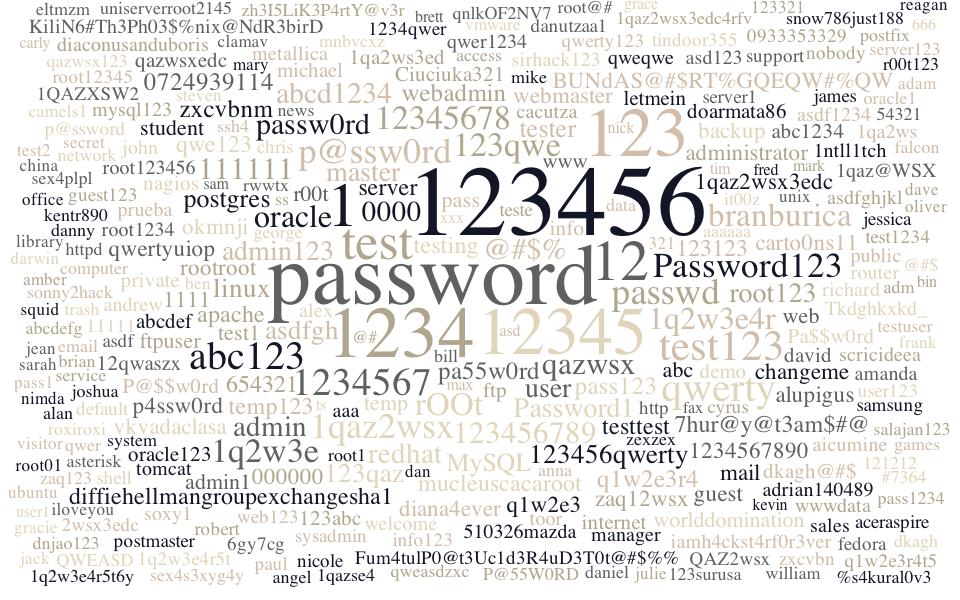
I had a few moments this past weekend to play with an idea for visualizing the passwords used against the honeypot @jayjacobs set up. While it’s not as informative as Jay’s weekend endeavors:

it is pretty, and it satisfied my need to make a word cloud out of useful data.

The image below is of the top 500 passwords used against the honeypot and requires an SVG-capable browser and also requires horizontal scrolling, so you can view or download it standalone if there are any issues. For those generally SVG-challenged, there’s also a slightly less #spiffy PNG version to view as well.

123456password123412312345112testtest123qwertyabc1231234567passwdp@ssw0rd1qaz2wsxPassword1231q2w3e123qwebranburicarOOtoracleqazwsx111111@#$%redhat0000usertester1111passabcwww123456781q2w3e4r123456789passw0rdadminroot123mastermailr00tabcd1234Password1postgrestempwebftptooralexaaaasdfbillssadmin123linuxasdfgh123qaz123456qwertyMySQLpa55w0rdwebadminq1w2e3r4pass123zxcvbnm0724939114654321123123qwe123testingtesttestserver7hur@y@t3am$#@apachetemp123mucleuscacarootdiffiehellmangroupexchangesha11234567890administratorwebmasterokmnjichangemeqwertyuiop000000BUNdAS@#$RT%GQEQW#%QWvkvadaclasa1qaz2wsx3edcp4ssw0rdrootrootcarto0ns11backupguestq1w2e3alupiguszaq12wsxdiana4everworlddominationstudentadmin1test1ftpuserdkagh@#$Pa$$w0rddoarmata86abc1234123abcP@$$w0rdnagiosabcdefdavidinternetinfodemooracle12312qwaszxCiuciuka321michaelprivateletmeinqazwsxedc1qa2ws3edaicuminesirhack123qweqweroot123456cacutzaasdf1234andrewadrian140489root1234diaconusanduborissoxy1welcome510326mazdaasd123wwwdatametallicaTkdghkxkd_salesqwer1234scricideeapruebarichard1ntll1tch1qaz@WSXasdfghjklpublic1qa2wsjohntomcatKiliN6#Th3Ph03$%nix@NdR3birDmysql123iamh4ckst4rf0r3verroutermanageramandaguest123web123shellaceraspire1QAZXSW2testesysadmin11111jamesserver1cyrusinfo123defaultFum4tulP0@t3Uc1d3R4uD3T0t@#$%%supportrobertqwerty123user123jessicafedoranobody2wsx3edctindoor355postmaster6gy7cgq1w2e3r4t5zxcvbnchris1234qwerQAZ2wsx0933353329root123451q2w3e4r5tnicolehttptest1234paulp@sswordsamsungdanutzaa1postfixoracle1it00zsystemdanielaccesswilliamcomputerqazwsx123root1dataasteriskzh3I5LiK3P4rtY@v3rsonny2hack121212mikeqnlkOF2NV71qaz2wsx3edc4rfvssh4georgejoshua123surusanetworkP@55W0RDtestuserroxiroxikentr890httpdqweasdzxcannaQWEASDr00t12354321salajan123sex4s3xyg4ymnbvcxzsnow786just188uniserverroot2145pass1234qweraaaaaa1q2w3e4r5t6yroot@#serviceemaildannysex4plplbrianserver123trash1qazse4newsabcdefgzaq123camels1alanrwwtxadmfalcon#7364angeleltmzmdnjao123@#$gamesdkaghzexzexunixadamfranknimdaclamavambersecretvmwareroot01libraryoffice321graciesquidsarah@#visitorstevenmarychinadavejackjeanoliverpass1danjulietest2benreagancarlyxxxfredtim666sammarkasduser1faxnicktsbinmaxgrace%s4kural0v3iloveyou123321ubuntudarwinkevinbrett

Brylcream? Check.
Decked out in your best Frankie Avalon or Annette Funicello beach fashions? Check.

Now, polish up your cruiser and get ready ‘cuz @GraniteSec is heading back to Fort Foster [info] [map] at Kittery Point, Maine for it’s fifth family & friends tweetup!

We can’t promise mermaids or sky-diving surfers, but you’re sure to have a groovy time hanging loose and chowing down with other hip cats & chicks.

For all the low down, check out granitesec.org (redirect to the latest tweetup Eventbrite page forthcoming) or rap with @hrbrmstr, @ITSecurity or @1_tjw on Twitter.

(And, if any of you younger cats are having trouble with the lingo/references, check this out, man…)

Also, if you want to help promote the tweetup, you can use the above 500x350px graphic or this 160x400px graphic and link to this post or http://granitesec.org/ which will have an Eventbrite redirect up in the near future.

This is an inaugural post for @MetricsHulk, on the condition that there are few – if any – “ALL CAPS” bits. Q3&4 tend to be “report season”, and @MetricsHulk usually has some critiques, praises, opines and suggestions (some smashes, too) to offer as we are inundated with a blitz of infographics.

The always #spiffy @WhiteHatSec released their 2011 Web Site Security stats report [direct link (PDF)] last week (here’s one of their teaser tweets):

With over 7,000 sites and hundreds of diverse organizations represented in the report, it is a great resource for folks to see how they stack up (more on that in a bit). Security folks should also take some encouragement from the report since:

  • Real vulnerabilities are down (significantly)
  • WAFs can help
  • Vulnerabilities are getting fixed faster (when found)

@WhiteHatSec does a fine job summarizing key & extended findings (hint: read the report), and they are awesomely up-front and honest with regard to the findings (see pages 4 & 5 for their analysis on why the ‘good stats’ might be so good).

The report is chock-full of data. Real. Data. The only way it could have been better data-wise is if they provided a Google Docs bundle of raw numbers. (NOTE: I didn’t get all the data in there, but it has decent amount from the report)

I do think there is some room for improvement. Take, for example, the – sigh – donut chart on page 9. I might be inclined to refrain from comment if this was one of those hipster infographics that seem to be everywhere these days. A pie chart isn’t much better, but at least we’re able to process the relative sizes a bit better when the actual angles are present. Here’s a before/after makeover for your comparison/opine (click for larger version):

We get an immediate sense of scale from the bars and it removes the need for the “Frosted Lucky Charms” color-wheel effect. The @WhiteHatSec folk use bars (very appropriately) almost everywhere else, so I’m not sure what the design decision was for deviating for this part of the report.

The next bit that confused me was Figure 18 (page 15). I’m having difficulty both figuring out where the “79” value comes from (I can’t get to it by averaging the values presents) and grok’ing the magnitude of the differences from the bubbles. So, here’s another before/after makeover for your comparison/opine (click for larger version):

Finally, I think Figure 23 & 24 could do with a bit of a slopegraph makeover, as the spirit of the visualization is to show year-over-year differences. The first two slopegraphs used the “Tufte binning technique“, so you’ll need to refer to the companion data tables if you want exact numbers for comparison (the trend is more important, IMO).

Average Days Open

Average Days to Close

Remediation Rates by Year

(You can also download easier to read PDFs of the slopegraphs)

Absolutely no one should take the makeover suggestions as report slander. As stated at the beginning of the post, @WhiteHatSec is open about the efficacy of their data and analysis, plus they provide actual data. The presentation of stats & trending by industry and vulnerability type should help any organization with an appsec program figure out if they are doing better or worse the others in their sector and see if they are smashing bugs with similar success. It also gives the general infosec community a view that we would otherwise not have. I would encourage other organizations to follow @WhiteHatSec’s example, even if it means more donut charts (mmm…donuts).

What information did you glean from the WhiteHat report, or what makeovers would you encourage for the next one?