Skip navigation

UPDATE: You can now run this as a local Shiny app by entering shiny::runGist("95ec24c1b0cb433a76a5", launch.browser=TRUE) at an R prompt (provided all the dependent libraries (below) are installed) or use it interactively over at Shiny Apps.

The impending arrival of the first real snowfall of the year in my part of Maine got me curious about what the most likely “first snow” dates are for my region. The U.S. Historical Climatology Network (USHCN) maintains [historical daily climate records](http://cdiac.ornl.gov/epubs/ndp/ushcn/daily_doc.html) for each station in each state and has data (for some stations) going back as far as the 1800’s. A quick look at their [data files](http://cdiac.ornl.gov/ftp/ushcn_daily/) indicated that they would definitely help satiate my curiosity (and make for a late night of cranking out some R code and ggplot visualizations).

To start, we’ll need a bit more than base R to get the job done:

library(pbapply)
library(data.table)
library(dplyr)
library(ggplot2)
library(grid)
library(gridExtra)
library(stringi)

In all honesty, `pbapply`, `dplyr` and `stringi` are not necessary, but they definitely make life easier by (respectively) giving us:

– free progress bars for `*apply` operations,
– high efficacy data manipulation idioms, and
– a handy utility for converting strings to title case.

With setup out of the way, the first real task is to see which observer station is closest to my area. To figure that out we need to read in the station data file which is, sadly, in fixed-width format. Some stations have `#` characters in their titles, to we have to account for that when we call `read.fwf`. After reading in the station database we use a naive–but-usable distance calculation to find the closest station:

stations <- read.fwf("data/ushcn-stations.txt",
                     widths=c(6, 9, 10, 7, 3, 31, 7, 7, 7, 3),
                     col.names=c("coop_id", "latitude", "longitude", "elevation",
                                 "state", "name", "component_1", "component_2",
                                 "component_3", "utc_offset"),
                     colClasses=c("character", "numeric", "numeric", "numeric",
                                  "character", "character", "character", "character",
                                  "character", "character"),
                     comment.char="", strip.white=TRUE)
 
# not a great circle, but it gets the job done here
closestStation <- function(stations, lat, lon) {
  index <- which.min(sqrt((stations$latitude-lat)^2 +
                          (stations$longitude-lon)^2))
  stations[index,]
}
 
# what's the closest station?
closestStation(stations, 43.2672, -70.8617)
 
##     coop_id latitude longitude elevation state   name component_1 component_2 component_3 utc_offset
633  272174    43.15    -70.95      24.4    NH DURHAM      ------      ------      ------         +5

As a Mainer, I’m not thrilled that this is the actual, closest station, so we’ll also see what the closest one is in Maine:

closestStation(stations %>% filter(state=="ME"), 43.2672, -70.8617)
##    coop_id latitude longitude elevation state             name component_1 component_2 component_3 utc_offset
10  176905  43.6497  -70.3003      13.7    ME PORTLAND JETPORT      ------      ------      ------         +5

The analysis is easy enough to do for both, so we’ll first take a look at Durham, New Hampshire then do the exact same valuation for Portland, Maine.

Despite being fixed-width, the station database was not too difficult to wrangle. The state-level files that contain the readings are another matter:

Variable Columns Type
COOP ID 1-6 Character
YEAR 7-10 Integer
MONTH 11-12 Integer
ELEMENT 13-16 Character
VALUE1 17-21 Integer
MFLAG1 22 Character
QFLAG1 23 Character
SFLAG1 24 Character
VALUE2 25-29 Integer
MFLAG2 30 Character
QFLAG2 31 Character
SFLAG2 32 Character
VALUE31 257-261 Integer
MFLAG31 262 Character
QFLAG31 263 Character
SFLAG31 264 Character

We have fixed-width, wide-format records with 31 days for each month, which proves the existence of truly insidious people in the world. Rather than use `read.fwf` again, we’ll take a different approach (since we ultimately need the data in long format) and use `readLines` to read in all the records from the NH data file, then filter out everything but snowfall entries from the station we’re interested in.

Next, we setup nested `lapply` calls to build a long data frame from each month then combine them all together into a single data frame:

snow <- readLines("data/state27_NH.txt")
 
snow <- grep("SNOW", snow, value=TRUE)
snow <- grep("^272174", snow, value=TRUE)
 
snow_dat <- rbindlist(pblapply(snow, function(x) {
 
  rbindlist(lapply(1:31, function(i) {
 
    # record format described here:
    # http://cdiac.ornl.gov/ftp/ushcn_daily/data_format.txt
 
    start <- 17 + (i-1)*8
 
    list(coop_id=substr(x, 1, 6),
         date=sprintf("%s-%02d-%02d", substr(x, 7, 10), as.numeric(substr(x, 11, 12)), i),
         element=substr(x, 13, 16),
         value=as.numeric(substr(x, start, start+4)),
         mflag=substr(x, start+5, start+5),
         qflag=substr(x, start+6, start+6),
         sflag=substr(x, start+7, start+7))
 
  }))
 
}))

Now, we’ll clean up the records even further by removing invalid entries (those with a `value` == `-9999`) and convert record dates to actual `Date` objects and filter out invalid dates:

snow_dat <- snow_dat %>% filter(value != -9999)
 
# since the data file has 31 days for each records regardless of whether
# that's valid or not we do a shortcut to remove invalid dates by doing the
# a vectorized Date conversion, then removing records with NA dates
 
snow_dat$date <- as.Date(snow_dat$date)
snow_dat <- snow_dat %>% filter(!is.na(date))
 
# having the year extracted is handy for filtering
snow_dat$year <- format(snow_dat$date, "%Y")

Given that Winter in the U.S. spans across two calendar years, we need a way to keep dates in January-May associated with the previous year (yes, that adds an inherent assumption that no first snow is in June, which might not hold true for Alaska). To facilitate this, we’ll convert each date to its corresponding day of year value then add the number of total days in the start year to those values for all months <= May. We really do need to do this, too, since there are many cases where the first snowfall will be in January-March for many states.

snow_dat$doy <- as.numeric(format(snow_dat$date, "%j"))
snow_dat$doy <- ifelse(snow_dat$doy<=180,
                       snow_dat$doy + as.numeric(format(as.Date(sprintf("%s-12-31", snow_dat$year)), "%j")),
                       snow_dat$doy)

Now, the fun begins. We use (mostly) `dplyr` to extract the first snowfall day from each year, then make a dot-line plot from the data:

first <- snow_dat %>%
  filter(value>0) %>%                           # ignore 0 values
  filter(date>=as.Date("1950-01-01")) %>%       # start at 1950 (arbitrary)
  merge(stations, by="coop_id", all.x=TRUE) %>% # merge station details
  group_by(coop_id, year) %>%                   # group by station and year
  arrange(doy) %>%                              # sort by our munged day of year
  filter(row_number(doy) == 1) %>%              # grab the first entry by group
  select(name, state, date, value, doy)         # we only need some variables
 
title_1 <- sprintf("First observed snowfall (historical) at %s, %s", stri_trans_totitle(unique(first$name)), unique(first$state))
 
gg <- ggplot(first, aes(y=year, x=doy))
gg <- gg + geom_segment(aes(xend=min(first$doy)-20, yend=year), color="#9ecae1", size=0.25)
gg <- gg + geom_point(aes(color=coop_id), shape=8, size=3, color="#3182bd")
gg <- gg + geom_text(aes(label=format(date, "%b-%d")), size=3, hjust=-0.2)
gg <- gg + scale_x_continuous(expand=c(0, 0), limits=c(min(first$doy)-20, max(first$doy)+20))
gg <- gg + labs(x=NULL, y=NULL, title=title_1)
gg <- gg + theme_bw()
gg <- gg + theme(legend.position="none")
gg <- gg + theme(panel.grid=element_blank())
gg <- gg + theme(panel.border=element_blank())
gg <- gg + theme(axis.ticks.x=element_blank())
gg <- gg + theme(axis.ticks.y=element_blank())
gg <- gg + theme(axis.text.x=element_blank())
gg <- gg + theme(axis.text.y=element_text(color="#08306b"))
by_year <- gg

While that will help us see the diversity across years, we have to do quite a bit of eye tracking to get the most likely date range for the first snowfall, so we’ll add a boxplot into the mix and use `summary` to figure out the quartiles (for labeling the chart) for the actual date values:

wx_range <- summary(as.Date(format(first$date, "2013-%m-%d")))
names(wx_range) <- NULL
min_wx <- gsub("2013-", "", wx_range[2])
max_wx <- gsub("2013-", "", wx_range[5])
 
title_2 <- sprintf("Most likely first snowfall will be between %s & %s", min_wx, max_wx)
 
gg <- ggplot(first %>% mutate(name="0000"), aes(name, doy))
gg <- gg + geom_boxplot(fill="#3182bd", color="#08306b", outlier.colour="#08306b")
gg <- gg + scale_y_continuous(expand=c(0, 0),
                              limits=c(min(first$doy)-20, max(first$doy)+20))
gg <- gg + coord_flip()
gg <- gg + labs(x=NULL, y=NULL, title=title_2)
gg <- gg + theme_bw()
gg <- gg + theme(legend.position="none")
gg <- gg + theme(panel.grid=element_blank())
gg <- gg + theme(panel.border=element_blank())
gg <- gg + theme(axis.ticks.x=element_blank())
gg <- gg + theme(axis.text.x=element_blank())
gg <- gg + theme(axis.ticks.y=element_line(color="white"))
gg <- gg + theme(axis.text.y=element_text(color="white"))
gg <- gg + theme(plot.title=element_text(size=11))
box_wx <- gg

Finally, we’ll combine them together to get the finished product:

grid.arrange(by_year, box_wx, nrow=2, heights=unit(c(0.9, 0.1), "npc"))

nh-2

And, do the same for Portland:

bothClick for larger

There are many more analyses and visualizations that can be performed on these data sets, but be wary when creating them as I’ve seen a few files with fixed-width formatting errors and have also noticed missing records for some observer stations.

You can find the complete, commented code up on [github](https://github.com/hrbrmstr/snowfirst).
In a previous post we looked at how to use D3 TopoJSON files with R and make some very D3-esque maps. I mentioned that one thing missing was moving Alaska & Hawaii a bit closer to the continental United States and this post shows you how to do that.

The D3 folks have it easy. They just use the built in modified Albers composite projection. We R folk have to roll up our sleeves a bit (but not much) to do the same. Thankfully, we can do most of the work with the elide (“ih lied”) function from the maptools package.

We’ll start with some package imports:

library(maptools)
library(mapproj)
library(rgeos)
library(rgdal)
library(RColorBrewer)
library(gthemes)
library(ggplot2)

I’m using a GeoJSON file that I made from the 2013 US Census shapefile. I prefer GeoJSON mostly due to it being single file and the easy conversion to TopoJSON if I ever need to use the same map in a D3 context (I work with information security data most of the time, so I rarely have to use maps at all for the day job). I simplified the polygons a bit (passing -simplify 0.01 to ogr2ogr) to reduce processing time.

We read in that file and then transform the projection to Albers equal area and join the polygon ids to the shapefile data frame:

# https://www.census.gov/geo/maps-data/data/cbf/cbf_counties.html
# read U.S. counties moderately-simplified GeoJSON file
us <- readOGR(dsn="data/us.geojson", layer="OGRGeoJSON")

# convert it to Albers equal area
us_aea <- spTransform(us, CRS("+proj=laea +lat_0=45 +lon_0=-100 +x_0=0 +y_0=0 +a=6370997 +b=6370997 +units=m +no_defs"))
us_aea@data$id <- rownames(us_aea@data)

Now, to move Alaska & Hawaii, we have to:

  • extract them from the main shapefile data frame
  • perform rotation, scaling and transposing on them
  • ensure they have the right projection set
  • merge them back into the original spatial data frame

The elide function has parameters for all the direct shape munging, so we’ll just do that for both states. I took a peek at the D3 source code for the Albers projection to get a feel for the parameters. You can tweak those if you want them in other positions or feel the urge to change the Alaska rotation angle.

# extract, then rotate, shrink & move alaska (and reset projection)
# need to use state IDs via # https://www.census.gov/geo/reference/ansi_statetables.html
alaska <- us_aea[us_aea$STATEFP=="02",]
alaska <- elide(alaska, rotate=-50)
alaska <- elide(alaska, scale=max(apply(bbox(alaska), 1, diff)) / 2.3)
alaska <- elide(alaska, shift=c(-2100000, -2500000))
proj4string(alaska) <- proj4string(us_aea)

# extract, then rotate & shift hawaii
hawaii <- us_aea[us_aea$STATEFP=="15",]
hawaii <- elide(hawaii, rotate=-35)
hawaii <- elide(hawaii, shift=c(5400000, -1400000))
proj4string(hawaii) <- proj4string(us_aea)

# remove old states and put new ones back in; note the different order
# we're also removing puerto rico in this example but you can move it
# between texas and florida via similar methods to the ones we just used
us_aea <- us_aea[!us_aea$STATEFP %in% c("02", "15", "72"),]
us_aea <- rbind(us_aea, alaska, hawaii)

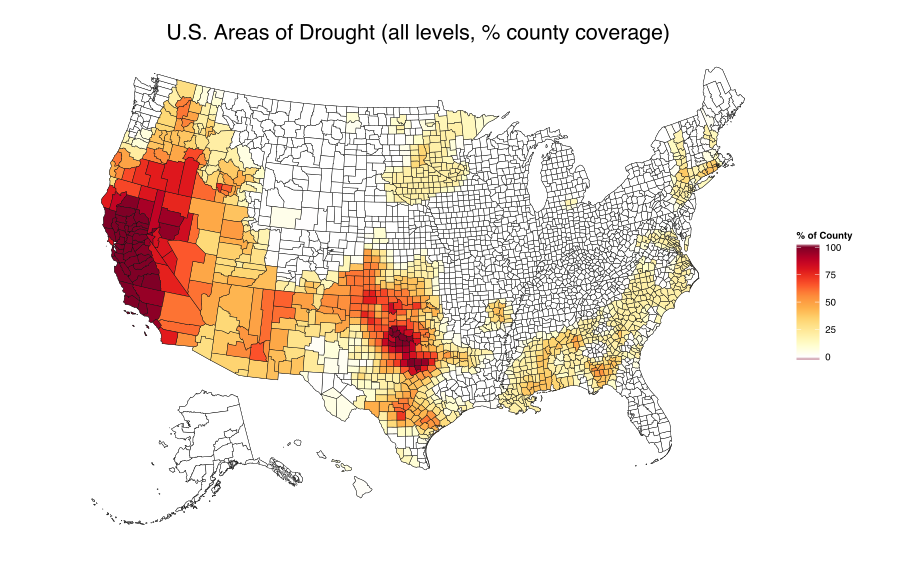
Rather than just show the resultant plain county map, we’ll add some data to it. The first example uses US drought data (from November 11th, 2014). Drought conditions are pretty severe in some states, but we’ll just show areas that have any type of drought (levels D0-D4). The color ramp shows the % of drought coverage in each county (you’ll need a browser that can display SVGs to see the maps):

# get some data to show...perhaps drought data via:
# http://droughtmonitor.unl.edu/MapsAndData/GISData.aspx
droughts <- read.csv("data/dm_export_county_20141111.csv")
droughts$id <- sprintf("%05d", as.numeric(as.character(droughts$FIPS)))
droughts$total <- with(droughts, (D0+D1+D2+D3+D4)/5)

# get ready for ggplotting it... this takes a cpl seconds
map <- fortify(us_aea, region="GEOID")

# plot it
gg <- ggplot()
gg <- gg + geom_map(data=map, map=map,
                    aes(x=long, y=lat, map_id=id, group=group),
                    fill="#ffffff", color="#0e0e0e", size=0.15)
gg <- gg + geom_map(data=droughts, map=map, aes(map_id=id, fill=total),
                    color="#0e0e0e", size=0.15)
gg <- gg + scale_fill_gradientn(colours=c("#ffffff", brewer.pal(n=9, name="YlOrRd")),
                                na.value="#ffffff", name="% of County")
gg <- gg + labs(title="U.S. Areas of Drought (all levels, % county coverage)")
gg <- gg + coord_equal()
gg <- gg + theme_map()
gg <- gg + theme(legend.position="right")
gg <- gg + theme(plot.title=element_text(size=16))
gg

img

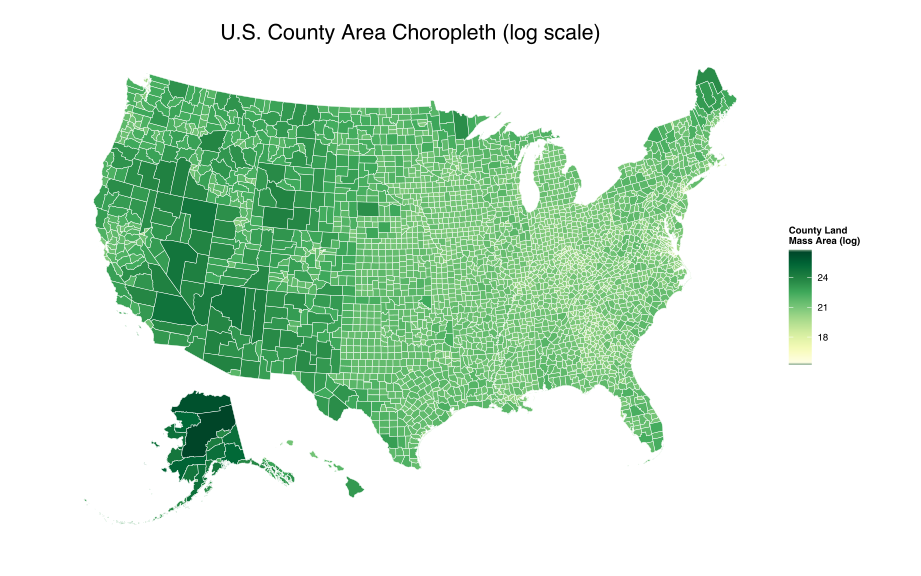
While that shows Alaska & Hawaii in D3-Albers-style, it would be more convincing if we actually used the FIPS county codes on Alaska & Hawaii, so we’ll riff off the previous post and make a county land-mass area choropleth (since we have the land mass area data available in the GeoJSON file):

gg <- ggplot()
gg <- gg + geom_map(data=map, map=map,
                    aes(x=long, y=lat, map_id=id, group=group),
                    fill="white", color="white", size=0.15)
gg <- gg + geom_map(data=us_aea@data, map=map, aes(map_id=GEOID, fill=log(ALAND)),
                    color="white", size=0.15)
gg <- gg + scale_fill_gradientn(colours=c(brewer.pal(n=9, name="YlGn")),
                                na.value="#ffffff", name="County Land\nMass Area (log)")
gg <- gg + labs(title="U.S. County Area Choropleth (log scale)")
gg <- gg + coord_equal()
gg <- gg + theme_map()
gg <- gg + theme(legend.position="right")
gg <- gg + theme(plot.title=element_text(size=16))
gg

img

Now, you have one less reason to be envious of the D3 cool kids!

The code & shapefiles are available on github.

granitesecx

The Washingon Post did another great story+vis, this time on states [Spending seized assets](http://www.washingtonpost.com/wp-srv/special/investigative/asset-seizures/).

According to their sub-head:

>_Since 2008, about 5,400 police agencies have spent $2.5 billion in proceeds from cash and property seized under federal civil forfeiture laws. Police suspected the assets were linked to crime, although in 81 percent of cases no one was indicted._

Their interactive visualization lets you drill down into each state to examine the spending in each category. Since the WaPo team made the [data available](http://www.washingtonpost.com/wp-srv/special/investigative/asset-seizures/data/all.json) [JSON] I thought it might be interesting to take a look at a comparison across states (i.e. who are the “big spenders” of this siezed hoarde). Here’s a snippet of the JSON:

{"states": [
  {
  "st": "AK",
  "stn": "Alaska",
  "total": 8470032,
  "cats":
     [{ "weapons": 1649832, 
     "electronicSurv": 402490, 
     "infoRewards": 760730, 
     "travTrain": 848128, 
     "commPrograms": 121664, 
     "salaryOvertime": 776766, 
     "other": 1487613, 
     "commComp": 1288439, 
     "buildImprov": 1134370 }],
  "agencies": [
     {
     "aid": "AK0012700",
     "aname": "Airport Police & Fire Ted Stevens Anch Int'L Arpt",
     "total": 611553,
     "cats":
        [{ "weapons": 214296, "travTrain": 44467, "other": 215464, "commComp": 127308, "buildImprov": 10019 }]
     },
     {
     "aid": "AK0010100",
     "aname": "Anchorage Police Department",
     "total": 3961497,
     "cats":
        [{ "weapons": 1104777, "electronicSurv": 94741, "infoRewards": 743230, "travTrain": 409474, "salaryOvertime": 770709, "other": 395317, "commComp": 249220, "buildImprov": 194029 }]
     },

Getting the data was easy (in R, of course!). Let’s setup the packages we’ll need:

library(data.table)
library(dplyr)
library(tidyr)
library(ggplot2)
library(scales)
library(grid)
library(statebins)
library(gridExtra)

We also need `jsonlite`, but only to parse the data (which I’ve downloaded locally), so we’ll just do that in one standalone line:

data <- jsonlite::fromJSON("all.json", simplifyVector=FALSE)

It’s not fair (or valid) to just compare totals since some states have a larger population than others, so we’ll show the data twice, once in raw totals and once with a per-capita lens. For that, we’ll need population data:

pop <- read.csv("http://www.census.gov/popest/data/state/asrh/2013/files/SCPRC-EST2013-18+POP-RES.csv", stringsAsFactors=FALSE)
colnames(pop) <- c("sumlev", "region", "divison", "state", "stn", "pop2013", "pop18p2013", "pcntest18p")
pop$stn <- gsub(" of ", " Of ", pop$stn)

We have to fix the `District of Columbia` since the WaPo data capitalizes the `Of`.

Now we need to extract the agency data. This is really straightforward with some help from the `data.table` package:

agencies <- rbindlist(lapply(data$states, function(x) {
  rbindlist(lapply(x$agencies, function(y) {
    data.table(st=x$st, stn=x$stn, aid=y$aid, aname=y$aname, rbindlist(y$cats))
  }), fill=TRUE)
}), fill=TRUE)

The `rbindlist` `fill` option is super-handy in the event we have varying columns (and, we do in this case). It’s also wicked-fast.

Now, we use some `dplyr` and `tidyr` to integrate the population information and summarize our data (OK, we cheat and use `melt`, but some habits are hard to break):

c_st <- agencies %>%
  merge(pop[,5:6], all.x=TRUE, by="stn") %>%
  gather(category, value, -st, -stn, -pop2013, -aid, -aname) %>%
  group_by(st, category, pop2013) %>%
  summarise(total=sum(value, na.rm=TRUE), per_capita=sum(value, na.rm=TRUE)/pop2013) %>%
  select(st, category, total, per_capita)

Let’s use a series of bar charts to compare state-against state. We’ll do the initial view with just raw totals. There are 9 charts, so this graphic scrolls a bit and you can select it to make it larger:

# hack to ordering the bars by kohske : http://stackoverflow.com/a/5414445/1457051 #####
 
c_st <- transform(c_st, category2=factor(paste(st, category)))
c_st <- transform(c_st, category2=reorder(category2, rank(-total)))
 
# pretty names #####
 
levels(c_st$category) <- c("Weapons", "Travel, training", "Other",
                           "Communications, computers", "Building improvements",
                           "Electronic surveillance", "Information, rewards",
                           "Salary, overtime", "Community programs")
gg <- ggplot(c_st, aes(x=category2, y=total))
gg <- gg + geom_bar(stat="identity", aes(fill=category))
gg <- gg + scale_y_continuous(labels=dollar)
gg <- gg + scale_x_discrete(labels=c_st$st, breaks=c_st$category2)
gg <- gg + facet_wrap(~category, scales = "free", ncol=1)
gg <- gg + labs(x="", y="")
gg <- gg + theme_bw()
gg <- gg + theme(strip.background=element_blank())
gg <- gg + theme(strip.text=element_text(size=15, face="bold"))
gg <- gg + theme(panel.margin=unit(2, "lines"))
gg <- gg + theme(panel.border=element_blank())
gg <- gg + theme(legend.position="none")
gg

Comparison of Spending Category by State (raw totals)

raw-sm

There are definitely a few, repeating “big spenders” in that view, but is that the _real_ story? Let’s take another look, but factoring in state population:

# change bar order to match per-capita calcuation #####
 
c_st <- transform(c_st, category2=reorder(category2, rank(-per_capita)))
 
# per-capita bar plot #####
 
gg <- ggplot(c_st, aes(x=category2, y=per_capita))
gg <- gg + geom_bar(stat="identity", aes(fill=category))
gg <- gg + scale_y_continuous(labels=dollar)
gg <- gg + scale_x_discrete(labels=c_st$st, breaks=c_st$category2)
gg <- gg + facet_wrap(~category, scales = "free", ncol=1)
gg <- gg + labs(x="", y="")
gg <- gg + theme_bw()
gg <- gg + theme(strip.background=element_blank())
gg <- gg + theme(strip.text=element_text(size=15, face="bold"))
gg <- gg + theme(panel.margin=unit(2, "lines"))
gg <- gg + theme(panel.border=element_blank())
gg <- gg + theme(legend.position="none")
gg

Comparison of Spending Category by State (per-capita)

capita-sm

That certainly changes things! Alaska, West Virginia, and D.C. definitely stand out for “Weapons”, “Other” & “Information”, respectively, (what’s Rhode Island hiding in “Other”?!) and the “top 10” in each category are very different from the raw total’s view. We can look at this per-capita view with the `statebins` package as well:

st_pl <- vector("list", 1+length(unique(c_st$category)))
 
j <- 0
for (i in unique(c_st$category)) {
  j <- j + 1
  st_pl[[j]] <- statebins_continuous(c_st[category==i,], state_col="st", value_col="per_capita") +
    scale_fill_gradientn(labels=dollar, colours=brewer.pal(6, "PuBu"), name=i) +
    theme(legend.key.width=unit(2, "cm"))
}
st_pl[[1+length(unique(c_st$category))]] <- list(ncol=1)
 
grid.arrange(st_pl[[1]], st_pl[[2]], st_pl[[3]],
             st_pl[[4]], st_pl[[5]], st_pl[[6]],
             st_pl[[7]], st_pl[[8]], st_pl[[9]], ncol=3)

Per-capita “Statebins” view of WaPo Seizure Data

(Doing this exercise also showed me I need to add some flexibility to the `statebins` package).

The (https://gist.github.com/hrbrmstr/27b8f44f573539dc2971) shows how to build a top-level category data table (along with the rest of the code in this post). I may spin this data up into an interactive D3 visualization in the next week or two (as I think it might work better than large faceted bar charts), so stay tuned!

A huge thank you to the WaPo team for making data available to others. Go forth and poke at it with your own questions and see what you can come up with (perhaps comparing by area of state)!

Markus Gessman (@MarkusGesmann) did a beautiful job [Visualising the seasonality of Atlantic windstorms](http://www.magesblog.com/2014/10/visualising-seasonality-of-atlantic.html) using small multiples, which was inspired by both a [post](http://freakonometrics.hypotheses.org/17113) by Arthur Charpentier (@freakonometrics) on using Markov spatial processes to “generate” hurricanes—which was [tweaked a bit](http://robertgrantstats.wordpress.com/2014/10/01/transparent-hurricane-paths-in-r/) by Robert Grant (@robertstats)—and [Gaston Sanchez](https://github.com/gastonstat)’s [Visualizing Hurricane Trajectories](http://rpubs.com/gaston/hurricanes) RPub.

I have [some history](http://rud.is/b/2012/10/28/watch-sandy-in-r-including-forecast-cone/) with hurricane data and thought I’d jump on the bandwagon using the same data and making some stop-frame animations. I borrowed from previous work (hence starting with all the credits above) but have used `dplyr` idioms for data-frame filtering & mutating and my own month/year extraction code.

The first animation accumulates storm tracks in-year and displays the names of the storms in a list down the left side while the second does a full historical accumulation of tracks. I changed the storm path gradient but kept most of the other formatting bits and made the plots suitable for 1080p output/playback.

Rather than go the `ffmpeg` route, I used [ImageMagick](http://www.imagemagick.org/) since it makes equally quick work out of converting a bunch of `png` files to an `mp4` file. I made the animations go quickly, but they can be advanced forward/back one frame at a time in any decent player.

library(maps)
library(data.table)
library(dplyr)
library(ggplot2)
library(grid)
library(RColorBrewer)
 
# takes in a numeric vector and returns a sequence from low to high
rangeseq <- function(x, by=1) {
  rng <- range(x)
  seq(from=rng[1], to=rng[2], by=by)
}
 
# etract the months (as a factor of full month names) from
# a date+time "x" that can be converted to a POSIXct object,
extractMonth <- function(x) {
  months <- format(as.POSIXct(x), "%m")
  factor(months, labels=month.name[rangeseq(as.numeric(months))])
}
 
# etract the years (as a factor of full 4-charater-digit years) from
# a date+time "x" that can be converted to a POSIXct object,
extractYear <- function(x) {
  factor(as.numeric(format(as.POSIXct(x), "%Y")))
}
 
# get from: ftp://eclipse.ncdc.noaa.gov/pub/ibtracs/v03r06/all/csv/Allstorms.ibtracs_all.v03r06.csv.gz
storms_file <- "data/Allstorms.ibtracs_all.v03r06.csv"
storms <-  fread(storms_file, skip=10, select=1:18)
 
col_names <- c("Season", "Num", "Basin", "Sub_basin", "Name", "ISO_time", "Nature",
             "Latitude", "Longitude", "Wind.kt", "Pressure.mb", "Degrees_North", "Deegrees_East")
setnames(storms, paste0("V", c(2:12, 17, 18)), col_names)
 
# use dplyr idioms to filter & mutate the data
 
storms <- storms %>%
  filter(Latitude > -999,                                  # remove missing data
         Longitude > -999,
         Wind.kt > 0,
         !(Name %in% c("UNNAMED", "NONAME:UNNAMED"))) %>%
  mutate(Basin=gsub(" ", "", Basin),                       # clean up fields
         ID=paste(Name, Season, sep="."),
         Month=extractMonth(ISO_time),
         Year=extractYear(ISO_time)) %>%
  filter(Season >= 1989, Basin %in% "NA")                  # limit to North Atlantic basin
 
season_range <- paste(range(storms$Season), collapse=" - ")
knots_range <- range(storms$Wind.kt)
 
# setup base plotting parameters (these won't change)
 
base <- ggplot()
base <- base + geom_polygon(data=map_data("world"),
                            aes(x=long, y=lat, group=group),
                            fill="gray25", colour="gray25", size=0.2)
base <- base + scale_color_gradientn(colours=rev(brewer.pal(n=9, name="RdBu")),
                                     space="Lab", limits=knots_range)
base <- base + xlim(-138, -20) + ylim(3, 55)
base <- base + coord_map()
base <- base + labs(x=NULL, y=NULL, title=NULL, colour = "Wind (knots)")
base <- base + theme_bw()
base <- base + theme(text=element_text(family="Arial", face="plain", size=rel(5)),
                     panel.background = element_rect(fill = "gray10", colour = "gray30"),
                     panel.margin = unit(c(0,0), "lines"),
                     panel.grid.major = element_blank(),
                     panel.grid.minor = element_blank(),
                     plot.margin = unit(c(0,0,0,0), "lines"),
                     axis.text.x = element_blank(),
                     axis.text.y = element_blank(),
                     axis.ticks = element_blank(),
                     legend.position = c(0.25, 0.1),
                     legend.background = element_rect(fill="gray10", color="gray10"),
                     legend.text = element_text(color="white", size=rel(2)),
                     legend.title = element_text(color="white", size=rel(5)),
                     legend.direction = "horizontal")
 
# loop over each year, producing plot files that accumulate tracks over each month
 
for (year in unique(storms$Year)) {
 
  storm_ids <- unique(storms[storms$Year==year,]$ID)
 
  for (i in 1:length(storm_ids)) {
 
    storms_yr <- storms %>% filter(Year==year, ID %in% storm_ids[1:i])
 
    # stuff takes a while, so it's good to have a progress message
    message(sprintf("%s %s", year, storm_ids[i]))
 
    gg <- base
    gg <- gg + geom_path(data=storms_yr,
                         aes(x=Longitude, y=Latitude, group=ID, colour=Wind.kt),
                         size=1.0, alpha=1/4)
    gg <- gg + geom_text(label=year, aes(x=-135, y=51), size=rel(6), color="white", vjust=1)
    gg <- gg + geom_text(label=paste(gsub(".[[:digit:]]+$", "", storm_ids[1:i]), collapse="\n"),
                         aes(x=-135, y=49.5), size=rel(4.5), color="white", vjust=1)
 
    # change "quartz" to "cairo" if you're not on OS X
 
    png(filename=sprintf("output/%s%03d.png", year, i),
        width=1920, height=1080, type="quartz", bg="gray25")
    print(gg)
    dev.off()
 
  }
 
}
 
# convert to mp4 animation - needs imagemagick
system("convert -delay 8 output/*png output/hurr-1.mp4")
# unlink("output/*png") # do this after verifying convert works

# take an alternate approach for accumulating the entire hurricane history
# start with the base, but add to the ggplot object in a loop, which will
# accumulate all the tracks.
 
gg <- base
 
for (year in unique(storms$Year)) {
 
  storm_ids <- unique(storms[storms$Year==year,]$ID)
 
  for (i in 1:length(storm_ids)) {
 
    storms_yr <- storms %>% filter(ID %in% storm_ids[i])
 
    message(sprintf("%s %s", year, storm_ids[i]))
    gg <- gg + geom_path(data=storms_yr,
                         aes(x=Longitude, y=Latitude, group=ID, colour=Wind.kt),
                         size=1.0, alpha=1/4)
 
    png(filename=sprintf("output/%s%03d.png", year, i),
        width=1920, height=1080, type="quartz", bg="gray25")
    print(gg)
    dev.off()
 
  }
 
}
 
system("convert -delay 8 output/*png output/hurr-2.mp4")
# unlink("output/*png") # do this after verifying convert works

Full code in [this gist](https://gist.github.com/hrbrmstr/23bf06784e898871dd61).

Man_From_Mars_Radio_Hat_-_Boing_Boing

I saw a re-tweet for this “Man From Mars Radio Hat” advertisement and—while it’s awesome as a bit of nostalgia on it’s own—it also reveals a bit about our (US) Postal history:

Man_From_Mars_Radio_Hat_-_Boing_Boing 2

The “Zone” field is not for modern ZIP codes, but for postal zones which were implemented back in 1943. The Smithsonian [online postal museum](http://postalmuseum.si.edu/) explains what they are in their [excerpt](http://postalmuseum.si.edu/zipcodecampaign/p2.html) from Carl H. Scheele’s book, _”A Short History of the Mail Service”_:

>_The basic idea of postal zoning came into being in 1943, in the midst of World War II. At this time, U.S. annual mail volume was growing steadily (the years between 1940 and 1943 saw an increase from about 28 billion pieces of mail to about 33 billion pieces of mail). In addition, post offices across the country were forced to hire inexperienced clerks as more experienced staff members went off to serve in the war. The creation of a postal zone system was deemed necessary in order to improve the accuracy and efficiency of mail sorting and delivery. Zone numbers were implemented in 124 of the country’s largest urban areas, and individual delivery districts within these areas were given one or two digit codes, to be written as part of the address after the city name. These early postal zone codes faced little opposition and caught on quickly with businesses and the American public._

Simpler times and smaller world back then.

When I used one of the Scotland TopoJSON files for a recent post, it really hit me just how much D3 cartography envy I had/have as an R user. Don’t get me wrong, I can conjure up D3 maps pretty well [1] [2] and the utility of an interactive map visualization goes without saying, but we can make great static maps in R without a great deal of effort, so I decided to replicate a few core examples from the D3 topojson gallery in R.

I chose five somewhat different examples, each focusing on various aspects of creating map layers and trying to not be too U.S. focused. Here they are (hit the main link to go to the gist for the example and the bl.ocks URL to see it’s D3 counterpart):

I used the TopoJSON/GeoJSON files provided with each example, so you’ll need a recent gdal (>= 1.11), and—consequently—a suitable build of rgdal) to work through the examples.

The Core Mapping Idiom

While the details may vary with each project you work on, the basic flow to present a map in R with ggplot are:

  • read in a map features (I use readOGR in these examples)
  • convert that into something ggplot can handle
  • identify values you wish to pair with those features (optional if we’re just plotting a plain map)
  • determine which portion of the map is to be displayed
  • plot the map features

Words & abbreviations mean things, just like map symbols mean things, and if you’re wondering what this “OGR” is, here’s the answer from the official FAQ:

OGR used to stand for OpenGIS Simple Features Reference Implementation. However, since OGR is not fully compliant with the OpenGIS Simple Feature specification and is not approved as a reference implementation of the spec the name was changed to OGR Simple Features Library. The only meaning of OGR in this name is historical. OGR is also the prefix used everywhere in the source of the library for class names, filenames, etc.

The readOGR function can work with a wide variety of file formats and OGR files can hold a wide variety of data. The most basic use for our mapping is to read in these TopoJSON/GeoJSON files and use the right features from them to make our maps. Features/layers can be almost anything (counties, states, countries, rivers, lakes, etc) and we can see what features we want to work with by using the ogrListLayers function (you can do this from an operating system command line as well, but we’ll stay in R for now). Let’s take a look at the layers available in the map from the Costa Rica example:

ogrListLayers("division.json")
 
## [1] "limites"    "provincias" "cantones"   "distritos" 
attr(,"driver")
## [1] "GeoJSON"
attr(,"nlayers")
## [1] 4

Those translate to “country”, “provinces”, “cantons”, & “districts”. Each layer has polygons and associated data for the polygons (and overall layer), including information about the type of projection. If you’re sensing a “math trigger warning”, fear not; I won’t be delving into to much more cartographic detail as you probably just want to see the maps & code.

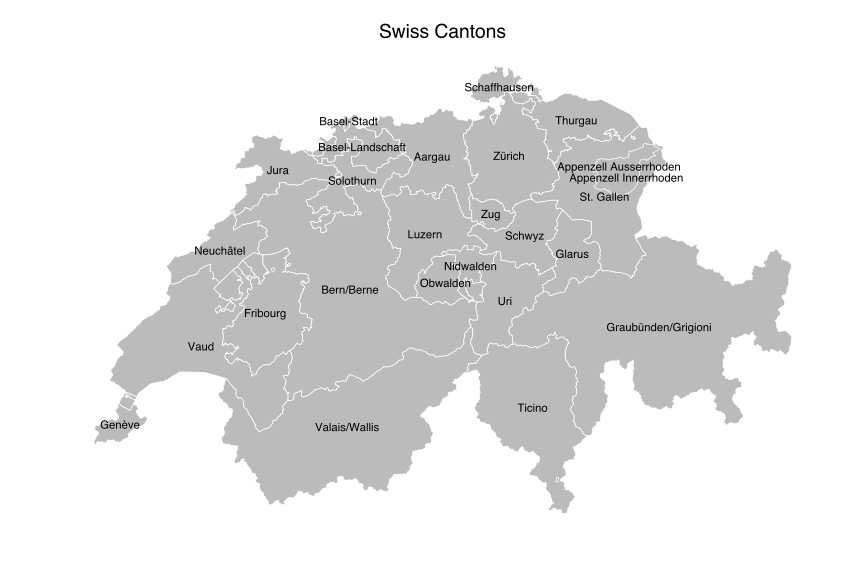
Swiss Cantons

If you’re from the U.S. you (most likely) have no idea what a canton is. The quickest explanation is that it is an administrative division within a country and, in this specific example, the 26 cantons of Switzerland are the member states of the federal state of Switzerland.

The D3 Swiss Cantons uses a TopoJSON/GeoJSON file that has only one layer (i.e. the cantons) along with metadata about the canton id and name:

ogrInfo("readme-swiss.json", "cantons")
 
## Source: "readme-swiss.json", layer: "cantons"
## Driver: GeoJSON number of rows 26 
## Feature type: wkbPolygon with 2 dimensions
## Extent: (5.956 45.818) - (10.492 47.808)
## Number of fields: 2 
##   name type length typeName
## 1   id    4      0   String
## 2 name    4      0   String

NOTE: you should learn to get pretty adept with the OGR functions or command-line tools as you can do some really amazing things with them, including extracting only certain features, simplifying the polygons or fixing issues. Some of the TopoJSON/GeoJSON files you’ll find with D3 examples may have missing or invalid components and you can fix some of them with these tools. We’ll be working around errors and missing values in these examples.

The D3 example displays the canton name at the centroid of the polygon, so that’s what we’ll do in R:

library(rgeos)
library(rgdal) # needs gdal > 1.11.0
library(ggplot2)
 
# ggplot map theme
devtools::source_gist("https://gist.github.com/hrbrmstr/33baa3a79c5cfef0f6df")
 
map = readOGR("readme-swiss.json", "cantons")
 
map_df <- fortify(map)

The map object is a SpatialPolygonsDataFrame and has a fairly complex structure:

slotNames(map)
## [1] "data"        "polygons"    "plotOrder"   "bbox"       
## [5] "proj4string"
 
names(map)
## [1] "id"   "name"
 
# execute these on your own and poke around the data structures after determining the class
class(map@data)
class(map@polygons)
class(map@plotOrder)
class(map@bbox)
class(map@proj4string)

The fortify function turns all that into something we can use with ggplot. Normally, we’d be able to get fortify to associate the canton name to the polygon points it encodes via the region parameter. That did not work with these TopoJSON/GeoJSON files and I didn’t really poke around much to determine why since it’s easy enough to work around. In this case, I manually merged the names with the fortified map data frame.

#  create mapping for id # to name since "region=" won't work
dat <- data.frame(id=0:(length(map@data$name)-1), canton=map@data$name)
map_df <- merge(map_df, dat, by="id")

We can get the centroid via the gCentroid function, and we’ll make a data frame of those center points and the name of the canton for use with a geom_text layer after plotting the base outlines of the cantons (with a rather bland fill, but I didn’t pick the color):

# find canton centers
centers <- data.frame(gCentroid(map, byid=TRUE))
centers$canton <- dat$canton
 
# make a map!
gg <- ggplot()
gg <- gg + geom_map(data=map_df, map=map_df,
                    aes(map_id=id, x=long, y=lat, group=group),
                    color="#ffffff", fill="#bbbbbb", size=0.25)
# gg <- gg + geom_point(data=centers, aes(x=x, y=y))
gg <- gg + geom_text(data=centers, aes(label=canton, x=x, y=y), size=3)
gg <- gg + coord_map()
gg <- gg + labs(x="", y="", title="Swiss Cantons")
gg <- gg + theme_map()

The coord_map() works with the mapproj package to help us display maps in reasonable projections (or really dumb ones). The default is "mercator" and we’ll stick with that since the D3 examples use it (but, winkel-tripel FTW!).

Here’s the result of our hard work (select map for larger version):

If you ignore the exposition above and just take into account non-blank source code lines, we did all that in ~16LOC and have a scaleable SVG file as a result. You can have some fun with the above code and remove the static fill="#bbbbbb" and move it to the mapping aesthetic parameter and tie it’s value to the canton name.

Costa Rica

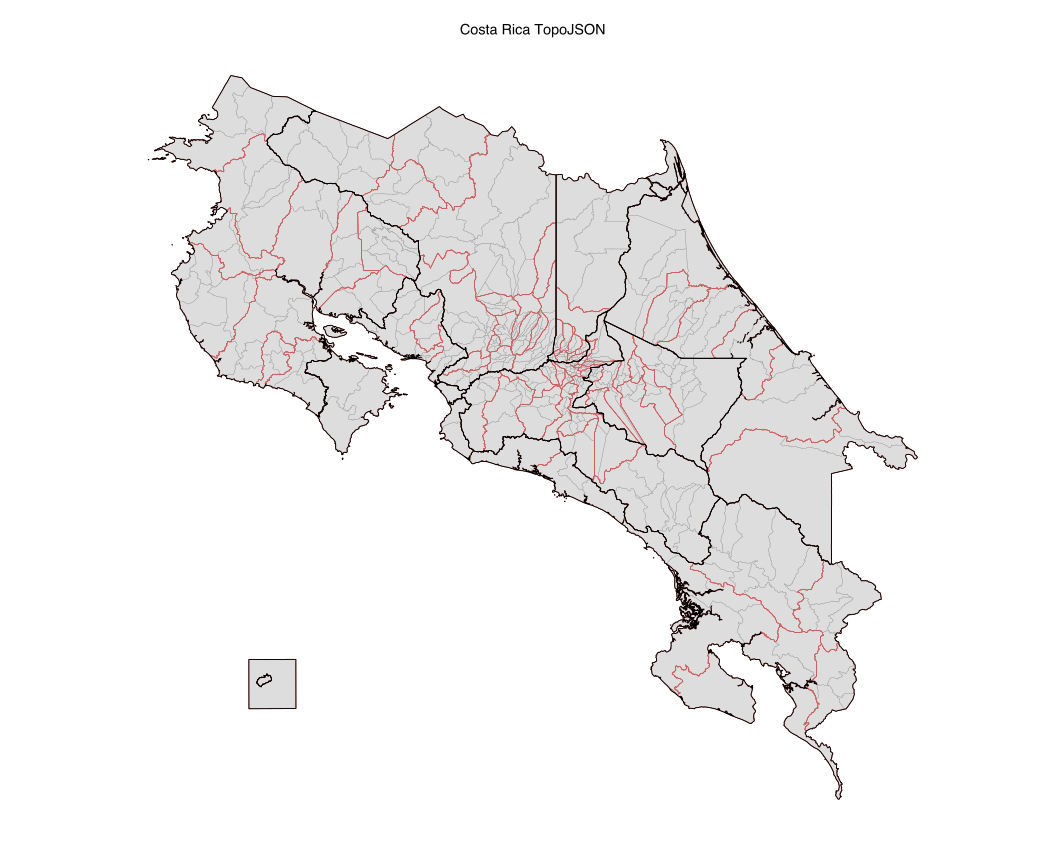
The TopoJSON/GeoJSON file provided with the D3 example is a good example of encoding multiple layers into a single file (see the first ogrListLayers above). We’ll create a fortified version of each layer and then plot each with a geom_map layer using different line colors, sizes and fills:

limites = readOGR("division.json", "limites")
provincias = readOGR("division.json", "provincias")
cantones = readOGR("division.json", "cantones")
distritos = readOGR("division.json", "distritos")
 
limites_df <- fortify(limites)
cantones_df <- fortify(cantones)
distritos_df <- fortify(distritos)
provincias_df <- fortify(provincias)
 
gg <- ggplot()
gg <- gg + geom_map(data=limites_df, map=limites_df,
                    aes(map_id=id, x=long, y=lat, group=group),
                    color="white", fill="#dddddd", size=0.25)
gg <- gg + geom_map(data=cantones_df, map=cantones_df,
                    aes(map_id=id, x=long, y=lat, group=group),
                    color="red", fill="#ffffff00", size=0.2)
gg <- gg + geom_map(data=distritos_df, map=distritos_df,
                    aes(map_id=id, x=long, y=lat, group=group),
                    color="#999999", fill="#ffffff00", size=0.1)
gg <- gg + geom_map(data=provincias_df, map=provincias_df,
                    aes(map_id=id, x=long, y=lat, group=group),
                    color="black", fill="#ffffff00", size=0.33)
gg <- gg + coord_map()
gg <- gg + labs(x="", y="", title="Costa Rica TopoJSON")
gg <- gg + theme_map()

The result is pretty neat and virtually identical to the D3 version:

Try playing around with the order of the geom_map layers (or remove some) and also the line color/size/fill & alpha values to see how it changes the map.

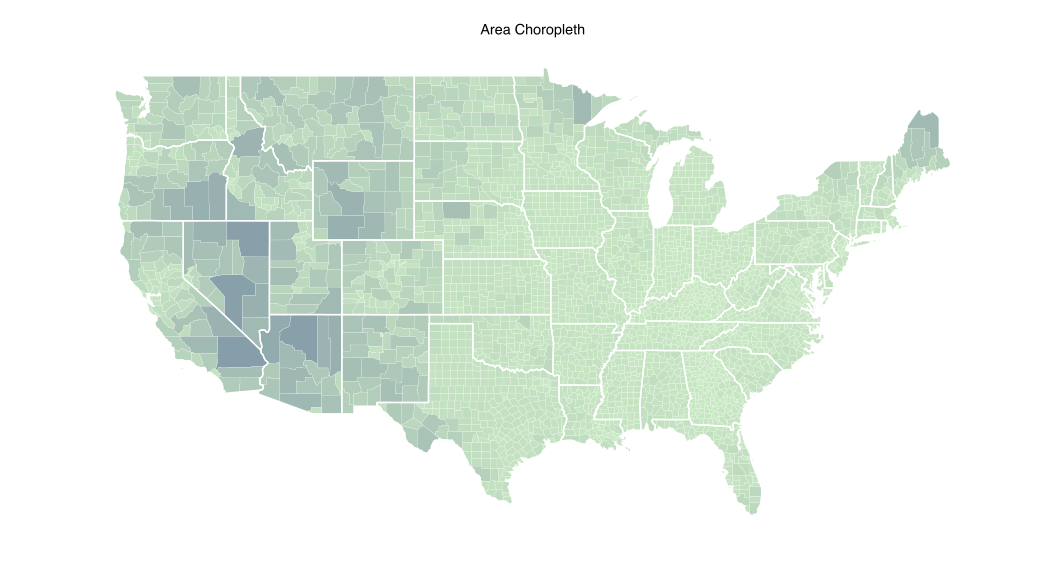
Area Choropleth

I’m not a huge fan of the colors used in the D3 version and I’m not going to spend any time moving Hawaii & Alaska around (that’s a whole different post). But, I will show how to make a similar area choropleth:

# read in the county borders
map = readOGR("us.json", "counties")
 
# calculate (well retrieve) the area since it's part of the polygon structure
# and associate it with the polygon id so we can use it later. We need to do
# the merge manually again since the "us.json" file threw errors again when
# trying to use the fortify "region" parameter.
 
map_area <- data.frame(id=0:(length(map@data$id)-1),
                       area=sapply(slot(map, "polygons"), slot, "area") )
 
# read in the state borders
states = readOGR("us.json", "states")
states_df <- fortify(states)
 
# create map data frame and merge area info
map_df <- fortify(map)
map_df <- merge(map_df, map_area, by="id")
 
gg <- ggplot()
 
# thin white border around counties and shades of yellow-green for area (log scale)
gg <- gg + geom_map(data=map_df, map=map_df,
                    aes(map_id=id, x=long, y=lat, group=group, fill=log1p(area)),
                    color="white", size=0.05)
 
# thick white border for states
gg <- gg + geom_map(data=states_df, map=states_df,
                    aes(map_id=id, x=long, y=lat, group=group),
                    color="white", size=0.5, alpha=0)
gg <- gg + scale_fill_continuous(low="#ccebc5", high="#084081")
 
# US continental extents - not showing alaska & hawaii
gg <- gg + xlim(-124.848974, -66.885444)
gg <- gg + ylim(24.396308, 49.384358)
 
gg <- gg + coord_map()
gg <- gg + labs(x="", y="", title="Area Choropleth")
gg <- gg + theme_map()
gg <- gg + theme(legend.position="none")

Play with the colors and use different values instead of the polygon area (perhaps use sample or runif to generate some data) to see how it changes the choropleth outcome.

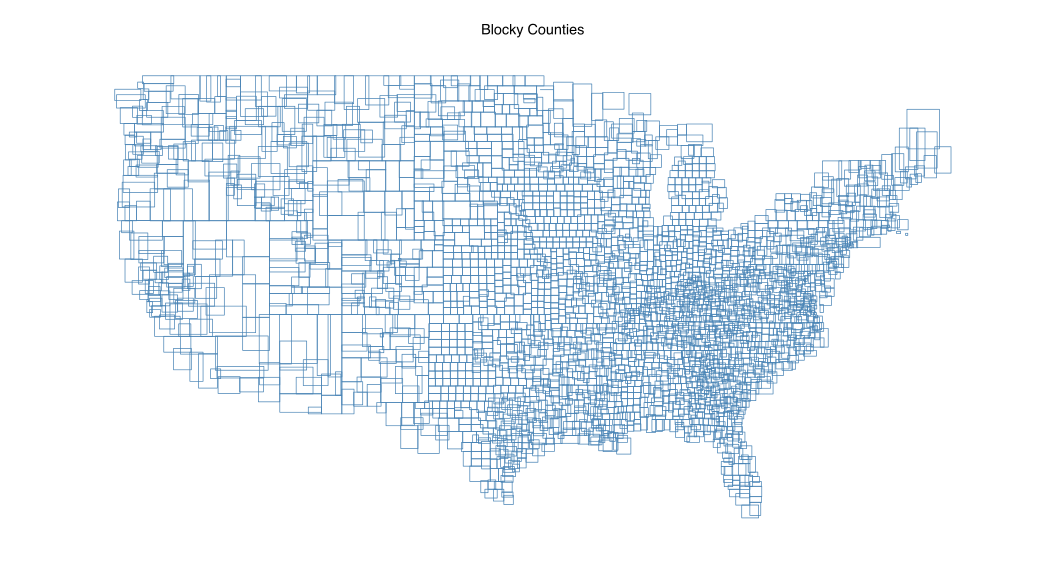
Blocky Counties

The example from the D3 wiki is more “how to work with shapefiles and map coordinates” than it is useful, but we have the same flexibility in R, so we’ll make the same plot by using the bbox function to make a data frame of bounding boxes we can use with geom_rect (there’s no geom_map in this example, just using the coordinate system to plot boxes):

# use the topojson from the bl.ocks example
map = readOGR("us.json", "counties")
 
# build our map data frame of rects
 
map_df <- do.call("rbind", lapply(map@polygons, function(p) {
 
  b <- bbox(p) # get bounding box of polygon and put it into a form we can use later
 
  data.frame(xmin=b["x", "min"],
             xmax=b["x", "max"],
             ymin=b["y", "min"],
             ymax=b["y", "max"])
 
}))
map_df$id <- map$id # add the id even though we aren't using it now
 
gg <- ggplot(data=map_df)
gg <- gg + geom_rect(aes(xmin=xmin, xmax=xmax,
                         ymin=ymin, ymax=ymax),
                     color="steelblue", alpha=0, size=0.25)
 
# continental us only
gg <- gg + xlim(-124.848974, -66.885444)
gg <- gg + ylim(24.396308, 49.384358)
gg <- gg + coord_map()
gg <- gg + labs(x="", y="", title="Blocky Counties")
gg <- gg + theme_map()
gg <- gg + theme(legend.position="none")

To re-emphasize we’re just working with ggplot layers, so play around and, perhaps color in only the odd numbered counties.

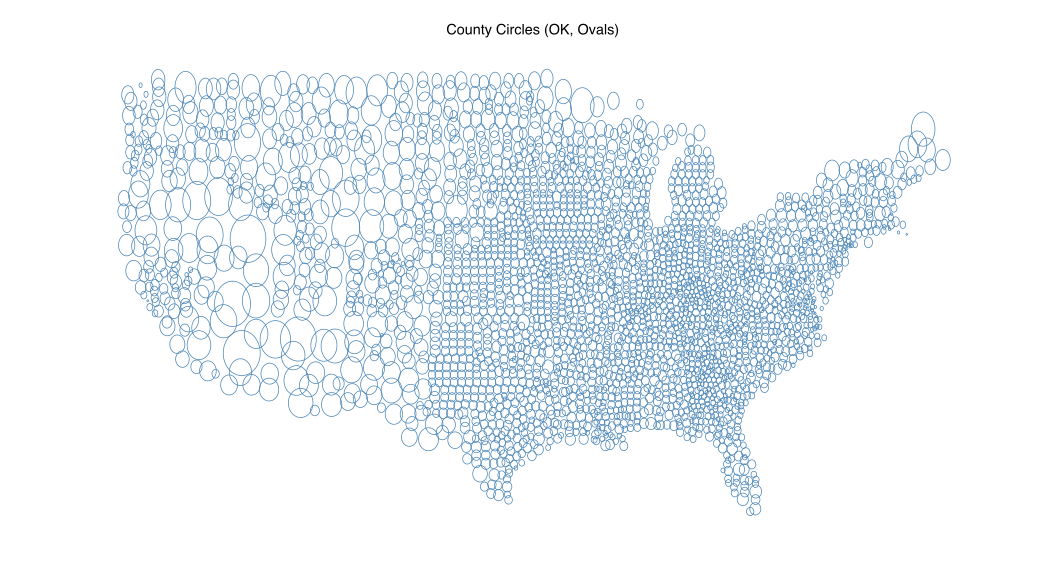
County Circles (OK, Ovals)

The last D3 example I’m copying swaps squares for circles, which makes this more of a challenge to do in R+ggplot since ggplot has no “circle” geom (and holey geom_points do not count). So, we’ll borrow and slightly adapt a function from StackOverflow by joran that builds a data frame of polygon points derived by a center & diameter. We’ll add an id value (for each of the counties) and make one really big data frame (well, big for use in ggplot) that we can then plot as grouped geom_paths. Unlike our cantons example, the gCentroid function coughed up errors on this TopoJSON/GeoJSON file, so I resorted to approximating the center from the rectangular bounding box. Also, I don’t project the circle coordinates before plotting, so they’re ovals. While it doesn’t mirror the D3 example perfectly, it should help reinforce how to work with the map’s metadata and draw arbitrary components on a map:

# adapted from http://stackoverflow.com/questions/6862742/draw-a-circle-with-ggplot2
# computes a circle from a given diameter. we add "id" so we can have one big
# data frame and group them for plotting
 
circleFun <- function(id, center = c(0,0),diameter = 1, npoints = 100){
    r = diameter / 2
    tt <- seq(0,2*pi,length.out = npoints)
    xx <- center[1] + r * cos(tt)
    yy <- center[2] + r * sin(tt)
    return(data.frame(id=id, x = xx, y = yy))
}
 
# us topojson from the bl.ocks example
map = readOGR("us.json", "counties")
 
# this topojson file gives rgeos_getcentroid errors here
# so we approximate the centroid
 
map_df <- do.call("rbind", lapply(map@polygons, function(p) {
 
  b <- bbox(p)
 
  data.frame(x=b["x", "min"] + ((b["x", "max"] - b["x", "min"]) / 2),
             y=b["y", "min"] + ((b["y", "max"] - b["y", "min"]) / 2))
 
}))
 
# get area & diameter
map_df$area <- sapply(slot(map, "polygons"), slot, "area")
map_df$diameter <- sqrt(map_df$area / pi) * 2
 
# make our big data frame of circles
circles <- do.call("rbind", lapply(1:nrow(map_df), function(i) {
  circleFun(i, c(map_df[i,]$x, map_df[i,]$y), map_df[i,]$diameter)
}))
 
gg <- ggplot(data=circles, aes(x=x, y=y, group=id))
gg <- gg + geom_path(color="steelblue", size=0.25)
 
# continental us
gg <- gg + xlim(-124.848974, -66.885444)
gg <- gg + ylim(24.396308, 49.384358)
gg <- gg + coord_map()
gg <- gg + labs(x="", y="", title="County Circles (OK, Ovals)")
gg <- gg + theme_map()
gg <- gg + theme(legend.position="none")

If you poke around a bit at the various map libraries in R, you should be able to figure out how to get those plotted as circles (and learn alot in the process).

Wrapping Up

R ggplot maps won’t and shouldn’t replace D3 maps for many reasons, paramount of which is interactivity. The generated SVG files are also fairly large and the non-SVG versions don’t look nearly as crisp (and aren’t as flexible). However, this should be a decent introductory primer on mapping and shapefiles and might come in handy when you want to use R to enhance maps with other data and write out (yep, R can read and write OGR) your own shapefiles for use in D3 (or other tools/languages).

Don’t forget that all source code (including TopoJSON/GeoJSON files and sample SVGs) are in their own gists:

If you figure out what is causing some of the errors I mentioned or make some epic maps of your own, don’t hesitate to drop a note in the comments.

The arrival of the autumnal equinox foreshadows the reality of longer nights and shorter days here in the northeast US. We can both see that reality and distract ourselves from it at the same time by firing up RStudio (or your favorite editor) and taking a look at the sunrise & sunset times based on our map coordinates using some functions from the R {maptools} package.

The sunriset function takes in a lat/lon pair, a range of dates and whether we want sunrise or sunset calculated and returns when those ephemeral events occur. For example, we can see the sunrise time for Portsmouth, NH on Christmas day this year (2014) via:

library(maptools)

# these functions need the lat/lon in an unusual format
portsmouth <- matrix(c(-70.762553, 43.071755), nrow=1)
for_date <- as.POSIXct("2014-12-25", tz="America/New_York")
sunriset(portsmouth, for_date, direction="sunrise", POSIXct.out=TRUE)

##         day_frac                time
## newlon 0.3007444 2014-12-25 07:13:04

We can pass in a vector of dates, to this function, and that means we’ll have data points we can work with to visualize this change. Let’s wrap the sequence generation into a function of our own and extract:

  • sunrise
  • sunset
  • solar noon
  • # hours of daylight

for every day in the sequence, returning the result as a data frame.

# adapted from http://r.789695.n4.nabble.com/maptools-sunrise-sunset-function-td874148.html
ephemeris <- function(lat, lon, date, span=1, tz="UTC") {

  # convert to the format we need
  lon.lat <- matrix(c(lon, lat), nrow=1)

  # make our sequence - using noon gets us around daylight saving time issues
  day <- as.POSIXct(date, tz=tz)
  sequence <- seq(from=day, length.out=span , by="days")

  # get our data
  sunrise <- sunriset(lon.lat, sequence, direction="sunrise", POSIXct.out=TRUE)
  sunset <- sunriset(lon.lat, sequence, direction="sunset", POSIXct.out=TRUE)
  solar_noon <- solarnoon(lon.lat, sequence, POSIXct.out=TRUE)

  # build a data frame from the vectors
  data.frame(date=as.Date(sunrise$time),
             sunrise=as.numeric(format(sunrise$time, "%H%M")),
             solarnoon=as.numeric(format(solar_noon$time, "%H%M")),
             sunset=as.numeric(format(sunset$time, "%H%M")),
             day_length=as.numeric(sunset$time-sunrise$time))

}

Now we can take a look at these values over 10 days near All Hallows Eve:

ephemeris(43.071755, -70.762553, "2014-10-31", 10, tz="America/New_York")

##          date sunrise solarnoon sunset day_length
## 1  2014-10-31     716      1226   1736  10.332477
## 2  2014-11-01     717      1226   1734  10.289145
## 3  2014-11-02     518      1026   1533  10.246169
## 4  2014-11-03     620      1126   1632  10.203563
## 5  2014-11-04     621      1126   1631  10.161346
## 6  2014-11-05     622      1126   1629  10.119535
## 7  2014-11-06     624      1126   1628  10.078148
## 8  2014-11-07     625      1126   1627  10.037204
## 9  2014-11-08     626      1126   1626   9.996721
## 10 2014-11-09     627      1126   1625   9.956719

We now have everything we need to visualize the seasonal daylight changes. We’ll use ggplot (with some help from the grid package) and build a two panel graph, one that gives us a “ribbon” view of what hours of the day are in daylight and the other just showing the changes in the total number of hours of daylight available during the day. We’ll build the function so that it will:

  • optionally show the current date/time (TRUE by default)
  • optionally show when solar noon is (FALSE by default)
  • optionally plot the graphs (TRUE by default)
  • return an arrangeGrob of the charts in the event we want to use them in other charts
library(ggplot2)
library(scales)
library(gridExtra)

# create two formatter functions for the x-axis display

# for graph #1 y-axis
time_format <- function(hrmn) substr(sprintf("%04d", hrmn),1,2)

# for graph #2 y-axis
pad5 <- function(num) sprintf("%2d", num)

daylight <- function(lat, lon, place, start_date, span=2, tz="UTC", 
                     show_solar_noon=FALSE, show_now=TRUE, plot=TRUE) {

  stopifnot(span>=2) # really doesn't make much sense to plot 1 value

  srss <- ephemeris(lat, lon, start_date, span, tz)

  x_label = ""

  gg <- ggplot(srss, aes(x=date))
  gg <- gg + geom_ribbon(aes(ymin=sunrise, ymax=sunset), fill="#ffeda0")

  if (show_solar_noon) gg <- gg + geom_line(aes(y=solarnoon), color="#fd8d3c")

  if (show_now) {
    gg <- gg + geom_vline(xintercept=as.numeric(as.Date(Sys.time())), color="#800026", linetype="longdash", size=0.25)
    gg <- gg + geom_hline(yintercept=as.numeric(format(Sys.time(), "%H%M")), color="#800026", linetype="longdash", size=0.25)
    x_label = sprintf("Current Date / Time: %s", format(Sys.time(), "%Y-%m-%d / %H:%M"))
  }

  gg <- gg + scale_x_date(expand=c(0,0), labels=date_format("%b '%y"))
  gg <- gg + scale_y_continuous(labels=time_format, limits=c(0,2400), breaks=seq(0, 2400, 200), expand=c(0,0))
  gg <- gg + labs(x=x_label, y="",
                  title=sprintf("Sunrise/set for %s\n%s ", place, paste0(range(srss$date), sep=" ", collapse="to ")))
  gg <- gg + theme_bw()
  gg <- gg + theme(panel.background=element_rect(fill="#525252"))
  gg <- gg + theme(panel.grid=element_blank())

  gg1 <- ggplot(srss, aes(x=date, y=day_length))
  gg1 <- gg1 + geom_area(fill="#ffeda0")
  gg1 <- gg1 + geom_line(color="#525252")

  if (show_now) gg1 <- gg1 + geom_vline(xintercept=as.numeric(as.Date(Sys.time())), color="#800026", linetype="longdash", size=0.25)

  gg1 <- gg1 + scale_x_date(expand=c(0,0), labels=date_format("%b '%y"))
  gg1 <- gg1 + scale_y_continuous(labels=pad5, limits=c(0,24), expand=c(0,0))
  gg1 <- gg1 + labs(x="", y="", title="Day(light) Length (hrs)")
  gg1 <- gg1 + theme_bw()

  if (plot) grid.arrange(gg, gg1, nrow=2)

  arrangeGrob(gg, gg1, nrow=2)

}

We can test our our new function using the same location and graph the sunlight data for a year starting September 1, 2014 (select graph for full-size version):

daylight(43.071755, -70.762553, "Portsmouth, NH", "2014-09-01", 365, tz="America/New_York")

sunlight

With the longer nights approaching we can further enhance the plotting function to add markers for solstices and perhaps even make a new version that compares sunlight across different geographical locations.

Complete code example is in this gist.