Skip navigation

Category Archives: Data Visualization

It’s no seekrit that I :heart: Hilbert curve heatmaps of IPv4 space. Real-world IPv4 maps (i.e. the ones that drop dots on the Earth) have little utility, but with Hilbert curves maps of IPv4 space many different topologies can be superimposed (from ASNs to—if need be—geographic locations). Plus, there’s more opportunity to find patterns by keeping CIDRs naturally close to each other.

The Measurement Factory created the [`ipv4-heatmap`](http://maps.measurement-factory.com/) command-line utility back in 2007 and there have been some tweaks and expansions to it by others over time. I wanted to use these IPv4 heatmaps in the [National Exposure](https://community.rapid7.com/community/infosec/blog/2016/06/07/rapid7-releases-new-research) report I worked on with @todb & @jhartftw at @Rapid7 but _cannot stand_ the built-in red-blue color scheme, especially when there’s [viridis](https://cran.r-project.org/web/packages/viridis/vignettes/intro-to-viridis.html) available. So, I [forked the code](https://github.com/hrbrmstr/ipv4-heatmap) and added both viridis and [colorbrewer](colorbrewer2.org) palettes to it as command-line options.

Here are two examples (the results of the National Exposure study), one using viridis and one using the colorbrewer `rdbu` palette:

![](https://www.dropbox.com/s/we5f5u7ejj7cp8l/viridis.png?raw=1)

![](https://www.dropbox.com/s/uznijxxq99qoces/rdbu-inverted.png?raw=1)

You specify the palette with `-P palette` and can invert the order of any palette with `-i` and the chosen palette will also be used in any legend you add the visualization.

Since these 4096×4096 files are a bit big, you can hit up [this dropbox link](https://www.dropbox.com/sh/wqyly8ewxeko5jn/AAC5bHIpQTuxWGBPYzMqceLQa?dl=0) to see a “gallery” of the various forward and reverse palettes.

The palette selection code is a bit brute-force at the moment, mostly due to the fact that I’m planning on a C++ port of the code and eventual inclusion of the Hilbert heatmap functionality in the [`iptools`](http://github.com/hrbrmstr/iptools) package.

This made the rounds on social media last week:

One of the original versions was static and was not nearly as popular, but—as you can see—this one went viral.

Despite the public’s infatuation with circles (I’m lookin’ at you, pie charts), I’m not going to reproduce this polar coordinate visualization in ggplot2. I believe others have already done so (or are doing so) and you can mimic the animation pretty easily with `coord_polar()` and @drob’s enhanced ggplot2 animation tools.

NOTE: If you’re more interested in the stats/science than a spirograph or colorful D3 animation (below), Gavin Simpson (@ucfagls) has an [awesome post](http://www.fromthebottomoftheheap.net/2016/03/25/additive-modeling-global-temperature-series-revisited/) with a detailed view of the HadCRUT data set.

## HadCRUT in R

I noticed that [the original data source](http://www.metoffice.gov.uk/hadobs/hadcrut4/), had 12 fields, two of which (columns 11 & 12) are the lower+upper bounds of the 95% confidence interval of the combined effects of all the uncertainties described in the HadCRUT4 error model (measurement and sampling, bias and coverage uncertainties). The spinning vis of doom may be mesmerizing, but it only shows the median. I thought it might be fun to try to make a good looking visualization using the CI as well (you can pick one of the other pairs to try this at home), both in R and then in D3. I chose D3 for the animated version mostly to play with the new 4.0 main branch, but I think it’s possible to do more with dynamic visualizations in D3 than it is with R (and it doesn’t require stop-motion techniques).

The following code:

– reads in the data set (and saves it locally to be nice to their bandwidth bill)
– does some munging to get fields we need
– saves a version out for use with D3
– uses `geom_segment()` + `geom_point()` to do the heavy lifting
– colors the segments by year using the `viridis` palette (the Plasma version)
– labels the plot by decade using facets and some fun facet margin “tricks” to make it look like the x-axis labels are on top

library(readr)    # read_table() / write_csv()
library(dplyr)
library(zoo)      # as.yearmon()
library(ggplot2)  # devtools::install_github("hadley/ggplot2")
library(hrbrmisc) # devtools::install_github("hrbrmstr/hrbrmisc")
library(viridis)

URL <- "http://www.metoffice.gov.uk/hadobs/hadcrut4/data/current/time_series/HadCRUT.4.4.0.0.monthly_ns_avg.txt"
fil <- sprintf("data/%s", basename(URL))
if (!file.exists(fil)) download.file(URL, fil)

global_temps <- read_table(fil, col_names=FALSE)

global_temps %>%
  select(year_mon=1, median=2, lower=11, upper=12) %>%
  mutate(year_mon=as.Date(as.yearmon(year_mon, format="%Y/%m")),
         year=as.numeric(format(year_mon, "%Y")),
         decade=(year %/% 10) * 10,
         month=format(year_mon, "%b")) %>%
  mutate(month=factor(month, levels=month.abb)) %>%
  filter(year != 2016) -> global_temps

# for D3 vis
write_csv(global_temps, "data/temps.csv")

#+ hadcrut, fig.retina=2, fig.width=12, fig.height=6
gg <- ggplot(global_temps)
gg <- gg + geom_segment(aes(x=year_mon, xend=year_mon, y=lower, yend=upper, color=year), size=0.2)
gg <- gg + geom_point(aes(x=year_mon, y=median), color="white", shape=".", size=0.01)
gg <- gg + scale_x_date(name="Median in white", expand=c(0,0.5))
gg <- gg + scale_y_continuous(name=NULL, breaks=c(0, 1.5, 2),
                              labels=c("0°C", "1.5°C", "2.0°C"), limits=c(-1.6, 2.25))
gg <- gg + scale_color_viridis(option="C")
gg <- gg + facet_wrap(~decade, nrow=1, scales="free_x")
gg <- gg + labs(title="Global Temperature Change (1850-2016)",
                subtitle="Using lower and upper bounds of the 95% confidence interval of the combined effects of all the uncertainties described in the HadCRUT4 error model (measurement and sampling, bias and coverage uncertainties; fields 11 & 12)",
                caption="HadCRUT4 (http://www.metoffice.gov.uk/hadobs/hadcrut4/index.html)")
gg <- gg + theme_hrbrmstr_my(grid="XY")
gg <- gg + theme(panel.background=element_rect(fill="black", color="#2b2b2b", size=0.15))
gg <- gg + theme(panel.margin=margin(0,0,0,0))
gg <- gg + theme(panel.grid.major.y=element_line(color="#b2182b", size=0.25))
gg <- gg + theme(strip.text=element_text(hjust=0.5))
gg <- gg + theme(axis.title.x=element_text(hjust=0, margin=margin(t=-10)))
gg <- gg + theme(axis.text.x=element_blank())
gg <- gg + theme(axis.text.y=element_text(size=12, color="#b2182b"))
gg <- gg + theme(legend.position="none")
gg <- gg + theme(plot.margin=margin(10, 10, 10, 10))
gg <- gg + theme(plot.caption=element_text(margin=margin(t=-6)))
gg

hadcrut

(Click image for larger version)

My `theme_hrbrmstr_my()` required the Myriad Pro font, so you’ll need to use one of the other themes in the `hrbrmisc` package or fill in some `theme()` details on your own.

## HadCRUT in D3

While the static visualization is pretty, we can kick it up a bit with some basic animations. Rather than make a multi-file HTML+js+D3+CSS example, this is all self-contained (apart from the data) in a single `index.html` file (some folks asked for the next D3 example to be self-contained).

Some nice new features of D3 4.0 (that I ended up using here):

– easier to use `scale`s
– less verbose `axis` creation
– `viridis` is now a first-class citizen

Mike Bostock has spent much time refining the API for [D3 4.0](https://github.com/d3/d3) and it shows. I’m definitely looking forward to playing with it over the rest of the year.

The vis is below but you can bust the `iframe` via [https://rud.is/projects/hadcrut4/](https://rud.is/projects/hadcrut4/).

I have it setup as “click to view” out of laziness. It’s not hard to make it trigger on `div` scroll visibility, but this way you also get to repeat the visualization animation without it looping incessantly.

If you end up playing with the D3 code, definitely change the width. I had to make it a bit smaller to fit it into the blog theme.

## Fin

You can find the source for both the R & D3 visualizations [on github](https://github.com/hrbrmstr/hadcrut).

I follow the most excellent Pew Research folks on Twitter to stay in tune with what’s happening (statistically speaking) with the world. Today, they tweeted this excerpt from their 2015 Global Attitudes survey:

I thought it might be helpful to folks if I made a highly aesthetically tuned version of Pew’s chart (though I chose to go a bit more minimal in terms of styling than they did) with the new geom_dumbbell() in the development version of ggalt. The source (below) is annotated, but please drop a note in the comments if any of the code would benefit from more exposition.

I’ve also switched to using the Prism javascript library starting with this post after seeing how well it works in RStudio’s flexdashboard package. If the “light on black” is hard to read or distracting, drop a note here and I’ll switch the theme if enough folks are having issues.

library(ggplot2) # devtools::install_github("hadley/ggplot2")
library(ggalt)   # devtools::install_github("hrbrmstr/ggalt")
library(dplyr)   # for data_frame() & arrange()

# I'm not crazy enough to input all the data; this will have to do for the example
df <- data_frame(country=c("Germany", "France", "Vietnam", "Japan", "Poland", "Lebanon",
                           "Australia", "South\nKorea", "Canada", "Spain", "Italy", "Peru",
                           "U.S.", "UK", "Mexico", "Chile", "China", "India"),
                 ages_35=c(0.39, 0.42, 0.49, 0.43, 0.51, 0.57,
                           0.60, 0.45, 0.65, 0.57, 0.57, 0.65,
                           0.63, 0.59, 0.67, 0.75, 0.52, 0.48),
                 ages_18_to_34=c(0.81, 0.83, 0.86, 0.78, 0.86, 0.90,
                                 0.91, 0.75, 0.93, 0.85, 0.83, 0.91,
                                 0.89, 0.84, 0.90, 0.96, 0.73, 0.69),
                 diff=sprintf("+%d", as.integer((ages_18_to_34-ages_35)*100)))

# we want to keep the order in the plot, so we use a factor for country
df <- arrange(df, desc(diff))
df$country <- factor(df$country, levels=rev(df$country))

# we only want the first line values with "%" symbols (to avoid chart junk)
# quick hack; there is a more efficient way to do this
percent_first <- function(x) {
  x <- sprintf("%d%%", round(x*100))
  x[2:length(x)] <- sub("%$", "", x[2:length(x)])
  x
}

gg <- ggplot()
# doing this vs y axis major grid line
gg <- gg + geom_segment(data=df, aes(y=country, yend=country, x=0, xend=1), color="#b2b2b2", size=0.15)
# dum…dum…dum!bell
gg <- gg + geom_dumbbell(data=df, aes(y=country, x=ages_35, xend=ages_18_to_34),
                         size=1.5, color="#b2b2b2", point.size.l=3, point.size.r=3,
                         point.colour.l="#9fb059", point.colour.r="#edae52")
# text below points
gg <- gg + geom_text(data=filter(df, country=="Germany"),
                     aes(x=ages_35, y=country, label="Ages 35+"),
                     color="#9fb059", size=3, vjust=-2, fontface="bold", family="Calibri")
gg <- gg + geom_text(data=filter(df, country=="Germany"),
                     aes(x=ages_18_to_34, y=country, label="Ages 18-34"),
                     color="#edae52", size=3, vjust=-2, fontface="bold", family="Calibri")
# text above points
gg <- gg + geom_text(data=df, aes(x=ages_35, y=country, label=percent_first(ages_35)),
                     color="#9fb059", size=2.75, vjust=2.5, family="Calibri")
gg <- gg + geom_text(data=df, color="#edae52", size=2.75, vjust=2.5, family="Calibri",
                     aes(x=ages_18_to_34, y=country, label=percent_first(ages_18_to_34)))
# difference column
gg <- gg + geom_rect(data=df, aes(xmin=1.05, xmax=1.175, ymin=-Inf, ymax=Inf), fill="#efefe3")
gg <- gg + geom_text(data=df, aes(label=diff, y=country, x=1.1125), fontface="bold", size=3, family="Calibri")
gg <- gg + geom_text(data=filter(df, country=="Germany"), aes(x=1.1125, y=country, label="DIFF"),
                     color="#7a7d7e", size=3.1, vjust=-2, fontface="bold", family="Calibri")
gg <- gg + scale_x_continuous(expand=c(0,0), limits=c(0, 1.175))
gg <- gg + scale_y_discrete(expand=c(0.075,0))
gg <- gg + labs(x=NULL, y=NULL, title="The social media age gap",
                subtitle="Adult internet users or reported smartphone owners who\nuse social networking sites",
                caption="Source: Pew Research Center, Spring 2015 Global Attitudes Survey. Q74")
gg <- gg + theme_bw(base_family="Calibri")
gg <- gg + theme(panel.grid.major=element_blank())
gg <- gg + theme(panel.grid.minor=element_blank())
gg <- gg + theme(panel.border=element_blank())
gg <- gg + theme(axis.ticks=element_blank())
gg <- gg + theme(axis.text.x=element_blank())
gg <- gg + theme(plot.title=element_text(face="bold"))
gg <- gg + theme(plot.subtitle=element_text(face="italic", size=9, margin=margin(b=12)))
gg <- gg + theme(plot.caption=element_text(size=7, margin=margin(t=12), color="#7a7d7e"))
gg

RStudio

I’ve been staring at this homeless data set for a few weeks now since I’m using it both here and in the data science class I’m teaching. It’s been one of the most mindful data sets I’ve worked with in a while. Even when reduced to pure numbers in named columns, the names really stick with you…_”Unsheltered Homeless People in Families”_…_”Unsheltered Chronically Homeless”_…_”Homeless Veterans”_…_”Unsheltered Homeless Unaccompanied Youth”_. These are real people, really hurting.

That’s one of the _superpowers_ “Data Science” gives you: the ability to shed light on the things that matter and to tell meaningful stories that people _need_ to hear. From my interactions with some of the folks who submitted entries, I know they, too, were impacted by the stories contained in this data set. Let’s see what they uncovered.

(All the code & un-shrunk visualizations are in the [52vis github repo](https://github.com/52vis/2016-14))

Camille compared a point-in-time view of one of the most vulnerable parts of the population—youth (under 25)—with the overall population:

homeless_rates

The youth homelessness situation in Nevada seems especially disconcerting and I wonder how much better/worse it might be if we factored in the 25 & under U.S. census information (I’m really a bit reticent to run those numbers for fear it’ll be even worse).

Craine Munton submitted our first D3 entry! I ended up tweaking some of the JS & CSS `href`s (to fix non-sync’d files) and you can see the full version [here](https://rud.is/52vis/2016-14/cmrunton/). I’m going to try to embed it below as well (I’ll leave it up even if it’s not fully sized well. Just hit the aforementioned URL for the full-browser version).

Craine focused on another vulnerable and sometimes forgotten segment: those that put their lives on the line for our freedom and the safety and security of threatened people groups around the globe.

Joshua Kunst is an incredibly talented individual who has made a number of stunning visualizations in R. He used htmlwidgets to tell [a captivating story](https://rud.is/52vis/2016-14/jbkunst/) that ends in (statistically inferred) _hope_.

Hit the [full page](https://rud.is/52vis/2016-14/jbkunst/) for the frame-busted visualization.

Jake Kaupp took inspiration from Alberto Cairo and created some truly novel visualizations. I’m putting the easiest to embed first:

Jake has [written a superb piece](https://jkaupp.github.io/) on his creation, included an [interactive Shiny app](https://jkaupp.shinyapps.io/52vis_Homeless/) and brought in extra data to try to come to grips with this data. Definitely take time to read his post (even if it means you never get back to this post).

His small-multiples view is below but you should click on it to see it in full-browser view.

Jonathan Carroll (another fellow rOpenSci’er) created a companion [blog post](http://jcarroll.com.au/2016/04/10/52vis-week-2-challenge/) for his animated choropleth entry:

HomelessPopulation_optim

I really like how it highlights the differences per year and a number of statistical/computational choices he made.

Julia Silge focused on youth as well asking two compelling questions (you can read her [exposition](http://rpubs.com/juliasilge/170499) as well):

unnamed-chunk-7-1

unnamed-chunk-9-1

(In seeing this second youth-focused vis and also having a clearer picture of the areas of greatest concern, I’m wondering if there’s a climate/weather-oriented reason for certain areas standing out when it comes to homeless youth issues.)

Philipp Ottolinger took a statistical look at youth and veterans:

homeless_plot

Make sure to dedicate some cycles to [check out his approach](https://github.com/ottlngr/2016-14/blob/ottlngr/ottlngr/homeless_ottlngr.Rmd).

@patternproject did not succumb to the temptation to draw a map just because “it’s U.S. State data” and chose, instead, to look across time and geography to tease out patterns using a heatmap.

Rplot01

I _really_ like this novel approach and am now rethinking my approach geo-temporal visualizations.

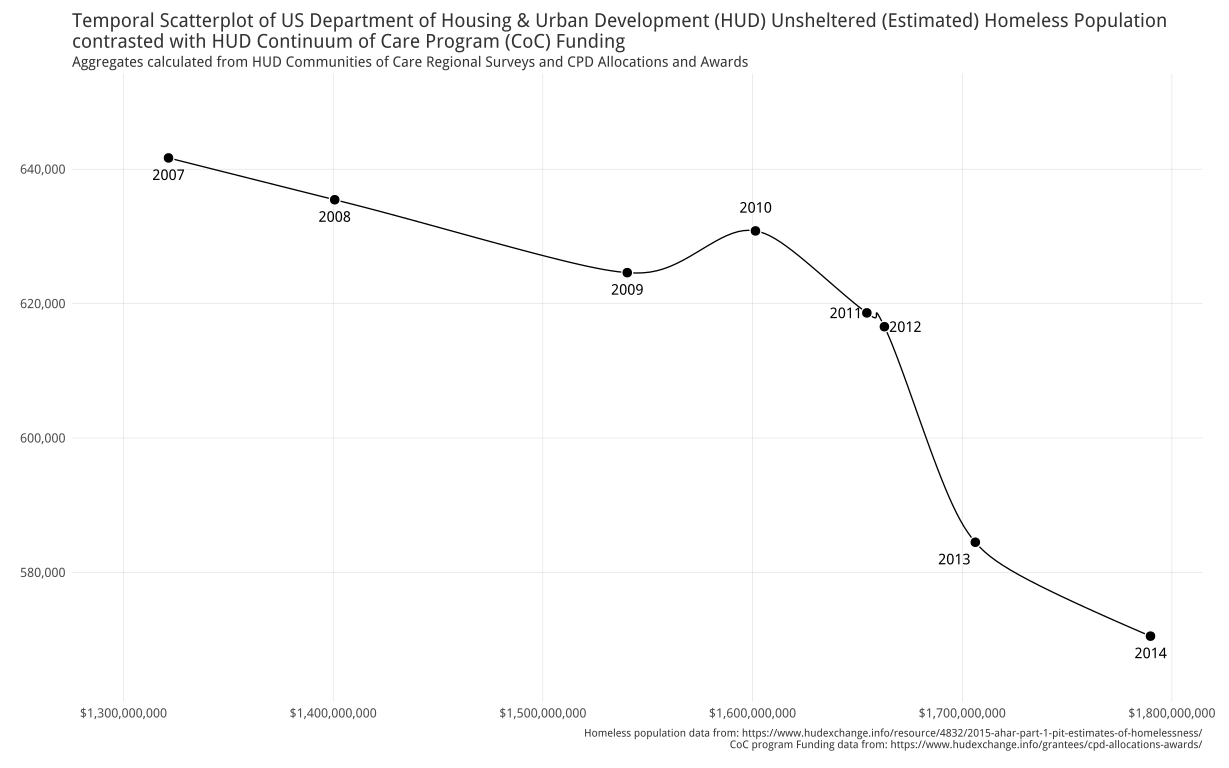
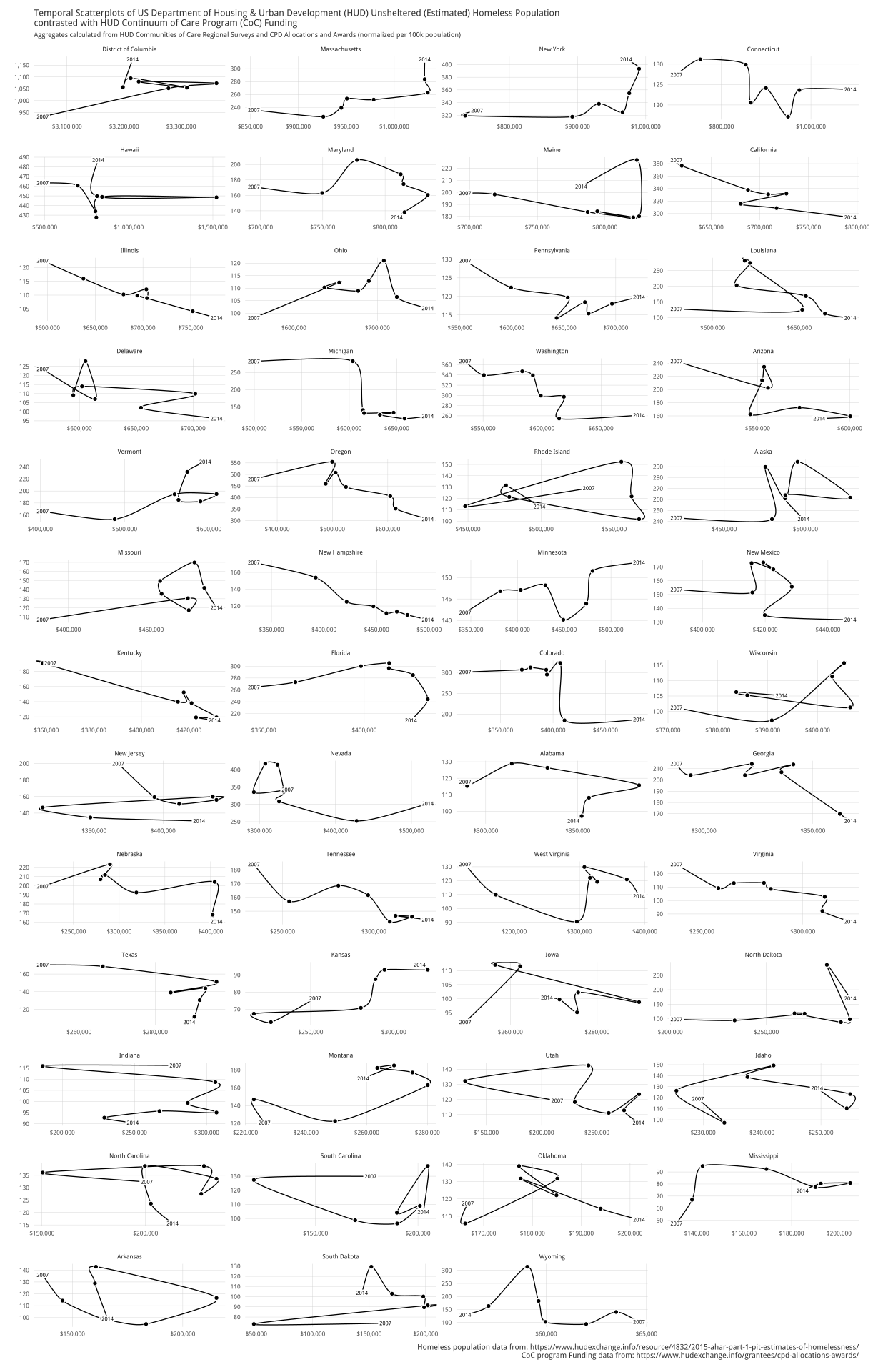
Xan Gregg looked at sheltered vs unsheltered homeless populations from a few different viewpoints (including animation).

homelesslines

homelessmaps

sheltered-homeless-by-state

(Again, beautiful work in JMP).

### We have a winner

The diversity and craftsmanship of these entries was amazing to see, as was the care and attention each submitter took when dealing with this truly tough subject. I was personally impacted by each one and I hope it raised awareness in the broader data science community.

I couldn’t choose between Joshua Kunst’s & Jake Kaupp’s entries so they’re tied for first place and they’ll both be getting a copy of [Data-Driven Security](http://dds.ec/amzn).

Joshua & Jake: hit up bob at rudis dot net to claim your prize!

A $50.00 donation has also been made to the [National Coalition for the Homeless](http://nationalhomeless.org/) dedicating it by name to each of the contest participants.

Shortly after I added lollipop charts to ggalt I had a few requests for a dumbbell geom. It wasn’t difficult to do modify the underlying lollipop Geoms to make a geom_dumbbell(). Here it is in action:

library(ggplot2)
library(ggalt) # devtools::install_github("hrbrmstr/ggalt")
library(dplyr)

# from: https://plot.ly/r/dumbbell-plots/
URL <- "https://raw.githubusercontent.com/plotly/datasets/master/school_earnings.csv"
fil <- basename(URL)
if (!file.exists(fil)) download.file(URL, fil)

df <- read.csv(fil, stringsAsFactors=FALSE)
df <- arrange(df, desc(Men))
df <- mutate(df, School=factor(School, levels=rev(School)))

gg <- ggplot(df, aes(x=Women, xend=Men, y=School))
gg <- gg + geom_dumbbell(colour="#686868",
                         point.colour.l="#ffc0cb",
                         point.colour.r="#0000ff",
                         point.size.l=2.5,
                         point.size.r=2.5)
gg <- gg + scale_x_continuous(breaks=seq(60, 160, by=20),
                              labels=sprintf("$%sK", comma(seq(60, 160, by=20))))
gg <- gg + labs(x="Annual Salary", y=NULL,
                title="Gender Earnings Disparity",
                caption="Data from plotly")
gg <- gg + theme_bw()
gg <- gg + theme(axis.ticks=element_blank())
gg <- gg + theme(panel.grid.minor=element_blank())
gg <- gg + theme(panel.border=element_blank())
gg <- gg + theme(axis.title.x=element_text(hjust=1, face="italic", margin=margin(t=-24)))
gg <- gg + theme(plot.caption=element_text(size=8, margin=margin(t=24)))
gg

Fullscreen_4_12_16__8_38_PM

The API isn't locked in, so definitely file an issue if you want different or additional functionality. One issue I personally still have is how to identify the left/right points (blue is male and pink is female in this one).

Working Out With Dumbbells

I thought folks might like to see behind the ggcurtain. It really only took the addition of two functions to ggalt: geom_dumbbell() (which you call directly) and GeomDumbbell() which acts behind the scenes.

There are a few additional, custom parameters to geom_dumbbell() and the mapped stat and position are hardcoded in the layer call. We also pass in these new parameters into the params list.

geom_dumbbell <- function(mapping = NULL, data = NULL, ...,
                          point.colour.l = NULL, point.size.l = NULL,
                          point.colour.r = NULL, point.size.r = NULL,
                          na.rm = FALSE, show.legend = NA, inherit.aes = TRUE) {

  layer(
    data = data,
    mapping = mapping,
    stat = "identity",
    geom = GeomDumbbell,
    position = "identity",
    show.legend = show.legend,
    inherit.aes = inherit.aes,
    params = list(
      na.rm = na.rm,
      point.colour.l = point.colour.l,
      point.size.l = point.size.l,
      point.colour.r = point.colour.r,
      point.size.r = point.size.r,
      ...
    )
  )
}

The exposed function eventually calls it's paired Geom. There we get to tell it what are required aes parameters and which ones aren't required, plus set some defaults.

We automagically add yend to the data in setup_data() (which gets called by the ggplot2 API).

Then, in draw_group() we create additional data.frames and return a list of three Geom layers (two points and one segment). Finally, we provide a default legend symbol.

GeomDumbbell <- ggproto("GeomDumbbell", Geom,
  required_aes = c("x", "xend", "y"),
  non_missing_aes = c("size", "shape",
                      "point.colour.l", "point.size.l",
                      "point.colour.r", "point.size.r"),
  default_aes = aes(
    shape = 19, colour = "black", size = 0.5, fill = NA,
    alpha = NA, stroke = 0.5
  ),

  setup_data = function(data, params) {
    transform(data, yend = y)
  },

  draw_group = function(data, panel_scales, coord,
                        point.colour.l = NULL, point.size.l = NULL,
                        point.colour.r = NULL, point.size.r = NULL) {

    points.l <- data
    points.l$colour <- point.colour.l %||% data$colour
    points.l$size <- point.size.l %||% (data$size * 2.5)

    points.r <- data
    points.r$x <- points.r$xend
    points.r$colour <- point.colour.r %||% data$colour
    points.r$size <- point.size.r %||% (data$size * 2.5)

    gList(
      ggplot2::GeomSegment$draw_panel(data, panel_scales, coord),
      ggplot2::GeomPoint$draw_panel(points.l, panel_scales, coord),
      ggplot2::GeomPoint$draw_panel(points.r, panel_scales, coord)
    )

  },

  draw_key = draw_key_point
)

In essence, this new geom saves calls to three additional geom_s, but does add more parameters, so it's not really clear if it saves much typing.

If you end up making anything interesting with geom_dumbbell() I encourage you to drop a note in the comments with a link.

>UPDATE: Changed code to reflect the new `horizontal` parameter for `geom_lollipop()`

I make a fair share of bar charts throughout the day and really like switching to lollipop charts to mix things up a bit and enhance the visual appeal. They’re easy to do in `ggplot2`, just use your traditional `x` & `y` mapping for `geom_point()` and then use (you probably want to call this first, actually) `geom_segment()` mapping the `yend` aesthetic to `0` and the `xend` aesthetic to the same thing you used for the `x` aesthetic. But, that’s alot of typing. Hence, the need for `geom_lollipop()`.

I’ll build this example from one [provided by Stephanie Evergreen](http://stephanieevergreen.com/lollipop/) (that one’s in Excel). It’s not much code:

df <- read.csv(text="category,pct
Other,0.09
South Asian/South Asian Americans,0.12
Interngenerational/Generational,0.21
S Asian/Asian Americans,0.25
Muslim Observance,0.29
Africa/Pan Africa/African Americans,0.34
Gender Equity,0.34
Disability Advocacy,0.49
European/European Americans,0.52
Veteran,0.54
Pacific Islander/Pacific Islander Americans,0.59
Non-Traditional Students,0.61
Religious Equity,0.64
Caribbean/Caribbean Americans,0.67
Latino/Latina,0.69
Middle Eastern Heritages and Traditions,0.73
Trans-racial Adoptee/Parent,0.76
LBGTQ/Ally,0.79
Mixed Race,0.80
Jewish Heritage/Observance,0.85
International Students,0.87", stringsAsFactors=FALSE, sep=",", header=TRUE)

# devtools::install_github("hrbrmstr/ggalt")
library(ggplot2)
library(ggalt)
library(scales)

gg <- ggplot(df, aes(y=reorder(category, pct), x=pct))
gg <- gg + geom_lollipop(point.colour="steelblue", point.size=3, horizontal=TRUE)
gg <- gg + scale_x_continuous(expand=c(0,0), labels=percent,
                              breaks=seq(0, 1, by=0.2), limits=c(0, 1))
gg <- gg + coord_flip()
gg <- gg + labs(x=NULL, y=NULL, 
                title="SUNY Cortland Multicultural Alumni survey results",
                subtitle="Ranked by race, ethnicity, home land and orientation\namong the top areas of concern",
                caption="Data from http://stephanieevergreen.com/lollipop/")
gg <- gg + theme_minimal(base_family="Arial Narrow")
gg <- gg + theme(panel.grid.major.y=element_blank())
gg <- gg + theme(panel.grid.minor=element_blank())
gg <- gg + theme(axis.line.y=element_line(color="#2b2b2b", size=0.15))
gg <- gg + theme(axis.text.y=element_text(margin=margin(r=-5, l=0)))
gg <- gg + theme(plot.margin=unit(rep(30, 4), "pt"))
gg <- gg + theme(plot.title=element_text(face="bold"))
gg <- gg + theme(plot.subtitle=element_text(margin=margin(b=10)))
gg <- gg + theme(plot.caption=element_text(size=8, margin=margin(t=10)))
gg

And, I’ll reiterate Stephanie’s note that the data is fake.

download

Compare it with it’s sister bar chart:

download1

to see which one you think works better (it really does come down to personal aesthetics choice).

You can find it in the development version of [`ggalt`](https://github.com/hrbrmstr/ggalt). The API is not locked in yet so definitely provide feedback in the issues.

>UPDATE: Since I put in a “pull request” requirement, I intended to put in a link to getting started with GitHub. Dr. Jenny Bryan’s @stat545 has a great [section on git](https://stat545-ubc.github.io/git00_index.html) that should hopefully make it a bit less painful.

### Why 52Vis?

In case folks are wondering why I’m doing this, it’s pretty simple. We need a society that has high data literacy and we need folks who are capable of making awesome, truthful data visualizations. The only way to do that is by working with data over, and over, and over, and over again.

Directed projects with some reward are one of the best Pavlovian ways to accomplish that :-)

### This week’s challenge

The Data is Plural folks have [done it again](http://tinyletter.com/data-is-plural/letters/data-is-plural-2016-04-06-edition) and there’s a neat and important data set in this week’s vis challenge.

From their newsletter:

>_Every January, at the behest of the U.S. Department of Housing and Urban Development, volunteers across the country attempt to count the homeless in their communities. The result: HUD’s “point in time” estimates, which are currently available for 2007–2015. The most recent estimates found 564,708 homeless people nationwide, with 75,323 of that count (more than 13%) living in New York City._

I decided to take a look at this data by seeing which states had the worst homeless problem per-capita (i.e. per 100K population). I’ve included the population data along with some ready-made wrangling of the HUD data.

But, before we do that…

### RULES UPDATE + Last week’s winner

I’ll be announcing the winner on Thursday since I:

– am horribly sick after being exposed to who knows what after rOpenSci last week in SFO :-)
– have been traveling like mad this week
– need to wrangle all the answers into the github repo and get @laneharrison (and his students) to validate my choice for winner (I have picked a winner)

Given how hard the wrangling has been, I’m going to need to request that folks both leave a blog comment and file a PR to [the github repo](https://github.com/52vis/2016-14) for this week. Please include the code you used as well as the vis (or a link to a working interactive vis)

### PRIZES UPDATE

Not only can I offer [Data-Driven Security](http://dds.ec/amzn), but Hadley Wickham has offered signed copies of his books as well, and I’ll keep in the Amazon gift card as a catch-all if you have more (NOTE: if any other authors want to offer up their tomes shoot me a note!).

### No place to roam

Be warned: this was a pretty depressing data set. I went in with the question of wanting to know which “states” had the worst problem and I assumed it’d be California or New York. I had no idea it would be what it was and the exercise shattered some assumptions.

NOTE: I’ve included U.S. population data for the necessary time period.

library(readxl)
library(purrr)
library(dplyr)
library(tidyr)
library(stringr)
library(ggplot2)
library(scales)
library(grid)
library(hrbrmisc)
 
# grab the HUD homeless data
 
URL <- "https://www.hudexchange.info/resources/documents/2007-2015-PIT-Counts-by-CoC.xlsx"
fil <- basename(URL)
if (!file.exists(fil)) download.file(URL, fil, mode="wb")
 
# turn the excel tabs into a long data.frame
yrs <- 2015:2007
names(yrs) <- 1:9
homeless <- map_df(names(yrs), function(i) {
  df <- suppressWarnings(read_excel(fil, as.numeric(i)))
  df[,3:ncol(df)] <- suppressWarnings(lapply(df[,3:ncol(df)], as.numeric))
  new_names <- tolower(make.names(colnames(df)))
  new_names <- str_replace_all(new_names, "\\.+", "_")
  df <- setNames(df, str_replace_all(new_names, "_[[:digit:]]+$", ""))
  bind_cols(df, data_frame(year=rep(yrs[i], nrow(df))))
})
 
# clean it up a bit
homeless <- mutate(homeless,
                   state=str_match(coc_number, "^([[:alpha:]]{2})")[,2],
                   coc_name=str_replace(coc_name, " CoC$", ""))
homeless <- select(homeless, year, state, everything())
homeless <- filter(homeless, !is.na(state))
 
# read in the us population data
uspop <- read.csv("uspop.csv", stringsAsFactors=FALSE)
uspop_long <- gather(uspop, year, population, -name, -iso_3166_2)
uspop_long$year <- sub("X", "", uspop_long$year)
 
# normalize the values
states <- count(homeless, year, state, wt=total_homeless)
states <- left_join(states, albersusa::usa_composite()@data[,3:4], by=c("state"="iso_3166_2"))
states <- ungroup(filter(states, !is.na(name)))
states$year <- as.character(states$year)
states <- mutate(left_join(states, uspop_long), homeless_per_100k=(n/population)*100000)
 
# we want to order from worst to best
group_by(states, name) %>%
  summarise(mean=mean(homeless_per_100k, na.rm=TRUE)) %>%
  arrange(desc(mean)) -> ordr
 
states$year <- factor(states$year, levels=as.character(2006:2016))
states$name <- factor(states$name, levels=ordr$name)
 
# plot
#+ fig.retina=2, fig.width=10, fig.height=15
gg <- ggplot(states, aes(x=year, y=homeless_per_100k))
gg <- gg + geom_segment(aes(xend=year, yend=0), size=0.33)
gg <- gg + geom_point(size=0.5)
gg <- gg + scale_x_discrete(expand=c(0,0),
                            breaks=seq(2007, 2015, length.out=5),
                            labels=c("2007", "", "2011", "", "2015"),
                            drop=FALSE)
gg <- gg + scale_y_continuous(expand=c(0,0), labels=comma, limits=c(0,1400))
gg <- gg + labs(x=NULL, y=NULL,
                title="US Department of Housing & Urban Development (HUD) Total (Estimated) Homeless Population",
                subtitle="Counts aggregated from HUD Communities of Care Regional Surveys (normalized per 100K population)",
                caption="Data from: https://www.hudexchange.info/resource/4832/2015-ahar-part-1-pit-estimates-of-homelessness/")
gg <- gg + facet_wrap(~name, scales="free", ncol=6)
gg <- gg + theme_hrbrmstr_an(grid="Y", axis="", strip_text_size=9)
gg <- gg + theme(axis.text.x=element_text(size=8))
gg <- gg + theme(axis.text.y=element_text(size=7))
gg <- gg + theme(panel.margin=unit(c(10, 10), "pt"))
gg <- gg + theme(panel.background=element_rect(color="#97cbdc44", fill="#97cbdc44"))
gg <- gg + theme(plot.margin=margin(10, 20, 10, 15))
gg

percapita

I used one of HUD’s alternate, official color palette colors for the panel backgrounds.

Remember, this is language/tool-agnostic & go in with a good question or two, augment as you feel you need to and show us your vis!

Week 2’s content closes 2016-04-12 23:59 EDT

Contest GitHub Repo:

>UPDATE: Deadline is now 2016-04-05 23:59 EDT; next vis challenge is 2016-04-06!

Per a suggestion, I’m going to try to find a neat data set (prbly one from @jsvine) to feature each week and toss up some sample code (99% of the time prbly in R) and offer up a vis challenge. Just reply in the comments with a link to a gist/repo/rpub/blog/etc (or post directly, though inserting code requires some markup that you can ping me abt) post containing the code & vis with a brief explanation. I’ll gather up everything into a new github organization I made for this context. You can also submit a PR right to [this week’s repo](https://github.com/52vis/2016-13).

Winners get a free digital copy of [Data-Driven Security](http://amzn.to/ddsec), and if you win more than once I’ll come up with other stuff to give away (either an Amazon gift card, a book or something Captain America related).

Submissions should include a story/angle/question you were trying to answer, any notes or “gotchas” that the code/comments doesn’t explain and a [beautiful] vis. You can use whatever language or tool (even Excel or _ugh_ Tableau), but you’ll have to describe what you did step-by-step for the GUI tools or record a video, since the main point about this contest is to help folks learn about asking questions, munging data and making visualizations. Excel & Tableau lock that knowledge in and Tableau even locks that data in.

### Droning on and on

Today’s data source comes from this week’s Data Is Plural newsletter and is all about drones. @jsvine linked to the [main FAA site](http://www.faa.gov/uas/law_enforcement/uas_sighting_reports/) for drone sightings and there’s enough ways to slice the data that it should make for some interesting story angles.

I will remove one of those angles with a simple bar chart of unmanned aircraft (UAS) sightings by week, using an FAA site color for the bars. I wanted to see if there were any overt visual patterns in the time of year or if the registration requirement at the end of 2015 caused any changes (I didn’t crunch the numbers to see if there were any actual patterns that could be found statistically, but that’s something y’all can do). I’m not curious as to what caused the “spike” in August/September 2015 and the report text may have that data.

I’ve put this week’s example code & data into the [52 vis repo](https://github.com/52vis/2016-13) for this week.

library(ggplot2)
library(ggalt)
library(ggthemes)
library(readxl)
library(dplyr)
library(hrbrmisc)
library(grid)
 
# get copies of the data locally
 
URL1 <- "http://www.faa.gov/uas/media/UAS_Sightings_report_21Aug-31Jan.xlsx"
URL2 <- "http://www.faa.gov/uas/media/UASEventsNov2014-Aug2015.xls"
 
fil1 <- basename(URL1)
fil2 <- basename(URL2)
 
if (!file.exists(fil1)) download.file(URL1, fil1)
if (!file.exists(fil2)) download.file(URL2, fil2)
 
# read it in
 
xl1 <- read_excel(fil1)
xl2 <- read_excel(fil2)
 
# munge it a bit so we can play with it by various calendrical options
 
drones <- setNames(bind_rows(xl2[,1:3],
                             xl1[,c(1,3,4)]), 
                   c("ts", "city", "state"))
drones <- mutate(drones, 
                 year=format(ts, "%Y"), 
                 year_mon=format(ts, "%Y%m"), 
                 ymd=as.Date(ts), 
                 yw=format(ts, "%Y%V"))
 
# let's see them by week
by_week <- mutate(count(drones, yw), wk=as.Date(sprintf("%s1", yw), "%Y%U%u")-7)
 
# this looks like bad data but I didn't investigate it too much
by_week <- arrange(filter(by_week, wk>=as.Date("2014-11-10")), wk)
 
# plot
 
gg <- ggplot(by_week, aes(wk, n))
gg <- gg + geom_bar(stat="identity", fill="#937206")
gg <- gg + annotate("text", by_week$wk[1], 49, label="# reports", 
                    hjust=0, vjust=1, family="Cabin-Italic", size=3)
gg <- gg + scale_x_date(expand=c(0,0))
gg <- gg + scale_y_continuous(expand=c(0,0))
gg <- gg + labs(y=NULL,
                title="Weekly U.S. UAS (drone) sightings",
                subtitle="As reported to the Federal Aviation Administration",
                caption="Data from: http://www.faa.gov/uas/law_enforcement/uas_sighting_reports/")
gg <- gg + theme_hrbrmstr(grid="Y", axis="X")
gg <- gg + theme(axis.title.x=element_text(margin=margin(t=-6)))
gg

RStudioScreenSnapz024

### Fin

I’ll still keep up a weekly vis from the Data Is Plural weekly collection even if this whole contest thing doesn’t take root with folks. You can never have too many examples for budding data folks to review.