Skip navigation

Author Archives: hrbrmstr

Don't look at me…I do what he does — just slower. #rstats avuncular • ?Resistance Fighter • Cook • Christian • [Master] Chef des Données de Sécurité @ @rapid7

If you’re preparing to install Windows 7 or Windows Server 2008 R2 Service Pack 1, now would be a good time to give Microsoft’s Attack Surface Analyzer a spin. ASA takes a baseline snapshot of your system state and then lets you take another snapshot after any configuration change or product installation and displays the changes to a number of key elements of the Windows attack surface, including analysis of changed or newly added files, registry keys, services, ActiveX Controls, listening ports, access control lists and other parameters.

Ideally, you’d take your baseline after a fresh install of your workstation or server from known, good media/images and after your own base configuration changes.

This would also be a good thing to do when building your base VM images so you can then validate their state as you duplicate and modify VDIs.

The installation of a Service Pack is a pretty radical change to your environment. If you run ASA prior to the SP install you can see if there are any significant changes to your system’s security profile after the bundle of patches and hotfixes are put down. You could also use the SP1 event to baseline post-install, provided you’ve done as thorough of a malware & rootkit sweep as can be done (you still cannot truly trust the results).

It may take some discipline to run ASA regularly on your personal systems every time you update software or drivers. IT shops should have an easier time scripting ASA during system deployments as well as application code updates. In either scenario, this free tool from Microsoft should help make you a more informed user and also aid you in building and maintaining more secure systems.

See also: MSDN SDLC blog post on the new Attack Surface Analyzer

The following excerpt is from The Five Dysfunctions of a Team: A Leadership Fable by Patrick Lencioni.

I wonder how many of you recognize traits like these on your own team(s), past or present. I can certainly point to these as being core reasons various teams I’ve been on or led have been ineffective and unsuccessful. The book seems like a good, short read, too.

  • Dysfunction OneAbsence of Trust

    When team members do not trust one another, they are unwilling to be vulnerable within the team. It is impossible for a team to build a foundation for trust when team members are not genuinely open about their mistakes and weaknesses.

  • Dysfunction TwoFear of Conflict

    Failure to build trust sets the stage for the second dysfunction. Teams without trust are unable to engage in passionate debate about ideas. Instead, they are guarded in their comments and resort to discussions that mask their true feelings.

  • Dysfunction ThreeLack of Commitment

    Teams that do not engage in healthy conflict will suffer from the third dysfunction. Because they do not openly surface their true opinions or engage in open debate, team members will rarely commit to team decisions, though they may feign agreement in order to avoid controversy or conflict.

  • Dysfunction FourAvoidance of Accountability

    A lack of commitment creates an atmosphere where team members do not hold one another accountable. Because there is no commitment to a clear action plan, team members hesitate to hold one another accountable on actions and behaviors that are contrary to the good of the team.

  • Dysfunction FiveInattention to Results

    The lack of accountability makes it possible for people to put their own needs above the team’s goals. Team members will focus on their own career goals or recognition for their departments to the detriment of the team.

A weakness in any one area can cause teamwork to deteriorate. The model is easy to understand, and yet can be difficult to practice because it requires high levels of discipline and persistence.
and persistence.

By now, many non-IT and non-Security folk have heard of Firesheep, a tool written by @codebutler which allows anyone using Firefox on unprotected networks to capture and hjijack active sessions to popular social media sites (and other web sites). The sidebar/extension puts an attactive and easy-to-understand GUI over a process that “real” security people have been using for as long as there has been http-based sessions.

I’ve been using Firesheep quite a bit in non-echo-chamber demos to help illustrate some of the core issues facing enterprises and individual users. A big question that comes out of each demo is “what can I do to safeguard my access to Facebook?”. I provide quick guidance on-the-spot to interested individuals and wanted to share what I communicate to them here both to help a broader audience and get feedback on other steps users can take to safeguard their connections.

General Guidance

The first action I tell users to take is an anti-action: if at all possible, never use free/unsecured Wi-Fi connections. While there are ways of grabbing sessions and other data on wired or secure Wi-Fi networks, the means to do so are beyond the capabilities of most Firesheep users. The danger is still present and you should always consider how much you trust the network you are on when accessing anything on the Internet, but the risk is greatly diminished.

If users are unable or unwilling to follow that first action (and even if they do avoid insecure networks) I then instruct them to ensure that all services they access always use “https (SSL/TLS) which encrypts the communication and prevents tools like Firesheep from working. It still – much like the first action – doesn’t stop determined & skilled attackers.

I then caution users on smartphones and tablets to also make sure any applications they use also communicate over SSL. This is far too easy to overlook and can leak data just as easily as a web browser. Tablet & smartphone users can also switch to only using 3G connections to make it that much more difficut for otherrs to eavesdrop.

Finally, I suggest using a virtual private networking (VPN) service such as PureVPN to secure all their connections – not just browser sessions – on public networks (secured or otherwise). SSL/TLS connections are potentially susceptible to what is called a man-in-the-middle (MITM) attack [SANS Reading Room (PDF)] and one way to mitigate that threat is to use a VPN to secure all network communication using a more robust/holistic solution. PureVPN (and other, similar good services) are not free, but $5.00-10.00USD per month is not much to pay for personal data security on-the-go.

The Elephant In The Room

For some reason, even with that general guidance, the whole concept of someone hijacking their Facebook account really scares folks and many end up asking specific question on ensuring their Facebook access is protected. This usually involves walking them through how to check to see if SSL is enabled by Facebook’s service and also how to monitor access to their Facebook account.
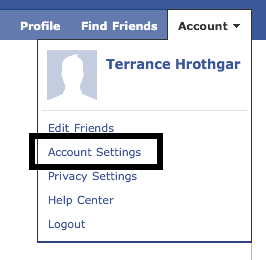
Unsurprisingly, Facebook does not make setting SSL as a default an easy task. It’s unintuitively not under any “privacy” settings. Instead, you need to navigate down to account settings and poke around to get to the right areas. The screen captures below show the navigation sequence. You’ll notice that this account does not have security enabled since it’s the one I use for demos (I do not have a personal Facebook account).

Getting to Facebook Account Settings

Location of Facebook Account Security Settings

Facebook SSL Settings

You’ll also notice that you can have Facebook send you an e-mail when there is an access to your account from an unknown device and also review recent activity on your account. This gives you the ability to be in control as much or as little as you desire.

Homeward Bound

I usually close with guidance on securing your home Wi-Fi network. Many users still have an aging 802.11b/g router that barely does wired-equivalent-privacy (WEP) security. Even newer Wi-Fi equipment with Wi-Fi Protected Access (WPA/WPA2) may not be enough as you or someone else in your house most likely handout the access password to any guest you allow in the residence. Any malware on their systems now has the potential to infect other systems on your network and you have also given the keys to your local security to someone you may not fully trust. Many of the newest Wi-Fi access points – such as Apple AirPort Extremes and Netgear N[3|6]00s – provide for the ability to setup both a protected internal network and as open of a guest network as you want. I still suggest ensuring that the guest network be secured as you may be liable for any actions taken from your network (protected or otherwise).

Highway Safety

Being safe[r] on the Internet is much lke being safe[r] when driving a car. You need to make sure the fluids are at the right levels, that the tire pressure is sufficient for the driving conditions and that you wear your seatbelt before leaving the driveway. If you don’t regularly perform those tasks you run the risk of significant problems out on the road. You need to get in the habit of doing similar checks when navigating in potentially dangerous network territory as well. It doesn’t help that Facebook cares not a whit about your privacy or security and will seemingly randomly change your settings if it benefits them (or if they are just their usual incompetent selves). Want proof? You have to be diligent in the maintenance of all Internet security settings to ensure your consistent, personal online safety.

If anyone is experiencing the “Are you sure…” problem when trying to upload media to your WordPress blog, it’s usually due to a wonky plugin. In my case it was “Google Analytics 3 codes for WordPress”. Hopefully this helps others who are searching for a resolution to the problem.

You were right…(UPDATED with PK talk appearance )

Speaker: Jennifer Bayuk


Based on work for Stevens Institute of Technology.

How do professional systems engineers work?

History:

  1. Mainframe
  2. physical security (punch cards)
  3. cables to terminals
  4. network to workstations (some data moves there & on floppies) *spike in misuse & abuse
  5. modems and dedicated links to external providers/partners
  6. added midrange servers (including e-mail)
  7. added dial-back procedures to modem
  8. e-mail & other issues begat firewalls
  9. firewalls begat the “port 80” problem
  10. modems expanded to the remote access issue
  11. remote access issue begat multi-factor auth
  12. then an explosion of midrange begat more malware
  13. internal infestation from web sites & more e-mail
  14. added proxy servers
  15. made anti-virus ubiquitous
  16. kicked in SSL on web servers that now host critical biz apps
  17. (VPN sneaks in for vendors & remote access)
  18. more customers begat identity management
  19. increasing attacks begat IDS
  20. formalized “policies” in technical security enforcement devices
  21. now we have data & access everywhere, begets log management
  22. data loss begat disk encryption on servers & workstations
  23. increasingly common app vulns begat WAFs


Reference: Stevens Inst. “systems thinking”

Use systemogram to show what systems are supposed to do (very cool visualization for differing views of “security systems thinking”)

applied that systemogram model to a real world example of Steven’s school computer lab


Shows the “Vee Model” (her diagram is more thorough – GET THE PRESENTATION)


Advantages of this approach include:

  • Manage complexity
  • Top-down requirements tracing
  • Black box modeling
  • Logical flow analysis
  • Documentation
  • Peer review
  • Detailed Communication

Must advance and move beyond threat->countermeasure insidious cycle.


Traditional requirements process involves gathering functional requirements, interface definition and system-wide “ilities” – need to get it in before the interface level (high-level “black box”)

The major vulnerabilities are at the functional decompositional level

Many security vulns are introduced at the interface level as well

Unfortunately, it’s usually put at the system-wide level (as they do with availability ,etc)


What Do Security Requiremens Look Like Today?

  • Functional – what is necessary for mission assurance
  • Nonfunctional: what is necessary for system survival
  • V&V: what is necessary to ensure requirements are met


V&V: Verification: did we build it right? Validation: was it built right? (akin to correctness & effectiveness)

There are more similarities than system architects really want to believe or understand.


Much of security metrics are really verification vs validation


Validation Criteria

  • content
  • face
  • criterion
  • construct

Speaker: Jared Pfost (@JaredPfost)

Framing: IT Security Metrics in an Enterprise


If metrics are valuable, why aren’t we measuring them. Virtually no research on them.


The Chase

  • Measuring metric program maturity would be easy, but not valuable
  • Metric programs aren’t a priority for enough CISOs for a benchmark to matter
  • Additional proof needed: correlate maturity and losses

Bottom line: which metrics impact actual loss?


Make a Difference?

  • Metrics don’t matter to enough people
  • Results would not inspire action
  • We need benchmarking to commute security posture, key attributes of effective controls and hold control owners accountable with visibility


When you provide visibility into the efficacy of your environment it drives behaviour. (Even if it’s not necessarily the behaviour you wanted…at least they make a risk-based decision)


Metrics are too hard to get now :: get vendors to improve metric repots


Actions

  • Reactive: anytime a loss occurs, measure metric maturity (relevant to root cause)
  • Proactive: ITPI-type measurements needed; require metrics to be defined before budget approval
  • Good example: @Tripwire’s “Cost of Compliance“?


It’s crucial to effective compliance initiatives to have solid, real metrics that define program success.